홈
» 리눅스
»
How to Configure SAP HANA Memory Limits on SUSE Linux Enterprise Server
How to Configure SAP HANA Memory Limits on SUSE Linux Enterprise Server
SAP HANA memory control on SUSE Linux Enterprise Server works best when you separate two different jobs: limiting what HANA may allocate, and protecting SAP workloads when the Linux host is under memory pressure. SAP HANA handles the first job with database parameters such as global_allocation_limit and statement_memory_limit. SUSE's systemd/cgroup-based Workload Memory Protection handles the second with MemoryLow on SAP.slice. These mechanisms complement each other, but they are not interchangeable.
This guide uses SAP HANA Platform 2.0 SPS 08 documentation and current SUSE Linux Enterprise Server for SAP Applications guidance available in October 2026. Before changing a production system, confirm that your exact HANA revision and SLES service pack are supported. SAP's installation guide points administrators to SAP Note 2235581 for supported operating systems: SAP HANA Server Installation and Update Guide.
Which memory control should you use?
Control
What it does
Best fit
Main trade-off
global_allocation_limit
Caps the memory SAP HANA can allocate on a host.
Dedicated HANA hosts, co-located SAP systems, or environments where HANA must leave RAM for the OS and other services.
Too low can cause allocation failures or poor performance; too high leaves less headroom outside HANA.
statement_memory_limit
Limits memory used by an individual SQL statement.
Mixed workloads where one large query should not consume a disproportionate share of memory.
A low limit can abort legitimate analytical or administrative statements.
User-specific statement limit
Overrides the global statement memory limit for one database user.
Reporting, ad-hoc analytics, ETL, or other users with different risk profiles.
Adds policy complexity and must be maintained as users and workloads change.
SUSE MemoryLow on SAP.slice
Protects a minimum amount of memory for SAP processes under cgroup v2 memory pressure.
Hosts where non-SAP processes could compete with SAP for RAM.
It is protection, not a HANA hard cap; setting it too close to physical RAM can starve system services.
SAP documents global_allocation_limit in MB. With the parameter left at its default value of 0, HANA calculates an automatic limit based on available physical memory; the SPS 08 Administration Guide describes the current formula as 90% of the first 64 GB plus 97% of each additional GB, with special handling for very small systems. The same guide states that changing the parameter does not require a restart. See SAP HANA Administration Guide 2.0 SPS 08.
Step 1: Measure host memory before setting a limit
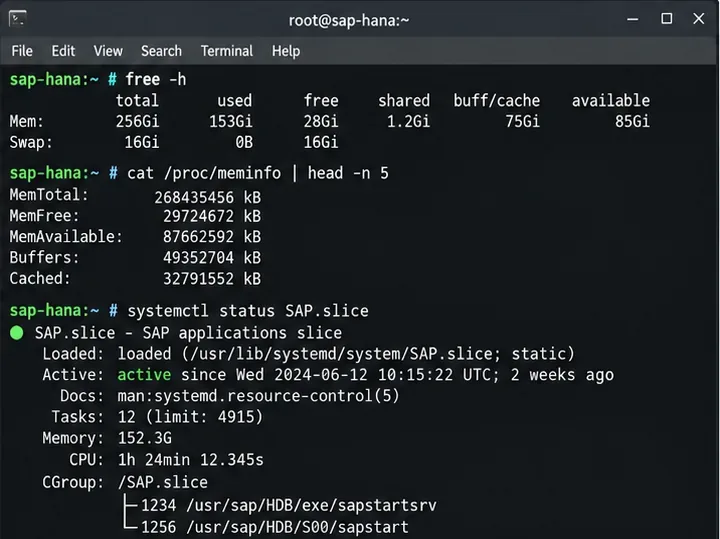
Start on SLES by checking physical RAM, available memory, swap activity, and whether SAP processes are already grouped in SAP.slice. This gives you the boundary conditions before you decide how much memory HANA may use.
free -h
grep MemTotal /proc/meminfo
systemctl status SAP.slice
Do not choose a HANA limit simply by subtracting a fixed number of gigabytes from installed RAM. Reserve memory for the Linux kernel, SAP Host Agent, monitoring software, backup tools, cluster components, and any co-located application servers. If ABAP and HANA share a host, SAP explicitly requires the sizing of both systems to fit within physical memory and recommends coordinating HANA's global allocation limit with the ABAP PHYS_MEMSIZE setting: SAP Configuring Memory Settings.
SUSE Linux checks for installed memory, current availability, and the SAP.slice cgroup before choosing a HANA allocation limit.
Step 2: Read the existing HANA memory parameters
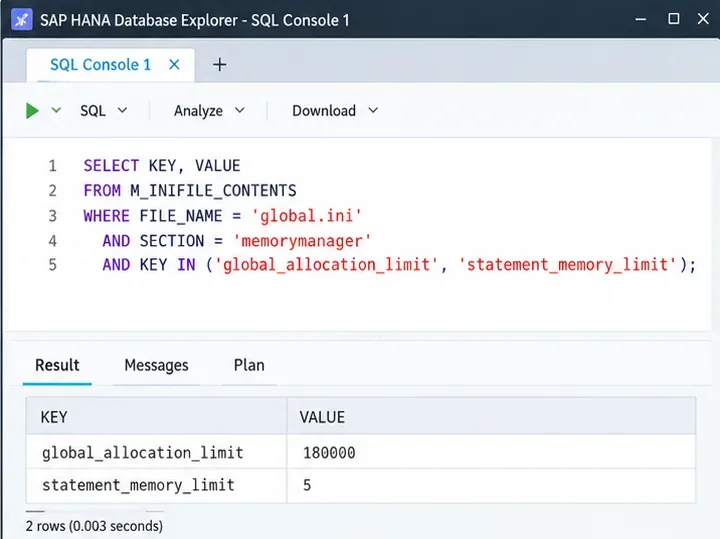
Before changing anything, record the effective configuration. You can inspect M_INIFILE_CONTENTS from SAP HANA Database Explorer, Cockpit SQL console, or another authorized SQL client.
SELECT FILE_NAME, SECTION, KEY, VALUE, LAYER_NAME
FROM M_INIFILE_CONTENTS
WHERE FILE_NAME = 'global.ini'
  AND SECTION = 'memorymanager'
  AND KEY IN ('global_allocation_limit',
              'statement_memory_limit',
              'statement_memory_limit_threshold')
ORDER BY KEY, LAYER_NAME;
The layer matters. In multi-tenant systems, system-level and database-level settings can have different scope. Do not copy a command from a single-container example without checking whether you are connected to SYSTEMDB or a tenant database and which layer you intend to change.
The HANA SQL console is used to inspect existing memory-manager parameters before making changes.
Step 3: Set the global HANA allocation limit
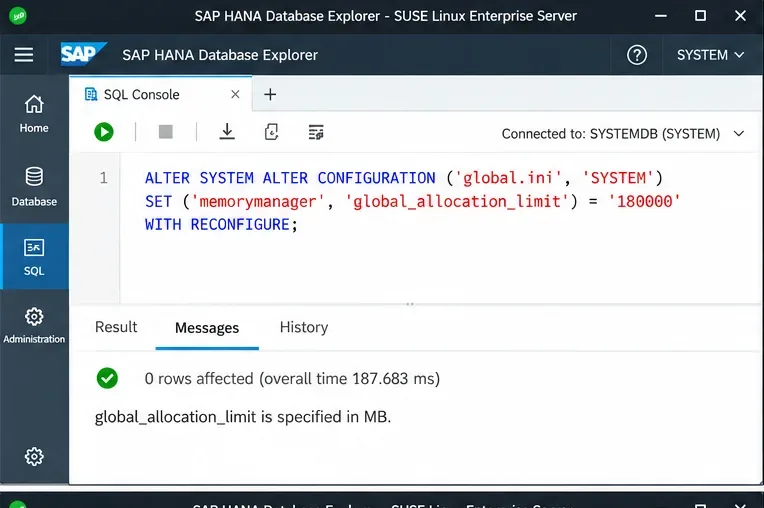
Use global_allocation_limit when the objective is to bound HANA's total allocation. A value such as 180000 means 180,000 MB; it is only an example, not a universal recommendation. The correct number must come from sizing, workload history, high-availability requirements, and the memory that must remain available to the operating system and other processes.
ALTER SYSTEM ALTER CONFIGURATION ('global.ini', 'SYSTEM')
SET ('memorymanager', 'global_allocation_limit') = '180000'
WITH RECONFIGURE;
The advantage of a lower global limit is predictable headroom outside HANA. The cost is less room for column-store growth, caches, intermediate query results, and service overhead. If the host is dedicated to HANA, the automatic default may be appropriate after sizing validation. If the host is shared, an explicit limit is usually easier to reason about because every resident workload has a defined budget.
An example SYSTEM-layer change to global_allocation_limit; the numeric value must be replaced with the result of your own sizing.
Step 4: Decide whether to limit individual SQL statements
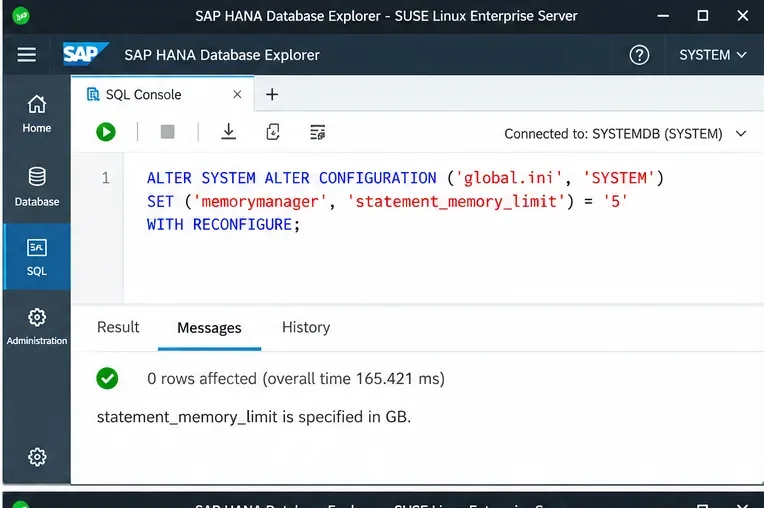
statement_memory_limit controls the maximum memory allocation for a single statement and is expressed in GB. SAP documents the default as 0, meaning no statement-specific limit. A finite value is useful when ad-hoc analytical queries or poorly filtered joins can consume a large portion of the global pool.
ALTER SYSTEM ALTER CONFIGURATION ('global.ini', 'SYSTEM')
SET ('memorymanager', 'statement_memory_limit') = '5'
WITH RECONFIGURE;
절충점은 명확합니다. 메모리 사용량 제한을 엄격하게 설정하면 동시성을 보호할 수 있지만, 비즈니스에 필수적인 메모리 집약적인 명령문이 중단될 수 있습니다. SAP에서는 제한에 도달하면 명령문이 중단되고 이름에 '...'가 포함된 덤프가 발생할 수 있다고 안내합니다 . 자세한 내용은 SAP HANA 문제 해결 및 성능 분석 가이드compositelimit_oom 의 메모리 관리 섹션을 참조하십시오 .
예시로 명세서당 5GB의 제한이 있습니다. 실제 운영 환경에서의 값은 일반적인 최대 쿼리 요구 사항을 기준으로 검증해야 합니다.
5단계: 하나의 전역 값이 너무 모호할 경우 사용자별 제한값을 사용하십시오.
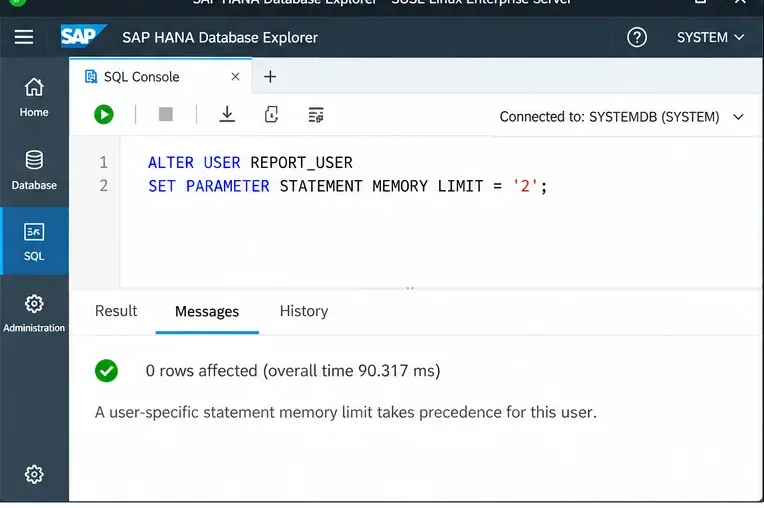
단일 명세서 제한은 작동이 간편하지만, 야간 ETL 계정을 대화형 보고 사용자처럼 취급합니다. SAP는 사용자별 제한을 지원하며, STATEMENT MEMORY LIMIT이 제한은 해당 사용자에 대한 전역 명세서 제한보다 우선 적용됩니다.
ALTER USER REPORT_USER
SET PARAMETER STATEMENT MEMORY LIMIT = '2';
이 접근 방식은 모든 사용자에게 전역 제한을 낮추는 것보다 더 나은 경우가 많습니다. 예를 들어, 임시 보고에는 제한을 두면서 배치 또는 관리 계정에는 더 큰 허용량을 부여할 수 있습니다. 단점은 관리 측면에서 문제가 발생할 수 있다는 것입니다. 예외 사항은 문서화하고 검토한 후 더 이상 필요하지 않을 때 삭제해야 합니다. SAP는 또한 데이터베이스 간 쿼리 및 특정 XS Classic 시나리오에 대한 제한 사항을 문서화하고 있으며, 이러한 경우 워크로드 클래스가 더 적합할 수 있습니다. 자세한 내용은 SAP 워크로드 사용자 매개변수 설정 문서를 참조하십시오 .
사용자별 명령문 메모리 제한을 설정하면 모든 워크로드에 대한 허용량을 줄이지 않고도 보고 또는 임시 작업을 수행하는 사용자를 분리할 수 있습니다.
6단계: SUSE에서 SAP 메모리를 보호하려면 두 번째 하드 캡을 사용하는 대신 MemoryLow를 사용하십시오.
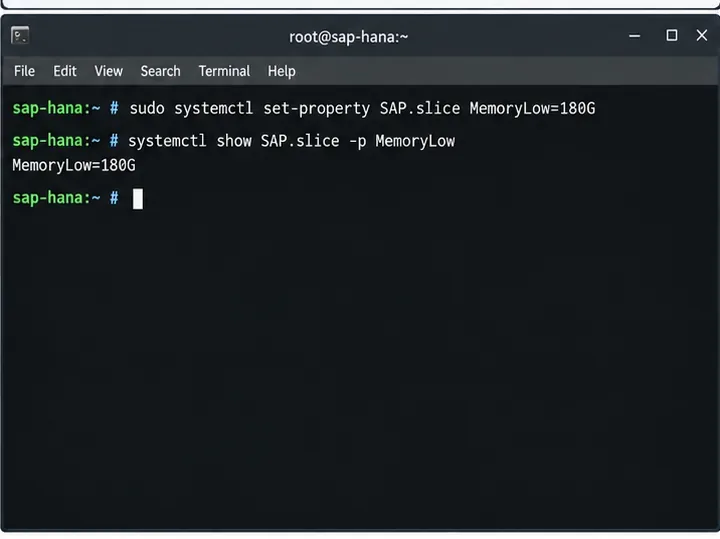
SLES for SAP Applications에서 SUSE는 systemd 및 cgroup v2를 통한 워크로드 메모리 보호를 권장합니다. SAP 인스턴스는 에 배치되며 SAP.slice, SUSE는 SAP HANA의 경우 HANA 전역 할당 제한을 기준으로 사용할 수 있다고 명시합니다 MemoryLow.
sudo systemctl set-property SAP.slice MemoryLow=180G
systemctl show SAP.slice -p MemoryLow
MemoryLow이는 보호 임계값입니다. 메모리 부족 상황에서 커널은 cgroup에 대해 해당 값만큼의 메모리를 보호하려고 시도합니다. 이는 HANA 자체 할당자와는 다르며 MemoryMax, HANA의 내부 할당자를 대체하지도 않습니다. 이러한 차이점은 중요합니다. 왜냐하면 운영체제 수준의 엄격한 제한은 HANA의 내부 할당 제어와는 다른 오류 모드를 발생시킬 수 있기 때문입니다.
MemoryLowSUSE는 시스템 서비스 및 기타 설치된 소프트웨어에도 메모리가 필요하므로 물리적 메모리 총량에 가깝거나 그 이상으로 설정하지 않도록 경고합니다 . 최신 지침은 SAP 15 SP6용 SLES의 SUSE 워크로드 메모리 보호 에서 확인할 수 있습니다 .
SLES 환경에서 MemoryLow호스트 메모리 부족 시 SAP.slice를 보호하며, HANA 할당 한도를 적용하지 않습니다.
7단계: 실수로 충돌하는 cgroup cap을 추가하지 않았는지 확인합니다.
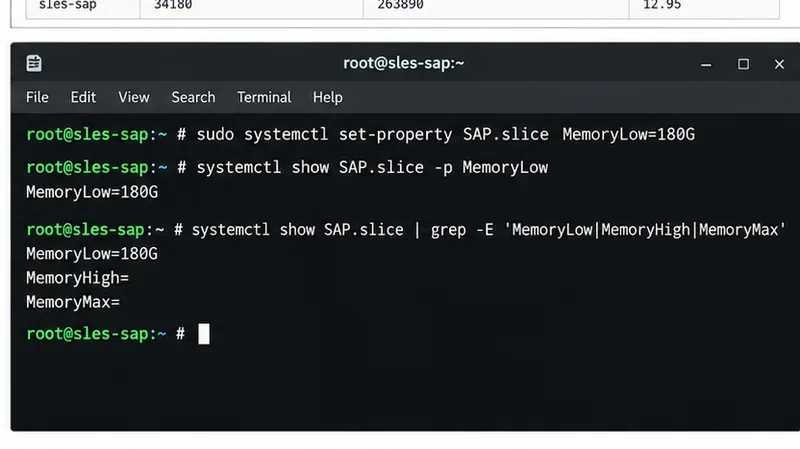
설정을 완료한 후 MemoryLow관련 systemd 속성을 검사하십시오. 설계에서 의도적으로 MemoryHigh또는 를 사용하지 않는 경우 MemoryMax, 로컬 드롭인, 자동화 시스템 또는 관련 없는 튜닝 정책에 의해 해당 속성이 추가되지 않았는지 확인하십시오.
systemctl show SAP.slice | grep -E 'MemoryLow|MemoryHigh|MemoryMax'
이는 구성 자동화로 관리되는 공유 호스트에서 특히 중요합니다. SUSE의 워크로드 메모리 보호 기능은 보호되는 cgroup 외부의 워크로드로 인한 부하로부터 SAP를 보호하도록 설계되었지만, 동일한 cgroup을 공유하는 SAP 시스템이나 SAP 인스턴스 간의 부하로부터는 보호할 수 없습니다 SAP.slice. 즉, cgroup 보호 기능이 활성화된 경우에도 애플리케이션 수준의 크기 조정은 여전히 중요합니다.
SAP.slice 속성을 검토하면 의도된 저메모리 보호 기능과 별도의 고용량 또는 최대 메모리 제어 기능을 구분하는 데 도움이 됩니다.
8단계: HANA 설정을 확인하고 실제 부하 조건에서 동작을 관찰합니다.
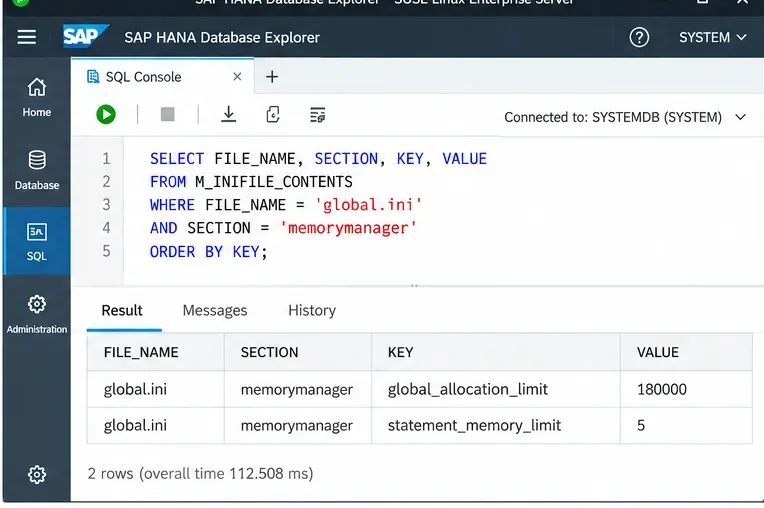
M_INIFILE_CONTENTS변경 후 다시 쿼리하여 의도한 레이어와 값을 확인하십시오. 그런 다음 정상 및 최대 부하 시 시스템을 모니터링하십시오. SQL 문이 오류 없이 실행되었다고 해서 구성이 성공한 것은 아닙니다.
SELECT FILE_NAME, SECTION, KEY, VALUE
FROM M_INIFILE_CONTENTS
WHERE FILE_NAME = 'global.ini'
  AND SECTION = 'memorymanager'
ORDER BY KEY;
메모리 부족 이벤트, 명령문 취소, 지속적인 메모리 압박, 스와핑 및 워크로드 지연 시간을 주시하십시오. 이전에는 완료되던 명령문이 메모리 제한 오류로 실패하기 시작하면 명령문별 메모리 제한 값이 너무 제한적일 수 있습니다. Linux의 여유 공간이 매우 부족한데 HANA가 전역 제한에 자주 근접한다면 호스트의 전체 워크로드에 비해 전역 제한이 너무 높을 수 있습니다. HANA가 제한보다 훨씬 낮은 수준을 유지하는 반면 중요한 쿼리가 메모리 부족 현상을 겪거나 중단된다면 제한이 너무 낮거나 워크로드에 더욱 특화된 정책이 필요할 수 있습니다.
최종 검증은 HANA에 구성된 값을 확인하고 대표적인 작업 부하 조건에서 관찰하는 것으로 이어져야 합니다.
일반적인 배포 패턴에 적합한 정책 선택
전용 프로덕션 HANA 호스트
HANA 자체의 전역 메모리 할당 관리를 우선적으로 사용하고 SAP 사이징을 기반으로 충분한 운영 체제 여유 공간을 확보하십시오. 개별 명령문이 동시 실행에 위협이 될 가능성이 있는 워크로드 기록이 있는 경우에만 명령문 제한을 추가하십시오. MemoryLow호스트에서 SAP 워크로드를 SAP 이외의 메모리 압력으로부터 보호하려면 SUSE를 사용하십시오.
HANA Plus 애플리케이션 서버를 단일 호스트에서 실행
명시적인 예산을 사용하십시오. HANA를 global_allocation_limit애플리케이션 서버의 메모리 설정(예: )과 연동하십시오 PHYS_MEMSIZE. 이는 양쪽 모두 자유롭게 확장하도록 허용하는 것보다 유연성이 떨어지지만, 한 구성 요소가 다른 구성 요소에 필요한 메모리를 소비하는 위험을 줄여줍니다.
예측 불가능한 임시 쿼리가 포함된 혼합 분석
적절한 전역 할당 제한과 문 수준 제어를 결합하십시오. 임의로 작은 수치를 설정하기보다는 비용이 많이 드는 문과 최대 메모리 사용량 데이터를 기반으로 시작하십시오. 특정 사용자 또는 애플리케이션만 위험한 쿼리를 생성하는 경우 사용자별 제한 또는 워크로드 클래스가 더 적합합니다.
HA 또는 클러스터형 HANA 시스템
활성 상태와 테이크오버 상태 모두에 메모리 크기를 할당해야 합니다. 보조 노드가 기본 노드가 될 경우, 정상 상태 복제 중에 사용하는 메모리와는 상당히 다른 메모리 용량이 필요할 수 있습니다. 장애 조치 설계, 클러스터 에이전트, 모니터링 스택, 그리고 함께 배치된 워크로드를 모두 메모리 예산의 일부로 간주하고 각 호스트를 개별적으로 구성하지 마십시오.
흔히 저지르는 실수들을 피하는 방법
MemoryLow를 하드캡으로 취급합니다. 이는 메모리를 보호하는 것이지, HANA의 용량을 해당 값으로 제한하는 것은 아닙니다.
MemoryMax라는 설정은 HANA의 메모리 할당 제한과 비슷하게 들리기 때문에 사용하는 경우가 있습니다. 하지만 의미는 다르며, 운영체제의 하드 캡은 HANA 자체의 메모리 관리에 영향을 줄 수 있습니다.
워크로드 증거 없이 모든 사용자에게 동일한 명령문 제한을 적용하는 것은 문제가 될 수 있습니다. 보고 쿼리와 유지 관리 작업은 각각 매우 다른 메모리 요구 사항을 가질 수 있습니다.
MDC 시스템의 구성 계층을 무시하십시오. SYSTEM, HOST 또는 DATABASE 범위를 변경하는지, 그리고 SQL 세션이 어떤 데이터베이스를 대상으로 하는지 확인하십시오.
예시 수치를 실제 운영 환경에 복사하는 경우입니다. 여기에 표시된 180GB 및 5GB 값은 예시 값이며, 권장 용량이 아닙니다.
SUSE와 지원 서비스에 여유 공간이 전혀 남지 않습니다. HANA만이 물리적 RAM을 소비하는 것은 아닙니다.
최종 권고
SAP HANA global_allocation_limit메모리 사용량 제한은 SAP HANA에서 제공하는 제한으로 설정하고 statement_memory_limit, 개별 쿼리 위험을 제어해야 할 때만 추가하십시오. 또한, 워크로드별로 다른 제한이 필요한 경우에는 사용자별 또는 워크로드 클래스별 정책을 사용하십시오. SAP 애플리케이션용 SUSE Linux Enterprise Server에서는 SAP.sliceMemoryLowcgroup 하드 캡을 사용하여 HANA 제한을 중복 적용하는 대신, 호스트 수준의 부하로부터 SAP 워크로드를 보호하기 위해 이 방법을 사용하십시오.
가장 중요한 절충점은 HANA 캐시/쿼리 용량을 최대화하는 것과 운영 체제 및 코로케이션 서비스의 안정적인 운영을 위한 호스트 여유 공간을 확보하는 것 사이의 균형입니다. 최종 수치는 SAP 사이징 및 실제 운영 환경에서 관찰된 최대 부하를 기반으로 결정한 다음, 변경 후 HANA와 SLES를 모두 검증하십시오.