Home
» LINUX
»
SLES 15 KVM Virtualization Setup and VM Auto-Start Guide
SLES 15 KVM Virtualization Setup and VM Auto-Start Guide
SUSE Linux Enterprise Server 15 can serve as a KVM host with the QEMU/KVM hypervisor and the libvirt management stack. This guide is written as a practical reference for administrators who want a repeatable setup: confirm hardware virtualization, install the supported components, choose networking and storage, create a guest, enable per-VM automatic startup, and verify that the guest returns after the host reboots.
The commands and menu paths below were checked against the SUSE Linux Enterprise Server 15 SP7 Virtualization Guide, whose current publication is dated September 10, 2026. Earlier SLES 15 service packs are similar, but package versions, daemon defaults, and available guest profiles can differ. SUSE recommends managing supported virtualization through libvirt rather than mixing libvirt with direct hypervisor-specific management.
Quick planning checklist
Item
What to decide or verify
CPU
Hardware virtualization is supported and enabled in firmware: Intel VT-x or AMD-V on x86 systems.
Host resources
Leave enough CPU, RAM, storage, and I/O capacity for SLES itself as well as every guest.
Networking
Use a bridge when guests need normal Layer 2 access to the LAN; use a libvirt virtual network when NAT or routed isolation fits better.
Storage
Choose where guest disk images will live and make sure the backing filesystem or storage pool has sufficient free space.
Management
Use libvirt tools such as virsh, virt-install, and Virtual Machine Manager consistently.
Boot behavior
Auto-start is configured individually for each persistent VM, not with one global switch for all guests.
1. Verify that the host can run KVM
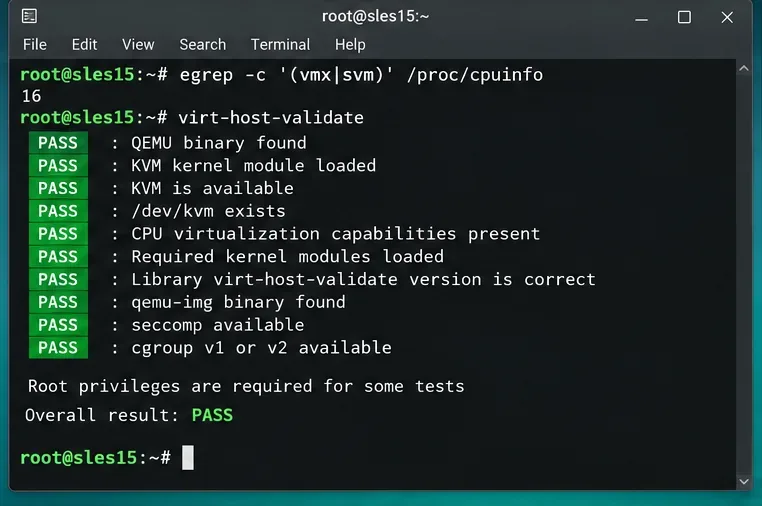
KVM requires processor virtualization support and firmware settings that expose that support to the operating system. On an x86 host, a quick first check is to look for the Intel vmx or AMD svm CPU flag. The libvirt client package also provides virt-host-validate, which performs a broader set of host checks.
A positive CPU flag count is useful, but it is not the only requirement. If validation reports that KVM is unavailable, check BIOS or UEFI settings first, especially on a newly provisioned server. SUSE's KVM host documentation states that virtualization must be supported by the CPU and enabled in BIOS/firmware. Also remember that nested virtualization is a separate feature; on SLES 15 SP7 SUSE documents nested KVM as a technology preview rather than a production-supported default.
A terminal view of the preflight stage: CPU virtualization flags and host validation are checked before creating any VMs.
2. Install the KVM server and libvirt management tools
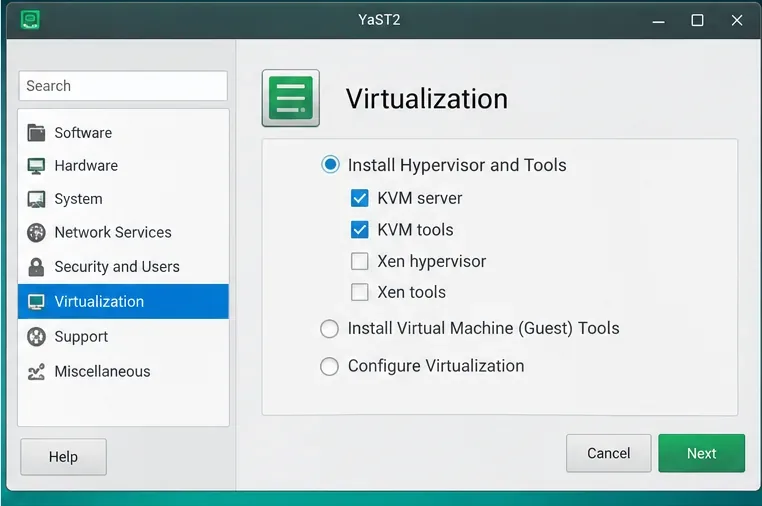
The most support-aligned path is YaST. Open YaST > Virtualization > Install Hypervisor and Tools, select KVM server, and select KVM tools if you want the libvirt management stack. SUSE documents the yast2-vm package as the YaST module used for this setup.
For command-line automation, SLES groups the same functionality into installation patterns. Install both the host and management patterns:
The kvm_server pattern installs the basic QEMU/KVM host environment. The kvm_tools pattern adds libvirt-based tools for managing and monitoring guests. The exact dependency list is service-pack dependent, so installing the documented patterns is preferable to maintaining a hand-written package list unless you have a controlled minimal-host design.
In YaST, select KVM server and KVM tools to install the hypervisor and the libvirt management stack.
3. Choose the VM network model before moving production traffic
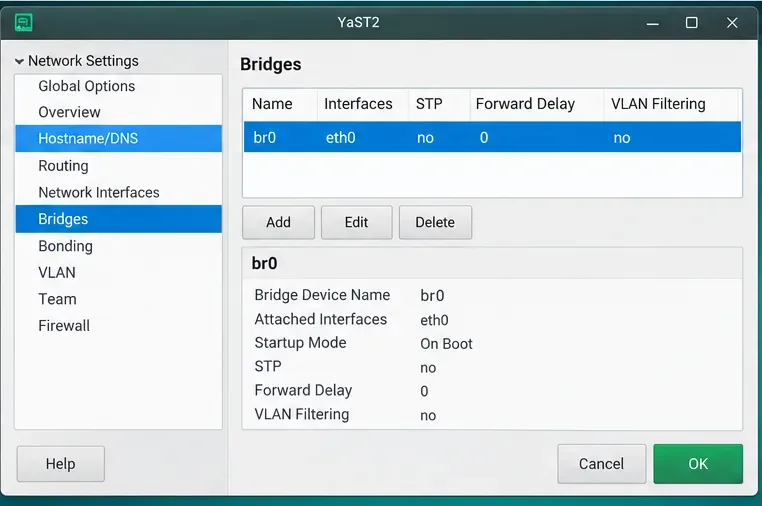
SUSE describes a network bridge as the default and recommended connection when guests should attach directly to the host's LAN. A bridge acts like a Layer 2 switch: the host's physical interface and VM virtual interfaces participate in the same Ethernet segment. This is usually the clearest choice for infrastructure VMs that need their own LAN addresses, inbound services, DHCP reservations, or normal visibility to other machines.
A libvirt virtual network is often better when guests need isolation or simple outbound connectivity. NAT can let several guests share the host's external address while remaining on a private subnet. Routed mode forwards traffic without address translation, but requires suitable routing in the surrounding network.
If the host uses wicked, which SUSE documents as the default network management service on server hosts, create the bridge with YaST or the corresponding command-line configuration. NetworkManager systems can use nmcli. Be cautious on remote servers: moving the host IP configuration to a bridge can interrupt SSH if the change is wrong. Schedule a maintenance window or make sure you have console access.
A bridged network example with br0 attached to a physical Ethernet interface, suitable when guests need Layer 2 LAN access.
4. Confirm the KVM kernel modules are loaded
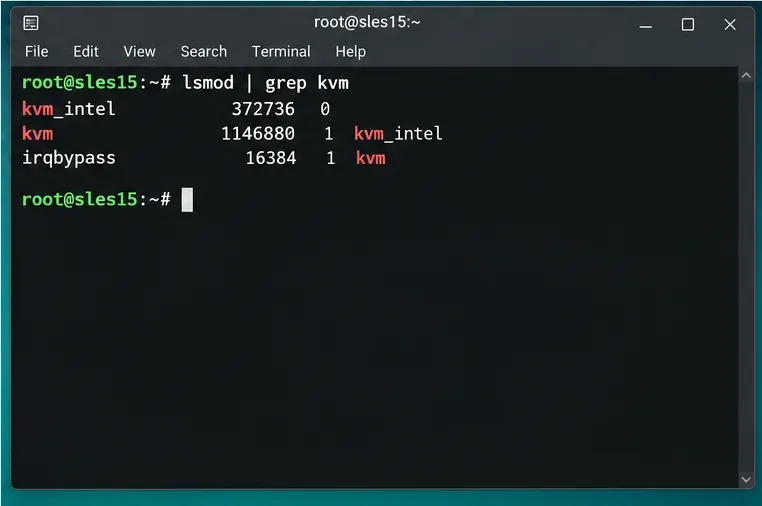
After installation, verify the kernel side of KVM. Intel hosts normally use kvm_intel; AMD hosts use kvm_amd. SUSE's KVM host setup guide demonstrates loading the processor-specific module and checking it with lsmod.
Je zou de generieke kvmmodule en de processorspecifieke module moeten zien. Als de module niet laadt, ga dan niet verder door simpelweg een VM in software-emulatie te maken. Controleer eerst de firmware-virtualisatie-instellingen en de hostcompatibiliteit opnieuw, tenzij software-emulatie bewust onderdeel is van je ontwerp.
De verwachte modulecontrole op een Intel-host toont zowel de generieke KVM-module als de Intel-specifieke KVM-module.
5. Controleer welk libvirt-daemonmodel door uw servicepack wordt gebruikt.
SLES 15 SP7 maakt standaard gebruik van het modulaire libvirt-daemonmodel. Voor KVM is de primaire hypervisor-daemon virtqemud. Secundaire daemons verzorgen functies zoals virtueel netwerken en opslag. SUSE documenteert nog steeds de traditionele monolithische libvirtdimplementatie, maar u moet niet beide modellen willekeurig inschakelen.
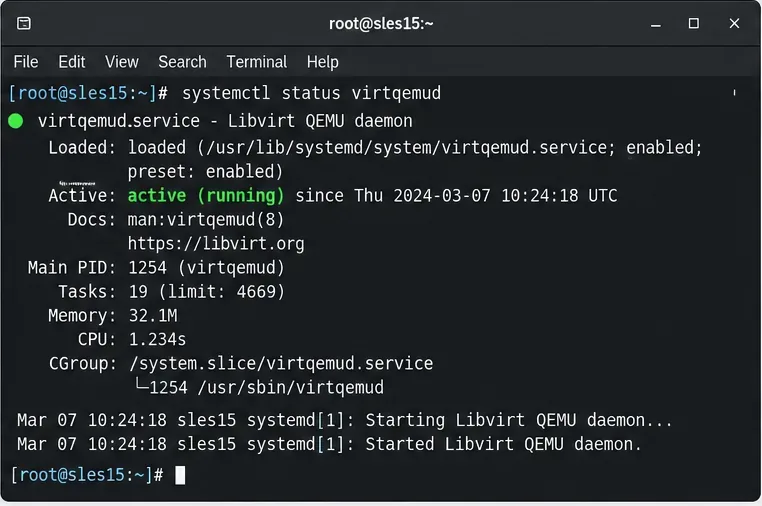
Controleer op een standaard SP7 KVM-host de QEMU-daemon:
systemctl status virtqemud.service
sudo systemctl enable --now virtqemud.service
SUSE raadt specifiek aan om de relevante libvirt-service zo te configureren dat deze bij het opstarten van de host start, wanneer VM's ook zijn geconfigureerd voor automatisch opstarten bij het opstarten van de host. Controleer bij een oudere installatie die bewust gebruikmaakt van monolithische libvirt libvirtd.servicede bijbehorende sockets. Voordat u overschakelt naar een ander daemonmodel op een bestaande host, volgt u de door SUSE gedocumenteerde overgangsprocedure en stopt of evacueert u de virtuele machines.
Controleer op de huidige SLES 15 SP7 de modulaire virtqemud-service voordat u vertrouwt op het automatisch opstarten van VM's bij het opstarten van de host.
6. Bereid de opslag- en installatiemedia voor.
Voordat u de virtuele machine aanmaakt, moet u bepalen waar de virtuele schijf zich bevindt en waar de installatie-ISO wordt gemount. De standaardinstellingen zijn handig voor een kleine, zelfstandige host, terwijl grotere installaties mogelijk gebruikmaken van dedicated LVM-volumes, aparte bestandssystemen, NFS, iSCSI of andere opslag die via libvirt wordt beheerd. De belangrijkste operationele regel is om te voorkomen dat het rootbestandssysteem van de host ongemerkt vol raakt met steeds groter wordende VM-images.
Controleer voor een gastbesturingssysteem met bestandsback-up de beschikbare schijfruimte voordat u de schijf aanmaakt:
df -h /var/lib/libvirt/images
ls -lh /data/ISOs/
Als u een libvirt-opslagpool gebruikt, controleer dit dan virsh pool-list --allen zorg ervoor dat de beoogde pool actief is. Neem voor productiesystemen de VM-opslag mee in uw capaciteitsbewaking en back-upontwerp, in plaats van de schijfimage te behandelen als een ondoorzichtig bestand dat zichzelf wel redt.
7. Maak de virtuele machine aan.
Je kunt een virtuele machine grafisch aanmaken met Virtual Machine Manager of via de commandoregel met virt-install. SUSE beschrijft virt-installals de commandoregeltool voor het aanmaken van virtuele machines via libvirt, en deze is met name handig voor herhaalbare builds en beheer op afstand.
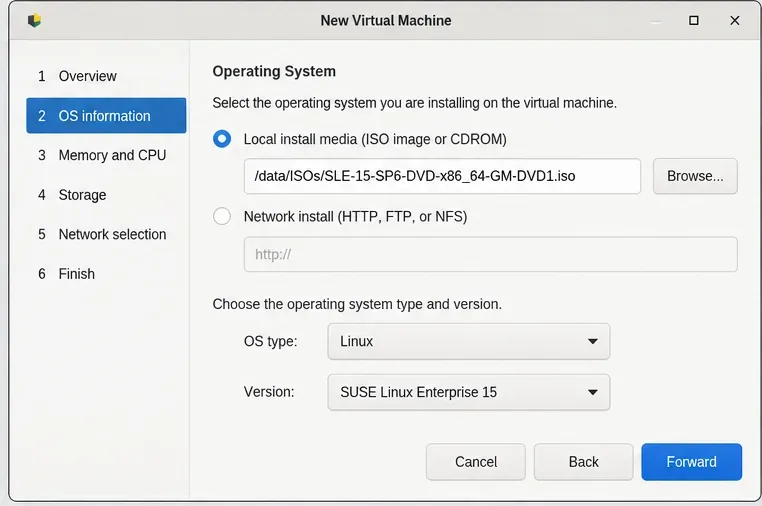
Maak in Virtual Machine Manager een nieuwe VM aan, kies lokale installatiemedia, selecteer het gastbesturingssysteem, wijs geheugen en virtuele CPU's toe, selecteer opslag en kies vervolgens het gewenste virtuele netwerk. Het onderstaande scherm gebruikt een SLES 15 ISO als illustratief voorbeeld; gebruik de exacte installatie-image en het profiel die overeenkomen met uw gelicentieerde servicepack.
Virtual Machine Manager kan een virtuele machine maken vanaf lokale ISO-media; kies de juiste SLES 15-image voor het servicepack dat u wilt installeren.
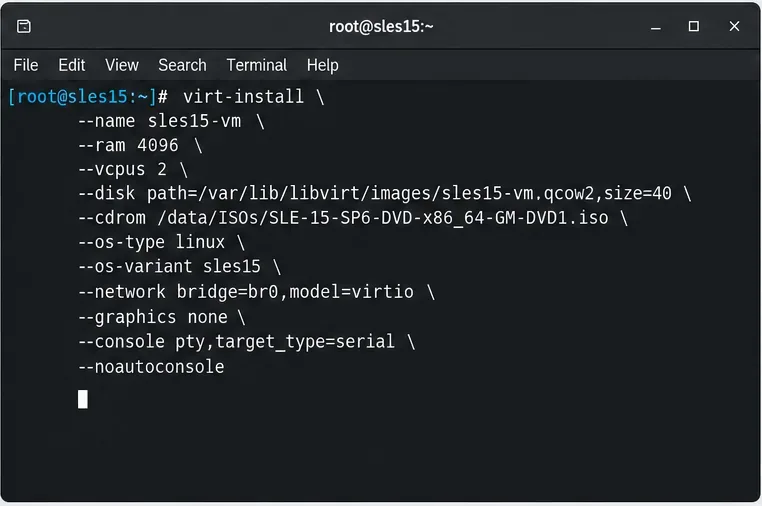
Een vergelijkbaar voorbeeld via de commandoregel is:
Pas het geheugen, het aantal CPU's, de schijfgrootte, het ISO-pad, de netwerkbron, de firmware en de grafische opties aan uw workload aan. Als u een libvirt NAT-netwerk gebruikt in plaats van een bridge, vervang dan de bridge-optie door het juiste virtuele netwerk. Controleer de ondersteunde gastbesturingssystemen en apparaatkeuzes in de documentatie van SUSE over virtualisatieondersteuning wanneer productieondersteuning belangrijk is.
Een virt-install workflow definieert de gastnaam, het RAM-geheugen, de vCPU's, de schijf, het installatiemedium en de netwerkverbinding in één herhaalbare opdracht.
8. Schakel automatisch opstarten van virtuele machines in.
VM-automatisch opstarten is een libvirt-eigenschap voor elke persistente gast-VM. De documentatie van SUSE vermeldt expliciet dat deze functie niet standaard is ingeschakeld en individueel moet worden geactiveerd; er is geen algemene schakelaar die elke VM markeert voor automatisch opstarten.
Schakel het in voor de gast:
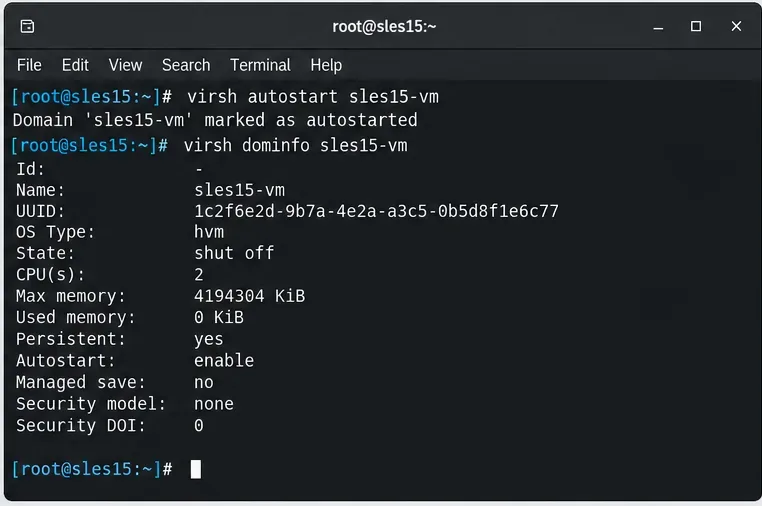
sudo virsh autostart sles15-vm
Controleer de instelling:
sudo virsh dominfo sles15-vm | grep -i autostart
Om dit gedrag later uit te schakelen:
sudo virsh autostart --disable sles15-vm
In Virtual Machine Manager vindt u de overeenkomstige instelling onder Weergave > Details > Opstartopties van het gastbesturingssysteem . Daar kunt u ' De virtuele machine starten bij het opstarten van de host' inschakelen en de wijziging toepassen.
Na het inschakelen van automatisch opstarten zou virsh dominfo moeten melden dat de virtuele machine is geconfigureerd om automatisch op te starten met de virtualisatieservice van de host.
9. Test de configuratie in plaats van ervan uit te gaan dat automatisch opstarten werkt.
De zinvolle test is een gecontroleerde herstart van de host tijdens een onderhoudsvenster. Noteer vóór de herstart de huidige status en controleer of de VM persistent is:
sudo virsh list --all
sudo virsh dominfo sles15-vm
Start vervolgens de host opnieuw op. Controleer na het opnieuw opstarten van de host de status van de virtualisatiedaemon en de virtuele machine:
systemctl is-active virtqemud.service
sudo virsh list --all
Als uw implementatie gebruikmaakt van monolithische libvirt, vervang dan de servicecontrole door libvirtd. Een automatisch gestarte VM zou runningzonder handmatige tussenkomst moeten overgaan naar virsh start. Controleer ook de service in de gast-VM, niet alleen de VM-status. Een draaiende VM kan nog steeds een mislukte applicatie, een ontbrekende netwerkconfiguratie of een probleem met bestandssysteemherstel hebben.
Handleiding voor probleemoplossing
Symptoom
Waarschijnlijk gebied om te controleren
Nuttig commando
KVM niet beschikbaar
Firmwarevirtualisatie uitgeschakeld, niet-ondersteunde CPU of ontbrekende kernelmodule.
virt-host-validate qemu
De virtuele machine heeft geen verbinding met het LAN.
Bridge-lidmaatschap, plaatsing van host-IP-adressen, VLAN, firewall of switchbeleid
ip linkEnbridge link
De VM-definitie bestaat, maar start niet op.
Schijfpad, machtigingen, opslagpool, XML of uitgeputte resources
virsh start VMNAMEplus logboeken
De virtuele machine start niet op na het opnieuw opstarten van de host.
De automatische opstartvlag of de libvirt-daemon is niet ingeschakeld voor het opstarten van de host.
SUSE waarschuwt dat een geforceerde afsluiting virsh destroygelijk staat aan het abrupt uitschakelen van de stroom en kan leiden tot beschadiging van het bestandssysteem van de virtuele machine of gegevensverlies. Test het gedrag bij een gecontroleerde afsluiting en herstart voordat u een virtuele machine in een productieomgeving gebruikt.
Praktische basis voor een betrouwbare SLES 15 KVM-host
Een schone basisconfiguratie is eenvoudig: houd de host op een ondersteund SLES 15-servicepack, installeer de gedocumenteerde pakketten kvm_serveren kvm_toolspatronen, gebruik libvirt consequent, kies bewust voor bridge- of virtuele netwerkverbinding, houd VM-opslag buiten een te klein root-bestandssysteem en markeer alleen de gasten die daadwerkelijk bij het opstarten moeten worden gestart met virsh autostart.
Voor SLES 15 SP7 is het belangrijk om rekening te houden met een detail over de daemons dat gemakkelijk over het hoofd gezien kan worden: modulaire libvirt-daemons zijn de standaard, net als virtqemudde service die je normaal gesproken valideert voor KVM, in plaats van ervan uit te gaan dat elke huidige host is gecentreerd rond de verouderde monolithische daemon libvirtd. Dit onderscheid is van belang bij het diagnosticeren van een VM die correct is gemarkeerd voor automatisch opstarten, maar die na een herstart van de host nog steeds niet verschijnt.