Master Microsoft Teams 2026: Ultimate Tutorial for Business & Education Success

🚀 Imagine transforming chaotic emails and scattered files into seamless teamwork. That's the magic of Microsoft Teams in 2026 – your all-in-one hub for business collaboration and education innovation. Whether you're leading a corporate team or teaching a virtual class, this 2026 tutorial guides you through every essential feature. Get ready to boost productivity and connect like never before!

Getting Started with Microsoft Teams: Quick Setup Guide

Starting is effortless. Download the latest Microsoft Teams app from the official site or use the web version. Sign in with your Microsoft 365 account – free for personal use, or enterprise plans for pro features.

  1. 📱 Install and Launch: Available on Windows, macOS, iOS, Android, and web browsers.
  2. 👥 Create or Join a Team: Click "Teams" > "Join or create a team." Name it, add members via email.
  3. ⚙️ Customize Your Workspace: Pin apps like Outlook, OneNote, or Planner in the left sidebar.

Pro Tip: Enable dark mode under Settings > General for eye-friendly sessions. Now, dive into specialized uses!

How to Use Microsoft Teams for Business: Streamline Operations

In business, Microsoft Teams shines as a collaboration powerhouse. Replace endless meetings with channels and real-time chats.
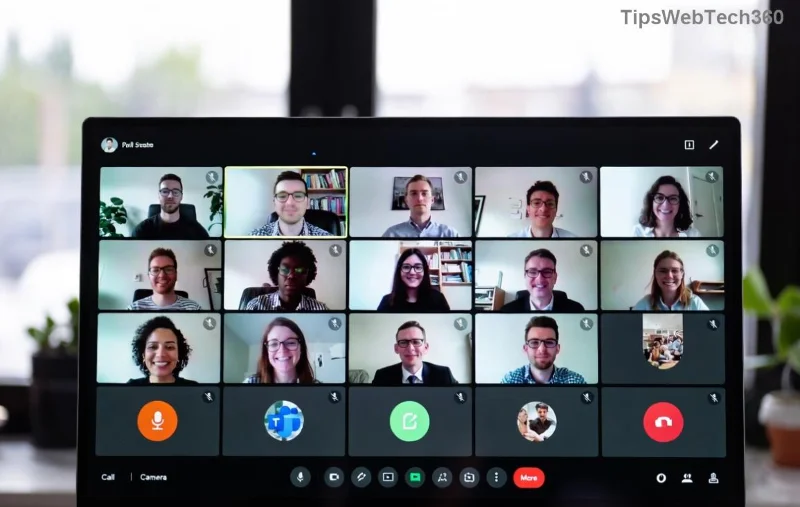
Microsoft Teams business dashboard showing channels and meetings

Key Business Features

  • Channels for Projects: Organize discussions by topic (e.g., "Q1 Sales"). Post files, @mention teammates.
  • 🎥 Meetings & Calls: Schedule via Calendar integration. Use breakout rooms for focused brainstorming.
  • 📊 Integrations: Connect Power BI for dashboards or SharePoint for secure file sharing.
Feature Business Benefit Quick Action
Live Events Broadcast company-wide updates Teams > Calendar > New Meeting > Live Event
Tasks by Planner Assign and track projects Add Planner tab to a channel
Copilot AI Summarize meetings automatically Enable in Settings (requires premium)

✅ Result? Teams report 20% faster decision-making. Ready for the classroom? Keep reading!

How to Use Microsoft Teams for Education: Empower Learning

Educators, rejoice! Microsoft Teams for Education (free with Office 365 Education) turns lessons into interactive experiences.

Microsoft Teams education interface with classes and assignments

Essential Education Tools

  1. 1️⃣ Class Teams: Auto-creates channels for homework, notes, and discussions.
  2. 2️⃣ Assignments & Grading: Set due dates, attach quizzes via Forms. Auto-grade with Insights.
  3. 3️⃣ Virtual Classroom: Whiteboard, screen share, and praise badges for engagement.

Bonus: Use Teams Insights for attendance analytics. Students love the mobile app for on-the-go submissions!

Edu Feature How to Activate Student Impact
Flip Classroom Post videos in Assignments Flexible learning
Quizzes Integrate Microsoft Forms Instant feedback
Parent Join Share class code Family involvement

Advanced Microsoft Teams Features for 2026

Level up with these cutting-edge tools:

  • 🤖 Copilot in Teams: AI generates notes, suggests replies. (Check Microsoft Support for rollout.)
  • 🔒 Security Boosts: End-to-end encryption, sensitivity labels for sensitive data.
  • 📱 Mesh Avatars: Immersive 3D meetings for remote vibes.

Top Tips & Tricks to Maximize Microsoft Teams

👆 Stay efficient:

  • Use keyboard shortcuts: Ctrl + E (search), Alt + N (new meeting).
  • Pin favorites for quick access.
  • Record sessions and transcribe with AI for recaps.
  • Avoid overload: Mute notifications via Focus modes.

Common Pitfall: 🛑 Don't ignore updates – they bring AI enhancements and bug fixes.

Conclusion: Elevate Your Workflow Today

Mastering How to Use Microsoft Teams for Business and Education in 2026 means smarter collaboration and inspired learning. Start small: Create your first team today and watch productivity soar! What's your first Teams project? Share in the comments. 👏

Stay tuned for more tutorials – your Teams journey just began!
Leave a Comment

🔧 Instant Fix: Conquer Microsoft Teams For Linux Installation Error in 5 Minutes!

🔧 Instant Fix: Conquer Microsoft Teams For Linux Installation Error in 5 Minutes!

Tired of the frustrating Microsoft Teams "For Linux" installation error? Discover proven, step-by-step fixes for Ubuntu, Fedora, and more. Get back to seamless video calls without the hassle!

Fix Microsoft Teams Web App Login Problems Fast – Ultimate Troubleshooting Guide

Fix Microsoft Teams Web App Login Problems Fast – Ultimate Troubleshooting Guide

Struggling with Microsoft Teams Meeting Web App login problems? Get instant fixes for cache issues, browser glitches, and account errors. Step-by-step solutions to rejoin meetings seamlessly.

🚀 Microsoft Teams Error Report Not Sending? Fix It in Minutes with This Ultimate Guide!

🚀 Microsoft Teams Error Report Not Sending? Fix It in Minutes with This Ultimate Guide!

Struggling with Microsoft Teams error report not sending? This comprehensive guide provides proven troubleshooting Microsoft Teams error report not sending steps to resolve crashes, failed reports, and connectivity issues fast. Get back to productive meetings!

🚀 Fix Microsoft Teams Guest Access Error in Minutes: Ultimate Troubleshooting Guide

🚀 Fix Microsoft Teams Guest Access Error in Minutes: Ultimate Troubleshooting Guide

Stuck with Microsoft Teams "Guest" access error? Follow our step-by-step troubleshooting guide to resolve guest invite issues, enable access, and get teams collaborating seamlessly. Proven fixes for admins and users alike.

🚀 Fix Microsoft Teams Code Error Redemption Instantly: Proven Troubleshooting Guide

🚀 Fix Microsoft Teams Code Error Redemption Instantly: Proven Troubleshooting Guide

Stuck with Microsoft Teams "Code Error" during redemption? Discover step-by-step fixes for code redemption issues, common causes, and pro tips to resolve it fast and redeem your licenses without hassle. Updated with the latest solutions.

🚀 Fix Microsoft Teams Errors Instantly: Ultimate Troubleshooting Guide for Bị Lỗi Issues

🚀 Fix Microsoft Teams Errors Instantly: Ultimate Troubleshooting Guide for Bị Lỗi Issues

Struggling with Microsoft Teams errors like "Bị lỗi"? Discover proven troubleshooting Microsoft Teams steps to resolve general errors, crashes, sign-in issues, and more. Quick fixes for seamless collaboration!

🚀 Fix Microsoft Teams Logs Error Access Denied in 5 Minutes – Proven 2026 Solutions!

🚀 Fix Microsoft Teams Logs Error Access Denied in 5 Minutes – Proven 2026 Solutions!

Struggling with Microsoft Teams "Logs Error" Access Denied? Discover quick, step-by-step fixes to resolve this frustrating issue and get back to seamless collaboration. Updated with the latest Teams patches for instant relief!

🚀 Fix Microsoft Teams User Not Authorized Error: Proven Steps to Get Back Online Fast!

🚀 Fix Microsoft Teams User Not Authorized Error: Proven Steps to Get Back Online Fast!

Stuck with Microsoft Teams "User Not Authorized" error? Follow our expert, step-by-step guide to quickly fix it and resume seamless collaboration. Simple solutions that work every time.

🚀 Microsoft Teams Whiteboard Not Syncing? Fix It Fast with Proven Steps!

🚀 Microsoft Teams Whiteboard Not Syncing? Fix It Fast with Proven Steps!

Struggling with Microsoft Teams Whiteboard not syncing properly? Discover step-by-step fixes for syncing issues, from cache clearing to network tweaks. Get your collaborative whiteboard back on track in minutes!

🚀 Fix Microsoft Teams Time Limit Error FAST: 7 Proven Steps for Instant Relief!

🚀 Fix Microsoft Teams Time Limit Error FAST: 7 Proven Steps for Instant Relief!

Struggling with the frustrating Microsoft Teams "Time Limit" Error? Discover proven, step-by-step fixes to resolve it quickly. Update Teams, clear cache, and more—no tech skills needed! Works on latest versions.









