Home
» INTERNET
»
11 Best Free and Public DNS Servers: Addresses and Features
11 Best Free and Public DNS Servers: Addresses and Features
The best free public DNS server depends on what you need: Cloudflare and Google offer straightforward everyday resolution; Quad9 emphasizes blocking known malicious domains; and AdGuard DNS, CleanBrowsing, and Control D provide useful filtering options. Below are 11 public DNS services with verified IPv4 addresses, plus practical advice for choosing and setting one up.
A router can supply DNS settings to devices throughout a home network, while individual devices can also use their own settings.
What is a public DNS server?
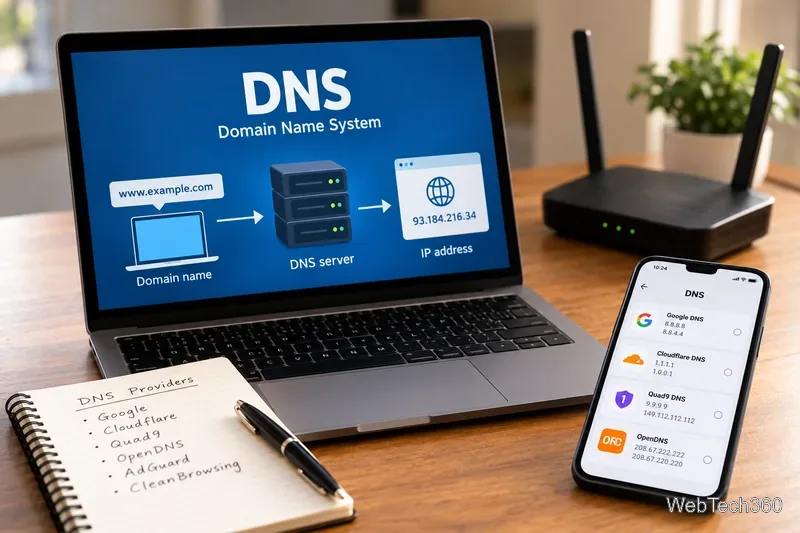
The Domain Name System translates names such as example.com into IP addresses that computers use to reach websites. Your internet service provider normally chooses a recursive DNS resolver for you. A public DNS provider is an alternative that you can configure on your device or router.
Changing resolvers can improve lookup reliability or add phishing, malware, or content filtering. It will not increase your internet plan's bandwidth, prevent all tracking, or act as a VPN. Ordinary DNS is typically unencrypted; DNS over HTTPS (DoH) and DNS over TLS (DoT) protect DNS queries in transit when correctly enabled.
11 best free and public DNS servers
Each pair below contains primary and secondary IPv4 DNS addresses. Use both addresses from the same provider and filtering profile for consistent results; these are not measured speed rankings. Check each provider's official setup page for IPv6 and encrypted-DNS endpoints.
For family filtering: Cloudflare's malware-and-adult-content profile uses 1.1.1.3 and 1.0.0.3; its malware-only profile uses 1.1.1.2 and 1.0.0.2. OpenDNS FamilyShield uses 208.67.222.123 and 208.67.220.123. CleanBrowsing Family uses 185.228.168.168 and 185.228.169.168. AdGuard Family uses 94.140.14.15 and 94.140.15.16. These are different filtering profiles, not interchangeable backups.
DNS looks up the IP address associated with a domain name; choosing a public resolver changes which service handles that lookup.
How to choose the right DNS service
For everyday browsing and privacy
Start with Cloudflare or Google Public DNS if you want a widely documented, unfiltered alternative. Quad9 is a strong option when blocking known malicious domains matters more than leaving every hostname unfiltered. Compare each provider's privacy statement rather than assuming a public DNS provider never processes or retains any data.
For ads, malware, or family controls
AdGuard DNS Default aims to block known ad and tracking domains, while CleanBrowsing and Cloudflare offer separate security or family filtering profiles. DNS blocking works at the domain level: it cannot reliably remove every in-app advertisement, inspect a specific page's contents, or replace parental controls and endpoint security. Legitimate sites can occasionally be blocked; switch profiles or consult the provider's documentation if that happens.
For custom setups or regional needs
Control D has multiple free preset resolvers, including unfiltered, malware, and ad/tracker options, but personalized rules belong to its paid features. CIRA Canadian Shield provides Private, Protected, and Family profiles; choose the latter two if filtering is the goal. DNS.WATCH offers a published, unfiltered pair. OpenNIC is another community-run alternative, but its public resolver directory changes with individual operator availability, so old static IP lists should not be treated as permanent.
How to change DNS servers in Windows 11
Open Settings > Network & internet and choose your active Wi-Fi or Ethernet connection.
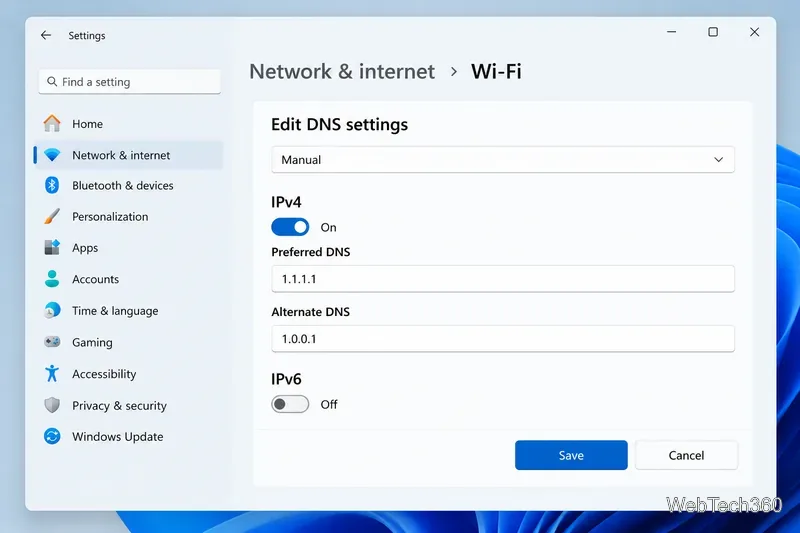
Find DNS server assignment, select Edit, and change the selection from Automatic (DHCP) to Manual.
Enable IPv4 and enter the two addresses from one row of the table as Preferred DNS and Alternate DNS.
If you want encrypted DNS, select a supported DoH option or provide the provider's documented template where Windows offers that setting. Entering IP addresses alone does not guarantee encryption.
If your network uses IPv6, configure the corresponding IPv6 resolver addresses as well. Save, then reopen the settings to confirm your changes.
Example of a Windows 11 DNS settings panel using Cloudflare IPv4 addresses. Available encrypted-DNS controls can vary by Windows configuration.
For an entire home network, change DNS in the router's administration interface, if supported. Some browsers, VPN clients, mobile private-DNS settings, and managed networks can override device or router DNS. Before editing anything, record the previous settings so you can restore them.
How to check whether the new DNS works
Open a few familiar websites, then use the chosen provider's diagnostic page if it offers one; for example, Quad9 provides on.quad9.net. On Windows, run nslookup example.com in Command Prompt to inspect a DNS query and the resolver reported by that tool. Note that browser-level encrypted DNS, a VPN, or cached answers may make a single test inconclusive.
If websites stop resolving, check for a mistyped address, reconnect the device, and temporarily restore Automatic DNS or your saved settings. Captive-portal Wi-Fi networks may require the original DNS configuration for sign-in. Avoid turning off antivirus protection just to troubleshoot a DNS problem.
Frequently asked questions
Which public DNS is the fastest?
There is no universal winner: performance varies with your location, ISP routing, resolver cache, and time of day. Compare several providers from your own network rather than relying on an unsupported global ranking.
Does public DNS hide browsing from my ISP?
Not by itself. Encrypted DNS obscures DNS queries in transit from some observers, but it is not a VPN, and your ISP may still learn about connections through other network metadata. Filtering DNS also cannot protect against every malicious URL.