Home
» INTERNET
»
100 Funny Wi-Fi Names That Will Make Your Neighbors Laugh
100 Funny Wi-Fi Names That Will Make Your Neighbors Laugh
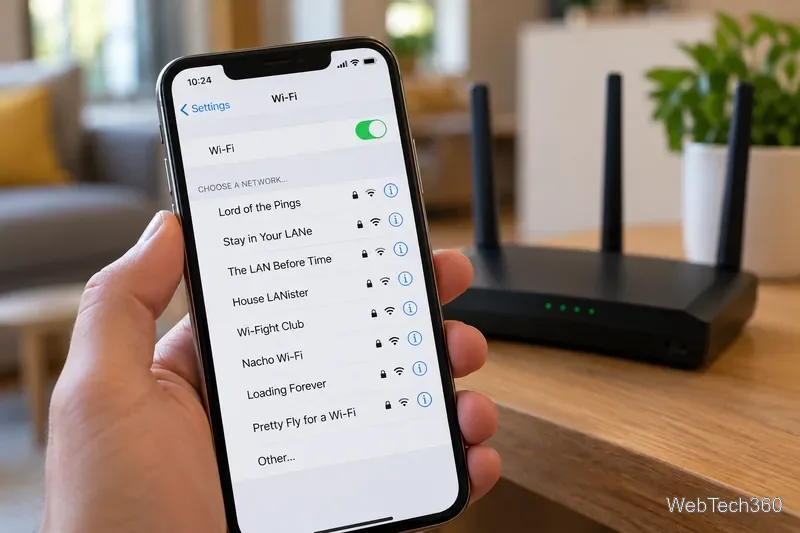
Looking for a funny Wi-Fi name that makes your neighbors smile? Start with Lord of the Pings, Nacho Wi-Fi, or Stay in Your LANe. Below are 100 clever, punny, sarcastic, seasonal, and geeky network names you can use or customize.
Your network name is also called its SSID—the label people see when they browse nearby Wi-Fi networks. A playful one adds personality without changing how your internet connection works.
A recognizable joke makes a Wi-Fi network easy to spot on the list.
100 Funny Wi-Fi Names by Category
Pick a name that fits your sense of humor. All 100 choices below are short enough for the usual 32-byte SSID limit when written exactly as shown.
Clever Wi-Fi Names
404 Network Not Found
Loading Forever
Searching for Wi-Fi
Connection Pending
Tell My Wi-Fi Love Her
You Again?
Just One More Bar
This Is Not a Hotspot
Access Denied
No Signal, No Problem
Not Your Router
Wi-Finally Home
LAN of Opportunity
Stay in Your LANe
Connecting the Dots
Almost Online
Router? I Hardly Know Her
Buffering Since Tuesday
Not the Network You Seek
Very Important Wi-Fi
Punny Wi-Fi Names
Silence of the LANs
Pretty Fly for a Wi-Fi
LAN Solo
Obi-Wi-Fi Kenobi
Lord of the Pings
The LAN Before Time
Nacho Wi-Fi
Wu-Tang LAN
House LANister
Get Off My LAN
LAN of Milk and Honey
Drop It Like Its Hotspot
No More Mr. Wi-Fi
Wi-Fight Club
Winternet Is Coming
A LAN Down Under
Ping Me Maybe
The Ping of the North
LAN in 60 Seconds
Pinging in the Rain
A familiar pun can be a conversation starter when neighbors notice the same network name.
Sarcastic Wi-Fi Names
Definitely Not Free
Ask Your Own Router
Nice Try, Neighbor
Password Is Not Password
No Free Downloads
Slow Internet Express
Loading Your Patience
Premium Members Only
Wi-Fi Not Included
You Shall Not Pass
Buffering Is a Feature
Great Signal, Bad Attitude
Reserved for Houseplants
Too Many Devices
Try Again Tomorrow
Sorry, Wrong Network
Pay Rent, Get Wi-Fi
Totally Working
The Good Network Is Next Door
Error: Snacks Not Found
Holiday and Seasonal Wi-Fi Names
HalloWi-Fi
Frosty the Router
Ho Ho Hotspot
Merry Connectmas
New Year New Wi-Fi
Spooki-Fi
Trick or Connect
Boo-tooth and Wi-Fi
Pumpkin Spice LAN
Turkey Day Downloads
ThanksgiWi-Fi
Santa's Hotspot
Snow Much Bandwidth
Winter Is Buffering
Easter Egg Network
Hoppy Easter Hotspot
Valentine LANd
Cupid's Connection
Summer of Wi-Fi
Spring Into Signal
Geeky Wi-Fi Names
Localhost Only
The Bandwidth Strikes Back
Starfleet HQ
Ctrl Alt Connect
Quantum Router
Nerdtopia
The LANding Page
Beta Test Zone
Glitched Network
Source Code LANd
Dark Mode Enabled
MAC and Cheese
Operation Wi-Fi
Back to the Router
Warp Speed Connection
Byte Me
Hack to the Future
It Works on My Machine
Kernel Panic Room
May the Wi-Fi Be With You
How to Choose a Funny Wi-Fi Name
The best name gets a quick laugh but still helps you recognize your own network. A few practical rules make the choice easier:
Keep it short and readable. An SSID can be up to 32 bytes; simple letters, numbers, and familiar punctuation are less likely to cause compatibility problems.
Protect your privacy. Skip your full name, apartment number, exact address, birth year, and other identifying details. Nearby people may see the SSID.
Keep the joke friendly. Avoid threats, offensive wording, or names that impersonate emergency services or official authorities.
Make it recognizable. If several networks are visible, a distinctive name is easier to identify when connecting a new device.
For a more personal joke, mix a hobby with a networking term: a movie title plus “LAN,” a favorite food plus “Wi-Fi,” or a seasonal phrase plus “router.”
A lighthearted network name can show personality without sharing personal details.
How to Change Your Wi-Fi Name
You can usually rename an existing network without resetting the router. Exact menus vary by brand, model, firmware version, and whether you use a provider or mesh-network app.
Connect to your home network and open your router manufacturer’s app or its official web administration page.
Sign in with your router administrator credentials. These are different from your Wi-Fi password. Check the router’s documentation or your internet provider’s instructions if you do not know them.
Open Wi-Fi, Wireless, or Network settings and find Network Name (SSID).
Enter the new name and select Save or Apply. Some routers have separate names for different frequency bands.
After the network name changes, reconnect your phones, computers, TVs, and smart-home devices to the renamed network. A router restart is not always required.
A clever SSID does not secure your router or reveal your Wi-Fi password. Use WPA3-Personal if your equipment supports it, or WPA2-Personal where needed. Choose a strong, unique Wi-Fi password and a separate administrator password, and keep router firmware updated. If guests need access, a separate guest network can help protect your main devices.
The Federal Trade Commission’s home Wi-Fi security guide explains these safeguards. A VPN may protect some traffic in certain situations, but it does not replace Wi-Fi encryption, good passwords, or router updates.
Once your network is secure, let the name do the entertaining. Pretty Fly for a Wi-Fi is more memorable than another string of random letters.