Home
» INTERNET
»
Starlink Internet Review: Is the Speed Worth the Price?
Starlink Internet Review: Is the Speed Worth the Price?
Starlink is worth considering if fiber, cable, and reliable cellular home internet are unavailable. It can make video calls, streaming, and online gaming practical in rural locations, but it is not automatically the best or cheapest connection. The real trade-offs are the monthly bill, equipment costs, a clear-sky installation requirement, and occasional dips in speed or reliability.
This Starlink internet review compares current advertised plans, documented network performance, and the limitations to check before buying. It is based on published information, not a claim of hands-on testing. Prices below are a U.S. reference point, not worldwide quotes; your service address determines the actual offer.
How Starlink Internet Works
SpaceX's Starlink uses a large network of low Earth orbit satellites to connect a dish at your property to the internet. Those satellites orbit much closer to Earth than traditional geostationary internet satellites, reducing the delay, or latency, that makes older satellite services frustrating for interactive applications. A router then distributes the connection to devices in your home. The dish must have a sufficiently open view of the sky.
An open-sky location is central to a reliable satellite internet connection.
Starlink Plans and Prices: What Will You Pay?
Starlink's U.S. service-plan page displayed the following monthly rates in October 2026. Availability, discounts, equipment offers, taxes, and additional fees can differ by address.
Plan
Advertised U.S. price
Best suited for
Residential 100 Mbps
$55/month
Basic home use; download cap of 100 Mbps
Residential 200 Mbps
$85/month
Most households; download cap of 200 Mbps
Residential Max
$130/month
Higher-demand homes; highest available residential speeds
Roam 100GB
$55/month
Occasional trips; 100GB high-speed allowance
Roam 300GB
$80/month
Frequent trips; 300GB high-speed allowance
Roam Unlimited
$175/month
Regular travel with heavier data use
Residential tiers include unlimited data, although lower-priced tiers have speed ceilings and can perform differently during congestion. Roam's 100GB and 300GB tiers continue with unlimited low-speed data once their high-speed allowance is used; they are not unlimited full-speed plans. Roam may be used in motion where allowed, but international and water coverage remain subject to specific rules.
Businesses can choose Local Priority for in-country land use (advertised at $55–$530 monthly across preset data tiers) or Global Priority for maritime and broader international service ($250–$2,150 monthly). Priority data blocks, public-IP features, and support differ from residential products. Neither is necessary for an ordinary home.
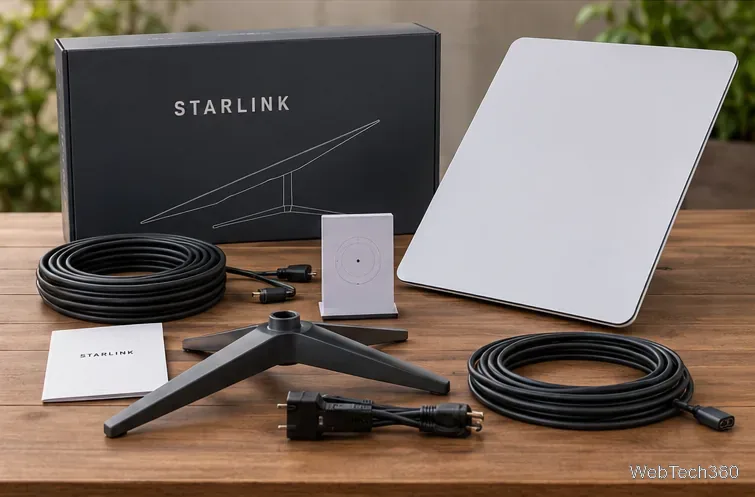
Do not budget from the subscription price alone. Starlink advertises no upfront hardware charge in some residential areas, while other locations require a kit purchase or may have promotional commitments. Get the full checkout total, including the kit, shipping, installation accessories, and terms of any offer, before comparing it with your current ISP.
Equipment and mounting needs affect the upfront cost; verify exactly what is included with your kit.
Speed and Reliability: What Can You Actually Expect?
Starlink's network update reported nearly 200 Mbps median download speed during peak hours among U.S. customers as of July 2025, and 25.7 ms median peak-hour latency in June 2025. Those are Starlink's aggregate network measurements from specific dates—not a promise of performance at your house and not an independent test conducted for this article.
Likewise, a 100 Mbps or 200 Mbps residential plan cannot exceed its advertised download cap just because the broader network reports a higher median. Congested cells, obstructed sky views, weather, network routing, and your Wi-Fi setup can cause slower speeds or interruptions. Starlink's residential marketing describes Max as reaching up to 400+ Mbps, but expressly says advertised maximum speeds are not guaranteed.
Streaming, video calls, and gaming
With a clear view of the sky and a healthy connection, Starlink can support HD streaming, work meetings, and many online games. Its lower latency makes it markedly more useful for gaming than traditional high-orbit satellite connections. Still, competitive shooters are sensitive to jitter and brief packet loss: a connection that averages a good ping can still have momentary disruptions. Test performance during your own busy hours rather than assuming every game will run flawlessly.
Setup: The Sky View Matters More Than the Dish
Before permanently mounting equipment, use the Starlink mobile app's obstruction-checking tool at the intended height and location. Trees, roofs, and nearby buildings may block parts of the sky and interrupt service. Test the connection in a safe temporary location, then route the cable and secure the equipment according to the instructions for your specific kit.
Check sky visibility at the intended mounting point before a permanent installation.
Some installations are straightforward; others need a pole, roof mount, professional installer, or weatherproof cable routing. Do not climb onto a roof without proper equipment and expertise. Check whether your local offer includes professional installation before paying someone separately.
Strengths and Drawbacks
Major advantage: useful broadband access at rural and remote properties where terrestrial networks are weak or unavailable.
More flexibility: Roam and business services support mobile or remote use under their coverage and regulatory restrictions.
Trade-off: equipment, mounts, and higher monthly fees can make the total cost less attractive than available fiber or cable.
Practical risk: trees, congestion, severe weather, and power interruptions can affect service.
Account management: some plans can be paused through paid Standby Mode. Pausing does not necessarily mean a $0 monthly bill.
Starlink advertises a 30-day trial, but this does not mean 30 days of free internet. Its help center explains the equipment return arrangement; review the terms applicable to your purchase and any promotional commitment.
Is Starlink Internet Worth It?
Yes, often, for underserved homes and regular travelers; less often where reliable fiber is already available. Start by checking the official availability map, entering your exact service address, and checking the full first-year cost. Compare local fiber, cable, or fixed wireless offers on real speed, latency, total fees, and reliability.
If you are buying a used kit, do not pay until you have verified that the seller can transfer ownership and that service is available where you intend to activate it. A secondhand dish that remains linked to another account may be impossible to use.