Home
» INTERNET
»
How to Clean a Sand Filter: Backwash, Rinse, and Deep-Clean Guide
How to Clean a Sand Filter: Backwash, Rinse, and Deep-Clean Guide
A pool sand filter usually does not need to be opened and scrubbed every time it gets dirty. Routine cleaning is normally a backwash: the system reverses water through the sand bed so trapped debris is carried to waste. The most important rule is simpler than the rest—turn the pump off before changing the multiport valve position.
As of September 2026, the current manufacturer manuals reviewed for this guide still use that same basic backwash-and-rinse method. What varies is the trigger and timing. Hayward residential guidance commonly calls for backwashing when pressure rises about 8–10 psi above the clean starting pressure, while a current Jandy sidemount manual specifies a 10–12 psi rise or about a 30% reduction in return flow. That is why the label and manual for your exact filter should override any one-size-fits-all number.
Quick reference: what kind of cleaning does your sand filter need?
Situation
Best next step
What to watch
Pressure has risen above the filter's clean baseline
Backwash, then rinse
Use the threshold in your model's manual
Return flow is noticeably reduced
Check baskets and valves, then backwash if the filter is loaded
A restriction elsewhere can also reduce flow
Pressure stays unusually high after a proper backwash
Check plumbing and consider manufacturer-approved deep cleaning
Mineral scale, oils, or a restricted valve may be involved
Sand is channeling, clumped, contaminated, or performance remains poor
Inspect the media and internals
Do not replace sand on a calendar alone without checking the system
Water is still cloudy but filter pressure is normal
Check water chemistry, circulation, run time, and debris load
A filter cannot correct every water-quality problem by itself
Before you start: safety and setup checklist
Find the owner's manual for your exact filter and valve.
Record the normal “clean” pressure after a known-good backwash.
Make sure the backwash or waste line is open and can discharge legally and safely.
Check the pool water level; backwashing sends water to waste.
Clean the pump strainer and skimmer baskets if they are loaded with debris.
Never move a multiport valve while the pump is running.
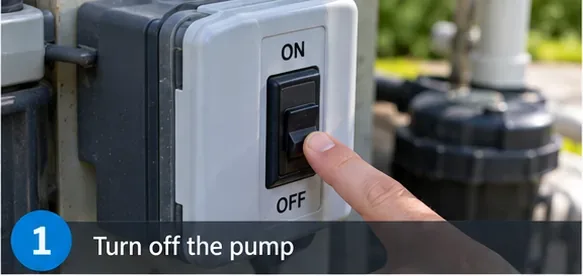
Shut the circulation pump down before touching the multiport valve. If your system has automatic controls, make sure they cannot restart the pump while you are repositioning the valve.
This is not just a convenience step. Moving a multiport valve under flow places unnecessary stress on the valve and plumbing, and manufacturers warn against it.
Turn the pump off before moving a multiport valve; manufacturers warn that changing valve positions with the pump running can damage equipment or cause a pressure hazard.
2. Set the valve to BACKWASH
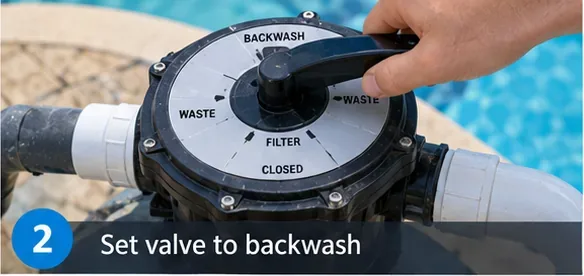
With the pump fully stopped, press or turn the multiport handle as required by your valve and select BACKWASH. Confirm that the waste line is open and unobstructed. Some systems use a backwash hose; others are permanently plumbed to an approved discharge point.
If your equipment uses a slide valve rather than a multiport valve, follow that valve's own instructions instead of copying multiport positions.
With the pump off, move the multiport valve to BACKWASH and make sure the waste line is open.
3. Run the backwash cycle until the water clears
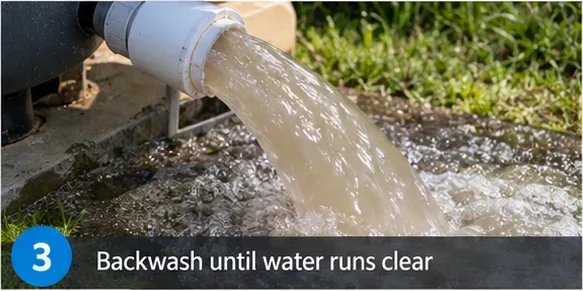
Start the pump and let the filter backwash. Backwash flow travels through the sand bed in the reverse direction, loosening trapped debris and carrying it out to waste. If your valve has a sight glass, it gives you a convenient way to watch the discharge clear.
Do not treat one timing as universal. Pentair's Sand Dollar manual says approximately three minutes or until the backwash water is clean. Hayward's residential manual says to backwash until the sight glass is clear, approximately two minutes or less depending on dirt accumulation. The correct endpoint for your unit is the one in its manual.
Run the backwash cycle until the discharge becomes clear, using your filter manual's timing as the primary reference.
4. Stop the pump and use the RINSE setting
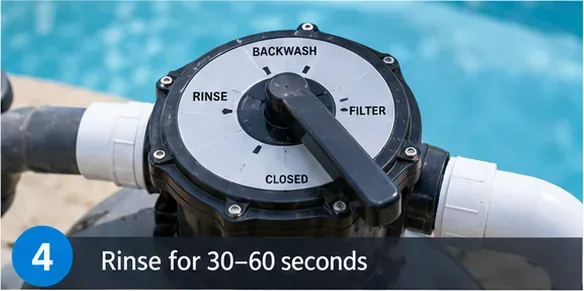
When the backwash is complete, stop the pump. Move the valve to RINSE, then restart the pump for the specified rinse period. Rinsing settles the sand bed and sends remaining dirty water to waste before normal filtration resumes.
Pentair's manual specifies about 30 seconds for its cited Sand Dollar procedure. Hayward lists roughly one-half to one minute for the model family in its residential manual. Again, follow your model rather than extending the cycle unnecessarily.
After backwashing, stop the pump, select RINSE, and run the rinse cycle for the time specified by the manufacturer.
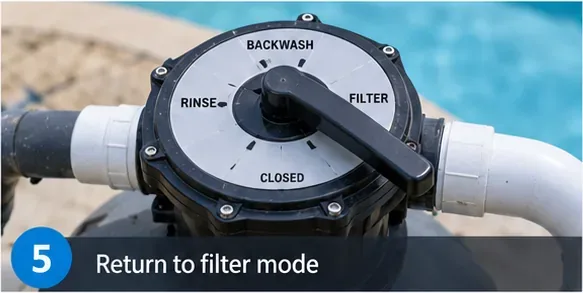
5. Return the valve to FILTER
Stop the pump once more, move the valve to FILTER, verify that the pool return path is open, and restart normal circulation. Check for leaks around the valve, unions, pressure gauge, and filter connections.
If your filter has a manual air-relief procedure, follow the manufacturer's startup instructions. Do not improvise on a pressurized vessel.
Stop the pump again before returning the valve to FILTER for normal circulation.
6. Check the pressure and flow
Once the system is stable, note the pressure gauge reading and compare it with your known clean-filter pressure. The absolute PSI matters less than the change from your own baseline because pump size, plumbing, fittings, elevation, and equipment layout affect normal pressure.
Hayward's cited residential manual calls for backwashing at 8–10 psi above the initial clean pressure. A current Jandy Sidemount Composite Sand Filter manual calls for backwashing at a 10–12 psi increase over clean pressure or when return flow falls about 30%. These are examples of why your exact manual matters.
After the filter is back in service, compare the pressure with your recorded clean-filter baseline rather than relying on a universal PSI number.
When backwashing is not enough
A properly backwashed filter should normally return close to its established clean pressure. If pressure stays elevated or flow remains poor, do not automatically assume the sand must be replaced. First rule out simple restrictions: a clogged pump basket, closed valve, blocked return line, dirty skimmer basket, or a problem with the pressure gauge itself.
If plumbing is open and the filter remains restricted, oils, scale, or other deposits may be binding the sand bed. Jandy's manual says a failure to return within about 5 psi of the clean pressure after backwashing can indicate a need to chemically clean the sand bed. Pentair also publishes a chemical-cleaning procedure using a filter cleaner intended for sand filters.
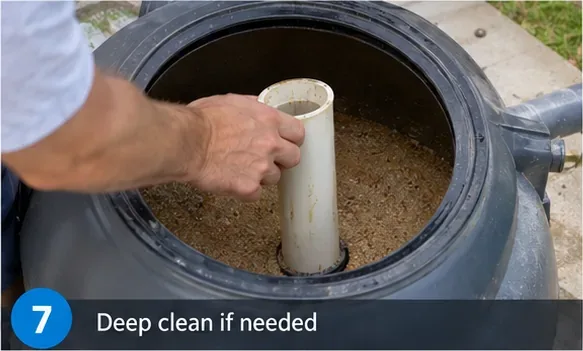
7. Deep-clean the sand bed only when needed
Deep cleaning is not the same as simply pouring a random chemical into the filter. Use a cleaner explicitly labeled for pool sand filters and follow both the cleaner label and filter-manufacturer procedure. Pentair's chemical-cleaning guidance describes backwashing first, draining as directed, introducing an industry-standard filter cleaner, soaking the sand bed, and then backwashing again without allowing cleaner to return to the pool.
Do not copy a chemical procedure from another model if your own manual differs. Filter construction, valve layout, and plumbing configuration matter.
Deep cleaning is a separate maintenance task from routine backwashing and should follow the procedure in the exact filter and cleaner instructions.
8. Inspect or replace sand only when performance indicates a problem
Filter sand does not need to be replaced every time you backwash, and there is no single replacement interval that fits every pool. Water chemistry, debris, oils, scale, operating hours, media specification, and past maintenance all affect the sand bed.
Inspect the media if repeated backwashing and approved deep cleaning fail to restore normal performance, or if you suspect channeling, clumping, incorrect media, or damaged internals. If you replace the media, use the sand grade and quantity specified by the filter manufacturer. Too much, too little, or the wrong particle size can impair filtration or backwashing.
Replace filter media only when inspection, performance, or the manufacturer's service guidance indicates it is needed; use the specified media type and amount.
How often should you backwash?
Use pressure and flow, not a rigid weekly schedule. Backwashing too early can waste water and may reduce filtration efficiency by repeatedly disturbing a lightly loaded sand bed. Waiting too long can restrict circulation and raise system pressure.
For a new pool, heavy cleanup can require unusually frequent backwashing because plaster dust and construction debris quickly load the filter. After the pool stabilizes, the interval may become much longer. Weather, swimmer load, pollen, algae cleanup, vacuuming, and landscaping all change how fast the filter accumulates debris.
A practical habit is to write the clean pressure on a tag near the equipment pad or mark the clean reference on the gauge if your gauge is designed for that purpose.
Troubleshooting after cleaning
Symptom
Likely checks
Next action
Pressure is still high after backwash
Incomplete backwash, scale or oil in sand, restricted return valve, bad gauge
Verify valves and baskets; compare with manual; consider approved deep cleaning
Pressure is unusually low
Low water level, clogged suction basket, air leak, pump problem
Check suction side before blaming the filter
Sand returns to the pool
Damaged lateral, standpipe, or internal component; incorrect media
Stop repeated backwashing and inspect/service internals
Water remains cloudy
Water chemistry, algae, insufficient run time, undersized system, very fine particles
Test water and circulation; do not rely on backwashing alone
Backwash water never becomes clear
Heavy debris load, insufficient flow, valve/plumbing issue
Follow model-specific troubleshooting and check the pump/valves
What not to do
Do not switch valve positions with the pump running.
Do not open the tank while it is pressurized.
Do not backwash solely because a calendar says it is time. Use the model's pressure or flow trigger.
Do not assume high pressure always means dirty sand. A closed or restricted return valve can also raise pressure.
Do not replace sand before checking simpler causes.
Do not use household acids or improvised chemicals. Use a product and procedure approved for the filter.
Do not discharge backwash water wherever convenient. Follow local requirements for pool-water disposal.
Self-check: did the cleaning work?
After the system has run for several minutes in FILTER mode, use this checklist:
The multiport valve is firmly in FILTER.
No water leaks are visible at the filter, valve, unions, drain, or gauge.
Return flow at the pool is stronger or back to its normal level.
The pressure is close to your established clean-filter baseline.
No sand or new debris is entering the pool through the returns.
The pump is fully primed and not pulling visible air.
The pool water level remains adequate after water lost to backwashing.
If pressure remains abnormally high after a correct backwash and rinse, or if you see sand entering the pool, stop treating the problem as routine cleaning. At that point the filter may need chemical cleaning, internal inspection, media service, or professional diagnosis.
Bottom line
For most residential pool sand filters, routine cleaning means four things: shut the pump off, backwash until the discharge clears, rinse for the specified period, and return to FILTER. The pressure gauge tells you when to clean more reliably than a fixed calendar, but the trigger is model-specific. Deep cleaning and sand replacement belong later in the troubleshooting process, not at the beginning.
For exact settings and limits, use the manual for your own equipment. This guide was cross-checked against current manufacturer instructions from Pentair, Hayward, and Jandy available in September 2026.