iMessage Is Signed Out on iPhone: How to Fix It

Fix the iMessage Is Signed Out error on iPhone by checking Apple Account sign-in, activation, connectivity, and settings—without erasing your messages.
The best Cydia tweaks for a jailbroken iPad depend on the iOS version, not simply the iPad model. On a classic iOS 5 or iOS 6 jailbreak, SwipeSelection, Activator, Quasar, and Springtomize 2 were standout ways to improve typing, gestures, multitasking, and customization. They remain useful names to know if you maintain an older jailbroken tablet, but they should not be treated as confirmed working on modern iPadOS.
Cydia, developed by Jay Freeman, is a package manager for jailbroken Apple devices. Many newer jailbreak setups instead include Sileo, another package manager. The distinction matters: finding a package in a repository does not mean it supports your firmware or jailbreak architecture.

This is a guide to classic iPad tweaks, not a promise that every package is still maintained or obtainable. Before installing anything, check the exact iOS or iPadOS version, the package's supported versions, its dependencies, and whether it supports the jailbreak's rootless or rootful setup. Prefer developer-owned repositories, make a backup, and avoid installing several system-changing tweaks at once.
Archived prices and old BigBoss or ModMyi listings are not reliable indications of what can be purchased today. If there is no current developer confirmation, treat availability and compatibility as unverified.
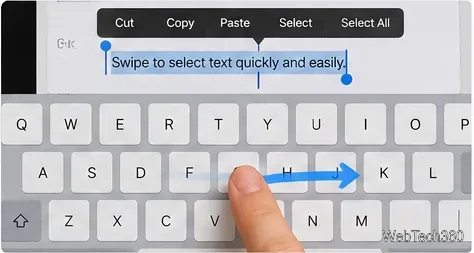
SwipeSelection lets you move the text cursor by sliding across the onscreen keyboard, with gestures for selecting text. It was particularly appealing on the iPad because reaching precisely into long notes and emails could be awkward. Developer Kyle Howells documents the original tweak and links to its source code. His historical compatibility notes do not establish support for newer iPadOS releases.
Activator provides a centralized way to assign actions to gestures and hardware-button interactions. It became a foundation for numerous other jailbreak add-ons. Ryan Petrich's developer page describes its shortcut-management purpose. Check its supported firmware and dependencies before considering it for an older device.
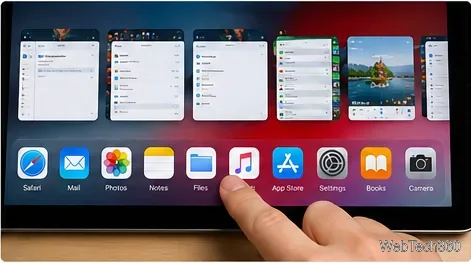
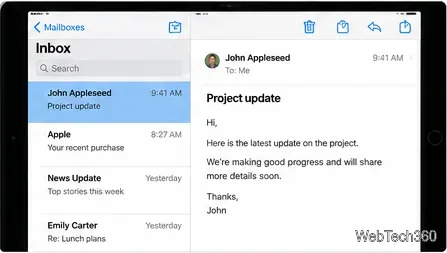
TenIconSwitcher expanded the old iPad app-switcher tray to display more icons per page, while SplitMail aimed to retain Mail's inbox-and-message layout in portrait orientation. Both addressed interface limits of early iOS rather than deficiencies in current iPadOS. Their present distribution and compatibility have not been independently confirmed.
NCPad stretched notification banners across more of the iPad display. CamSlideshow repurposed a lock-screen slideshow control as faster camera access on supported older models. They are best understood as period-specific improvements: lock-screen controls and notification designs have changed substantially since their introduction.
Quasar brought movable, resizable app windows to older jailbroken iPads, letting several apps share the screen. That was a distinctive capability when iPad multitasking was far more restrictive. Do not assume the original Quasar package works on recent firmware, and do not rely on its historical price.
Springtomize 2 bundled changes to icons, folders, the dock, animations, and lock-screen elements. Importantly, the archived Cydia listing explicitly identifies the iOS 5 and 6 edition. A package with a similar name from a later era is not necessarily the same product or compatible with the same devices.
FullScreen for iPad provided more immersive Safari browsing and gesture shortcuts; LockInfo brought extra information to the lock screen; Zephyr focused on gesture-driven app switching. They solved meaningful usability problems on early iPads, but their original purchase links, trial terms, and compatibility claims should be regarded as historical.
In many cases, no. Apple's iPadOS 26 windowing features handle multiple resizable apps without Quasar. The built-in Night Shift covers much of the basic evening color-adjustment use case associated with f.lux. Apple's Files app manages user documents without exposing the entire operating-system file system.
The older article also treated VLC as a Cydia-only app. That is outdated: VideoLAN documents VLC for Mobile in the App Store. It does not require jailbreaking on supported devices.
Bottom line: for a working vintage jailbreak, SwipeSelection and Activator are compelling starting points, with Quasar and Springtomize 2 worth researching if your exact iOS version matches. For a current iPad, try native multitasking, Files, Night Shift, and App Store apps first. Never install an abandoned tweak merely because an old list describes it as essential.
Fix the iMessage Is Signed Out error on iPhone by checking Apple Account sign-in, activation, connectivity, and settings—without erasing your messages.
Turn off your iPhone VPN in the app or Settings, confirm it disconnected, and stop automatic reconnections without deleting your account.
Learn how to encrypt your iPhone with a strong passcode, protect iCloud and computer backups, and secure your data if your phone is lost or stolen.
Learn how to clear Safari and Chrome cache on iPhone, manage app storage safely, and understand when clearing cached data actually helps.
Learn how to fight Gym Battles in Pokémon GO, pick effective attackers, use Charged Attacks and dodges, and claim a Gym after defeating its defenders.
Explore classic Cydia tweaks for jailbroken iPads, from SwipeSelection to Quasar, with compatibility warnings and modern alternatives.
Stop Apple Music signup prompts in the Music app. Learn where to find Show Apple Music on iOS and what turning it off does—and does not—change.
Set up a Shortcuts automation to text Mom when your iPhone battery gets low. Follow four steps, plus delivery checks and privacy tips.
Save posts on X in a few taps. Learn where to find the Bookmark button on iPhone, Android, and desktop, plus how to view, remove, and organize saved tweets.
Turn on AR mode in Pokémon GO during a wild encounter, find AR settings, and fix camera or device compatibility issues.







