iMessage Is Signed Out on iPhone: How to Fix It

Fix the iMessage Is Signed Out error on iPhone by checking Apple Account sign-in, activation, connectivity, and settings—without erasing your messages.
If Mom worries when your iPhone stops answering calls, you can warn her before the battery dies. The simplest current approach is a low-battery text automation in Apple Shortcuts: when your iPhone drops below a battery percentage you choose, it can send her a short message. You set it up on your phone; Mom does not need to install another app. A message is a heads-up, not proof that you are safe or a guarantee that your phone will remain reachable.
These instructions use the Shortcuts app on iPhone. The wording and placement of controls may differ between iOS versions. Before you start, make sure the Messages app can send texts to Mom and that you have her correct number saved in Contacts.
Open Shortcuts, select Automation, and tap the plus button or New Automation. Choose Battery Level from the available triggers. If you already have automations, the new-automation button may appear in a different corner.

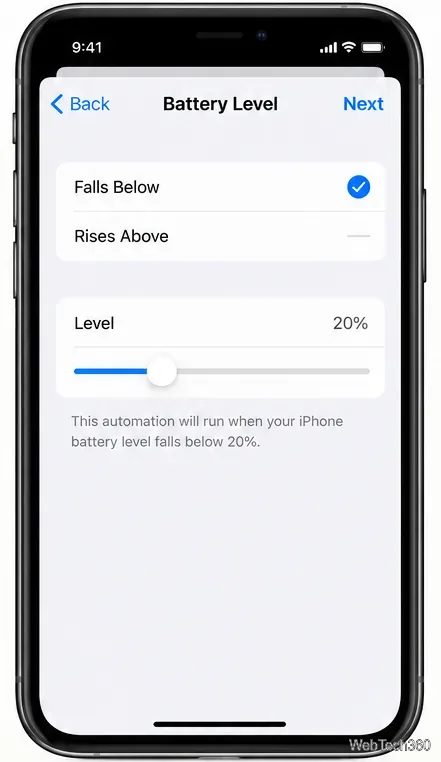
Choose Falls Below and set the slider to 20%, or choose 25% to give yourself more time to find a charger. Falls Below sends a warning when the charge crosses that threshold as it decreases; it does not repeatedly send a text every minute the battery stays low. Continue to the actions editor.
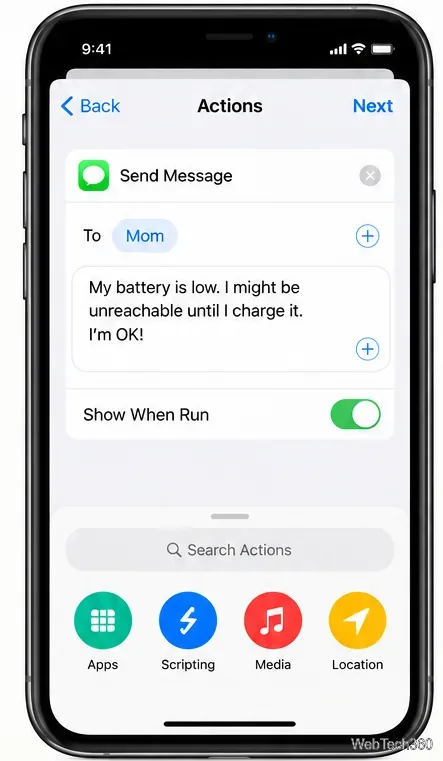
Search for and add the Send Message action. Set the recipient to Mom and write something calm and specific, such as: “My iPhone battery is low. I may be hard to reach until I charge it. I’m OK, and I’ll check in when I can.” Adjust the wording to something truthful for your situation. If the action displays Show When Run, turn it off so the message does not wait for you to approve a compose screen.
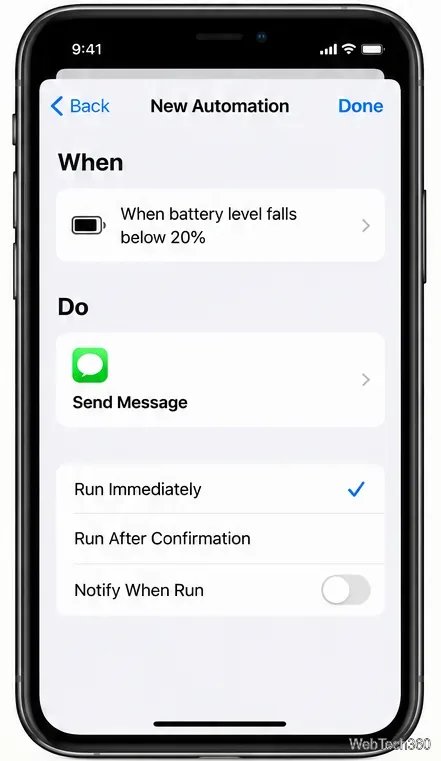
Choose Run Immediately if your version offers it. On versions that instead show Ask Before Running, disable that confirmation if appropriate. Save the automation, then review its recipient, action, and trigger. For a controlled test, you can temporarily set a threshold slightly above your current battery charge, let the charge cross it, and ask Mom whether the text arrived. Reset the threshold afterward; make sure Mom knows a test message may come through.
Apple documents the available battery conditions in its Shortcuts setting-trigger guide and explains automation permissions in its Shortcuts automation guide.
Mom gets the text you wrote, not an ongoing live view of your battery. It will not automatically share your location, let her control your phone, or tell her when you have recharged unless you create a separate message or check in yourself. This narrower sharing can be useful when you want to reassure a family member without granting continuous access to your activity.
A battery warning also does not mean an emergency has occurred. A useful family agreement is simple: if you send or trigger a low-battery notice, follow up when you have power again. For travel, keep a charged power bank or agree on a practical check-in time instead of depending on an automation alone.
Apple’s Messages troubleshooting guide explains common delivery and network requirements. If you need more battery time, see Apple’s battery-saving guidance for Low Power Mode and battery-health checks.
The older version of this article recommended an app called Battery Share. Its original setup required both people to install the app, exchange invitations, and agree to battery-status sharing. That was a different experience from sending a single automatic warning. We could not verify the app’s original App Store listing, current availability, subscription or purchase price, or compatibility with current iOS releases, so the old download link and historical prices should not be treated as current instructions.
For the specific goal of letting Mom know why you might suddenly go offline, Shortcuts is a practical alternative that avoids asking her to install a second app. Keep the warning concise, tell her what you plan to do next, and follow up once your iPhone is charged.
Fix the iMessage Is Signed Out error on iPhone by checking Apple Account sign-in, activation, connectivity, and settings—without erasing your messages.
Turn off your iPhone VPN in the app or Settings, confirm it disconnected, and stop automatic reconnections without deleting your account.
Learn how to encrypt your iPhone with a strong passcode, protect iCloud and computer backups, and secure your data if your phone is lost or stolen.
Learn how to clear Safari and Chrome cache on iPhone, manage app storage safely, and understand when clearing cached data actually helps.
Learn how to fight Gym Battles in Pokémon GO, pick effective attackers, use Charged Attacks and dodges, and claim a Gym after defeating its defenders.
Explore classic Cydia tweaks for jailbroken iPads, from SwipeSelection to Quasar, with compatibility warnings and modern alternatives.
Stop Apple Music signup prompts in the Music app. Learn where to find Show Apple Music on iOS and what turning it off does—and does not—change.
Set up a Shortcuts automation to text Mom when your iPhone battery gets low. Follow four steps, plus delivery checks and privacy tips.
Save posts on X in a few taps. Learn where to find the Bookmark button on iPhone, Android, and desktop, plus how to view, remove, and organize saved tweets.
Turn on AR mode in Pokémon GO during a wild encounter, find AR settings, and fix camera or device compatibility issues.







