iMessage Is Signed Out on iPhone: How to Fix It

Fix the iMessage Is Signed Out error on iPhone by checking Apple Account sign-in, activation, connectivity, and settings—without erasing your messages.
To turn off the Apple Music splash screen on an iPhone, open Settings > Apps > Music and switch off Show Apple Music. On older iOS versions, the route is Settings > Music. This preference is intended to hide Apple Music subscription features and promotional entry points while leaving the Music app and your own music library available. If you are tired of seeing a signup invitation when you want to play songs you already own, start here.
The location of Music settings has changed across iOS releases. Apple’s current iPhone guide directs users to Settings > Apps > Music; its older documentation explicitly describes the Show Apple Music switch. The wording and layout can vary with your iOS version and subscription status.
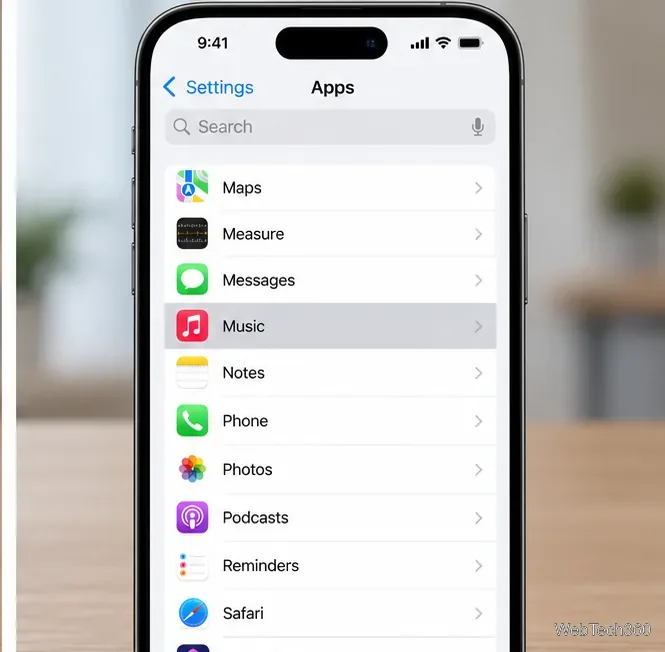
Find the gray gear icon on your Home Screen or in the App Library and open it. On newer versions of iOS, scroll to Apps. You can also use the search field in Settings to look for Music if you do not want to scroll.

Tap Apps, then find and tap Music. The apps are listed by name, so Music should appear with other apps beginning with M. On an older iPhone running a version that does not have the separate Apps section, look for Music directly in the main Settings list.
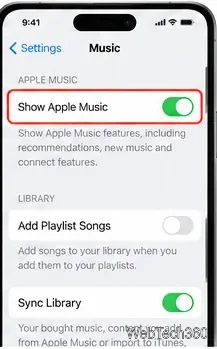
In Music settings, look for Show Apple Music and turn the switch off. This is the setting associated with hiding Apple Music’s subscription-oriented interface. It is not the same as Sync Library; do not turn off library syncing merely to get rid of a promotional screen. If you do not see the Show Apple Music control, use the troubleshooting section below rather than changing unrelated settings.
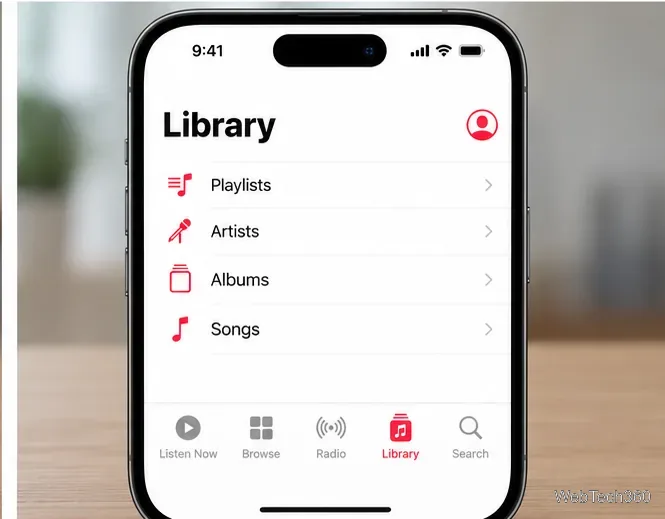
Open Music again and tap Library to browse your songs, albums, artists, and playlists. Hiding Apple Music features can simplify the app, but it does not guarantee that every version of Music will automatically open to the Library tab or suppress every system message. The exact tab arrangement can differ between iOS releases.
To restore Apple Music browsing features later, return to the same Music settings page and turn Show Apple Music back on, if the switch is available.
The switch changes what the Music app displays; it is not a command to erase music or deactivate your Apple Account. The practical distinction is important:
Apple explains that the Music app also supports listening to a personal library without using its streaming catalog. See its Music app overview for iPhone.
First, confirm that you are in the Music app’s settings rather than inside the Music player. Search Settings for “Music,” or open Settings > Apps > Music. Apple’s guide to finding iPhone settings explains how to search directly.
If the switch still is not listed, check your iOS version under Settings > General > About. The location and availability of individual controls can change between releases, and Apple’s current subscription instructions do not enumerate every Music preference. Do not assume that Join Apple Music is an equivalent off switch: it is an invitation to subscribe, not a toggle for hiding promotional screens.
If you use an Apple Music subscription, the app may show service-specific options that are different from those shown to nonsubscribers. There is no need to sign out of your Apple Account or change your account’s country merely to try to hide an offer. Availability is regional, as described on Apple’s Apple Media Services availability page, but a country change is not a reliable or appropriate troubleshooting shortcut.
Try dismissing the offer, then reopen Music. If the app is actually unresponsive, close it from the app switcher and launch it again. Restarting the iPhone and installing available iOS updates are reasonable next steps when Music behaves unexpectedly. Apple outlines these remedies in its app troubleshooting instructions.
Avoid repeatedly turning Wi-Fi off, deleting the Music app, or resetting your Apple Account as a first response. Those actions can interrupt downloads or create additional problems without addressing the underlying display preference.
No. To cancel a subscription billed by Apple, open Settings > [your name] > Subscriptions, select Apple Music, and choose Cancel Subscription if that option is present. Apple provides the full process in its official subscription cancellation guide.
When a paid plan or trial ends, you may lose access to songs and playlists that depend on the Apple Music catalog. Music purchased separately or synced to the device before subscribing is treated differently. Apple explains that distinction in its Apple Music cancellation guidance. If your only goal is to remove the signup splash screen while keeping your personal library, the Show Apple Music setting is the place to start—not subscription cancellation.
Fix the iMessage Is Signed Out error on iPhone by checking Apple Account sign-in, activation, connectivity, and settings—without erasing your messages.
Turn off your iPhone VPN in the app or Settings, confirm it disconnected, and stop automatic reconnections without deleting your account.
Learn how to encrypt your iPhone with a strong passcode, protect iCloud and computer backups, and secure your data if your phone is lost or stolen.
Learn how to clear Safari and Chrome cache on iPhone, manage app storage safely, and understand when clearing cached data actually helps.
Learn how to fight Gym Battles in Pokémon GO, pick effective attackers, use Charged Attacks and dodges, and claim a Gym after defeating its defenders.
Explore classic Cydia tweaks for jailbroken iPads, from SwipeSelection to Quasar, with compatibility warnings and modern alternatives.
Stop Apple Music signup prompts in the Music app. Learn where to find Show Apple Music on iOS and what turning it off does—and does not—change.
Set up a Shortcuts automation to text Mom when your iPhone battery gets low. Follow four steps, plus delivery checks and privacy tips.
Save posts on X in a few taps. Learn where to find the Bookmark button on iPhone, Android, and desktop, plus how to view, remove, and organize saved tweets.
Turn on AR mode in Pokémon GO during a wild encounter, find AR settings, and fix camera or device compatibility issues.







