iMessage Is Signed Out on iPhone: How to Fix It

Fix the iMessage Is Signed Out error on iPhone by checking Apple Account sign-in, activation, connectivity, and settings—without erasing your messages.
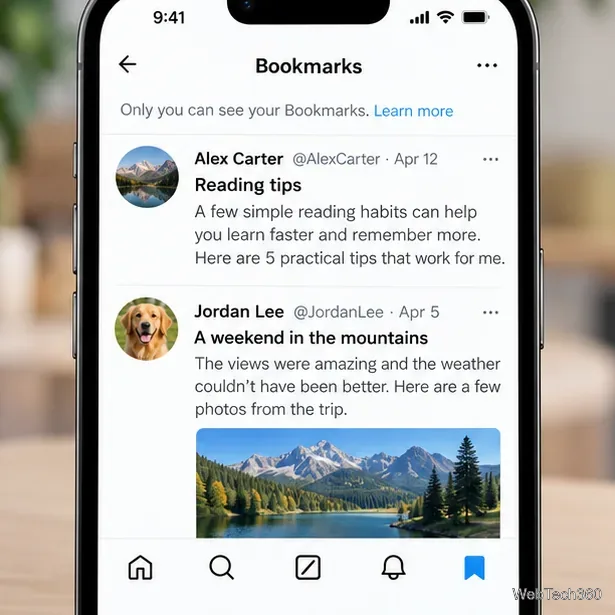
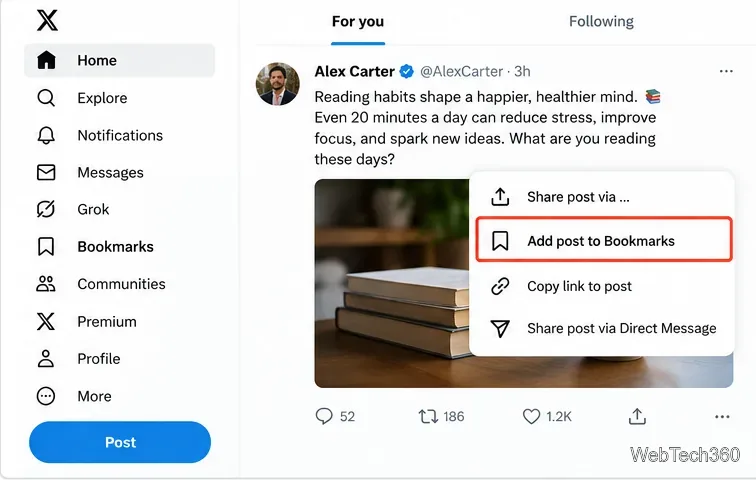
To bookmark a tweet on X (formerly Twitter), open the post and select the Bookmark icon. If that icon is not visible, tap or click Share and choose Add post to Bookmarks. You can find saved posts later in the Bookmarks section of your X account. Your bookmark list is private.
X now calls tweets “posts,” but bookmarking works for the same kind of content: useful threads, articles, videos, and updates you want to revisit without liking or reposting them. The exact control can vary between iPhone, Android, and the website.

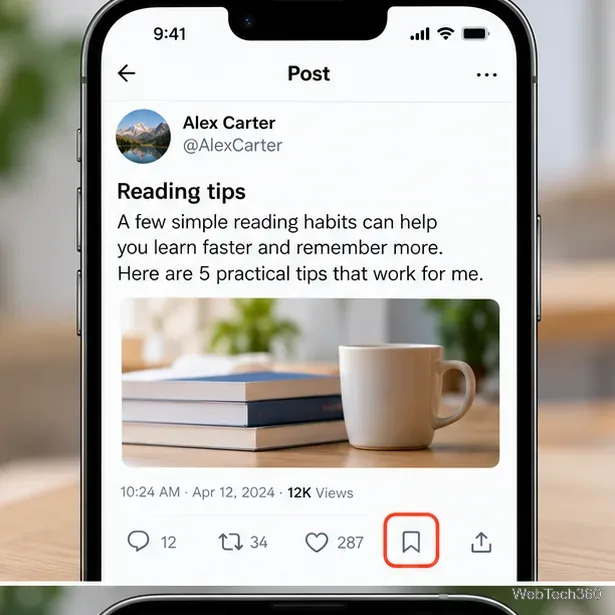
These alternate paths matter because X’s own help pages describe both the dedicated icon and the Share-menu method. You do not need to publish the post or send it to another person to bookmark it.
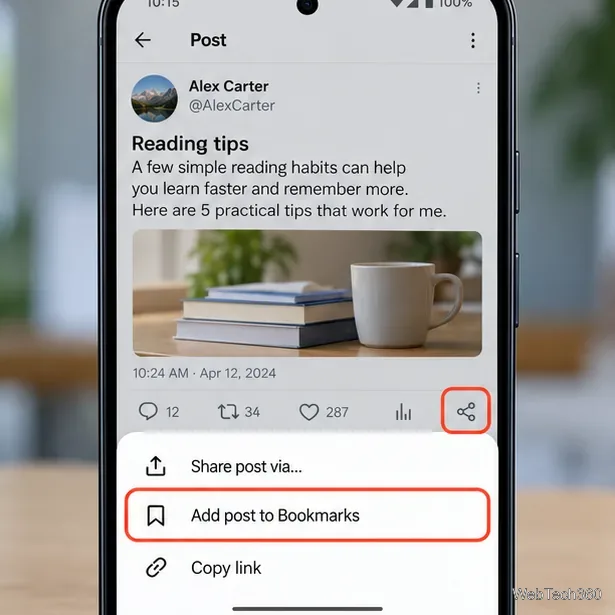
Bookmarks belong to your X account, not just the phone on which you tapped Save. They are different from Likes, which are a separate interaction, and from Lists, which group accounts rather than acting as a private reading queue.
Do not confuse the Share icon with Repost: bookmarking saves a private reference for yourself and does not repost the content to your followers.
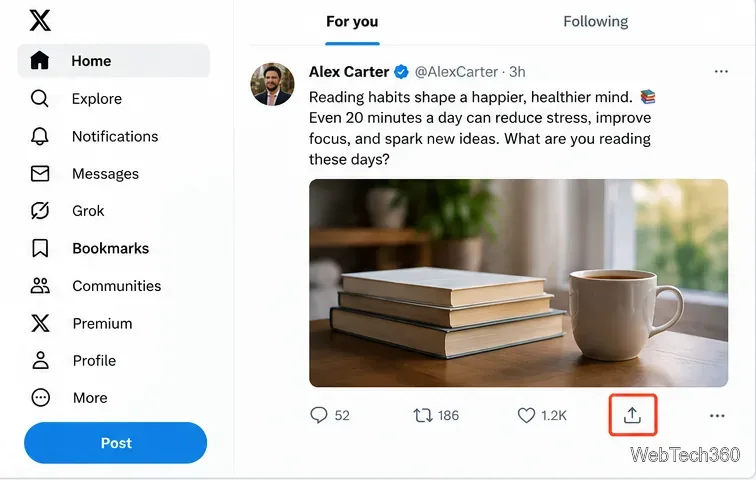
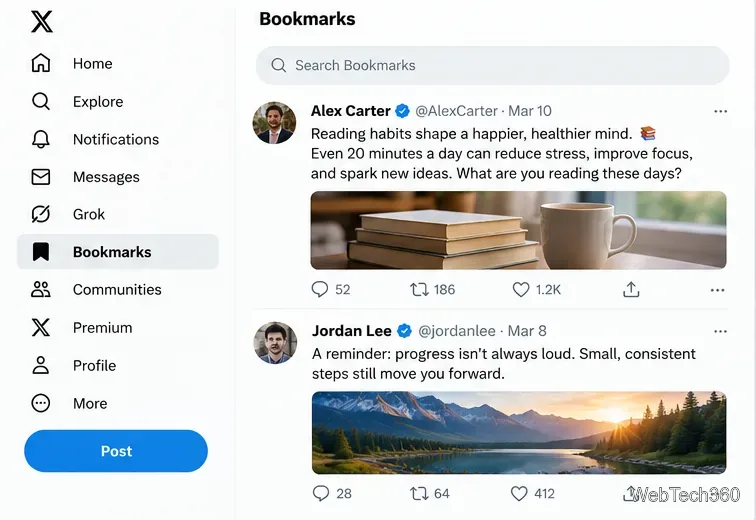
On the X website, select Bookmarks in the left navigation sidebar. If the sidebar is collapsed, expand the navigation or check under More. Your saved posts appear in a separate timeline. Clicking one takes you back to that post, provided it is still accessible to your account.
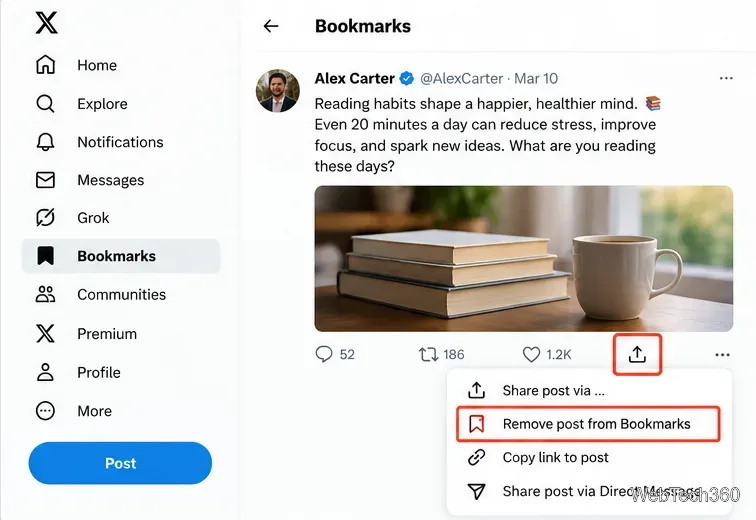
Saving a post is reversible. To remove one bookmark, open the post from your Bookmarks page and select the active bookmark icon, or use Share → Remove post from Bookmarks on versions that show the Share menu. The post disappears from your saved list; you are not deleting the author’s post.
To clear your entire list, open Bookmarks and look for the More (three-dot) menu at the top. X documents a remove-all option there. Use it carefully: it is meant to clear your saved list, not just one item.
Yes. According to the official X Bookmarks guide, other people cannot open your personal bookmark list. X may show a post’s total bookmark count, but that number does not identify which accounts saved it. See X’s bookmark-count explanation for the distinction.
A bookmark is not a permanent copy. If the original post is deleted, the author changes who can view it, or your account loses access, the content may no longer be available when you return to it.
Yes, but Bookmark Folders are a Premium feature, not a requirement for ordinary bookmarking. X says Premium members can create folders and add saved posts to them. A post can remain in All Bookmarks even after you remove it from a particular folder. For current folder controls, see X’s Premium how-to guide.
For the device-specific alternatives, X also documents the process in its timeline help guide. In most cases, the quickest solution is simply to open the post and check both the Bookmark and Share controls.
Fix the iMessage Is Signed Out error on iPhone by checking Apple Account sign-in, activation, connectivity, and settings—without erasing your messages.
Turn off your iPhone VPN in the app or Settings, confirm it disconnected, and stop automatic reconnections without deleting your account.
Learn how to encrypt your iPhone with a strong passcode, protect iCloud and computer backups, and secure your data if your phone is lost or stolen.
Learn how to clear Safari and Chrome cache on iPhone, manage app storage safely, and understand when clearing cached data actually helps.
Learn how to fight Gym Battles in Pokémon GO, pick effective attackers, use Charged Attacks and dodges, and claim a Gym after defeating its defenders.
Explore classic Cydia tweaks for jailbroken iPads, from SwipeSelection to Quasar, with compatibility warnings and modern alternatives.
Stop Apple Music signup prompts in the Music app. Learn where to find Show Apple Music on iOS and what turning it off does—and does not—change.
Set up a Shortcuts automation to text Mom when your iPhone battery gets low. Follow four steps, plus delivery checks and privacy tips.
Save posts on X in a few taps. Learn where to find the Bookmark button on iPhone, Android, and desktop, plus how to view, remove, and organize saved tweets.
Turn on AR mode in Pokémon GO during a wild encounter, find AR settings, and fix camera or device compatibility issues.







