How to Uninstall Kodi Repositories the Right Way

Learn how to uninstall a Kodi repository safely, remove its saved source URL separately, and check which installed add-ons or dependencies you still need.
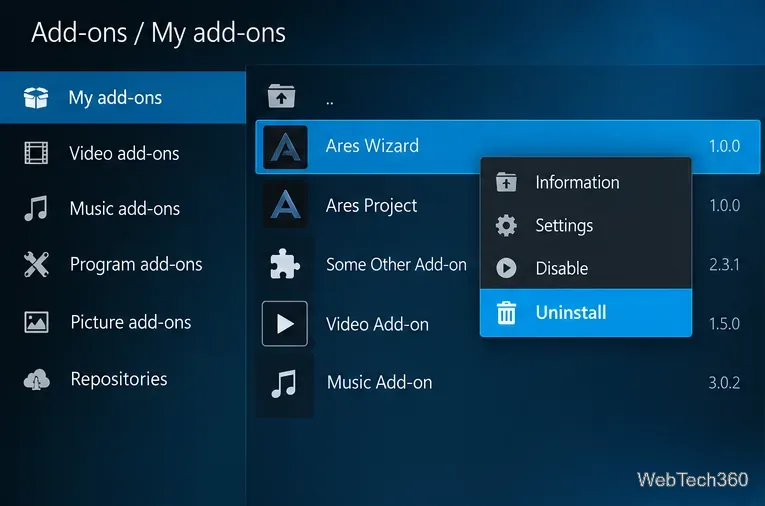
Ares Wizard is no longer a dependable way to manage Kodi. The Ares Project repository and wizard are abandoned; links promising a “working Ares Wizard” are not trustworthy by default. If you only need backups, troubleshooting, or add-on cleanup, Kodi's built-in manager and utilities from its official repository are better starting points. Third-party maintenance wizards exist, but they deserve extra scrutiny.
Ares Wizard once handled Kodi builds, repositories, maintenance, and backups. Its original ecosystem disappeared amid the Kodi add-on shutdowns and copyright disputes of 2017. Old Cosmic Saints and Looking Glass installation instructions are not reliably verifiable today.
Avoid unofficial Ares ZIP files, “fully loaded” builds, and unknown APKs. Older add-ons may also be incompatible with modern Kodi dependencies.
Choose a tool for the task you actually need rather than installing another all-in-one build manager.
| Option | Best for | Trust and limitations |
|---|---|---|
| Kodi Add-on Manager | Uninstalling add-ons, reviewing updates, and removing orphaned dependencies | Built into Kodi; no wizard required |
| Backup | Saving and restoring Kodi settings, libraries, and add-ons | Listed in Kodi's official repository |
| Log Viewer for Kodi | Reading the Kodi log when an add-on fails | Listed in Kodi's official repository |
| EZ Maintenance+ | Optional cleanup and maintenance functions | Third-party project; review its code, source, and version compatibility before installation |
From Kodi's home screen, open Add-ons → My add-ons. Inspect installed add-ons, uninstall unwanted entries, and review repositories. Advanced settings also expose orphaned dependencies. Kodi documents these controls in its official Add-on Manager guide.
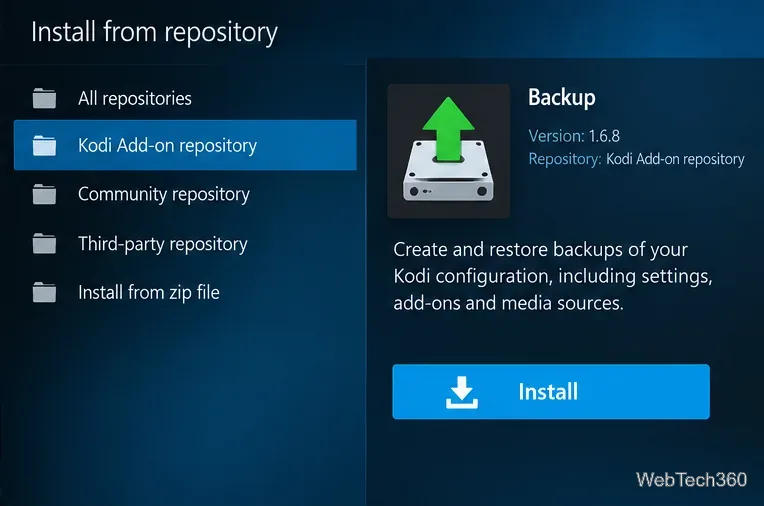
The Backup program add-on is available from Kodi's official repository. Open Add-ons → Install from repository → Kodi Add-on repository → Program add-ons → Backup → Install. Select a destination outside Kodi and back up before major changes. The official Backup add-on page explains its backup and restore functions.
If Kodi opens but an add-on fails, install Log Viewer for Kodi from the official repository's Program add-ons section. Review errors before updating or removing add-ons; redact personal details before sharing logs. See the Kodi Log Viewer documentation.
The developer's EZ Maintenance+ source repository describes cleanup, backup, and wizard features, and its add-on metadata includes a 2026 release note. That indicates project activity, not independent security approval. Check its publisher, code, and compatibility before installing. Unlike Backup or Log Viewer, it should not be presented as an officially vetted Kodi add-on.
What about OpenWizard? Its original GitHub repository explicitly states that development has ended and was archived in 2022. It is a historical Ares-style alternative, not a currently maintained recommendation.
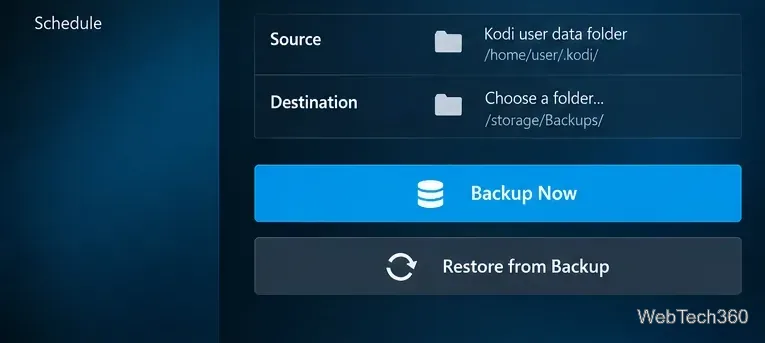
If you suspect a modified build has damaged Kodi, a clean reinstall may be appropriate, but first preserve your libraries and settings. Kodi's backup guidance explains both automated and manual options. Avoid deleting the entire userdata folder just to clear a playback problem.
Not automatically. Kodi's official repository is curated, while third-party ZIP files, repositories, and builds are not vetted by Team Kodi. Security depends on the publisher, code, and ongoing maintenance. Kodi explains this distinction in its official legal and add-on safety guidance.
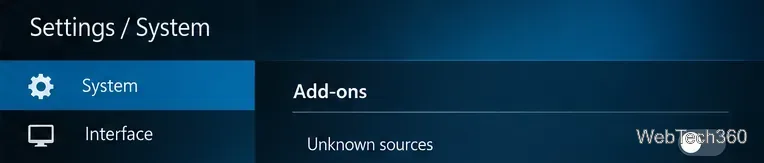
For a more cautious setup, leave Unknown sources disabled unless you deliberately need a trusted third-party add-on. Under Settings → System → Add-ons, keep official add-ons set to update from official repositories. If you are assessing an unfamiliar repository, Notify, but don't install updates allows manual review; remember that postponing updates can also delay security fixes. Kodi documents these options in its add-on settings reference.
A VPN can protect traffic from some network observers, but it cannot scan an add-on for malware, make pirated streaming lawful, or guarantee anonymity. It is not a substitute for trusted downloads. Cache purges are not a guaranteed speed boost; avoid indiscriminate database or thumbnail deletion.
For most users, install Backup and, when necessary, Log Viewer for Kodi from the official repository, then manage add-ons with Kodi's built-in tools. Consider third-party tools only for a needed feature and after reviewing their source. There is no reason to revive the abandoned Ares repository.
Learn how to uninstall a Kodi repository safely, remove its saved source URL separately, and check which installed add-ons or dependencies you still need.
Find the safest way to watch live tennis with Kodi: learn what iPlayer WWW can stream, how to find licensed coverage, and which add-ons to avoid.
Learn how to watch movies on Kodi from your computer, USB drive, or NAS, add online video services, and fix missing titles with clear setup steps.
Set a Kodi Master Lock PIN, protect selected menus, and create a separate kids’ profile with media sources you choose.
Find the authorized stream for your country, check whether its provider supports Kodi, and watch a boxing PPV on your TV without relying on outdated add-ons.
Compare five Kodi skins in the official Omega catalog, then follow the current Settings path to install one, customize it, or switch back.
Looking for the 1Channel Kodi add-on? Learn why old PrimeWire installation guides are unreliable and how to install a supported video add-on safely.
Enable Kodi’s Chorus2 web interface, control your media from any browser, and learn how to connect remotely without exposing Kodi to the Internet.
Follow the original Nemesis Kodi installation process, learn what changed with Stream Army, and avoid outdated repository and PIN instructions.
Download Kodi safely on Windows using the official installer or Microsoft Store, then add your media library and set up trusted add-ons.








