How to Uninstall Kodi Repositories the Right Way

Learn how to uninstall a Kodi repository safely, remove its saved source URL separately, and check which installed add-ons or dependencies you still need.
To watch Pluto TV on Kodi, install Pluto.tv PVR Client from Kodi's built-in add-on repository, then open Kodi's TV section to browse live channels and the program guide. The service is free and ad-supported, but what you can watch depends on your location. Older video add-on guides may show different menus.
The practical choice for Kodi 21 Omega is Pluto.tv PVR Client, listed in Kodi's PVR clients category. Kodi's Kodi's Pluto.tv PVR Client listing identifies version 21.3.3, dated February 8, 2025. Other Kodi releases may show different versions.
Despite being distributed through Kodi's repository, the client is not an official app from Pluto TV. Kodi explicitly describes it as volunteer-developed. It integrates live channels into Kodi's TV interface. You do not need an external repository or to enable Unknown sources for this installation.
Follow these steps; menu placement varies by Kodi skin.
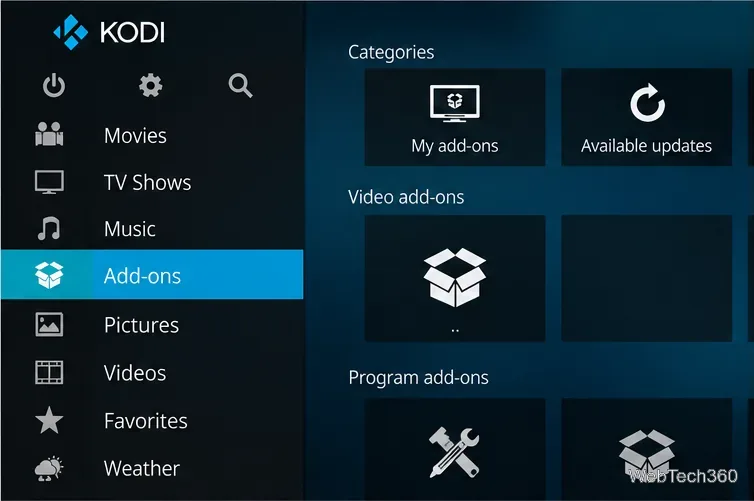
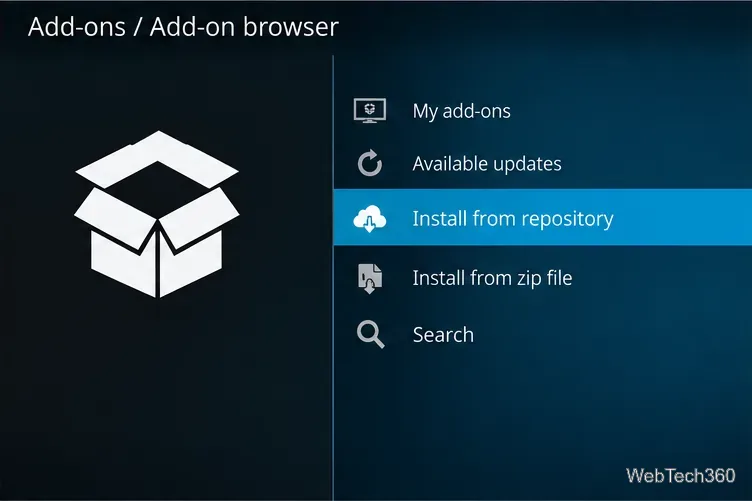
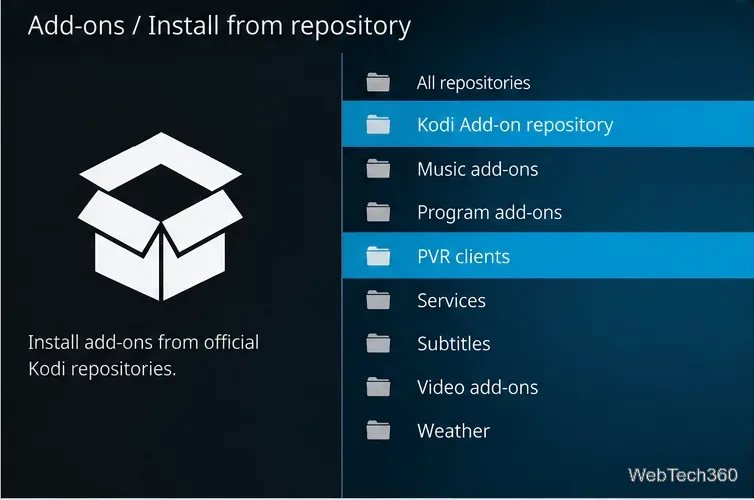
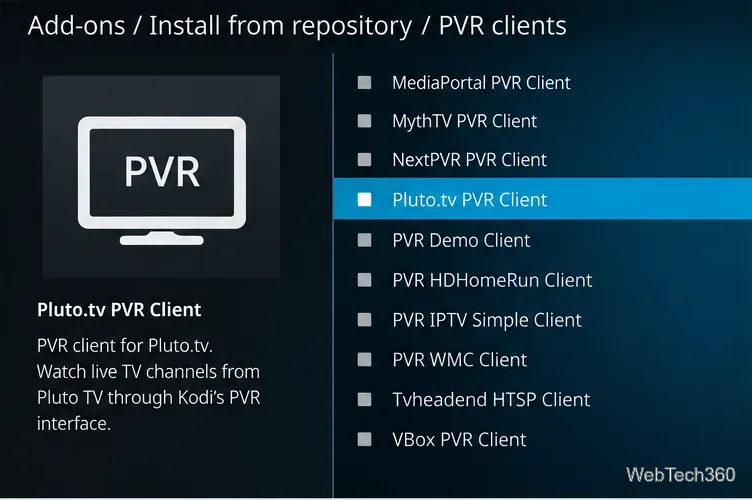
Kodi also documents this route in its Kodi's installation instructions. If the add-on is already installed, manage it through Add-ons > My add-ons > PVR clients, rather than installing a second copy.
Unlike a conventional video plug-in that opens as a separate folder menu, a PVR client puts available stations into Kodi's TV area. Use Channels to pick a station, or Guide to see available schedules. Select a channel to start playback; use Kodi's usual back and playback controls to return to the list.
Pluto TV offers themed live programming across areas such as movies, news, entertainment, comedy, and sports. Individual channels, names, schedules, and geographic availability change. Older channel lists may no longer reflect what's available.
The PVR client is principally for live TV. For Pluto TV's separate on-demand movie and show catalog, use a supported Pluto TV app or website where the service is available. Guide listings do not guarantee recording or timeshifting support.
Older guides often instruct you to install Pluto TV under Video add-ons, then use menus such as Channel Guide and Browse Channels. Kodi's older Pluto TV video plug-in listing documents that separate plug-in as version 1.6.0 from June 2022. Its menus and channel counts differ from the PVR client. If you cannot find that video plug-in on your Kodi version, use the PVR instructions above instead.
Pluto TV is free because its programming includes advertisements, as Pluto TV's explanation of its ads explains. No paid subscription is listed as required. If your installation offers account or regional settings, follow the options actually present in your version rather than entering credentials or choosing a country based on an old screenshot.
A VPN is not required to install this Kodi add-on. It cannot guarantee access to geo-restricted streams. Avoid third-party ZIP downloads and unsolicited VPN promotions masquerading as necessary installation steps.
If you already use Kodi and want free, ad-supported live channels alongside your other media, Pluto.tv PVR Client is a convenient option. Its strongest advantage is Kodi's familiar channel guide; its main limits are changing regional availability and dependence on a volunteer-maintained integration. For technical details or reported issues, consult the PVR Client source code or Kodi's Kodi Add-on manager guide.
Learn how to uninstall a Kodi repository safely, remove its saved source URL separately, and check which installed add-ons or dependencies you still need.
Find the safest way to watch live tennis with Kodi: learn what iPlayer WWW can stream, how to find licensed coverage, and which add-ons to avoid.
Learn how to watch movies on Kodi from your computer, USB drive, or NAS, add online video services, and fix missing titles with clear setup steps.
Set a Kodi Master Lock PIN, protect selected menus, and create a separate kids’ profile with media sources you choose.
Find the authorized stream for your country, check whether its provider supports Kodi, and watch a boxing PPV on your TV without relying on outdated add-ons.
Compare five Kodi skins in the official Omega catalog, then follow the current Settings path to install one, customize it, or switch back.
Looking for the 1Channel Kodi add-on? Learn why old PrimeWire installation guides are unreliable and how to install a supported video add-on safely.
Enable Kodi’s Chorus2 web interface, control your media from any browser, and learn how to connect remotely without exposing Kodi to the Internet.
Follow the original Nemesis Kodi installation process, learn what changed with Stream Army, and avoid outdated repository and PIN instructions.
Download Kodi safely on Windows using the official installer or Microsoft Store, then add your media library and set up trusted add-ons.








