How to Uninstall Kodi Repositories the Right Way

Learn how to uninstall a Kodi repository safely, remove its saved source URL separately, and check which installed add-ons or dependencies you still need.
Kodi is the better choice for most Android users today. SPMC (Semper Media Center) was an Android-focused fork of Kodi that appealed to owners of older TV boxes and NVIDIA Shield devices. But SPMC is no longer maintained as a current media-center alternative: its source repository was archived in December 2024. Kodi continues to receive releases, documentation, and add-on updates. If you are setting up an Android phone, tablet, or TV device now, start with Kodi.
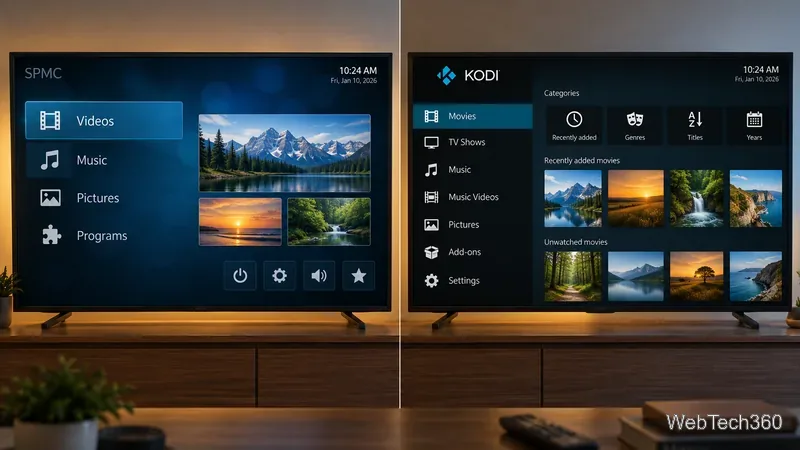
Kodi is a free, open-source media center for organizing and playing videos, music, pictures, and supported online services. It works on Android as well as several desktop and other operating systems. Kodi does not include a subscription, a library of movies, or preloaded streaming content; you supply your own media or configure legitimate services.
SPMC was built from Kodi's code by developer Koying with an emphasis on Android hardware and remote-control navigation. The apps shared the same general approach: local and network media libraries, customizable menus, and installable add-ons. SPMC was especially interesting when Android media-center support was less mature.
The crucial change is maintenance. The SPMC project repository is read-only and marked archived, while the official Kodi Android download page continues to offer maintained releases. That matters more in 2026 than SPMC's original lightweight design.
| Category | Kodi | SPMC |
|---|---|---|
| Project status | Actively developed, with stable and test releases | Legacy project; public repository archived |
| Platforms | Android and multiple other operating systems | Built primarily for Android |
| Interface | Full media library and configurable skins | Historically streamlined for Android and TV remotes |
| Add-ons | Maintained official repository and modern dependencies | Older add-on environment; compatibility is not guaranteed |
| Best fit | New and existing Android installations | Existing legacy setups with a specific, proven need |
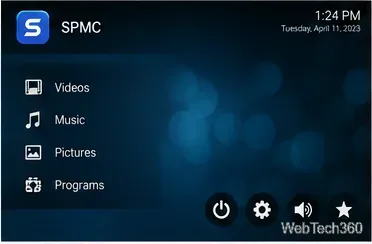
Older SPMC builds emphasized straightforward access to Videos, Music, Pictures, and Programs, with recognizable buttons for settings, volume, and favorites. Some releases also included Android-specific playback work and device tweaks. Those were reasonable selling points at the time, especially for people navigating from a couch rather than a keyboard.
However, an older, smaller application is not automatically faster or more compatible on modern Android. Actual playback depends on the device's decoder support, firmware, audio-output path, and the file being played. Neither app can guarantee smooth 4K, HDR, or passthrough audio on every box.
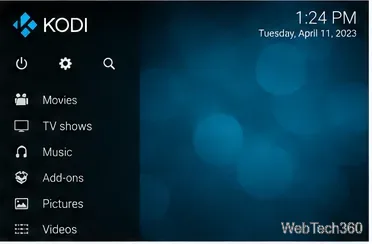
To add an official extension, open Add-ons, enter the add-on browser, and select Install from repository. Kodi's built-in repository is the safest starting point for extensions; the official add-on manager guide explains the menus and update settings. Screen wording may vary slightly by skin.
Older SPMC installation files and release records remain available from its historical release page, but availability there does not mean that the app is supported on today's Android versions. The old instruction to search Google Play and tap Install should not be treated as a reliable current procedure.
If you already run SPMC on a dedicated older device, back up its settings before changing anything. Avoid downloading a repackaged SPMC APK from an unfamiliar site: sideloaded installers can be altered, and archived software may lack recent security and compatibility fixes. For a fresh installation, Kodi is the sensible default.
Not necessarily. SPMC inherited Kodi's add-on architecture, so some add-ons written for older Kodi releases could work in matching SPMC builds. That does not make every present-day Kodi add-on compatible. Dependencies, Python versions, repository formats, and APIs can differ across generations. The original claim that all Kodi repositories and add-ons work perfectly in SPMC is no longer defensible.
Also, an add-on does not by itself make a stream authorized. official Kodi project information explains that the software ships without media content. Use content you own or services you are entitled to access. A VPN is not required simply to run Kodi or SPMC, and it does not make unauthorized streaming lawful.
Choose Kodi for an Android TV, streaming box, tablet, or phone you use regularly. It offers current development, better access to official help, an actively maintained add-on ecosystem, and a clear path to security and playback updates. SPMC remains an interesting part of Kodi's Android history, but it is better regarded as legacy software for existing specialized setups—not the best general-purpose Android media player in 2026.
Learn how to uninstall a Kodi repository safely, remove its saved source URL separately, and check which installed add-ons or dependencies you still need.
Find the safest way to watch live tennis with Kodi: learn what iPlayer WWW can stream, how to find licensed coverage, and which add-ons to avoid.
Learn how to watch movies on Kodi from your computer, USB drive, or NAS, add online video services, and fix missing titles with clear setup steps.
Set a Kodi Master Lock PIN, protect selected menus, and create a separate kids’ profile with media sources you choose.
Find the authorized stream for your country, check whether its provider supports Kodi, and watch a boxing PPV on your TV without relying on outdated add-ons.
Compare five Kodi skins in the official Omega catalog, then follow the current Settings path to install one, customize it, or switch back.
Looking for the 1Channel Kodi add-on? Learn why old PrimeWire installation guides are unreliable and how to install a supported video add-on safely.
Enable Kodi’s Chorus2 web interface, control your media from any browser, and learn how to connect remotely without exposing Kodi to the Internet.
Follow the original Nemesis Kodi installation process, learn what changed with Stream Army, and avoid outdated repository and PIN instructions.
Download Kodi safely on Windows using the official installer or Microsoft Store, then add your media library and set up trusted add-ons.








