How to Uninstall Kodi Repositories the Right Way

Learn how to uninstall a Kodi repository safely, remove its saved source URL separately, and check which installed add-ons or dependencies you still need.
Can you watch F1 live on Kodi? Sometimes, but only through an add-on connected to a broadcaster that has the rights to show the race in your region. Kodi does not include a free, worldwide Formula 1 live stream. Its official Formula 1 add-on is useful for video highlights and features, not live Grand Prix coverage. For live sessions, look for an authorized TV service that works with Kodi—or use the broadcaster’s own app.
The right choice depends on whether you want free F1 clips or an actual live race. These are the most useful options with identifiable current sources.
What it offers: Videos published on Formula 1’s website, accessible from Kodi’s official add-on repository. The listing identifies version 2.0.7 for Kodi Omega, dated September 28, 2025. It does not promise access to F1 TV Pro or Premium live sessions, and it should not be confused with an F1 TV subscription app. See the official Formula 1 Kodi add-on listing.
What it offers: Kayo lists every F1 practice, qualifying session, and race as live content in Australia. A community-built Kayo Sports add-on is included in the SlyGuy repository. You need an eligible Kayo account and must be within the service’s permitted viewing region. This add-on is not maintained by Kodi or Kayo; check its current compatibility and dependencies before installing. The Kayo content guide confirms F1 coverage, but that does not guarantee the third-party add-on will play every session.
What it offers: The official Zattoo PVR Client connects Kodi’s TV interface to a Zattoo account, including supported live channels and a program guide. In Austria, Zattoo advertises 2026 F1 broadcasts on ORF 1 and ServusTV; specific races alternate between those channels. Availability depends on your subscription, location, channel lineup, and the broadcaster’s schedule. See Zattoo’s F1 coverage details before race day. This is not a global F1 feed.
What it offers: Videos from RSI’s television library through the Kodi-listed RSI Play TV add-on. It may be useful for racing-related programs or replays where rights permit. Its published description does not guarantee live Formula 1 race streams, so do not rely on it as your sole live-race option.
You can install this add-on without enabling Unknown sources. Kodi’s official add-on manager instructions describe the repository workflow. Menu layouts can differ slightly by Kodi version and skin.
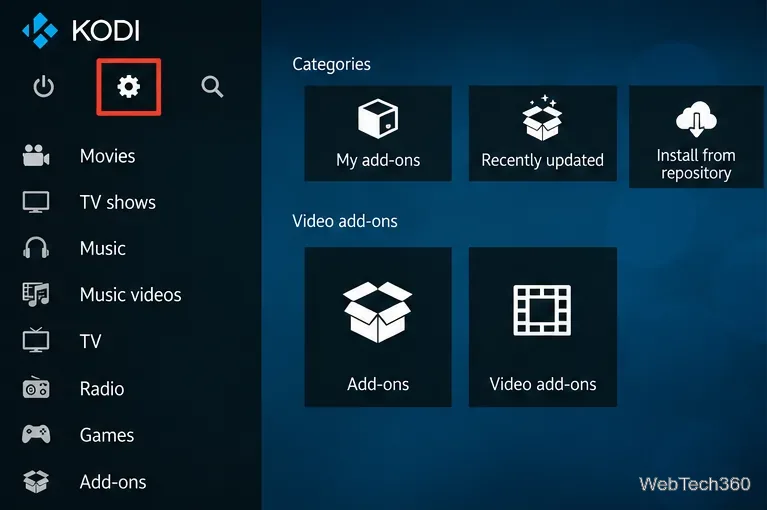
Open Settings. Start Kodi and select the gear icon from the home screen.
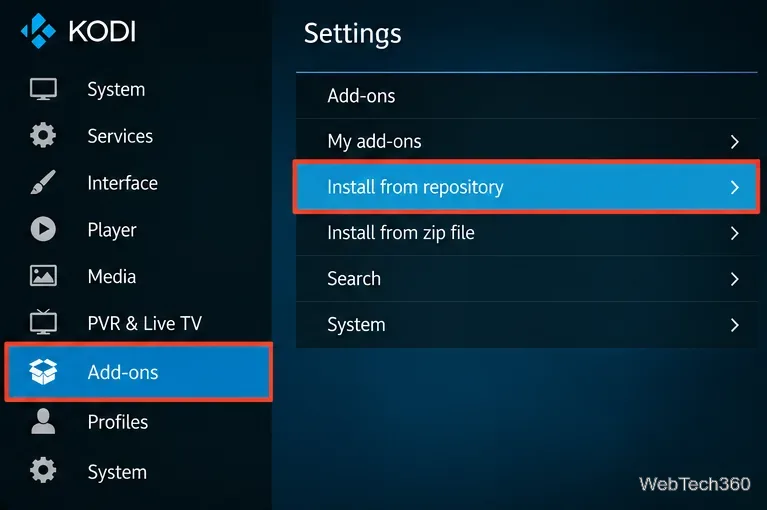
Open the add-on browser. Choose Add-ons, then Install from repository. If more than one repository is available, select Kodi Add-on repository.
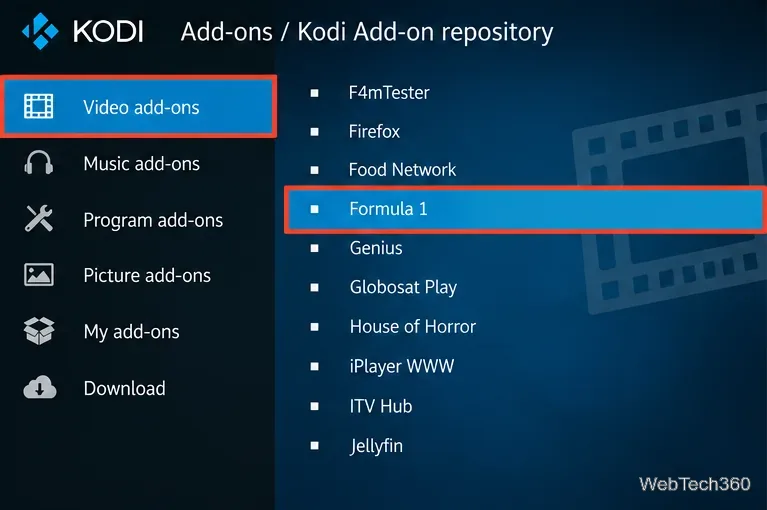
Find Formula 1. Open Video add-ons, scroll to Formula 1, and select it. You can also use the add-on search function.
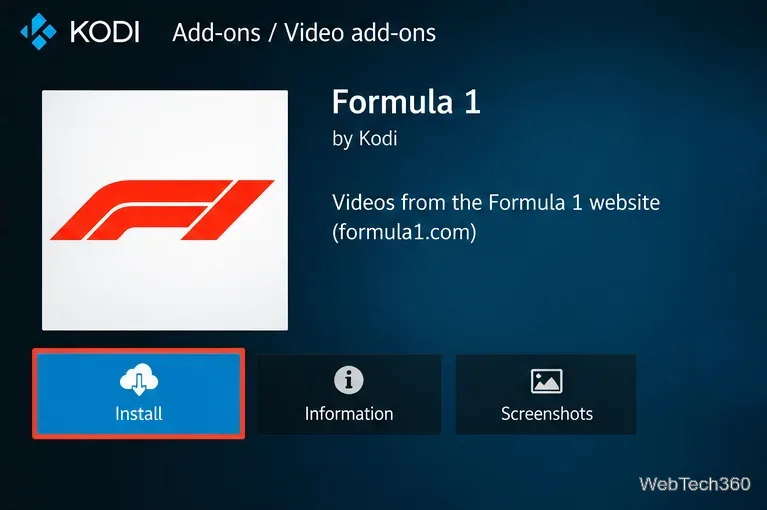
Install and open. Select Install, accept any required dependencies, and wait for the completion notification. Return to Add-ons > Video add-ons to open Formula 1 and browse available videos.
F1 TV Pro carries live sessions in eligible countries, while Premium adds features such as 4K and Multiview on supported devices. F1 TV Access does not include live races. Formula 1 lists supported streaming devices and the differences among plans in its subscription comparison. Neither plan is an official Kodi add-on, so the native app or supported browser is generally the more dependable way to watch.
Broadcast rights differ by market. In the United States, Apple TV is the exclusive home of F1 in 2026; ESPN and NBC Sports are not current U.S. F1 viewing options. In the United Kingdom, Sky Sports carries full race weekends, with selected free-to-air coverage on Channel 4. For other regions, use Formula 1’s official worldwide broadcaster list rather than guessing from an add-on name. U.S. viewers can check Apple TV’s official F1 page for viewing options.
Guides naming NBC Sports Live Extra, Sports365.Live, FTFA, or UK Turk Playlists as dependable live F1 solutions are outdated or lack verified current access. Do not assume a working repository URL means its streams are licensed, available, or secure. An older unofficial F1 TV Kodi project even states that it was abandoned after service API changes. Avoid entering credentials into a repository you cannot independently verify.
Kodi warns that installing from unknown sources gives outside add-ons access to data on your device. Leave the option disabled unless you have evaluated a developer and genuinely need that add-on. A VPN can protect network traffic in some circumstances, but it does not grant broadcast rights, guarantee access, or make unauthorized streaming lawful. Check race dates and session times on the official F1 calendar, since start times and time zones vary by venue.
Bottom line: Install Kodi’s Formula 1 add-on for free official-site videos. For a live Grand Prix, use a licensed broadcaster in your country and treat Kodi integrations as optional—not a replacement for an authorized streaming subscription.
Learn how to uninstall a Kodi repository safely, remove its saved source URL separately, and check which installed add-ons or dependencies you still need.
Find the safest way to watch live tennis with Kodi: learn what iPlayer WWW can stream, how to find licensed coverage, and which add-ons to avoid.
Learn how to watch movies on Kodi from your computer, USB drive, or NAS, add online video services, and fix missing titles with clear setup steps.
Set a Kodi Master Lock PIN, protect selected menus, and create a separate kids’ profile with media sources you choose.
Find the authorized stream for your country, check whether its provider supports Kodi, and watch a boxing PPV on your TV without relying on outdated add-ons.
Compare five Kodi skins in the official Omega catalog, then follow the current Settings path to install one, customize it, or switch back.
Looking for the 1Channel Kodi add-on? Learn why old PrimeWire installation guides are unreliable and how to install a supported video add-on safely.
Enable Kodi’s Chorus2 web interface, control your media from any browser, and learn how to connect remotely without exposing Kodi to the Internet.
Follow the original Nemesis Kodi installation process, learn what changed with Stream Army, and avoid outdated repository and PIN instructions.
Download Kodi safely on Windows using the official installer or Microsoft Store, then add your media library and set up trusted add-ons.








