Home
» WEB
»
How to Send Messages to Yourself on Facebook Messenger
How to Send Messages to Yourself on Facebook Messenger
Yes, you can send messages to yourself on Facebook Messenger. Open a new conversation, search for your own Facebook profile, select it, and send a message. Your self-chat can hold quick notes, links, and photos that you want to find again on another device where you use the same Messenger account.
You do not need to make a group chat, create a second account, or send anything to a friend. The steps below cover the Messenger mobile app and a desktop browser.
How to message yourself on Messenger for iPhone or Android
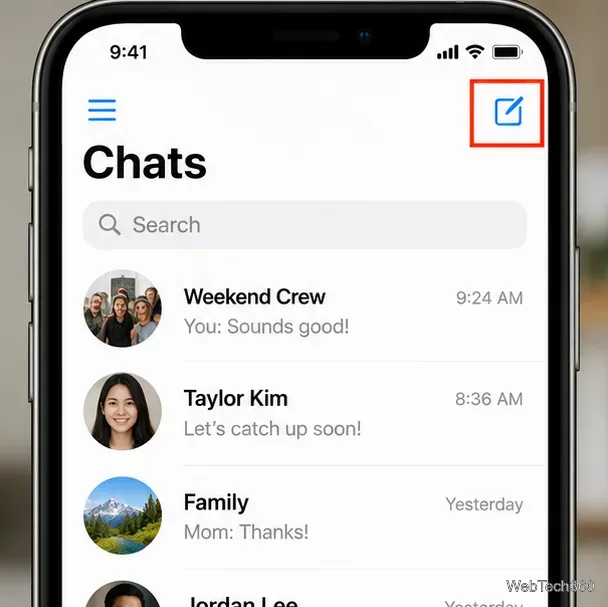
Open Messenger and go to Chats. Tap the compose or New message icon. It typically looks like a pencil in a square; its position can differ between app versions.
From Chats, use the compose icon to start a conversation.
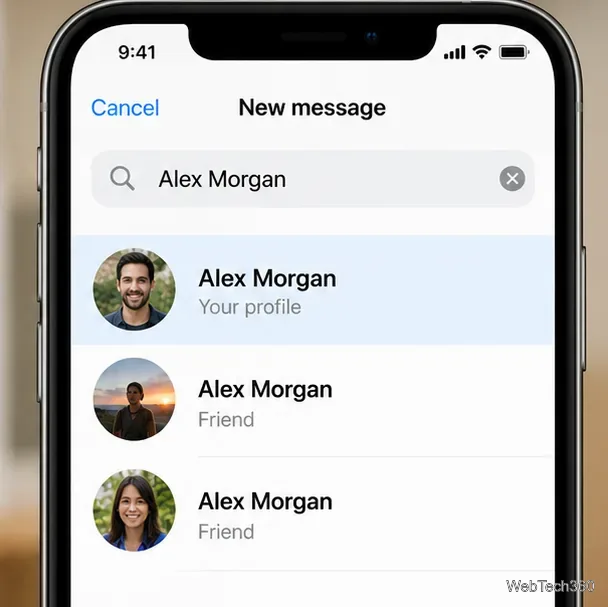
Search for your own name. Type the name shown on your Facebook profile into the recipient search field. If several people have the same name, check the profile photo and any label identifying your own account.
Choose your profile. Tap your own profile in the results to open a one-to-one conversation with yourself. Do not choose a similarly named friend or a group.
Identify your own profile rather than selecting another account with the same name.
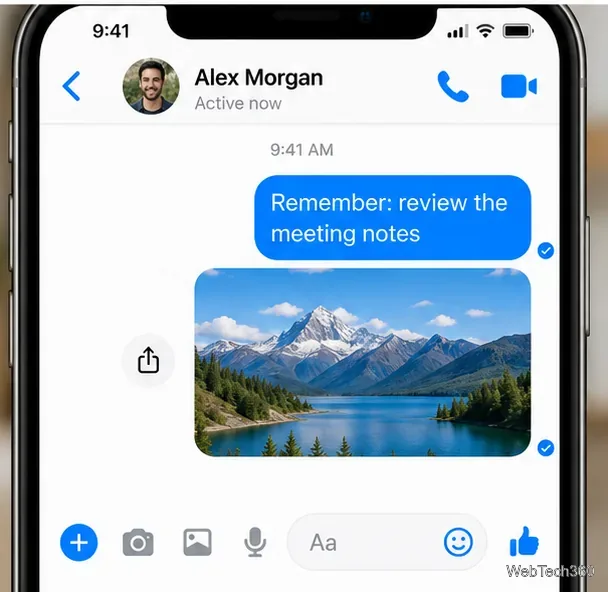
Type and send your message. Enter a note, paste a link, or use the photo or attachment controls to add supported media. Tap Send. The conversation should then appear in your Chats list, although newer conversations may push it down over time.
A self-chat can keep a short reminder and a photo together in one conversation.
For a quick cross-device handoff, copy text or a web address on your phone, paste it into this chat, and open the same chat on your computer. This transfers a message through Messenger; it does not automatically synchronize your devices' clipboards.
How to send a message to yourself from a computer
In a browser, open Facebook Messages and sign in to the Facebook account you use in Messenger.
Use the new-message or compose control in the message inbox, or search for your own name if the self-chat already exists.
Choose your own profile from the results. Verify that the name and profile photo match before proceeding.
Type your note into the message field and press Enter or use Send, depending on the interface. To attach a photo or another supported file, use the relevant media or attachment control.
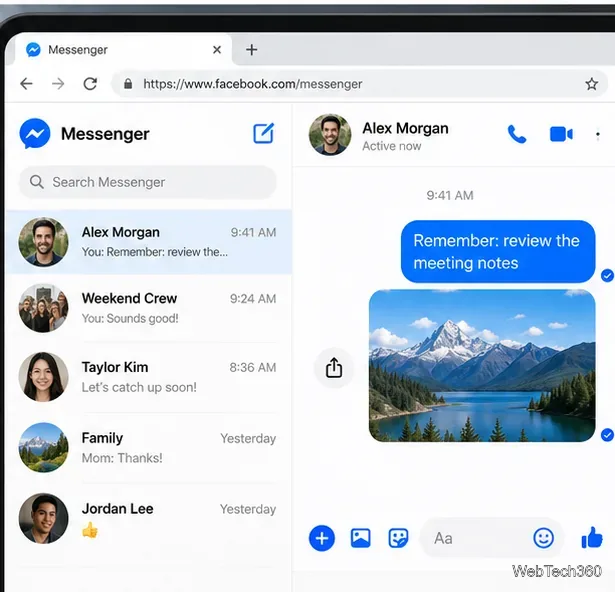
Open your self-chat in a browser to retrieve text or media sent from your phone.
If you have already started the conversation on your phone, you usually only need to find that existing chat in the browser. Both devices must be signed into the same account and connected to the internet to access newly sent content.
What can you save in a Messenger self-chat?
Practical uses include temporary reminders, a link to revisit later, an address copied from another app, or a photo you want to open on a different device. Messenger supports sending photos and files, although available attachment types and controls can vary by platform. See Meta's guide to sending photos, stickers, and files for the supported options.
For important documents, use a dedicated notes app or file storage service as the primary copy. Messenger is convenient for a quick transfer, but it is not a versioned backup system or a replacement for secure file storage.
How to find your self-chat again
Go to Chats and search for your own profile name. Search is useful if other conversations have pushed your self-chat down the list. Meta explains the general lookup process in its Messenger conversation-search instructions.
To find a specific note within the chat, open the conversation, select the chat name or its information menu, and look for Search or Search in conversation. The exact location varies by version. You can consult Meta's chat-search help page. If the conversation is missing from the main list, check archived chats before assuming it has been deleted.
If messaging yourself does not work
Your own profile does not appear: Confirm that you entered the name of your signed-in Facebook account. Try searching from Chats instead of composing a new message. If your account or app does not offer a self-chat result, these steps may not be available to you; do not select someone else as a substitute.
A message is missing on another device: Confirm both devices use the same account, check the connection, and give Messenger a chance to load or restore its chat history. Meta describes secure storage and restoring encrypted messages; availability and recovery depend on your settings.
A photo or file will not send: Verify the app has any necessary photo access, check the internet connection, and try a smaller or supported attachment format. Don't assume every attachment type is available on every device.
Are messages to yourself private?
A self-chat is a direct conversation, not a public Facebook post, but it still belongs to your Messenger account. Anyone who gains access to your unlocked device or account may be able to read content accessible there. Avoid using the chat to store passwords, recovery codes, or highly sensitive documents. When a note matters long term, save a separate copy in a tool designed for that purpose.