How to Play Minecraft Offline on Windows 10: Java and Bedrock
Prepare Java or Bedrock on Windows 10 for offline single-player, enable the right Xbox setting, and back up your local Minecraft worlds.
Windows 10 can remember the credentials for a network share. Select Remember my credentials when the sign-in prompt appears, or save the account in Credential Manager before connecting. The stored sign-in belongs to the Windows user profile on this PC; it does not create an account on the server or grant access you have not been given.
This guide covers shared folders and mapped network drives, such as \\server\share. If you know the address, you can open it directly in File Explorer. Network Discovery is needed to browse for devices under Network, not to save credentials for a known path.
Support note: Windows 10 Home and Pro reached end of support on October 14, 2025. Microsoft no longer provides standard security updates for those editions after that date. See the Windows 10 lifecycle details.
Get the exact network path and an account that is authorized for it. A UNC path has this format: \\server\share. For example, \\fileserver\Shared points to the Shared folder on a computer named fileserver.
At the prompt, enter the account for the remote computer or organization. Depending on how the network is set up, the username may look like SERVER\username, DOMAIN\username, or user@domain. Use the account password; a Windows Hello PIN for your PC is not the remote account password. If you are unsure which account to use, ask the network administrator.
\\fileserver\Shared, and press Enter. You can use this path even if Network Discovery is off.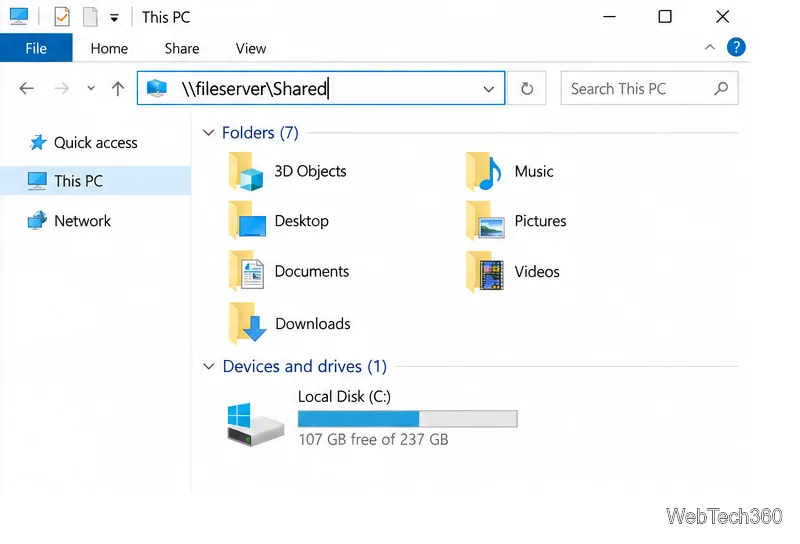
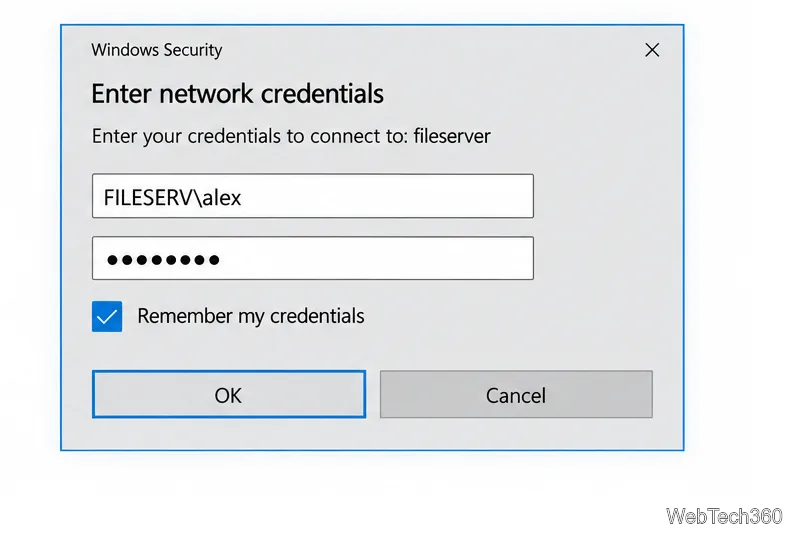
If the prompt has no remember option or you want to add the login first, use Credential Manager instead.
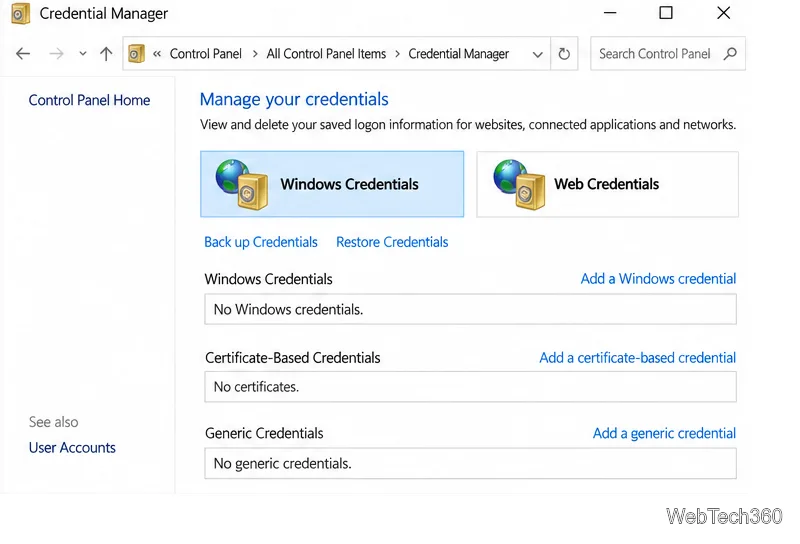
\\fileserver\Shared, enter fileserver. Use the same spelling or IP address that you use when connecting.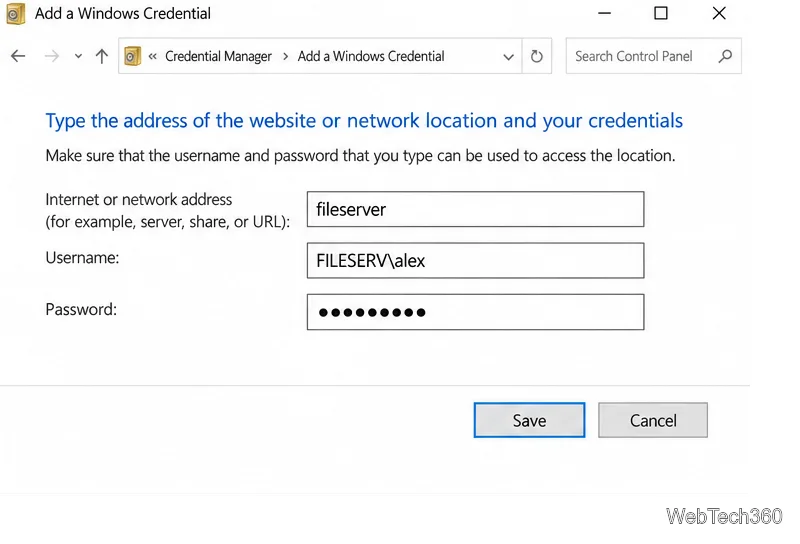
Microsoft’s Credential Manager guide explains how to open the Windows Credentials list and manage saved entries.
A mapped drive gives the share a drive letter; it is optional and separate from saving the password. In File Explorer, select This PC, open the Computer tab, and choose Map network drive. Select an available letter and enter the UNC path in the Folder box.
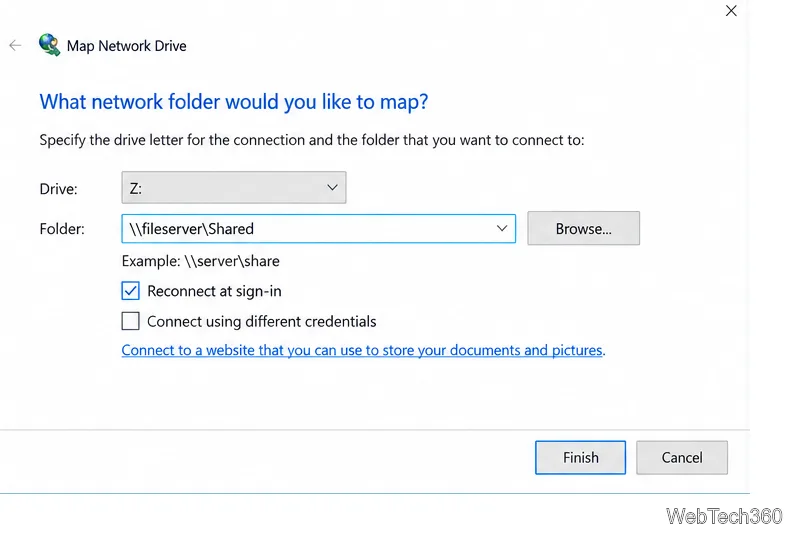
Select Reconnect at sign-in if you want the drive restored each time you sign in. If the share needs another account, select Connect using different credentials. Choose Finish, then enter the authorized login if Windows prompts you and save it. Microsoft’s network sharing guide also covers mapping a drive and reconnecting it at sign-in.
If the device does not appear under File Explorer’s Network section, Network Discovery may be off. On a trusted home or work network, set the network profile to Private, then open Control Panel > Network and Internet > Network and Sharing Center > Change advanced sharing settings. Expand Private, turn on Network discovery, and save the change.
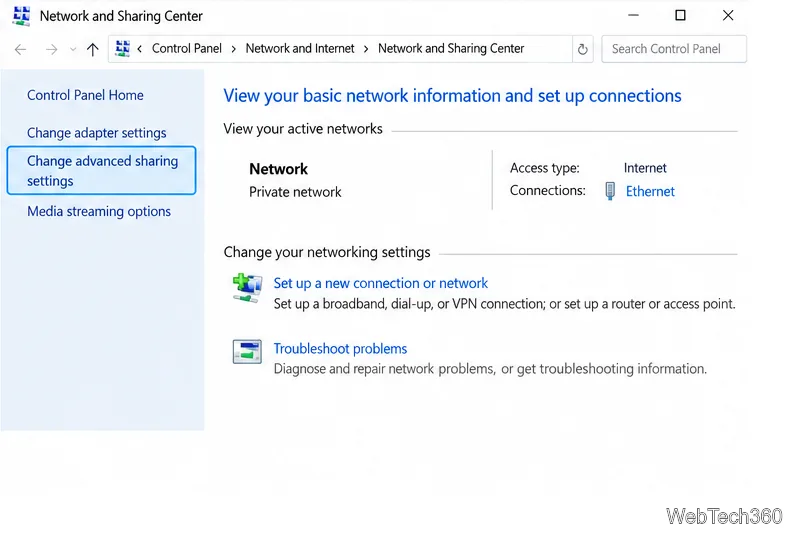
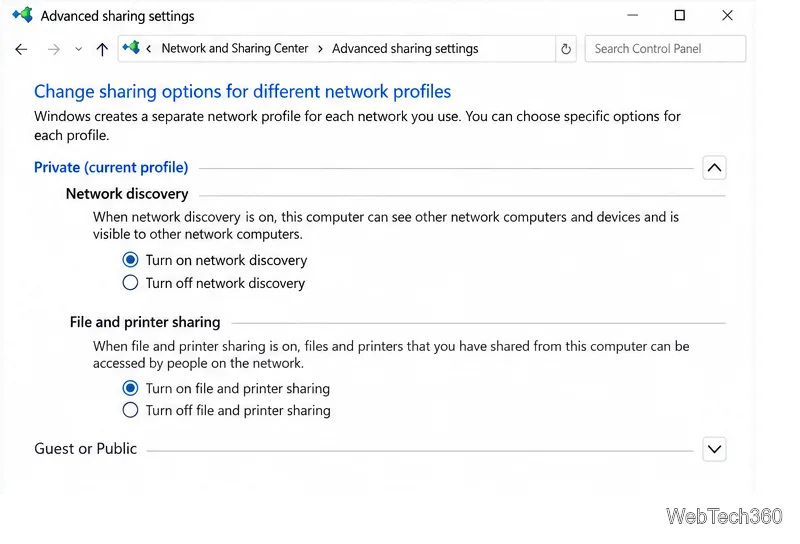
Do not mark a public Wi-Fi network as Private just to find a share. You also do not need to turn off password-protected sharing to save credentials; keep the share protected and use the account its owner provided. Microsoft’s file-sharing instructions describe the current discovery settings.
To check an entry, search for Credential Manager, open Windows Credentials, and expand the entry for the server. To clear an old password, select Remove and confirm. Then reopen the share and enter the updated credentials. This is useful after a password change or when Windows keeps trying an old account.
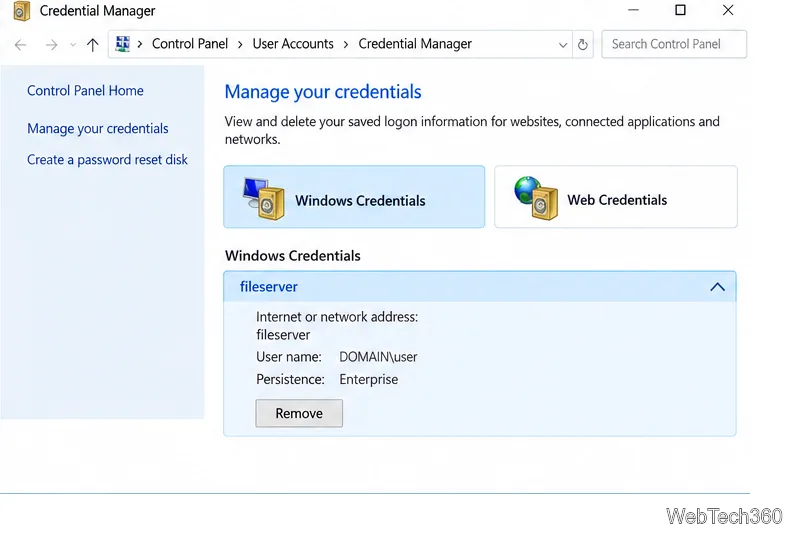
Once the correct account is saved, Windows can reuse it for that network location until the credential changes or you remove it from Credential Manager.
Prepare Java or Bedrock on Windows 10 for offline single-player, enable the right Xbox setting, and back up your local Minecraft worlds.
Change a file type icon in Windows 10 while keeping its current default app. Follow the FileTypesMan steps, handle icon picker issues, and restore the original setting.
Set PhysX in NVIDIA Control Panel on Windows 10, understand Auto-select vs. CPU or GPU, and learn when to use Windows Graphics settings instead.
Compare six free office suites for documents, spreadsheets, and presentations, including browser-based collaboration and offline desktop options.
Turn on Notepad’s Status Bar to see the current line and column in Windows 10, troubleshoot a disabled option, and learn when you need a line-number gutter.
Display a custom Windows dialog with a short PowerShell command, Command Prompt, or a reusable .bat or .ps1 file, including a title, icon, and buttons.
Fix Windows 10 update error 0x80071160 with Microsoft’s troubleshooter, a safe update-cache reset, DISM and SFC repairs, and a careful manual-install check.
Create a Windows 10 UEFI installer with Microsoft’s Media Creation Tool or Rufus, then boot and install safely without wiping the wrong drive.
Stop individual Edge tabs from crowding the Windows 10 Alt+Tab switcher. Change one Multitasking setting, limit recent tabs, and check why the option may be missing.
Enable Adobe’s PDF thumbnail handler, correct File Explorer’s icon settings, rebuild the thumbnail cache, and check OneDrive files that are not stored locally.