iMessage Is Signed Out on iPhone: How to Fix It

Fix the iMessage Is Signed Out error on iPhone by checking Apple Account sign-in, activation, connectivity, and settings—without erasing your messages.
To clear history on an iPad, use the app that recorded it. Safari history can be removed in Settings or from Safari’s History view; Chrome has its own delete controls; Google searches may be saved separately in the Google app or your Google Account. Clearing one place does not automatically clear the others.
Safari’s main clear-history control also removes website data such as cookies, which can sign you out of sites. If you only want to remove a bookmark, remember that bookmarks are saved links, not the list of pages you visited.
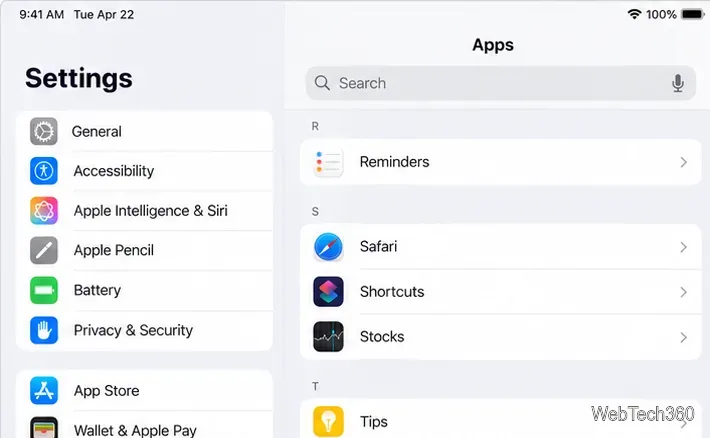
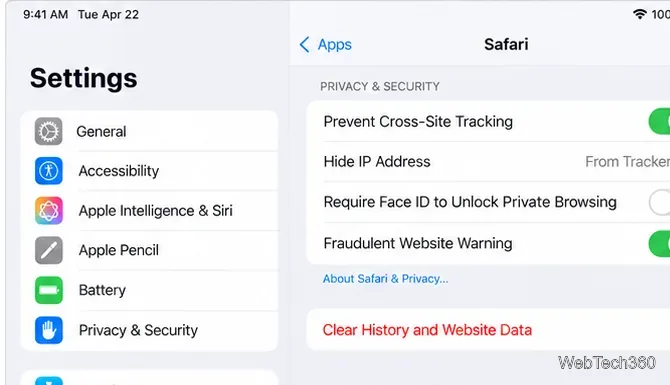
This is the quickest option when you want to clear Safari’s browsing record and website data together. Cookies can keep you signed in, so some sites may ask you to log in again. Clearing Safari history does not change AutoFill information. If the button is dimmed, there may be no Safari data to clear, or a Screen Time web-content restriction may be affecting it.
Want to keep your history but remove cookies and cache? Go to Settings > Apps > Safari > Advanced > Website Data, tap Remove All Website Data, then tap Remove Now. This separate control clears website data without using the history-clearing button.
You can clear history without leaving Safari. This is useful if you want to pick a shorter period instead of using Settings.
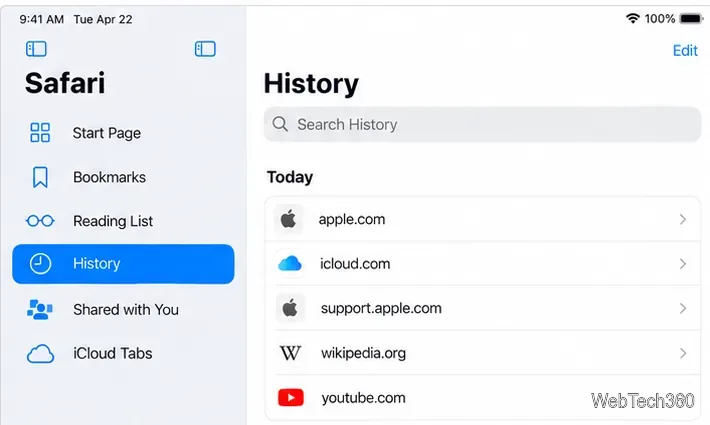
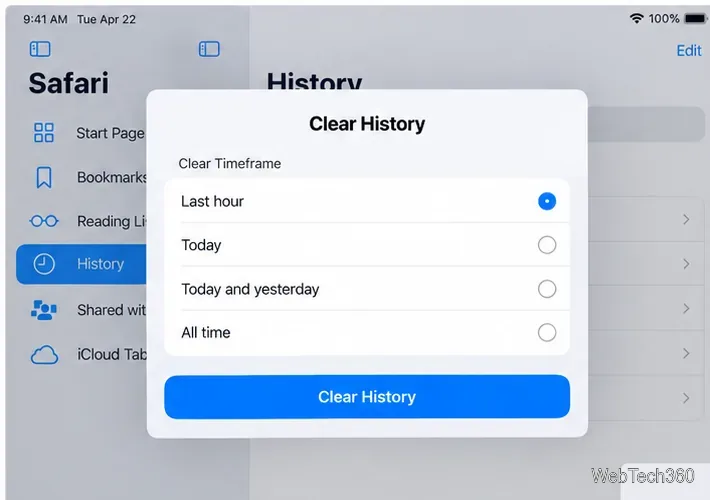
If Safari profiles are set up, choose a profile to clear only its history, or choose All Profiles. This changes the history Safari keeps on your device; it does not remove records kept independently by websites or activity in other apps. Apple’s current iPad Safari guide documents the in-app steps.
Safari’s controls do not affect Chrome. To clear the pages you opened in Chrome:
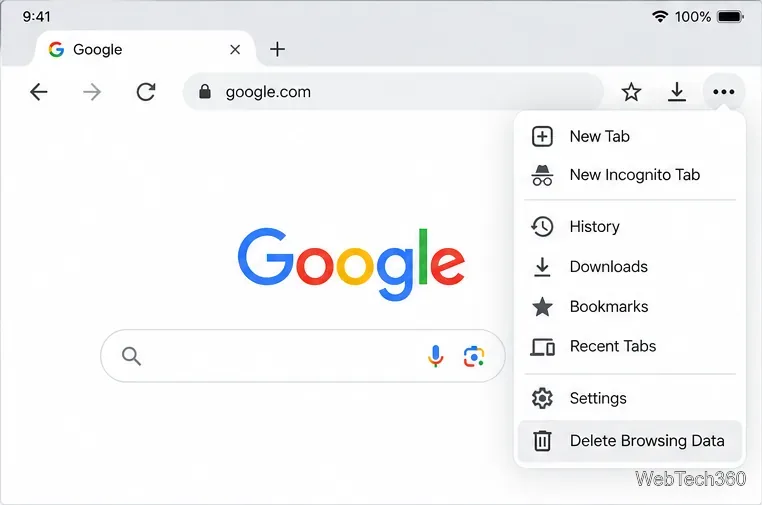
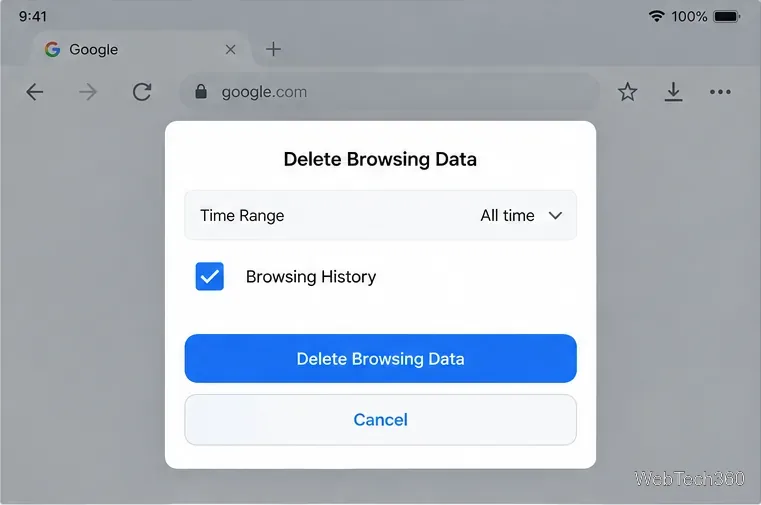
Chrome keeps a History list of pages visited in the last 90 days, and when Chrome history sync is enabled, that list can include pages from your other devices. Review the selected data types carefully: deleting cookies or other categories can affect site sign-ins and settings. Google explains the current iPhone and iPad controls in its Chrome history guide.
Searches made in the Google app can be stored as Google Account activity, independently of Safari or Chrome’s page history. To remove account search history:
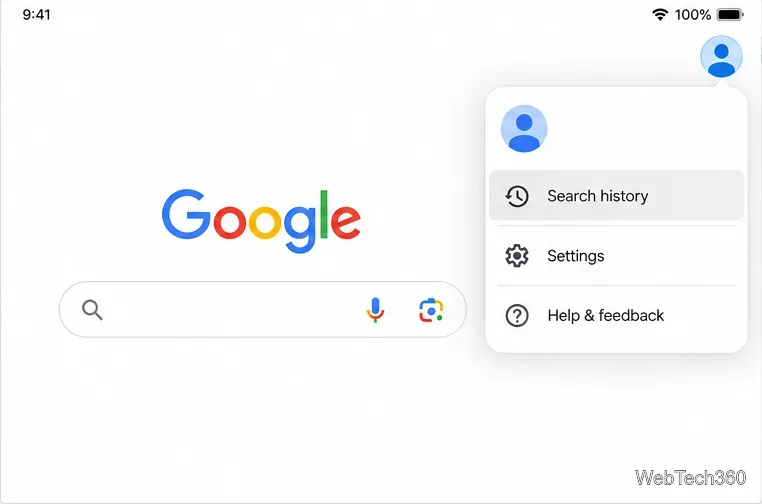
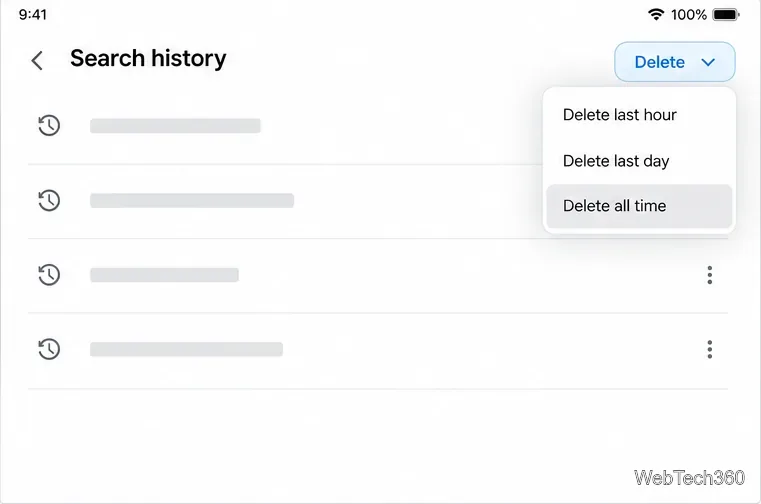
If you used the Google app while signed out, searches may be stored on the device instead. In that case, open the app’s profile menu, tap Settings > Privacy & Safety > Clear app history, then tap Clear all. Device history and account history are separate: deleting one may leave the other intact. Google’s Search history instructions explain both routes.
| What you want to remove | Use this control |
|---|---|
| Safari pages and related website data | Settings > Apps > Safari |
| A selected time range in Safari | Safari > Sidebar > History |
| Pages visited in Chrome | Chrome > More > Delete Browsing Data |
| Google searches saved to your account | Google app > Profile > Search history |
If history still appears after you clear it, check which app or account saved it. Safari cleanup will not remove Chrome history, and deleting Google Search activity will not clear a browser’s History list. For a borrowed iPad, also sign out of your personal browser or Google account when you are finished; clearing history by itself is not the same as signing out.
Fix the iMessage Is Signed Out error on iPhone by checking Apple Account sign-in, activation, connectivity, and settings—without erasing your messages.
Turn off your iPhone VPN in the app or Settings, confirm it disconnected, and stop automatic reconnections without deleting your account.
Learn how to encrypt your iPhone with a strong passcode, protect iCloud and computer backups, and secure your data if your phone is lost or stolen.
Learn how to clear Safari and Chrome cache on iPhone, manage app storage safely, and understand when clearing cached data actually helps.
Learn how to fight Gym Battles in Pokémon GO, pick effective attackers, use Charged Attacks and dodges, and claim a Gym after defeating its defenders.
Explore classic Cydia tweaks for jailbroken iPads, from SwipeSelection to Quasar, with compatibility warnings and modern alternatives.
Stop Apple Music signup prompts in the Music app. Learn where to find Show Apple Music on iOS and what turning it off does—and does not—change.
Set up a Shortcuts automation to text Mom when your iPhone battery gets low. Follow four steps, plus delivery checks and privacy tips.
Save posts on X in a few taps. Learn where to find the Bookmark button on iPhone, Android, and desktop, plus how to view, remove, and organize saved tweets.
Turn on AR mode in Pokémon GO during a wild encounter, find AR settings, and fix camera or device compatibility issues.








