iMessage Is Signed Out on iPhone: How to Fix It

Fix the iMessage Is Signed Out error on iPhone by checking Apple Account sign-in, activation, connectivity, and settings—without erasing your messages.
If an app on your iPhone 12 or a newer Face ID model is frozen or won’t respond, open the App Switcher and swipe the app’s preview up and off the screen. On an iPhone SE or another model with a Home button, double-click Home first, then swipe up on the app preview. Apple recommends closing an app only when it is unresponsive; routinely dismissing every app does not improve battery life or overall performance.
Use the App Switcher to quit an app that has stopped responding, appears frozen, or needs a fresh launch to recover. After closing it, tap its icon on the Home Screen or in the App Library to reopen it.
You do not need to close apps just because you have finished using them. iOS manages apps in the background, and apps in a suspended state generally are not actively using system resources. Apple says closing all apps does not improve overall performance or battery life. Reopening a force-closed app can take longer because it must reload, and quitting an app can interrupt some background activity. If an app is handling a transfer, don’t swipe it away just to “free up RAM”; whether the transfer continues depends on that app.
For the current model-specific steps, see Apple’s instructions for closing an iPhone app.
iPhone 12 models and iPhones with Face ID use the same gesture. You do not need to return to the Home Screen before opening the App Switcher.
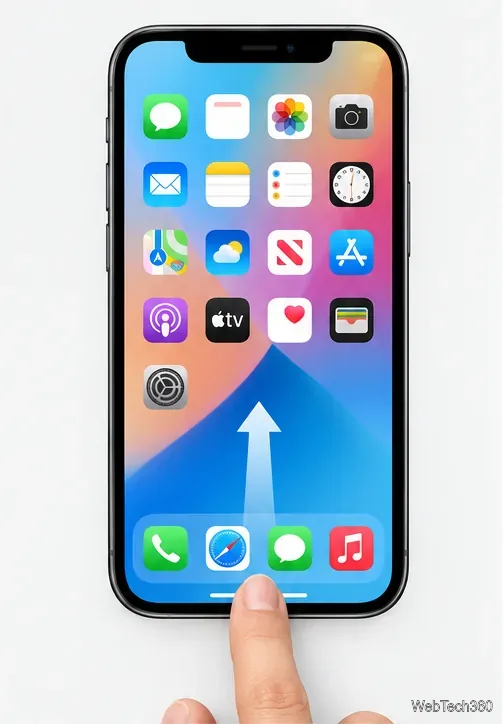
If the Home Screen appears instead of the App Switcher, repeat the gesture and pause midway rather than continuing all the way to the top.
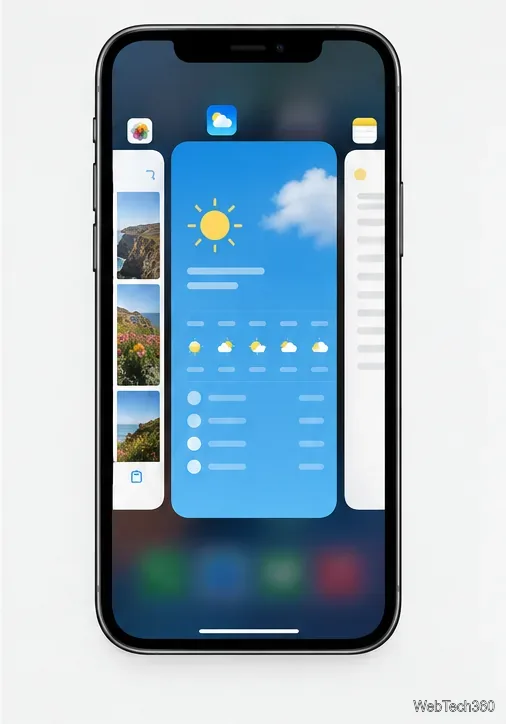
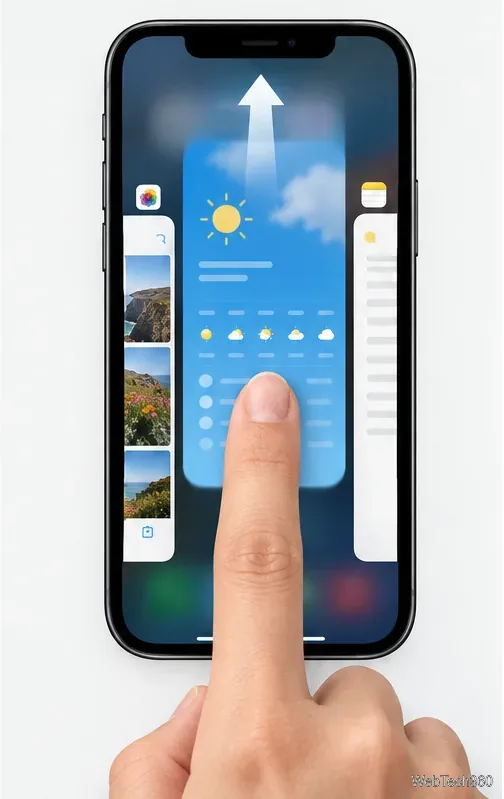
These cards show recently used apps; seeing a card does not mean that the app is actively running or draining the battery. To switch to another app instead of quitting it, tap that app’s preview.
The iPhone SE (including the second- and third-generation models) has a physical Home button. The same method applies to older iPhones with a Home button:
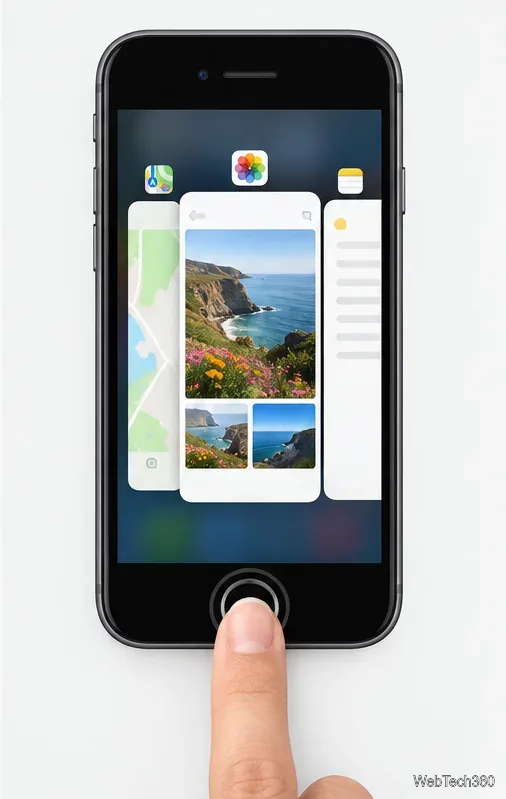
If your iPhone has no physical Home button, use the swipe-up-and-pause gesture in the previous section instead.
After force-closing, open the app again and check whether it responds. If it remains stuck, work through these steps:
Apple lists these options in its guide for an app that stops responding, closes unexpectedly, or won’t open. If the problem continues after the update or reinstall, contact the app’s developer; if several apps or iOS itself are affected, contact Apple Support.
There is no close-all control in the iPhone App Switcher. You can swipe away previews individually, but Apple does not recommend doing that as routine maintenance.
Usually, no. iOS manages background activity, and force-closing apps you are not using does not extend battery life. Close one when it is unresponsive, then reopen it if needed.
It can affect an app’s ability to continue background work, but the exact behavior depends on the app and the task. Keep a transfer open if you need it to finish, and use the app’s own download or sync guidance if it stalls.
Fix the iMessage Is Signed Out error on iPhone by checking Apple Account sign-in, activation, connectivity, and settings—without erasing your messages.
Turn off your iPhone VPN in the app or Settings, confirm it disconnected, and stop automatic reconnections without deleting your account.
Learn how to encrypt your iPhone with a strong passcode, protect iCloud and computer backups, and secure your data if your phone is lost or stolen.
Learn how to clear Safari and Chrome cache on iPhone, manage app storage safely, and understand when clearing cached data actually helps.
Learn how to fight Gym Battles in Pokémon GO, pick effective attackers, use Charged Attacks and dodges, and claim a Gym after defeating its defenders.
Explore classic Cydia tweaks for jailbroken iPads, from SwipeSelection to Quasar, with compatibility warnings and modern alternatives.
Stop Apple Music signup prompts in the Music app. Learn where to find Show Apple Music on iOS and what turning it off does—and does not—change.
Set up a Shortcuts automation to text Mom when your iPhone battery gets low. Follow four steps, plus delivery checks and privacy tips.
Save posts on X in a few taps. Learn where to find the Bookmark button on iPhone, Android, and desktop, plus how to view, remove, and organize saved tweets.
Turn on AR mode in Pokémon GO during a wild encounter, find AR settings, and fix camera or device compatibility issues.








