iMessage Is Signed Out on iPhone: How to Fix It

Fix the iMessage Is Signed Out error on iPhone by checking Apple Account sign-in, activation, connectivity, and settings—without erasing your messages.
To customize a mouse or trackpad pointer on iPad, connect the pointing device, then open Settings > Accessibility > Pointer Control. There you can adjust the pointer’s color, size, contrast, visibility, and animations. To change how quickly it moves across the screen, use the separate tracking speed control under General.
For a Bluetooth mouse, turn it on and put it in pairing mode. On the iPad, open Settings > Bluetooth, turn Bluetooth on, and tap the mouse when it appears under Other Devices. Once paired, it should appear in My Devices. Follow the accessory maker’s pairing instructions if the mouse does not show up.
You can also connect many USB mice or USB receiver dongles with a compatible cable or adapter. Compatibility varies by device and iPad model. If the mouse is already paired with another iPad or Mac, disconnect or unpair it there first. A compatible Bluetooth trackpad can be paired in Bluetooth settings as well.
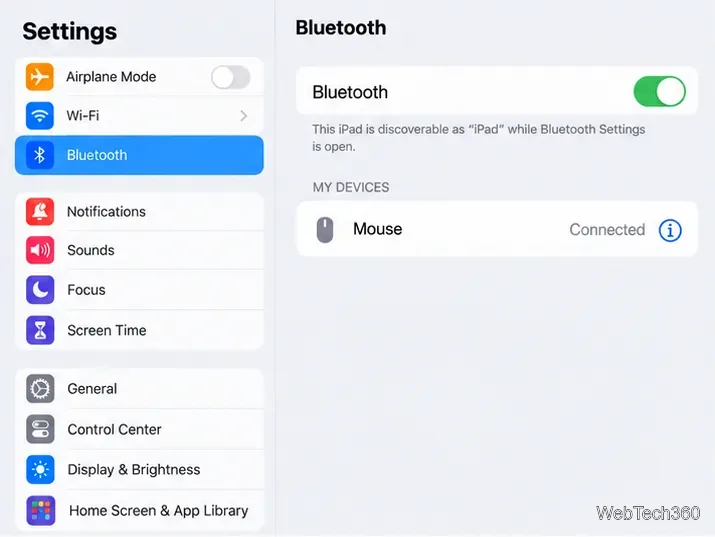
After connecting the mouse or trackpad, open Settings and tap Accessibility, then Pointer Control. This is the system page for pointer appearance and several related behaviors. The wording and available controls can vary slightly with the connected accessory and iPadOS version.
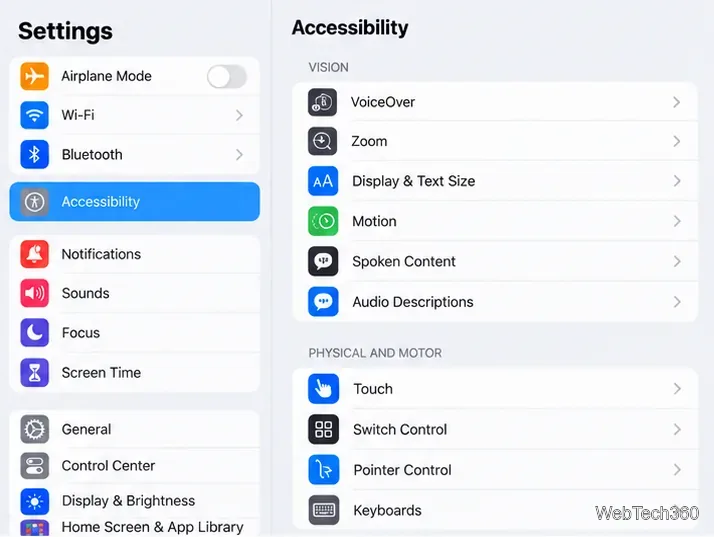
Use the options on the Pointer Control screen to make the cursor easier to follow or less distracting:
Change one option at a time and move the pointer over a few screens before settling on a combination. The circular pointer can adapt as you move over different on-screen controls, but the way an app responds to a pointer depends on that app.
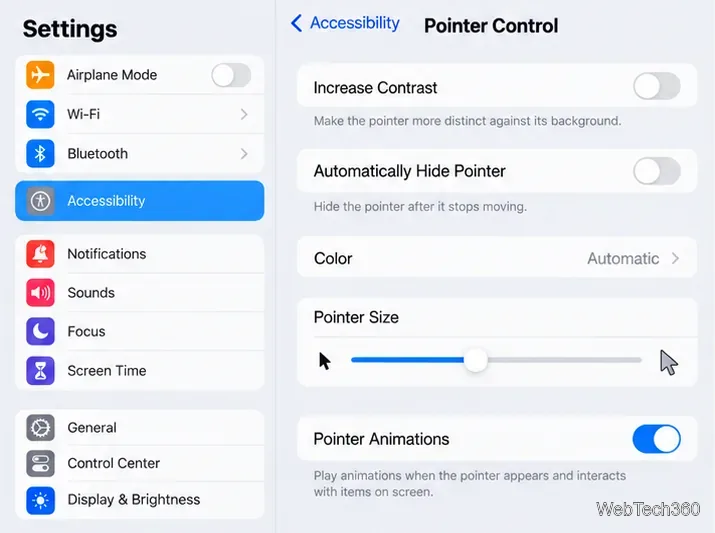
Two speed controls do different jobs. In Pointer Control, the Scrolling Speed slider changes how quickly a page moves when you scroll with a mouse or trackpad. It does not set how quickly the pointer travels across the display.
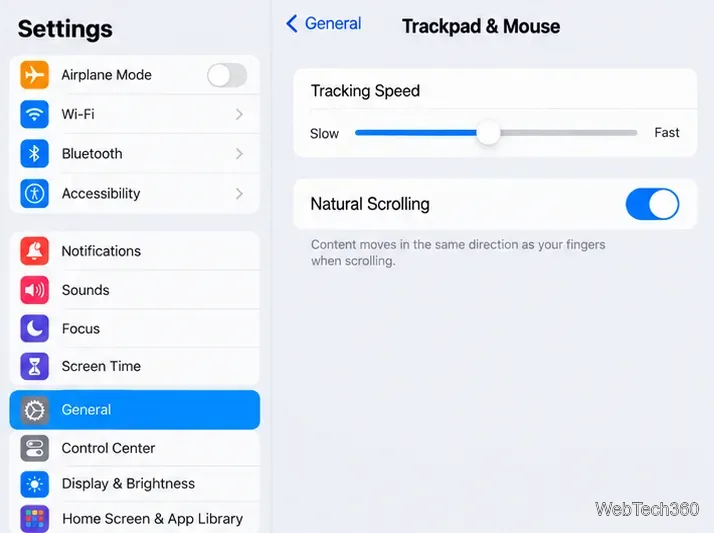
For pointer movement, go to Settings > General, then tap Trackpad or Trackpad & Mouse, depending on your accessory. Drag Tracking Speed to change how far or quickly the pointer moves as you move the mouse or trackpad. On this page, you can also turn Natural Scrolling on or off; when it is on, content moves in the same direction as your fingers on the trackpad. Trackpad-specific options such as Tap to Click may also appear when a compatible trackpad is connected.
Apple’s current instructions cover connecting a mouse to iPad, adjusting pointer settings, and changing trackpad settings.
Fix the iMessage Is Signed Out error on iPhone by checking Apple Account sign-in, activation, connectivity, and settings—without erasing your messages.
Turn off your iPhone VPN in the app or Settings, confirm it disconnected, and stop automatic reconnections without deleting your account.
Learn how to encrypt your iPhone with a strong passcode, protect iCloud and computer backups, and secure your data if your phone is lost or stolen.
Learn how to clear Safari and Chrome cache on iPhone, manage app storage safely, and understand when clearing cached data actually helps.
Learn how to fight Gym Battles in Pokémon GO, pick effective attackers, use Charged Attacks and dodges, and claim a Gym after defeating its defenders.
Explore classic Cydia tweaks for jailbroken iPads, from SwipeSelection to Quasar, with compatibility warnings and modern alternatives.
Stop Apple Music signup prompts in the Music app. Learn where to find Show Apple Music on iOS and what turning it off does—and does not—change.
Set up a Shortcuts automation to text Mom when your iPhone battery gets low. Follow four steps, plus delivery checks and privacy tips.
Save posts on X in a few taps. Learn where to find the Bookmark button on iPhone, Android, and desktop, plus how to view, remove, and organize saved tweets.
Turn on AR mode in Pokémon GO during a wild encounter, find AR settings, and fix camera or device compatibility issues.








