iMessage Is Signed Out on iPhone: How to Fix It

Fix the iMessage Is Signed Out error on iPhone by checking Apple Account sign-in, activation, connectivity, and settings—without erasing your messages.
Use Settings on the iPad for the quickest update, or use Finder on a Mac or the Apple Devices app on Windows if a wireless update is unavailable. Either way, your iPad installs only software Apple offers for that specific model.
One important version note: iPadOS 16 is no longer the latest iPadOS overall. As of October 24, 2026, Apple lists iPadOS 27.0.1 in its current update notes. Apple’s security releases page lists iPadOS 16.7.16 for the iPad (5th generation), iPad Pro 9.7-inch, and iPad Pro 12.9-inch (1st generation). The update shown on your iPad depends on its model and installed software. See Apple’s iPadOS release notes and security release list for current details.
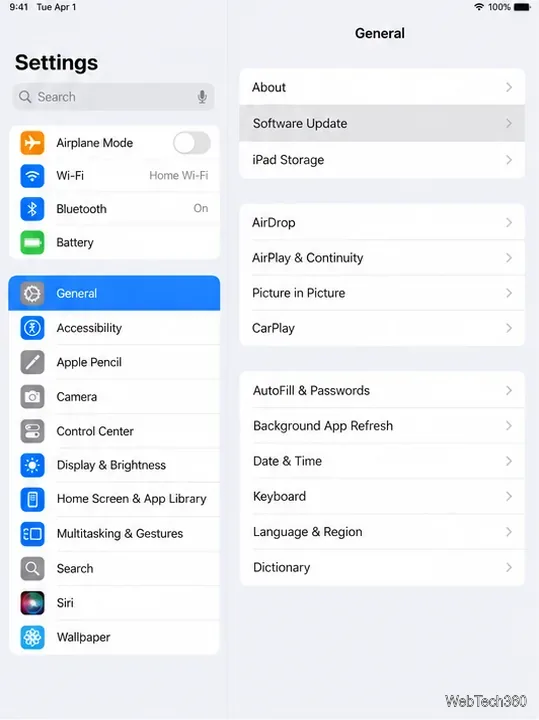
Open Settings, tap General, then tap Software Update. The page shows the installed iPadOS version and whether an update is available.
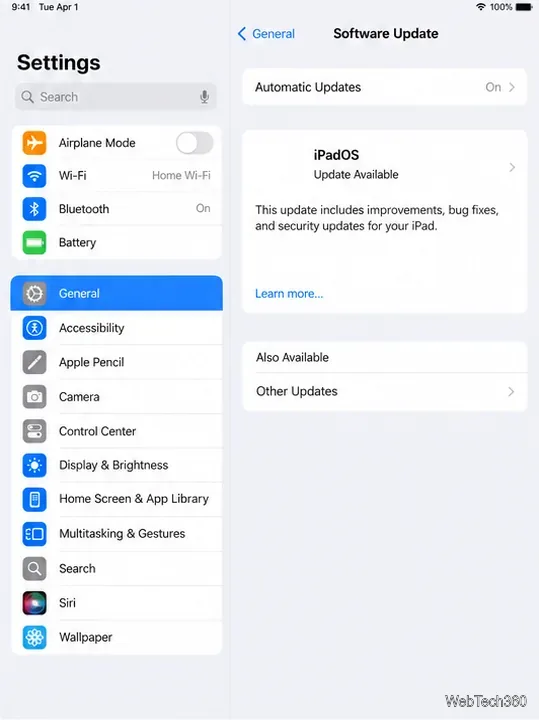
Review the update name and details before installing. If you see both a maintenance update for your current iPadOS and a separate major upgrade, choose the one that fits your goal. To remain on iPadOS 16, install an iPadOS 16 update only if Apple offers it for your model; choosing a newer major upgrade moves the iPad to that release. Software Update does not provide a menu of every older iPadOS version.
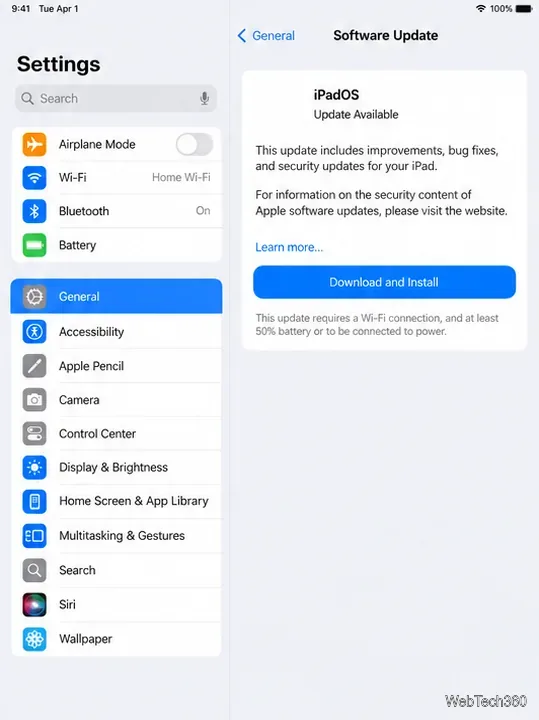
Tap Download and Install (or the update button shown), then follow the on-screen directions. Enter your passcode if prompted and leave the iPad connected to Wi-Fi and power while it downloads, restarts, and finishes installing.
If a storage alert asks to temporarily remove apps, tap Continue to let the update make room. Apple says the apps are automatically reinstalled after installation. If you prefer not to do that, cancel and free space yourself in iPad Storage.
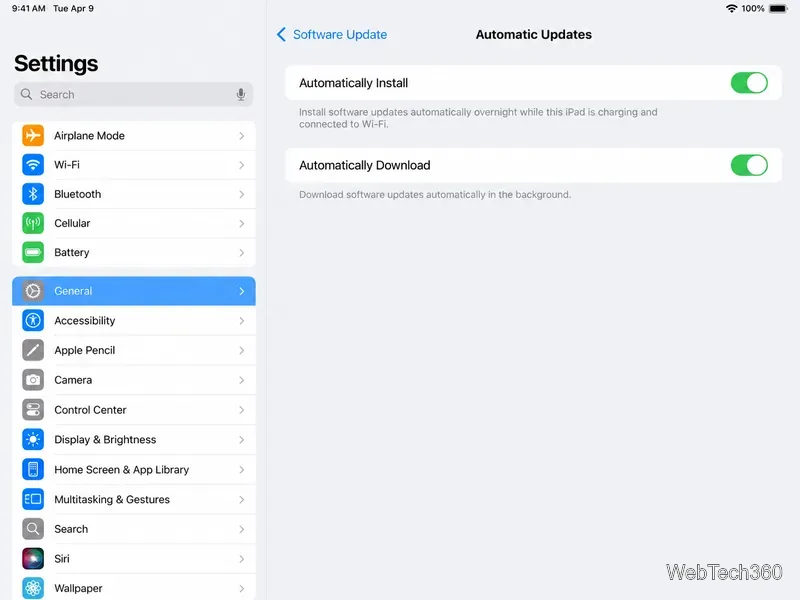
To let iPad download and install updates later, open Settings > General > Software Update > Automatic Updates. Enable Automatically Download and Automatically Install as desired. With automatic installation on, updates are installed overnight when the iPad is charging and connected to Wi-Fi; Apple says you’ll be notified before installation. The exact label can differ on older iPadOS versions.
Use a computer if the update does not appear on the iPad or the wireless download keeps failing. On a Mac with macOS Catalina or later, use Finder. On Windows, use Apple Devices. Macs running macOS Mojave or earlier use iTunes.
Connect the iPad to the computer with a USB or USB-C cable. Unlock the iPad and tap Trust if it asks whether to trust the computer.
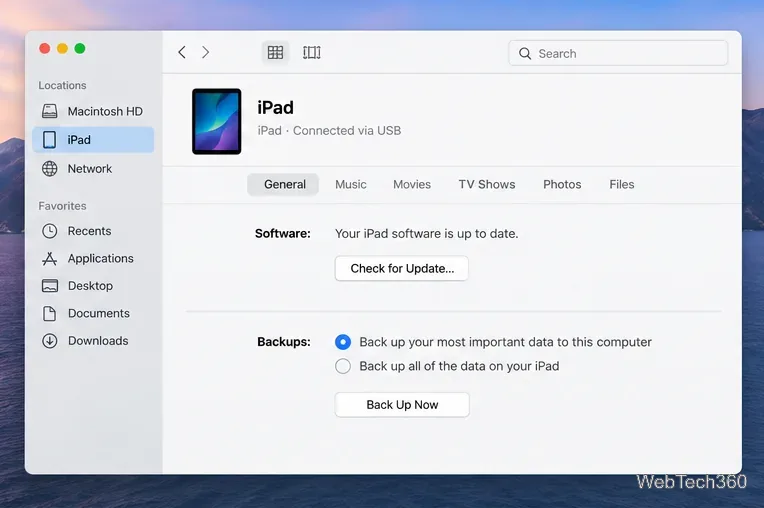
On a Mac: Open Finder, select the iPad in the sidebar, choose General, then click Check for Update. On Windows: Open Apple Devices, select the iPad, choose General, and click Update; if needed, click Check for Update first.
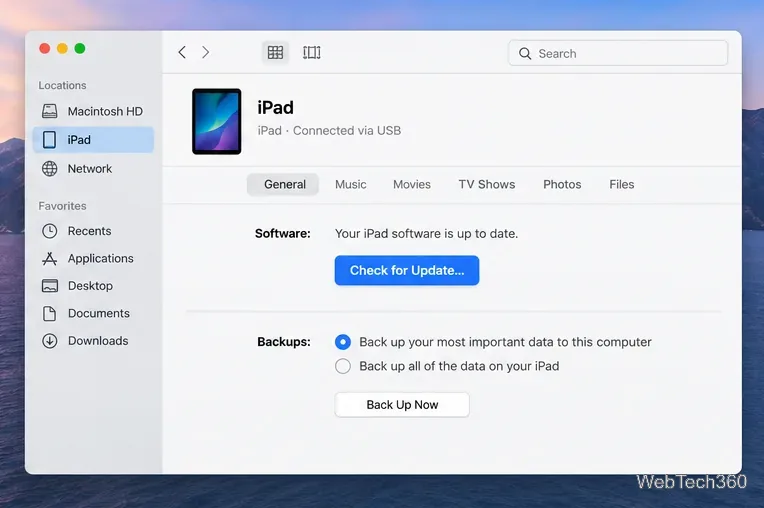
When an update is available, choose Download and Update or Update, then follow the prompts. Enter the iPad passcode if asked. Keep the iPad connected until the computer and iPad have completed the update and the device has restarted.
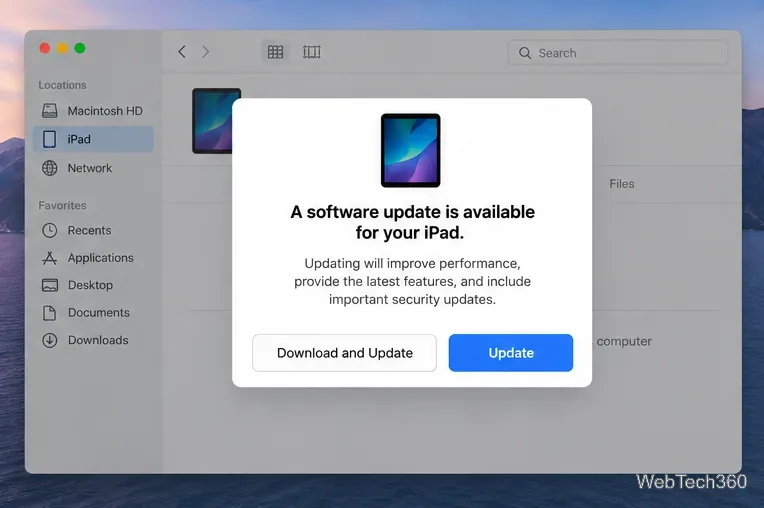
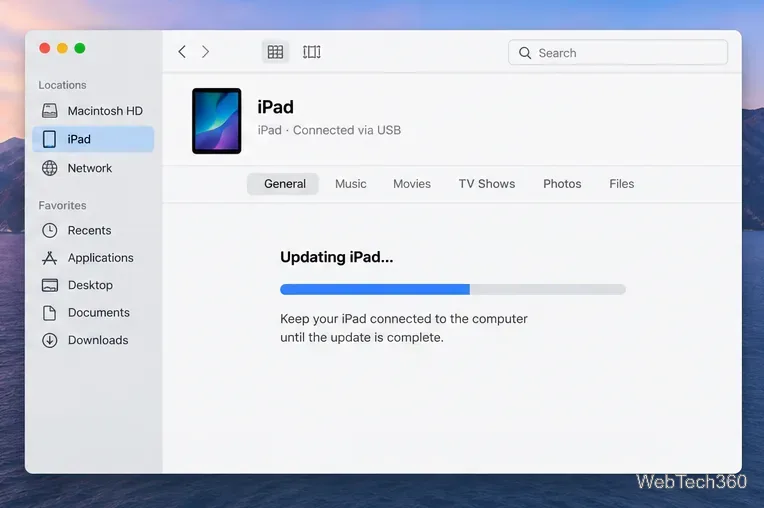
Apple’s Finder update guide and Windows Apple Devices guide list the current computer steps.
For most people, the Settings method is enough. The computer method is a reliable fallback, and Automatic Updates can handle future compatible releases in the background.
Fix the iMessage Is Signed Out error on iPhone by checking Apple Account sign-in, activation, connectivity, and settings—without erasing your messages.
Turn off your iPhone VPN in the app or Settings, confirm it disconnected, and stop automatic reconnections without deleting your account.
Learn how to encrypt your iPhone with a strong passcode, protect iCloud and computer backups, and secure your data if your phone is lost or stolen.
Learn how to clear Safari and Chrome cache on iPhone, manage app storage safely, and understand when clearing cached data actually helps.
Learn how to fight Gym Battles in Pokémon GO, pick effective attackers, use Charged Attacks and dodges, and claim a Gym after defeating its defenders.
Explore classic Cydia tweaks for jailbroken iPads, from SwipeSelection to Quasar, with compatibility warnings and modern alternatives.
Stop Apple Music signup prompts in the Music app. Learn where to find Show Apple Music on iOS and what turning it off does—and does not—change.
Set up a Shortcuts automation to text Mom when your iPhone battery gets low. Follow four steps, plus delivery checks and privacy tips.
Save posts on X in a few taps. Learn where to find the Bookmark button on iPhone, Android, and desktop, plus how to view, remove, and organize saved tweets.
Turn on AR mode in Pokémon GO during a wild encounter, find AR settings, and fix camera or device compatibility issues.








