Home
» IOS
»
Why the iPhone 18 Pro’s Display May Cause Headaches for Some Users — and What We Actually Know
Why the iPhone 18 Pro’s Display May Cause Headaches for Some Users — and What We Actually Know
Updated September 14, 2026: There is an important correction to make before discussing “iPhone 18 display headaches.” Apple has announced the iPhone 18 Pro and iPhone 18 Pro Max, but not a standard iPhone 18. The Pro models were announced on September 9 and do not reach retail customers until September 18. So there is not yet a broad population of ordinary owners from which to conclude that the new display is causing headaches.
What is verified is more nuanced. Apple says the iPhone 18 Pro uses a Super Retina XDR OLED display with ProMotion up to 120Hz, a 1-nit minimum brightness, up to 3000 nits of peak outdoor brightness, Always-On display, True Tone, and an anti-reflective coating. Apple also acknowledges more generally that iPhone brightness can be controlled with pulse-width modulation, or PWM, and that some people can perceive flicker when the display is dim. Research on temporal light modulation and migraine supports the idea that flicker can be uncomfortable for susceptible people, but none of that proves the iPhone 18 Pro itself causes headaches.
A smartphone user pauses during screen use in a softly lit room. Headaches can have many causes, so this scene illustrates visual discomfort rather than proving a device-specific effect.
First misconception: the iPhone 18 Pro does not use a completely new kind of display
Verified: Apple’s published specifications still describe the iPhone 18 Pro and Pro Max as using Super Retina XDR OLED panels with ProMotion. The 6.3-inch Pro display runs at 2622×1206 pixels, while the 6.9-inch Pro Max runs at 2868×1320 pixels; both are rated at 460 ppi. Apple lists adaptive refresh rates up to 120Hz, 1000 nits typical maximum brightness, 1600 nits peak HDR brightness, 3000 nits peak outdoor brightness, and a 1-nit minimum. You can check the current specifications on Apple’s iPhone 18 Pro technical specifications page.
What is new on the display side is not a wholesale switch to an unfamiliar display category. Apple highlights a smaller Dynamic Island created with “advanced display technology,” plus the same broader OLED/ProMotion framework. Therefore, claims that a mysterious new panel technology is uniquely responsible for headaches go beyond what Apple has actually disclosed.
Useful action: If you are deciding whether to preorder, do not assume the display will affect you differently simply because it belongs to the iPhone 18 generation. If you already know that OLED phones make you uncomfortable, wait until retail units are available and test one in person under both bright and dim conditions before committing.
What Apple has confirmed about PWM and flicker
Verified: Apple now explicitly explains that iPhone controls display brightness using pulse-width modulation (PWM), a technique that can make the screen appear to flicker when dim for some individuals. Apple offers a feature called Display Pulse Smoothing on supported iPhones to create smoother dimming at low brightness. The company documents the feature on its Accessibility features page and in its display accessibility guidance.
There is an important limitation as of September 14: Apple’s detailed support documentation currently names iPhone 17, iPhone 17 Pro, iPhone 17 Pro Max, and iPhone Air as models with Display Pulse Smoothing. It does not yet explicitly list iPhone 18 Pro. Because retail availability has not started, it would be premature to state that the same control is definitely present on launch-day iPhone 18 Pro hardware until Apple updates its support list or the setting can be verified on a retail unit.
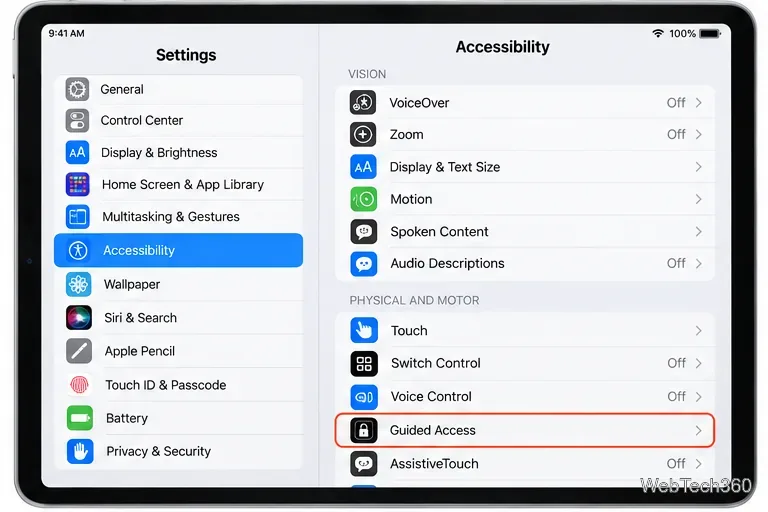
Useful action: When your iPhone 18 Pro arrives, go to Settings > Accessibility > Display & Text Size and check whether Display Pulse Smoothing is available. If it is, try it for several sessions and compare how you feel. Change only one display setting at a time so you can tell what actually helps.
Can PWM really contribute to headaches?
Condition-dependent: Temporal light modulation is a real phenomenon, and people do not respond to it equally. The U.S. Department of Energy’s review of flicker research notes that modulation can produce visual and nonvisual responses ranging from distraction and discomfort to headaches, and that sensitivity varies substantially between individuals. The DOE also emphasizes that the relationship between modulation characteristics and health effects is still an active research area. See the agency’s flicker research overview.
Migraine research also supports individual sensitivity. A controlled study indexed by the U.S. National Library of Medicine found that people with migraine had lower discomfort and pain thresholds to light than control participants, including between attacks. Another study found associations between migraine symptoms, flicker as a visual trigger, and visual discomfort. Those studies concern light sensitivity and flicker generally; they do not test the iPhone 18 Pro. See the original research records for light-induced discomfort and pain in migraine and visual motion processing and flicker-related triggers in migraine.
Useful action: If flickering lights, certain OLED phones, or bright screens have triggered headaches for you before, treat that history as more relevant than another person’s experience. Test the phone in the conditions where you normally use it — especially low-light evening use — rather than relying on a five-minute store demo.
High brightness is not the same problem as PWM
Verified but often confused: Brightness and PWM are related to display operation, but they are not interchangeable explanations. The iPhone 18 Pro can reach 3000 nits outdoors, which helps readability in sunlight. That does not mean the display runs at 3000 nits indoors. Auto-Brightness uses the ambient light sensor to adjust output for the environment.
A very bright screen in a dark room can feel uncomfortable simply because of luminance contrast, even if flicker is not the main issue. Conversely, aggressively lowering brightness can make PWM-related modulation more noticeable on some OLED implementations. That is why “turn brightness all the way down” is not a universally good solution for someone who suspects flicker sensitivity.
Apple provides multiple tools for perceived brightness and color comfort, including Auto-Brightness, True Tone, Night Shift, Dark Mode, and Reduce White Point. Apple explains these controls in its brightness and color temperature support guide.
Useful action: Start with a moderate brightness level that matches the room rather than the minimum setting. Keep Auto-Brightness on for a day, then test Reduce White Point if bright UI elements bother you. Use Night Shift if warmer colors feel more comfortable, but do not expect Night Shift to eliminate PWM; it changes color temperature, not the underlying dimming method.
Does 120Hz ProMotion cause headaches?
Not established: There is no verified evidence that the iPhone 18 Pro’s 120Hz ProMotion refresh rate is itself causing headaches. Screen refresh rate and OLED brightness modulation are different mechanisms. ProMotion changes how frequently the display updates visual content; PWM changes light output as part of brightness control.
Some people are sensitive to motion, animations, scrolling behavior, or transitions. Apple therefore provides a Limit Frame Rate option for ProMotion devices, as well as Reduce Motion and other motion accessibility settings. These tools can change how movement feels, but a preference for 60Hz does not prove that 120Hz was medically causing a headache.
Useful action: If scrolling rather than static reading seems to trigger discomfort, go to Settings > Accessibility > Motion, enable Limit Frame Rate, and use the phone that way for a meaningful period. If the problem only occurs while scrolling or watching motion, that observation is more informative than changing brightness, color temperature, and refresh rate simultaneously.
Could the 1-nit minimum brightness actually help?
Potentially, but it depends on the user: Apple lists a 1-nit minimum brightness for the iPhone 18 Pro display. A very low luminance floor can be useful in dark environments because it reduces the contrast between a glowing screen and a dark room. But lower luminance is not automatically more comfortable for every PWM-sensitive user, because comfort also depends on the modulation frequency, modulation depth, waveform, ambient lighting, and individual sensitivity.
This is one reason simple specifications cannot predict whether a person will experience symptoms. Two OLED displays can have similar brightness ratings while behaving differently when dimmed, and two people can react differently to the same display.
Useful action: In bed or another dark room, try a small lamp or other gentle ambient light instead of forcing the phone to its absolute minimum brightness. If that feels better, the issue may be partly the contrast between the display and the surrounding room rather than one particular display specification.
What is still unknown about the iPhone 18 Pro display?
Unknown: Apple does not publish the iPhone 18 Pro’s PWM frequency, modulation depth, or a full brightness-versus-flicker curve in its technical specifications. Apple also has not said that the display causes headaches, and there cannot yet be a reliable body of launch-user reports because retail availability begins September 18. Apple’s September 9 announcement confirms the release schedule on its official Newsroom page.
That means numerical claims circulating online about the iPhone 18 Pro’s PWM behavior should be treated cautiously unless they come with reproducible measurements of a retail unit, the brightness level tested, the measurement equipment, and the waveform itself.
Useful action: If display sensitivity is a major purchase factor for you, wait for measurements from retail hardware after September 18 rather than treating preorder-week speculation as established fact.
A simple way to troubleshoot discomfort without guessing
If you receive an iPhone 18 Pro and start noticing headaches, eye fatigue, nausea, or visual discomfort, do not immediately assume the hardware is defective. Use a controlled process:
Test the environment: Add comfortable room lighting and avoid using a very bright screen in a completely dark room.
Test brightness: Try moderate brightness instead of the minimum or maximum.
Check PWM controls: See whether Display Pulse Smoothing is available on your device and compare with it on and off.
Test motion separately: Use Limit Frame Rate or Reduce Motion if scrolling and animations seem to be the trigger.
Adjust visual intensity: Try Reduce White Point, True Tone, or Night Shift one at a time.
Track timing: Note whether symptoms begin after five minutes, an hour, only at night, or only while scrolling.
Compare devices: If possible, use your previous phone in the same room and at a similar apparent brightness for comparison.
This approach does not diagnose the cause, but it helps separate several variables that are often mixed together in online discussions.
When should you stop troubleshooting and seek medical advice?
A headache after screen use can have many causes unrelated to the display, including migraine, vision problems, dehydration, sleep disruption, medication effects, stress, and other medical conditions. A new phone should not become the default explanation for persistent or severe symptoms.
Useful action: If headaches are frequent, worsening, unusually severe, accompanied by new neurological or visual symptoms, or continue even after you stop using the phone, seek medical advice rather than continuing display experiments. If a specific device reliably causes symptoms that disappear when you stop using it, consider returning it within the applicable return period instead of trying to force yourself to adapt.
The bottom line
The headline “iPhone 18’s new display causes headaches” is stronger than the evidence supports on September 14, 2026. Apple has announced only the iPhone 18 Pro and Pro Max, retail units are not yet broadly available, and Apple has not published model-specific PWM measurements or acknowledged a headache problem.
What we can say is that the iPhone 18 Pro is an OLED phone, Apple openly acknowledges that PWM dimming can appear to flicker for some individuals, and established research shows that flicker and bright light can contribute to visual discomfort or migraine symptoms in susceptible people. That makes the concern plausible for some users, but highly individual rather than a proven defect in the new iPhone.
The best decision is practical: if you have a history of OLED or flicker sensitivity, test the phone under your normal evening conditions before making it your long-term device. If you already own it and feel uncomfortable, change one variable at a time and pay attention to patterns. The goal is not to prove that the display is “bad”; it is to find out whether this particular display works comfortably for you.