Home
» LINUX
»
6 Linux Puzzle Games You Can Play for Free
6 Linux Puzzle Games You Can Play for Free
Linux has plenty of good puzzle games that cost nothing to install, from quick number challenges to chemistry, coding, and spatial-logic games. These six picks are still available for Linux today and cover very different styles, so you can choose something casual or something that demands more planning.
One important distinction: free does not always mean open source. Flathub currently lists Aqueducts as proprietary software, while the other games below publish source code or are maintained by GNOME/KDE projects. The commands in this article use Flatpak because it provides a consistent installation method across distributions. If Flatpak is not configured yet, follow the official Flatpak setup instructions for your distribution first.
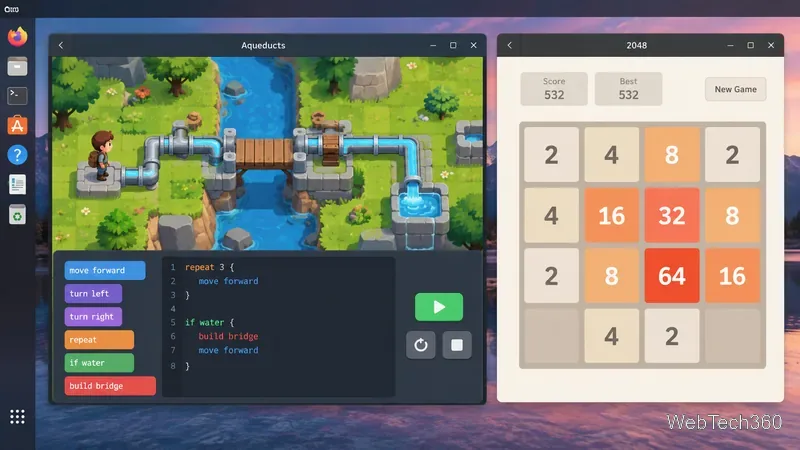
A Linux desktop view showing the two different puzzle styles: coding and pipe logic on the left, number merging on the right.
1. Aqueducts: coding and pipe puzzles
Aqueducts combines a light adventure with programming-style problem solving. Your goal is to restore water to a village by connecting pipes and changing objects in the environment. The game introduces ideas such as variables, conditionals, loops, debugging, JavaScript concepts, math, and logical sequencing across 15 levels.
It is a good fit if you want a puzzle game that teaches basic coding ideas without feeling like a conventional programming lesson. Flathub currently lists the Linux build as x86_64 only, so ARM Linux devices are not supported by that package.
2048 is ideal when you want a puzzle you can understand in seconds. Use the arrow keys to slide every tile in one direction. Tiles with matching values merge, and the main objective is to create a 2048 tile. You can keep playing after that to push your score higher.
This version is lightweight and available for both x86_64 and ARM through Flathub. The package is community-provided rather than verified by the developer, which is worth knowing before installation.
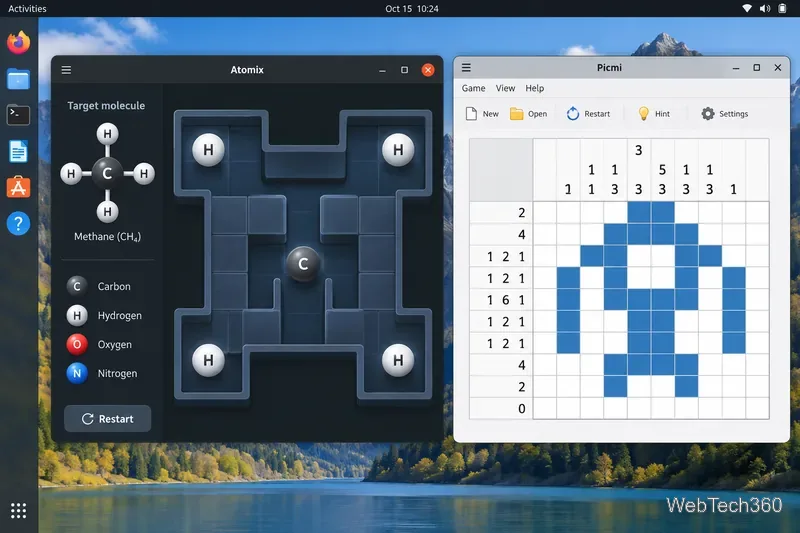
Atomix uses sliding atoms and molecular targets, while Picmi uses row and column clues to reveal a hidden pattern.
3. Atomix: build molecules with sliding atoms
Atomix turns basic chemistry into a movement puzzle. You assemble a target molecule by moving atoms around a board, but each atom keeps sliding until it hits a wall or another atom. That simple restriction makes positioning much harder than it first appears.
The current Flathub build remains available for x86_64 and ARM, although the package is community-provided and marked unverified. It is a strong choice if you prefer deliberate, grid-based logic over fast reactions.
Picmi is KDE's take on nonograms, also known as picture-cross or Picross-style puzzles. Each row and column has numerical clues that tell you how many consecutive cells should be filled. By combining those clues, you gradually reveal the hidden pattern.
Picmi includes generated puzzles as well as preset puzzles, and KDE continues to maintain it. It is best for players who enjoy careful deduction and pattern recognition.
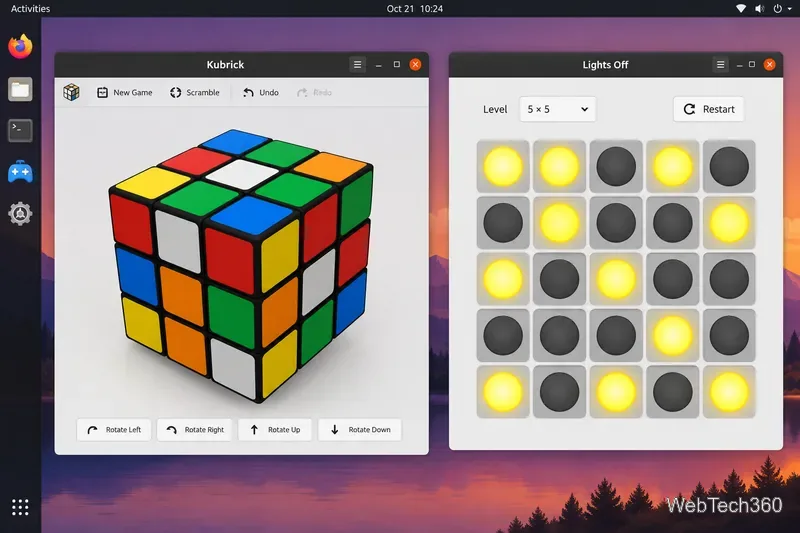
Kubrick focuses on 3D cube manipulation, while Lights Off asks you to clear a board by toggling connected lights.
5. Kubrick: Rubik's Cube-style puzzles in 3D
Kubrick recreates twisty-cube puzzles on the desktop. It supports cubes from 2×2×2 through 6×6×6, along with irregular bricks and flat configurations. You can work through included challenges, watch solution demonstrations, or create your own setups.
This is the best option here for spatial reasoning, especially if you already enjoy physical cube puzzles.
Lights Off looks simple: turn every light off. The catch is that clicking one light also toggles the surrounding lights, so every move changes several cells at once. The result is a compact logic game that quickly becomes more demanding as the patterns grow.
flatpak install flathub org.gnome.LightsOff
The current Linux package is available for x86_64 and ARM. You can review the game, help page, and source links on Flathub.
Which one should you play first?
Choose Aqueducts if you want coding concepts mixed with an adventure puzzle.
Choose 2048 for short sessions and simple controls.
Choose Atomix for sliding-block logic with a chemistry theme.
Choose Picmi if nonograms and number clues are your favorite.
Choose Kubrick for 3D spatial reasoning.
Choose Lights Off for compact move-planning puzzles.
All six give Linux users a different kind of brain teaser without requiring a purchase. If your distribution already packages one of them, you can also use its native software center; Flatpak simply keeps the installation commands consistent across most modern Linux desktops.