What should you determine before changing anything?
First determine whether the thin pool has exhausted data space, metadata space, or both. That distinction changes the recovery plan. A thin pool contains a data LV that stores allocated blocks and a metadata LV that tracks those allocations. The virtual size of thin logical volumes can exceed the physical capacity of the pool, which is the point of thin provisioning but also the reason overcommit must be monitored.
SUSE Linux Enterprise Server 15 SP7 documentation confirms that thin volumes allocate space from a thin pool on demand and that the combined virtual size can overbook the physical storage available. The upstream LVM thin-pool documentation adds an important operational rule: extend the pool before either Data% or Meta% reaches 100%. See the SUSE Linux Enterprise Server 15 SP7 Storage Administration Guide and the LVM thin provisioning manual.
1. Is data space full, or is metadata full?
Run lvs with explicit columns instead of relying on a generic disk-space check. A filesystem can still report free virtual space while the physical thin pool underneath it is nearly exhausted.
lvs -a -o lv_name,vg_name,lv_attr,lv_size,data_percent,metadata_percent
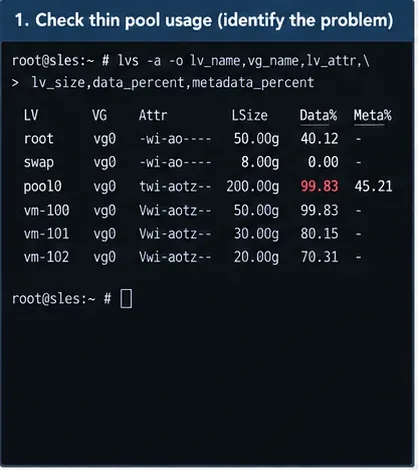
Caption: The thin pool must be identified by its Data% and Meta% values; filesystem free space alone does not show physical thin-pool exhaustion.
If Data% is at or near 100, the pool has run out of blocks for new writes. Upstream LVM documentation warns that writes can return errors when the data pool is exhausted, which can in turn damage filesystems. If Meta% reaches 100, the response is more conservative because metadata exhaustion can leave both thin-pool metadata and filesystems inconsistent.
2. Does the volume group still have free physical extents?
This is the next decision point. A thin pool can only grow if its volume group has free extents, unless you first add more physical storage to that volume group.
vgs -o vg_name,vg_size,vg_free
vgdisplay VG_NAME
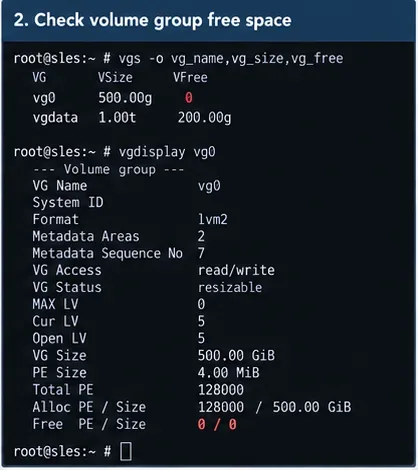
Caption: Checking VG free space separates a simple thin-pool extension from a case that requires adding storage first.
If the VG has enough free space, you can usually extend the thin pool directly. If VFree is zero or too small, do not keep retrying lvextend; decide whether you can remove unneeded thin volumes or snapshots, reclaim blocks with discard, or add a new physical volume.
3. Should you stop applications before recovery?
If the pool is already at 100%, stop or quiesce write-heavy applications before making storage changes. This reduces the chance that databases, virtual machines, containers, or other services continue issuing writes while the storage layer is failing or being repaired.
systemctl stop YOUR_APPLICATION.service
systemctl status YOUR_APPLICATION.service
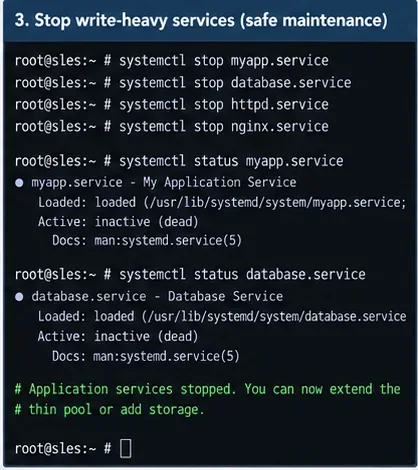
Caption: Quiescing applications limits additional writes while a full or damaged thin pool is being recovered.
There is no universal list of services to stop. Use your workload architecture and maintenance procedures. For databases and virtual machines, prefer the product's supported shutdown or quiesce method rather than abruptly killing processes.
4. If Data% is full and the VG has free space, how do you extend the pool?
Extend the thin pool itself, not the virtual thin LV, because the problem is lack of physical pool capacity. For example:
lvextend -L +20G VG_NAME/THIN_POOL
lvs -o lv_name,vg_name,lv_size,data_percent,metadata_percent VG_NAME/THIN_POOL
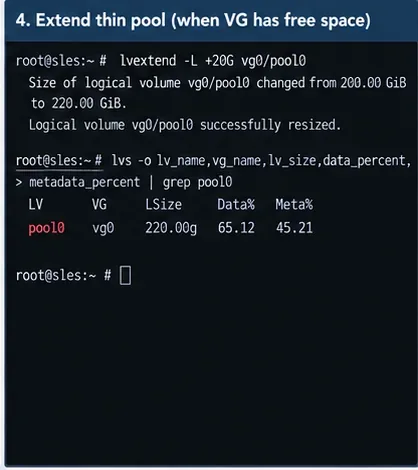
Caption: Extending the thin pool adds physical capacity; the resulting Data% should fall once the new space becomes available.
The lvextend manual documents direct thin-pool extension and the separate --poolmetadatasize option for metadata. Choose an increment based on real growth rate and the storage capacity you can reserve. A fixed example such as +20G is not a sizing recommendation for every system.
5. What if the volume group has no free space?
Add storage only after confirming the target block device is unused and contains no data you need. Creating an LVM physical volume writes LVM metadata to the selected device, so a device-name mistake can be destructive.
lsblk
blkid

pvcreate /dev/NEW_DEVICE
vgextend VG_NAME /dev/NEW_DEVICE
vgs -o vg_name,vg_size,vg_free
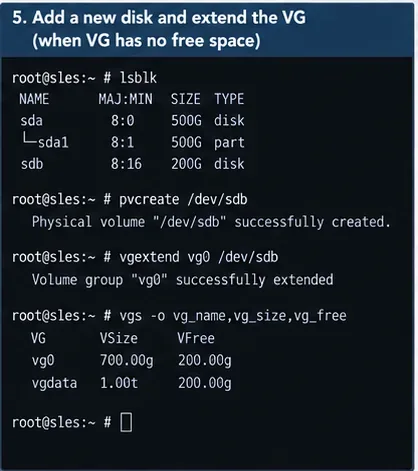
Caption: When the VG is full, new physical storage can be added first, after the administrator verifies the correct unused device.
SUSE documents that volume groups can be expanded by adding partitions or entire disks. Review the storage topology before doing this on multipath, SAN, RAID, encrypted, clustered, or cloud-backed systems because the correct device layer may not be the raw disk shown by a simple example.
6. What if Meta% reached 100%?
Treat metadata exhaustion as an offline repair case rather than merely adding data capacity. The LVM thin-pool manual explicitly states that metadata exhaustion can cause inconsistent thin-pool metadata and filesystems. Its documented recovery sequence is to deactivate the pool, repair it with lvconvert --repair, extend metadata, and then check the filesystem.
After stopping applications, unmount filesystems or otherwise deactivate thin LVs using the pool. Then follow a controlled maintenance procedure similar to:
lvchange -an VG_NAME/THIN_LV
lvconvert --repair VG_NAME/THIN_POOL
lvextend --poolmetadatasize +1G VG_NAME/THIN_POOL
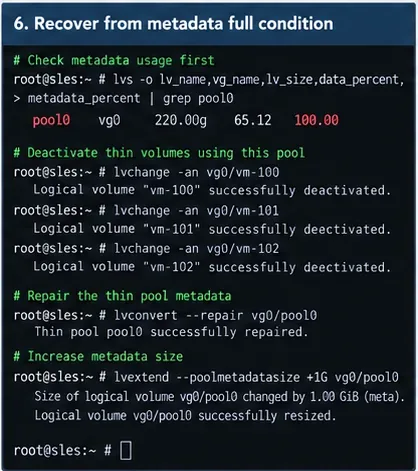
Caption: A metadata-full condition requires offline thin-pool repair and additional metadata space, not just more data extents.
The +1G figure is an example only. Metadata sizing depends on pool size, chunk size, snapshot use, and allocation behavior. After repair, inspect system logs and use the filesystem-specific supported check or repair procedure if I/O errors occurred. Do not run a filesystem repair tool blindly on a mounted filesystem.
Can deleting files free a thin pool immediately?
Not always. Deleting a file frees space inside the filesystem, but the thin pool only reclaims physical chunks when discard information reaches the pool. The LVM documentation notes that fstrim can reclaim such blocks, while snapshots may continue to reference blocks and prevent them from becoming free. If the pool is configured to ignore discards, trim will not reclaim the blocks.
When the filesystem and workload support it, check discard behavior and perform trim only after the pool is stable enough to operate:
lvs -o lv_name,discards VG_NAME/THIN_POOL
fstrim -v /mount/point
Deleting old thin snapshots can also release storage when those snapshots are the remaining references to blocks. Verify backup and retention requirements before deleting snapshots.
7. How do you stop this from happening again?
Enable and verify LVM thin-pool monitoring and configure auto-extension with enough free capacity in the VG. Upstream LVM uses dmeventd, normally through the lvm2-monitor service, to react when data or metadata usage crosses the configured threshold.
systemctl status lvm2-monitor.service
lvs -o+seg_monitor VG_NAME/THIN_POOL
lvchange --monitor y VG_NAME/THIN_POOL

lvmconfig --type full activation/thin_pool_autoextend_threshold
lvmconfig --type full activation/thin_pool_autoextend_percent
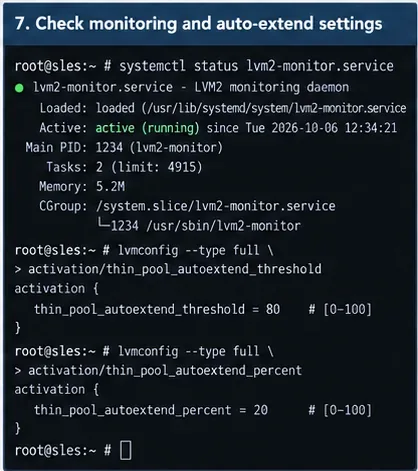
Caption: Auto-extension depends on active monitoring, an appropriate threshold, and free extents remaining in the volume group.
The LVM manual states that a threshold of 100 disables auto-extension and that the minimum valid threshold is 50. A lower threshold gives LVM more time to react on pools with very fast write rates. The extension percentage determines how much the pool grows when the policy is triggered.
A representative configuration in /etc/lvm/lvm.conf could be:
activation {
    thin_pool_autoextend_threshold = 70
    thin_pool_autoextend_percent = 20
}
Those values are examples, not universal defaults. Size the safety margin according to write burst rate, monitoring interval, storage provisioning lead time, and available VG free space. Auto-extension cannot help if the VG itself is already full.
8. How do you know the recovery really worked?
Verify more than one signal. The pool should have headroom, the VG should have enough free space for expected growth, applications should be able to write normally, and the logs should not show continuing thin-pool I/O or metadata errors.
lvs -a -o lv_name,vg_name,lv_attr,lv_size,data_percent,metadata_percent
vgs -o vg_name,vg_size,vg_free
journalctl -u lvm2-monitor.service --since "30 minutes ago"
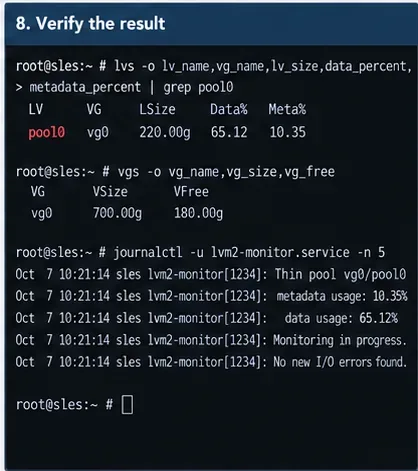
Caption: Recovery is confirmed when pool utilization has headroom, the VG retains usable free space, and monitoring reports no continuing I/O errors.
Restart applications gradually and watch the thin pool while real workload returns. If Data% climbs unusually fast again, extending the pool may have addressed the immediate outage without fixing the capacity-planning issue.
When should you stop and use a different recovery path?
| Observation | Recommended direction |
|---|
Data% near 100, Meta% healthy, VG has free space | Extend the thin pool and verify workload recovery. |
Data% near 100, VG has no free space | Add verified storage, reclaim blocks safely, or reduce retained thin volumes/snapshots before extending. |
Meta% reached 100 | Quiesce workloads, deactivate the pool, repair metadata offline, extend metadata, and verify filesystems. |
lvconvert --repair fails | Do not improvise repeated writes to metadata. Preserve logs and metadata backups and escalate to SUSE Support or an experienced LVM recovery engineer. |
| Clustered thin volumes | Follow cluster-resource procedures. SUSE requires the thin pool and thin volumes to be managed together so they remain exclusive to one node. |
| Pool fills again shortly after extension | Investigate snapshot retention, discard behavior, write growth, monitoring thresholds, and capacity planning. |
What should you avoid?
- Do not assume
df -h proves that a thin pool has free physical storage.
- Do not initialize a new device with
pvcreate until you have positively identified it as unused.
- Do not treat metadata exhaustion as the same problem as ordinary data exhaustion.
- Do not rely on auto-extension without reserving free extents in the VG.
- Do not run filesystem repair commands against mounted filesystems unless the filesystem vendor explicitly supports that operation.
- Do not disable monitoring merely to suppress warnings; the warning is often the last opportunity to extend the pool before writes fail.
Official and primary references









