Home
» LINUX
»
How to Configure Pardus Enterprise Management Software (LIDER AHENK)
How to Configure Pardus Enterprise Management Software (LIDER AHENK)
LIDER AHENK can give an IT team a central place to manage, monitor, and apply policies to Pardus systems, but a configuration is only useful when the server, directory, messaging layer, and endpoint agent are all working together. A setup that merely reaches the login page is not yet a successful deployment. The better target is measurable: the Lider interface is reachable, an Ahenk client registers cleanly, the client remains visible to the management system, and a low-risk management action can be issued and verified.
As checked in October 2026, the official LIDER AHENK documentation still publishes installation instructions centered on LIDER AHENK 3.0 and Pardus 23.1. That matters because some commands and package-management details are version-sensitive. This guide follows the currently published official path rather than assuming that a newer Pardus release is interchangeable. Before changing a production environment, compare these steps with the official LIDER AHENK documentation.
What a good LIDER AHENK configuration should achieve
LIDER AHENK has three core roles. Lider stores centrally collected data and distributes tasks and policies. Ahenk is the privileged service installed on managed computers; it executes instructions and returns results. The Lider Interface is the administrative web interface used for client and user management, policies, settings, and reporting.
A practical acceptance target is therefore broader than “installation completed.” Use these checks:
The Lider server can be reached from the administrator workstation on the intended management network.
The required services have network paths available through the firewall.
The web interface opens on the configured Lider address and port 8080.
At least one Ahenk endpoint can register and later reconnect after a reboot.
The registered endpoint appears in management and can return basic inventory or status information.
A harmless test task, such as requesting information rather than changing configuration, completes and is visible in task history or reporting.
If one of these checkpoints fails, stop there and fix that layer before adding more endpoints. Scaling an incomplete configuration usually makes diagnosis harder.
1. Prepare the server and network before running the installer
The official system-requirements page lists a production baseline of 4 CPU cores, 8 GB RAM, and 50 GB of disk, with resources increased according to client count. For development and test use, it lists 2 CPU cores, 4 GB RAM, and 20 GB disk. The documented ports are 8080, 22, 5222, 5280, 3306, and 389. It also specifies Pardus Server with the operating-system language set to English. See the official system requirements.
Do not interpret these minimums as sizing guidance for every organization. Database growth, reporting volume, concurrent administrators, endpoint count, retention, and whether components are split across servers can all change the real requirement. For a production rollout, measure resource use during a pilot and leave capacity headroom rather than treating the documented minimum as a target.
Before installation, confirm DNS or stable IP addressing, time synchronization, SSH access to the machines the installer will reach, and firewall rules between the relevant components. The server installer itself relies on SSH connectivity.
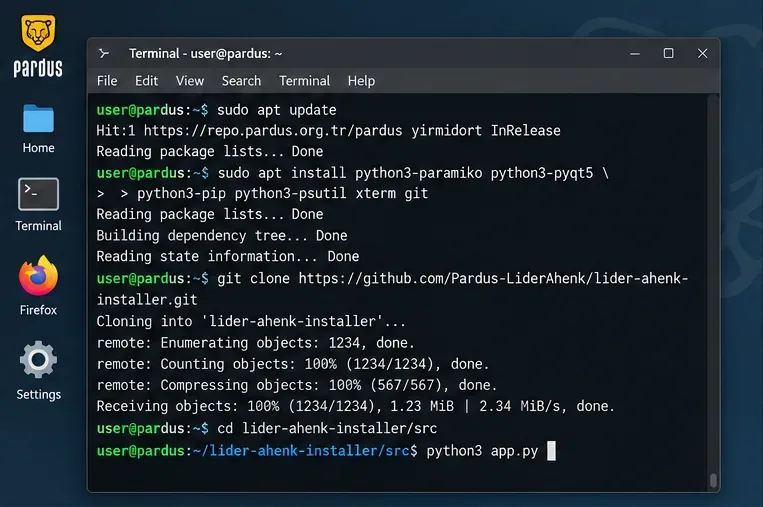
Prepare the installer host first: install the documented dependencies, obtain the official installer repository, and launch the installer only after SSH connectivity is ready.
The official server installation page currently instructs administrators to install Python and Qt dependencies, install Git, clone the official installer repository, change into its src directory, and run python3 app.py. Use the commands from the live documentation rather than copying an old blog post, because dependency handling can change.
The current official page also includes a command that removes Python's EXTERNALLY-MANAGED marker before using pip. That is a consequential system change, not a generic Python best practice. Follow it only on the documented Pardus installation path and only after checking the current official Lider server installation page. If your environment differs, use a staging system first rather than forcing the command onto another Debian-derived distribution.
2. Choose component placement and configure the Lider server
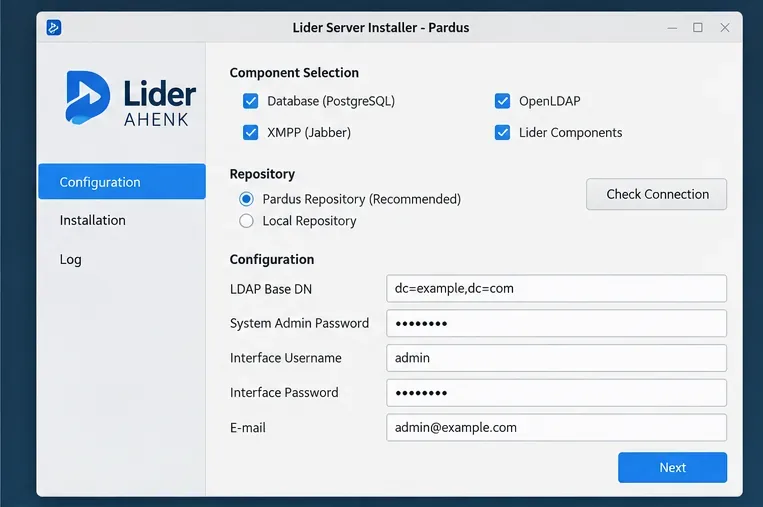
The installer can place the database, OpenLDAP, XMPP, and Lider components on one server or distribute them across separate servers. A single-server layout is simpler to deploy and troubleshoot for a pilot. A distributed layout can make more sense when an organization needs separate scaling, operational ownership, or isolation, but it introduces additional DNS, firewall, credential, and service-dependency paths.
Use the installer to decide where the database, OpenLDAP, XMPP, and Lider components live, then validate connectivity before starting the installation.
After entering server access information, use the installer's connection check before proceeding. For package sources, the official guide distinguishes the main repository for stable LIDER AHENK packages from the test repository. Production deployments should normally stay on the stable source unless there is a deliberate test plan. If your organization mirrors package repositories internally, the official guide supports entering the local repository address and key information instead.
The server configuration requires an LDAP Base DN, a system administrator password for LIDER AHENK components, a Lider Interface username and password, and an email address for the interface user. Plan the LDAP Base DN before enrollment. Changing directory naming after clients and users have been organized is much more disruptive than choosing it correctly at the start.
A reasonable quality gate at this point is simple: every target host passes the installer connectivity check, the intended repository is reachable, credentials are stored according to your organization's password policy, and the LDAP naming scheme is documented. If any of those are uncertain, correct them before clicking Start Installation.
3. Open the Lider Interface and validate the control plane
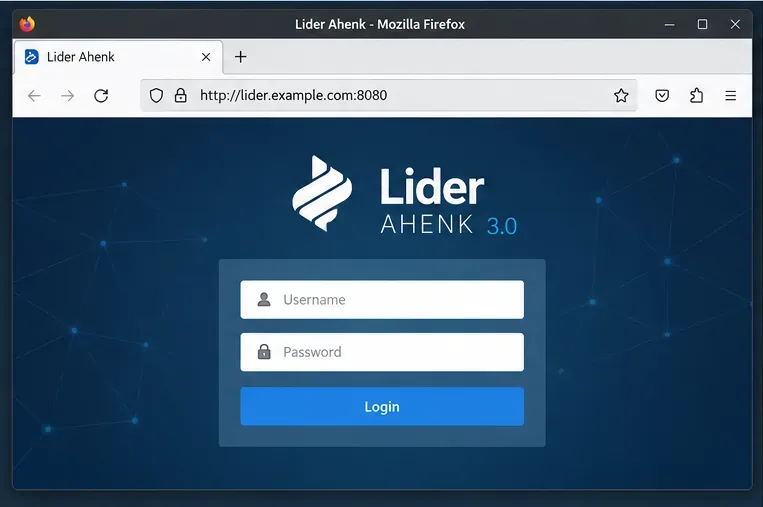
After server installation, the official guide says the Lider Interface is available at the Lider server address on port 8080. Open the interface from an administrative workstation that is supposed to have management access; do not test only from the server itself. Reaching it remotely verifies more of the real network path.
After installation, verify that the management interface is reachable from the intended administrator network on the documented port 8080 before enrolling endpoints.
Sign in with the interface account created during installation. Then review the available management areas before making broad changes. The official LIDER AHENK documentation describes client management, client groups, user management, policy management, scheduled tasks, reports, and server settings. The platform also supports capabilities such as package management, local user management, scripts, service management, file transfer, USB management, resource usage, and profiles that can be combined into policies.
At this stage, avoid starting with a high-impact policy. First confirm that the interface is stable, server settings are consistent with the deployment, and the management account can access the expected areas. If the page loads but settings or inventory calls fail, treat that as a backend or service-connectivity problem rather than a successful installation.
4. Install and register Ahenk on a pilot client
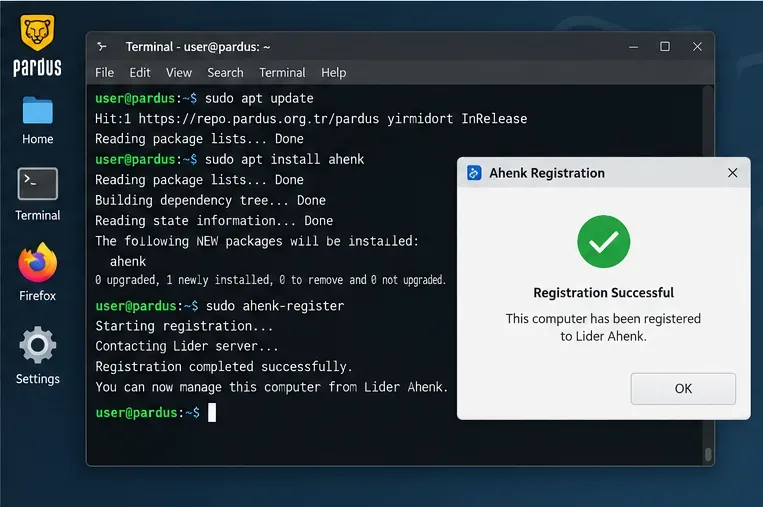
Enroll one representative Pardus endpoint before attempting bulk deployment. The official client instructions add the LIDER AHENK package repository, update APT metadata, install the ahenk package, and run sudo ahenk-register. Registration then collects the information required to join the managed environment, after which the documentation instructs the administrator to reboot the computer.
The official page currently shows the following core installation commands:
Repository setup should be taken directly from the official Ahenk client installation page. That page still shows apt-key for importing the repository key. Debian's own apt-key manual marks that mechanism as deprecated and recommends per-repository keyring approaches on newer APT versions. This is a useful boundary: follow the Pardus version and LIDER AHENK repository procedure that the project supports, but do not copy the legacy key command blindly onto unrelated or newer Debian-family systems.
A pilot endpoint should complete Ahenk registration successfully and then reconnect after reboot before you expand deployment to additional computers.
After reboot, confirm that the pilot endpoint remains registered. A one-time success dialog is not enough evidence: the client should reconnect after restart and be visible from the Lider management side.
How to validate the finished deployment
A useful validation sequence moves from observation to action. First, open the detailed client view and confirm the expected hostname, platform, and inventory information. Next, use a read-only or low-risk function such as resource usage or client information. Then inspect task history or the relevant report so you know the server recorded the result. Finally, reboot the client and repeat the check.
Check
Healthy result
If it fails
Web interface
Administrator can reach and sign in to the Lider Interface
Check port 8080, service state, routing, firewall, and the configured address
Server components
Installer connectivity checks succeed and management functions respond
Verify SSH, component hosts, credentials, DNS, and required ports
Ahenk registration
Pilot endpoint completes registration and survives reboot
Check repository access, client registration data, DNS, XMPP path, and server reachability
Management task
Low-risk task completes and its result is recorded
Inspect Ahenk connectivity and task/report history before changing policy scope
Policy rollout
Pilot group receives only the intended settings
Reduce scope, review profile composition, and retest on a small group
When to change the deployment approach
A single-server design is appropriate when simplicity matters more than component isolation and the pilot workload fits comfortably within measured capacity. Move toward a distributed design when resource contention, operational boundaries, redundancy requirements, or network architecture justify the added complexity. Do not split components merely because the software allows it; every additional server creates another dependency that must be monitored and backed up.
Similarly, do not move from one pilot endpoint directly to an organization-wide policy. Create a small client group, test representative hardware and user workflows, review task and system-log reports, and expand only when the results are repeatable. Policies can combine multiple profiles, so an error in scope can affect more than one setting at once.
Limits to keep in mind
The official documentation provides installation steps and minimum resource values, but it does not provide a universal production-sizing formula for every endpoint count, workload, retention period, or topology. It also cannot account for your firewall segmentation, directory design, backup policy, certificate requirements, or internal repository architecture. Treat those as deployment-design decisions that need local testing.
The most important version limitation is documentation drift. As of the October 2026 check for this article, the published install guide still names Pardus 23.1 and LIDER AHENK 3.0. If your organization uses a different Pardus release, a different APT behavior, or a newer LIDER AHENK branch, verify the current project's supported procedure before applying commands verbatim.
Final acceptance checklist
Server resources and required firewall paths have been verified.
The intended Lider, database, OpenLDAP, and XMPP placement is documented.
The installer passes its connection checks before deployment begins.
The Lider Interface is reachable from the real administrator network on port 8080.
A pilot Ahenk endpoint registers, reboots, and reconnects successfully.
A low-risk client information or monitoring task completes and is visible in reporting or history.
Policies are tested on a small group before broader assignment.
The deployed Pardus and LIDER AHENK versions match a procedure you have explicitly verified.
When all of those checks pass, the configuration is doing more than merely running: it is producing evidence that the control plane, endpoint agent, and management workflow work together. That is the point at which expanding the deployment becomes a controlled rollout rather than a larger troubleshooting exercise.