Home
» LINUX
»
How to Export SLES System Logs to a Remote Syslog Server Securely
How to Export SLES System Logs to a Remote Syslog Server Securely
The safest practical way to export SUSE Linux Enterprise Server (SLES) system logs to a remote syslog collector is to use rsyslog over TCP with TLS, validate the collector certificate by name, and give the forwarding action its own queue. Plain UDP syslog is simple, but it does not provide confidentiality or peer authentication. Plain TCP improves delivery behavior but still leaves log contents exposed in transit.
This guide uses the GnuTLS network stream driver (gtls) and modern rsyslog action syntax. The procedure is aimed at SLES 15 SP7 systems, whose Administration Guide was updated on October 1, 2026. Always check the exact packages and rsyslog version on your host before copying a configuration verbatim. The upstream rsyslog documentation recommends TCP with TLS for modern deployments and recommends an action queue for TCP forwarding.
Encrypts log traffic and supports certificate-based authentication.
Typical destination port
6514/tcp
RFC 5425 assigns TCP port 6514 for syslog over TLS.
rsyslog stream driver
gtls
Provides TLS through GnuTLS when the SLES module is installed.
TLS mode
StreamDriverMode="1"
Forces TLS-protected operation instead of plain TCP.
Authentication
x509/name
Validates the certificate chain and checks the expected server name.
Forwarding queue
queue.type="linkedList"
Decouples local log processing from temporary collector outages.
Before you configure forwarding
You need the fully qualified domain name of the remote collector, the TCP port it listens on, and the certificate authority (CA) certificate that signs the collector certificate. For mutual TLS, you also need a client certificate and private key for the SLES machine. The collector certificate must be valid for the hostname you configure in rsyslog, preferably through a Subject Alternative Name (SAN). Do not solve a name mismatch by disabling certificate verification.
The remote collector must already be configured to accept TLS syslog. This article focuses on the SLES sender because receiver setup varies between rsyslog, syslog-ng, SIEM appliances, and managed logging services. If a firewall separates the systems, allow the SLES host to initiate TCP connections to the collector on the configured port. A default stateful firewalld policy usually does not require opening an inbound port on the SLES sender.
Step 1: Confirm rsyslog is installed and identify the current build
Start by checking the package and daemon version. This prevents confusion when older examples use directives that are not supported by the build on your server.
rpm -q rsyslog
rsyslogd -v
systemctl status rsyslog --no-pager
Check the installed rsyslog package before changing its configuration.
If rsyslog is not installed, install it from your enabled SLES repositories. Keep the system patched through your normal SUSE update process before exposing a long-lived logging connection.
Step 2: Install the GnuTLS rsyslog module
On SLES, the TLS network driver is packaged separately. Install the GnuTLS module and keep the base rsyslog package present:
sudo zypper install rsyslog rsyslog-module-gtls
Install the rsyslog GnuTLS module that provides the gtls network stream driver.
You can confirm that the files came from the expected package with rpm -ql rsyslog-module-gtls. Package names are distribution-specific, so do not copy package names from Debian- or RHEL-oriented guides.
Step 3: Place the CA and client credentials safely
Use certificates issued by your organization or logging platform. For a production system, avoid creating a new private CA on the log-sending host. A lab can use a test CA, but production trust material should follow your organization’s PKI process.
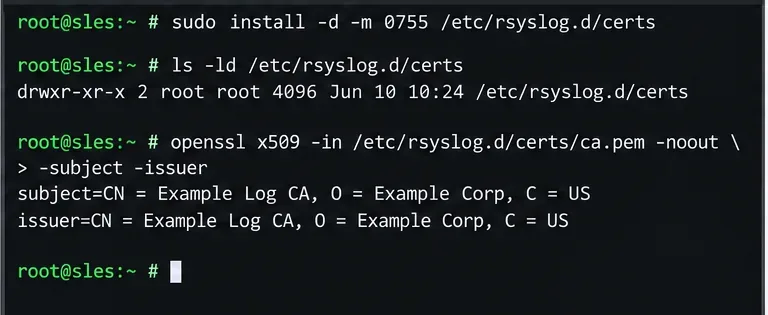
Create a root-owned directory, copy the files, and restrict the private key. Replace the example file names with the paths supplied by your PKI team:
Verify the certificate files and their ownership before referencing them from rsyslog.
The rsyslog TLS client documentation explicitly warns that the machine private key must be protected. If another user can read the private key, that user may be able to impersonate the logging client.
Step 4: Configure TLS forwarding with server-name verification
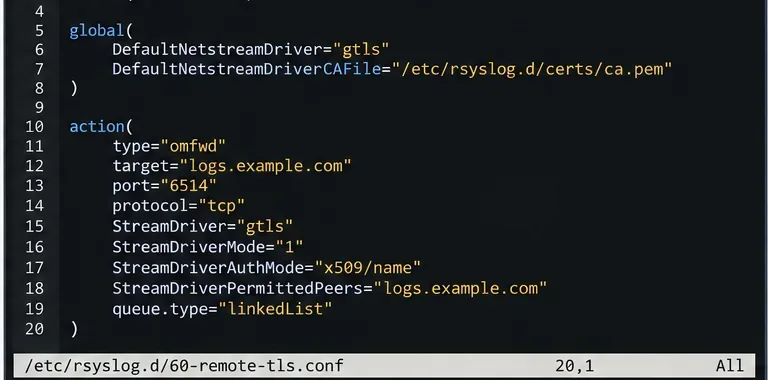
Create a dedicated drop-in such as /etc/rsyslog.d/60-remote-tls.conf. Keeping remote forwarding separate from the vendor configuration makes review and rollback easier.
The forwarding action uses TLS-only mode, an explicit permitted peer name, and a linked-list queue. The complete example in the article also includes the client certificate and key for mutual TLS.
StreamDriverMode="1" is important: choosing a TLS-capable driver alone is not enough on configurations where mode defaults to plain TCP. StreamDriverAuthMode="x509/name" then verifies the remote certificate and checks that the server identity matches the permitted peer. Use the exact collector name in the certificate instead of a broad wildcard whenever practical.
The action above forwards every message that reaches it. If you only want selected facilities or priorities, add a filter before the action. For example, a security-focused environment may forward authentication and daemon events while retaining high-volume application debug logs locally. Filtering should be driven by retention, incident-response, and compliance needs rather than by a blanket assumption that every message must leave the host.
Step 5: Validate, restart, send a test event, and check delivery
Validate the complete rsyslog configuration before restarting the service. This is the fastest way to catch syntax errors and missing module references:
sudo rsyslogd -N1
If validation succeeds, restart rsyslog and send a unique test message:
On the collector, search for the tag sles-tls-test and the sender hostname. A successful remote appearance proves that the message reached the collector, but it does not by itself prove certificate verification was configured correctly. The stronger check is to keep x509/name enabled and confirm there are no TLS handshake or peer-name errors in the rsyslog service log.
If the connection fails, test DNS resolution for logs.example.com, confirm TCP 6514 is reachable, check certificate validity dates, and verify that the collector certificate contains the expected DNS name. Also confirm that the collector trusts the CA that issued the SLES client certificate when mutual TLS is enabled.
Troubleshooting checklist
Connection refused: the collector is not listening on the configured address/port or a firewall is rejecting the connection.
Timeout: routing, network ACLs, or a firewall is silently dropping traffic.
Certificate verify failed: the CA file is wrong, incomplete, expired, or the server certificate chain is incomplete.
Peer name mismatch: the target/StreamDriverPermittedPeers name does not match the collector certificate identity.
Permission denied on the key: the key path or permissions do not allow the rsyslog process to read the file under the SLES service configuration.
Messages stop during an outage: review the action queue design and capacity. The upstream omfwd documentation specifically recommends a queue for TCP forwarding so an unavailable destination does not block normal processing.
Security notes that are easy to miss
Do not replace certificate validation with anonymous TLS unless you fully understand the trade-off. Encryption without authenticating the server can still expose logs to an active man-in-the-middle attacker. Likewise, do not open TCP 6514 inbound on the SLES sender just because the destination uses that port; forwarding is an outbound client connection.
Protect client private keys as credentials, rotate certificates before they expire, and use a collector hostname that remains stable across IP address changes. If you need stronger delivery guarantees than normal TCP/TLS forwarding, rsyslog documentation points to RELP as an alternative designed for acknowledged delivery. That is a separate design choice from transport encryption.
Final verification
A correct deployment should meet four observable conditions: rsyslog configuration validation returns successfully, the service stays active after restart, the collector receives the unique test event, and the sender log shows no TLS trust or peer-name errors. Once those checks pass, document the certificate expiration dates and the remote collector dependency so future maintenance does not silently break centralized logging.