Home
» LINUX
»
How to Increase the Size of the /tmp Folder on Linux
How to Increase the Size of the /tmp Folder on Linux
If Linux reports that /tmp is full, do not resize it blindly. First check what filesystem actually backs the directory. If /tmp is a tmpfs mount, you can raise its size limit immediately with a remount and make that limit persistent in /etc/fstab. If it is part of an ext4, XFS, Btrfs, or other disk-backed filesystem, the size= tmpfs option does not apply.
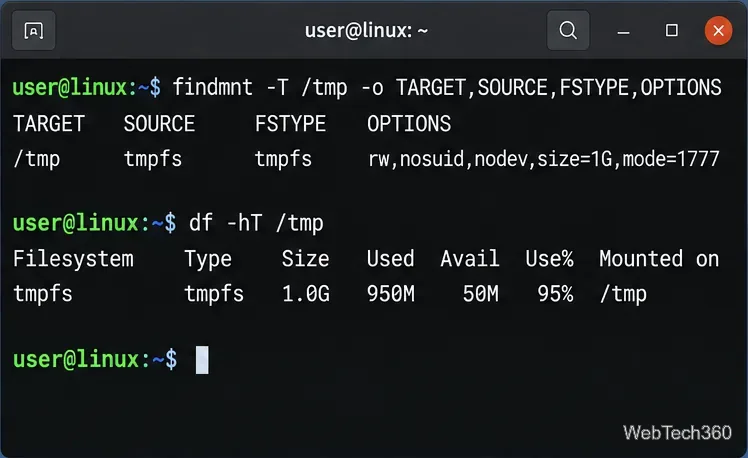
The findmnt command identifies the filesystem that contains /tmp, while df shows its size and current usage. The upstream findmnt documentation recommends using the target option to resolve the filesystem for a path.
If FSTYPE is tmpfs, continue with the steps below. If it is something such as ext4, xfs, or btrfs, skip to the disk-backed section.
Confirm that /tmp is actually a tmpfs mount before changing a tmpfs size limit.
Temporarily increase a tmpfs /tmp
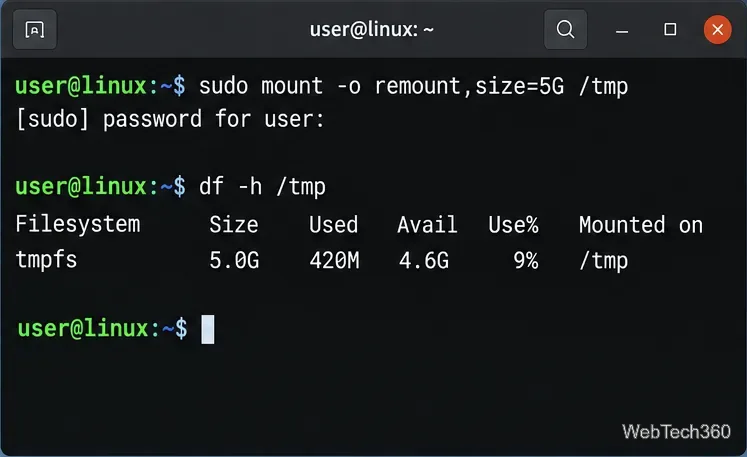
You do not need to unmount /tmp. Linux tmpfs supports changing its maximum size during a remount without discarding the files already stored there. For example, to raise the limit to 5 GiB, run:
sudo mount -o remount,size=5G /tmp
Then verify the result:
df -h /tmp
The Linux kernel's tmpfs documentation states that the size= limit can be changed on remount. A value such as 5G is a capacity ceiling, not 5 GiB of RAM reserved immediately. tmpfs consumes memory as files are stored and can use swap when swap is available.
Do not set an unnecessarily huge limit. A workload that fills a large tmpfs can create severe memory pressure. Also, a remount like this is temporary: the original boot configuration returns after a reboot unless you change the persistent mount settings.
A remount changes the live tmpfs size limit without unmounting /tmp.
Make the larger /tmp size persistent
Only use this method after confirming that /tmp is meant to be tmpfs. Back up /etc/fstab first:
sudo cp /etc/fstab /etc/fstab.backup
Open the file with your preferred root-capable editor, for example:
sudoedit /etc/fstab
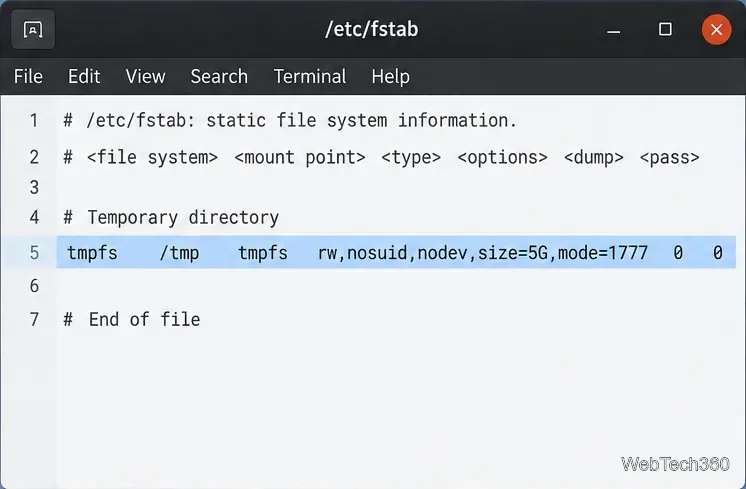
If an existing /tmp tmpfs line is present, keep its current security and compatibility options and change only its size= value. If your system uses systemd's default tmpfs-backed /tmp and has no /tmp entry in fstab, systemd documents that an /etc/fstab entry can be used to change the tmpfs mount options. A typical example is:
The mode=1777 setting keeps the normal world-writable temporary-directory permissions with the sticky bit. Do not add options such as noexec just for resizing; changing unrelated mount behavior can break software that expects the existing configuration. See systemd's API file systems guidance and the upstream fstab documentation.
For a persistent limit, set size= in the existing or intended tmpfs configuration for /tmp.
On a systemd-based distribution, reload generated units after editing fstab:
sudo systemctl daemon-reload
If /tmp is already mounted as tmpfs, you can apply the new fstab options immediately with:
sudo mount -o remount /tmp
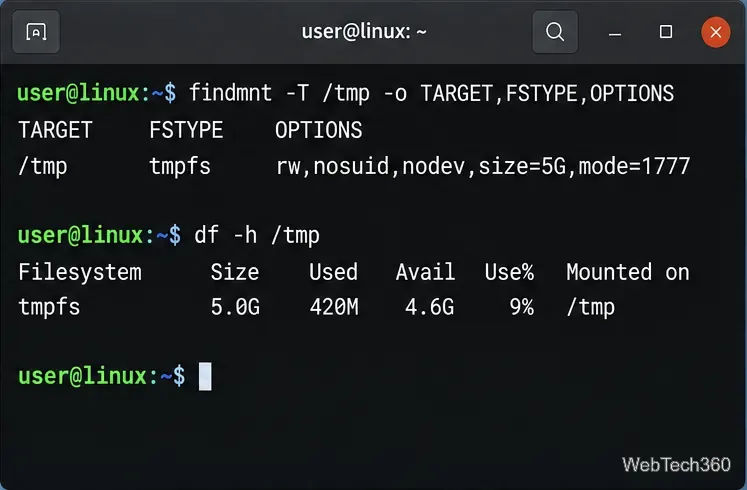
Otherwise, reboot at a convenient time. Afterward, check both the mount options and capacity:
Verify the filesystem type, mount options, and reported capacity after the change.
What if /tmp is not tmpfs?
If findmnt shows that /tmp lives on your root filesystem or another disk-backed filesystem, there is no independent tmpfs limit to enlarge. You must free space or expand the underlying filesystem, partition, or logical volume. Another option is to point a specific program at a larger temporary directory if it honors TMPDIR:
systemd's temporary-directory guidance notes that software should use $TMPDIR when it is set and that /var/tmp is generally better suited to larger temporary data that should survive a reboot.
If you still get “No space left on device”
Check inode usage as well as byte usage:
df -h /tmp
df -i /tmp
A filesystem can run out of inodes even when it still has free bytes. Also investigate which application is producing the temporary data rather than repeatedly enlarging /tmp. Resizing is appropriate when the normal workload legitimately needs more temporary capacity, but uncontrolled growth is usually better fixed at its source.