Home
» LINUX
»
How to Set Up an Encrypted SWAP Partition on Existing Debian 12
How to Set Up an Encrypted SWAP Partition on Existing Debian 12
Encrypting swap on an existing Debian 12 system is worthwhile when you want to prevent memory pages, passwords, document fragments, and other transient data from being written to disk as plaintext. For a machine that does not need hibernation, Debian documents a simple design: put the swap partition behind plain dm-crypt and generate a fresh random encryption key at every boot.
This guide uses that design. It assumes Debian 12 “bookworm,” a dedicated swap partition, and systemd as the init system. The commands are deliberately conservative because a mistake in a block-device path can overwrite the wrong partition. Read the decision points first, then substitute your own device identifiers rather than copying the example values blindly.
Debian’s cryptsetup documentation describes encrypted swap specifically and recommends deactivating swap, adding the partition to /etc/crypttab with /dev/urandom, changing /etc/fstab to the mapped device, and then reactivating swap. See the Debian cryptsetup README. Debian 12’s crypttab(5) manual also documents the crypttab fields and plain dm-crypt options.
Should you use random-key encrypted swap?
Use it when you want encrypted swap and do not need hibernation. The key is regenerated at every boot, so old swap contents become unreadable after shutdown. That is exactly the security property most desktop and server installations want.
Do not use this exact setup if you rely on hibernation, suspend-to-disk, hybrid sleep, or suspend-then-hibernate. Resume requires the next boot to decrypt the same hibernation image. A new random key makes that impossible. Debian explicitly notes that random-key swap cannot be used as a resume device. Debian 12’s systemd hibernate-resume documentation likewise shows that resume depends on a persistent resume device.
If hibernation is a requirement, use a persistent encryption design such as a LUKS-backed swap device with an appropriate unlock and resume configuration instead. That is a different setup and is intentionally outside this guide.
Is your swap already protected by disk encryption?
Check before changing anything. If your swap logical volume already lives inside a LUKS-encrypted container, adding another dm-crypt layer may provide little practical benefit while increasing complexity.
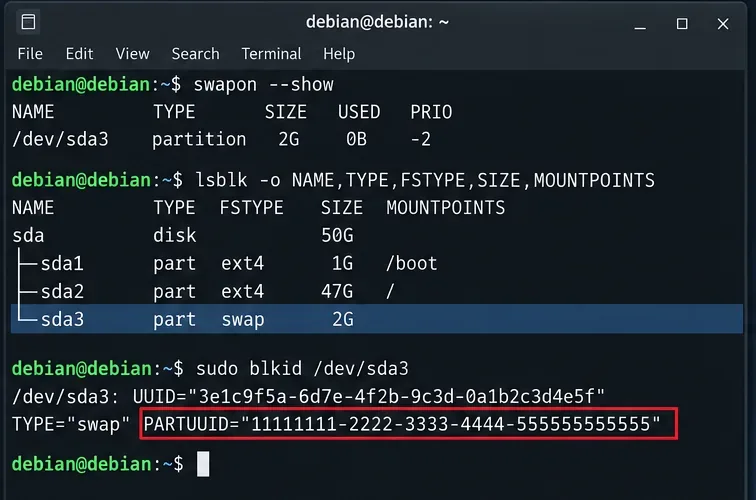
Look at the device shown by swapon --show and trace its parents in lsblk. A common unencrypted layout might show /dev/sda3 directly as type swap. An encrypted-LVM installation may instead show swap beneath a crypto_LUKS parent.
Identify the active swap partition and a stable partition identifier before making any changes. The device names and identifiers shown here are examples only.
The distinction matters because this article is about converting an unencrypted dedicated swap partition. If swapon --show reports a swapfile instead, use a swapfile-specific procedure. If the swap is already inside encrypted storage, first decide whether a second layer is actually necessary.
What should you record before turning swap off?
Record the exact partition path, its size, and its PARTUUID. A PARTUUID identifies the partition-table entry and remains useful even after the swap signature inside the partition is replaced by encrypted data.
For example:
sudo blkid /dev/sda3
ls -l /dev/disk/by-partuuid/
You may see output containing a value such as:
PARTUUID="11111111-2222-3333-4444-555555555555"
In the examples below, the corresponding stable path is:
Avoid relying on /dev/sda3 if disk enumeration could change. Also avoid using the old swap filesystem UUID as the long-term source identifier: the encrypted-swap setup recreates the swap signature on the mapped encrypted device, so that old raw-swap UUID is not the right persistent identity for the underlying partition.
1. How do you prepare the system safely?
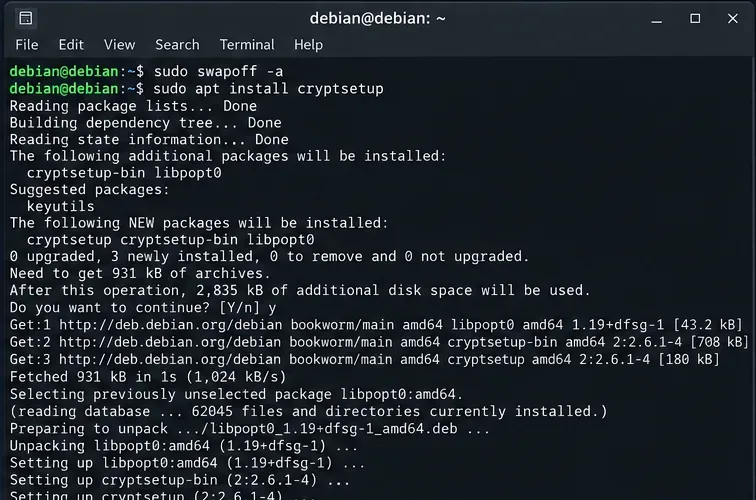
Install cryptsetup if it is not already present, then back up the two configuration files you will edit.
sudo apt update
sudo apt install cryptsetup
sudo cp -a /etc/crypttab /etc/crypttab.before-encrypted-swap 2>/dev/null || true
sudo cp -a /etc/fstab /etc/fstab.before-encrypted-swap
If /etc/crypttab does not yet exist, that is not a problem; create it when you edit the configuration.
Next, make sure the system has enough available memory for the short period while swap is disabled. Then turn off only the swap partition you are converting. Using the exact device is safer than swapoff -a on a machine with several swap areas:
sudo swapoff /dev/sda3
swapon --show
Disable the target swap before placing encryption over it. On systems with multiple swap devices, operate on the intended device rather than disabling everything unnecessarily.
Do not run mkswap on the raw partition after this point. The swap signature should be created on the encrypted mapper device, not on the unencrypted backing partition.
2. What belongs in /etc/crypttab?
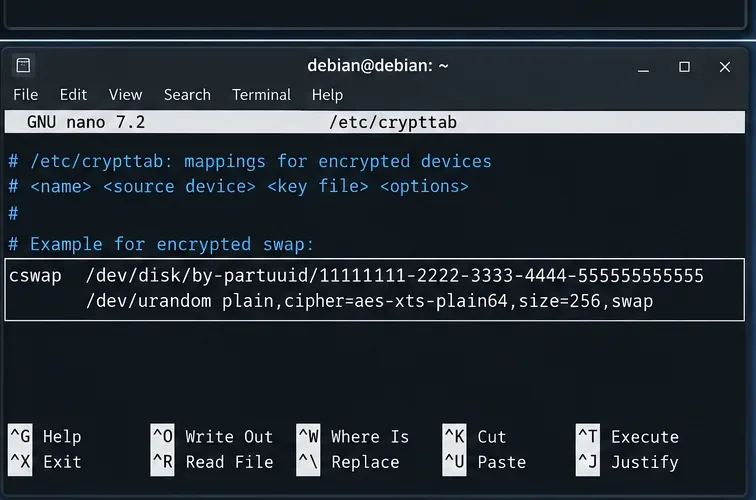
Create or edit /etc/crypttab and add one entry for the encrypted swap mapping. The following follows the Debian cryptsetup documentation:
Replace the example PARTUUID with the one from your system.
The fields mean:
cswap is the mapper name, creating /dev/mapper/cswap.
The second field is the actual underlying swap partition.
/dev/urandom supplies a new random key whenever the mapping is created.
plain selects plain dm-crypt rather than a persistent LUKS header.
cipher=aes-xts-plain64,size=256 makes the plain-dm-crypt parameters explicit instead of depending on defaults that may change.
swap tells the cryptsetup integration that this mapped device is swap and should be initialized appropriately.
The crypttab entry creates a temporary encrypted mapping named cswap with a fresh key from /dev/urandom on each activation.
Debian’s crypttab manual warns that plain dm-crypt does not store cipher, hash, or key-size metadata in a header, unlike LUKS. That is why explicitly recording the cipher and key size is useful. The manual also documents discard but notes security implications; do not add it merely because the backing device is an SSD unless you have evaluated that tradeoff.
3. What changes in /etc/fstab?
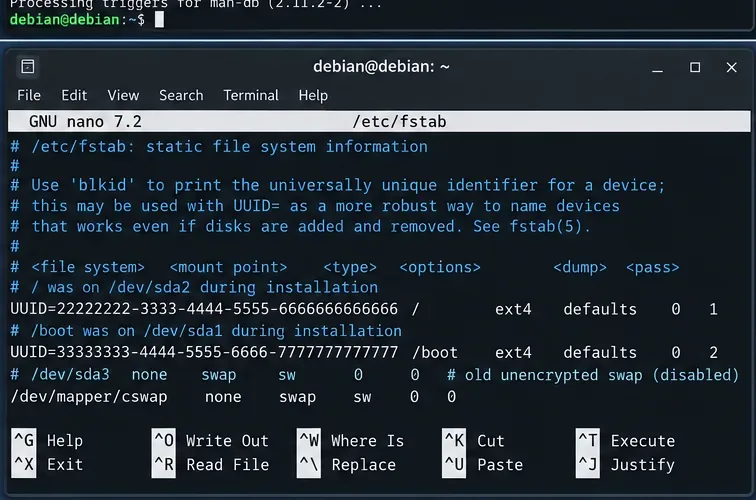
Find the old unencrypted swap line in /etc/fstab. It may use a UUID, a device path, or another persistent identifier. For example:
UUID=OLD-SWAP-UUID none swap sw 0 0
Replace it with the mapped encrypted device:
/dev/mapper/cswap none swap sw 0 0
Do not leave both entries active. If both the raw partition and /dev/mapper/cswap are enabled as swap, you defeat the purpose of encrypting the partition and risk confusing boot-time activation.
fstab should point to the encrypted mapper device, not to the original raw swap partition.
Debian’s fstab(5) manual defines the swap entry format, while swapon(8) explains how entries marked as swap are activated.
4. How do you activate and verify it before rebooting?
After saving both files, start the encrypted mapping and then enable the swap entry. Debian’s cryptsetup documentation uses:
sudo cryptdisks_start cswap
sudo swapon -a
Now verify all three layers:
swapon --show
sudo cryptsetup status cswap
lsblk -o NAME,TYPE,FSTYPE,SIZE,MOUNTPOINTS
A healthy result should show swap on /dev/mapper/cswap, not directly on the original partition. cryptsetup status cswap should report the mapping as active.
If cryptdisks_start is unavailable in your installation, do not improvise destructive commands. Recheck that the cryptsetup package is installed and that the crypttab syntax is valid. You can also let the normal Debian boot process create the mapping after completing the resume configuration below. Debian 12 uses systemd generators to translate crypttab and fstab configuration into boot-time units.
5. Do you need to disable hibernation resume?
Yes, if this partition was configured as the system’s resume device. A random key cannot decrypt a hibernation image written with the previous key. Debian’s encrypted-swap instructions explicitly tell administrators to disable resume when converting the old resume swap partition to random-key encrypted swap.
If it refers to the swap partition you just converted, set resume to none:
echo "RESUME=none" | sudo tee /etc/initramfs-tools/conf.d/resume
sudo update-initramfs -u
This is the point where update-initramfs -u is relevant. You do not need to rebuild the initramfs merely because a normal post-boot swap entry changed; you do need to update it when removing an old hibernation resume target that the initramfs may otherwise try to use.
Reboot test: what proves the setup works?
Reboot only after the live activation works and the configuration files are correct:
The raw backing partition is not listed directly as active swap.
cryptsetup status cswap reports an active plain dm-crypt mapping.
The machine boots without asking for a swap passphrase; the random key is generated automatically.
You can also reboot twice and compare the mapping behavior. The point of the design is that the encryption key is ephemeral; the previous boot’s swap contents are not recoverable after the mapping is recreated.
What if the machine drops into emergency mode?
The most common causes are a wrong backing-device path, a typo in /etc/crypttab, or an /etc/fstab line that still points to the old raw swap. Boot into recovery mode or use a rescue environment, mount the root filesystem read-write, and restore the backups if necessary.
Useful checks include:
sudo cryptsetup status cswap
systemctl status systemd-cryptsetup@cswap.service
systemctl status dev-mapper-cswap.swap
journalctl -b -u systemd-cryptsetup@cswap.service
Unit names may be escaped differently for unusual mapper names, so use systemctl list-units '*cryptsetup*' if the exact service name is not obvious.
What about SSD discard?
Do not enable discard by default just to chase theoretical SSD performance. Debian’s crypttab documentation states that passing discard requests through an encrypted device has security implications. Debian’s swapon manual similarly notes that discard may improve performance on some SSDs, but often does not. If you need it, evaluate your storage model and threat model first, then add it deliberately.
Is encrypted swap still useful if the root filesystem is unencrypted?
Yes, but understand the boundary. Encrypted swap protects memory pages written to the swap partition. It does not encrypt files saved on an unencrypted root or home filesystem, shell history, application caches, crash dumps, temporary files, or logs. If the goal is broad protection against data exposure from a stolen disk, full-disk or filesystem encryption is the more complete control.
Final checklist
Confirm the target is a dedicated unencrypted swap partition, not a swapfile and not already protected by an encrypted parent device.
Record a stable partition path such as /dev/disk/by-partuuid/....
Disable the raw swap before configuring dm-crypt.
Add a random-key plain-dm-crypt entry to /etc/crypttab.
Point /etc/fstab only to /dev/mapper/cswap.
Activate the mapping and verify it before rebooting.
If the old swap was a resume device, set RESUME=none and run update-initramfs -u.
After reboot, verify that only the encrypted mapper is active as swap.
For Debian 12 systems that do not hibernate, this approach keeps the configuration small and avoids storing a persistent swap key. The key decision is not “which encryption command should I run?” but whether random-key swap matches your power-management requirements. Once that is settled, the rest is a controlled migration from the raw swap partition to a dm-crypt mapping that is recreated securely on every boot.