Home
» MS OFFICE
»
How to Run ONLYOFFICE Document Server Behind an HAProxy Load Balancer
How to Run ONLYOFFICE Document Server Behind an HAProxy Load Balancer
The most important rule is this: putting ONLYOFFICE Document Server behind HAProxy is straightforward for a single backend, but a multi-node editor cluster needs more than plain round-robin. ONLYOFFICE’s current API documentation states that requests for the same document must reach the same Document Server node during collaborative editing. For modern integrations, the recommended mechanism is the shardkey query parameter, which the load balancer can use for document-aware affinity.
If you only have one Document Server and want HAProxy for HTTPS termination, a stable public hostname, or centralized health checks, the configuration is simpler. If you have two or more Document Server nodes, use the same proxy fundamentals but add routing based on shardkey rather than assuming ordinary round-robin is enough.
HAProxy is a sensible front end when you want one public URL such as https://docs.example.com, TLS termination at the load balancer, active health checks, or multiple Document Server nodes behind one endpoint. It is also useful when your Nextcloud, ownCloud, custom DMS, or application should never connect directly to an individual Document Server node.
This guide assumes:
HAProxy can reach each Document Server over the internal network.
Each Document Server already works directly before the load balancer is introduced.
The public hostname resolves to HAProxy.
Your TLS certificate covers the public hostname.
If you run multiple nodes, they are deployed as a supported multi-server ONLYOFFICE architecture rather than unrelated standalone servers that merely happen to share a load balancer.
Step 1: Verify every Document Server before adding HAProxy
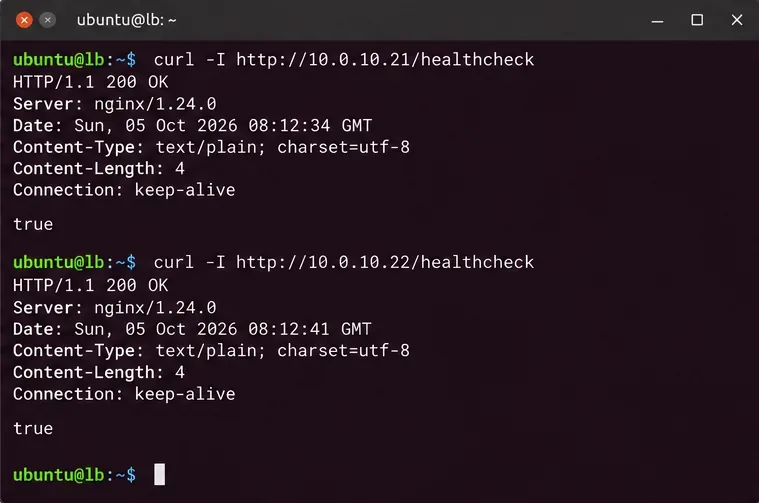
Do not begin with the load balancer. First prove that every backend is healthy from the HAProxy host. ONLYOFFICE documents /healthcheck as the endpoint for checking editor availability. A healthy server returns true; the check covers core dependencies such as the database, message broker, Redis connection, and storage.
Check each backend directly from the HAProxy host before configuring load balancing. A load balancer cannot compensate for an unhealthy Document Server node.
If one backend fails here, troubleshoot that node first. Common causes include firewall rules, an incorrect internal port, Document Server services not running, or unavailable supporting services.
Step 2: Set HTTP mode and timeouts that tolerate editor connections
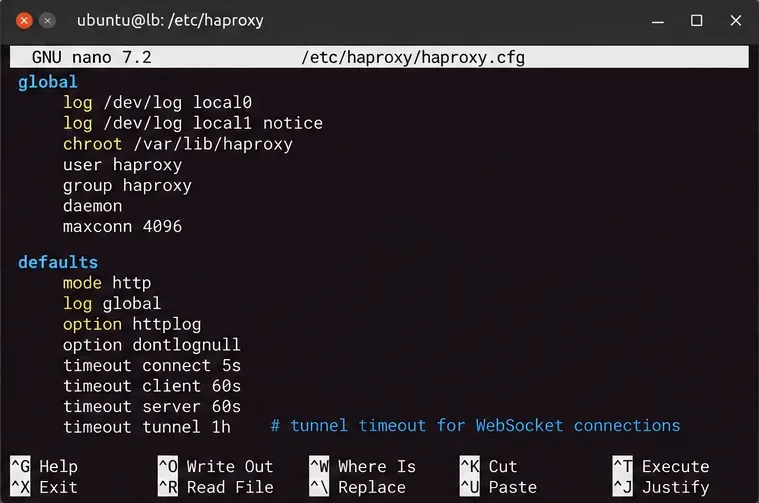
ONLYOFFICE is an HTTP application and uses long-lived WebSocket connections during editing. HAProxy can proxy WebSockets automatically after the HTTP upgrade, but its timeout policy still matters. HAProxy’s own documentation recommends a timeout tunnel value for upgraded WebSocket connections.
The WebSocket tunnel timeout should be longer than ordinary request timeouts so idle collaborative editing sessions are not dropped prematurely.
A one-hour tunnel timeout is an example, not a universal requirement. Choose a value that fits your organization’s editing behavior, security policy, and resource limits. If editors disconnect at a very regular interval, compare that interval with HAProxy and any upstream firewall or reverse-proxy idle timeouts.
Step 3: Terminate HTTPS and preserve the original request context
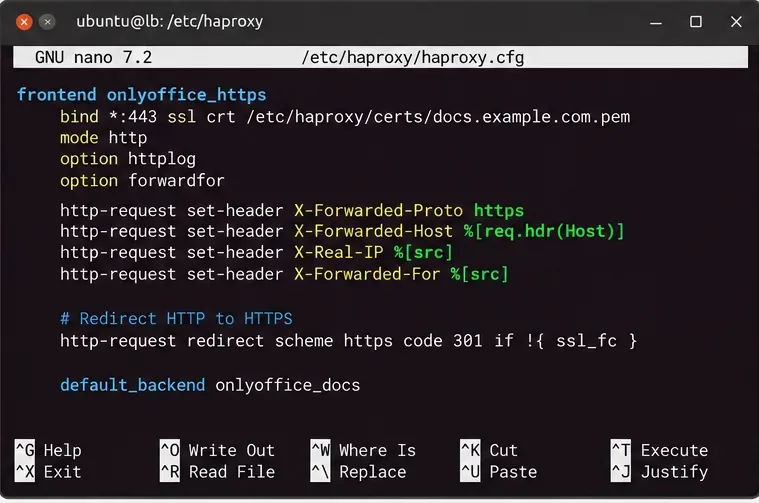
ONLYOFFICE explicitly requires forwarded headers when it runs behind a proxy. In particular, X-Forwarded-Proto tells Document Server whether the original client used HTTP or HTTPS, while X-Forwarded-Host preserves the hostname requested by the client.
Terminate TLS at HAProxy and forward the original scheme and host so ONLYOFFICE can generate externally correct URLs.
You normally do not need to manually recreate NGINX-style Upgrade and Connection header rules in modern HAProxy HTTP mode. HAProxy recognizes the HTTP-to-WebSocket upgrade and switches the connection into tunnel mode. The important part is not to insert rules that strip or break the upgrade request.
For client IP visibility, add option forwardfor in the backend. That generates an X-Forwarded-For header from the client source address.
Step 4: Add health checks and choose the right balancing rule
Single Document Server
If HAProxy fronts one Document Server, the backend can be simple:
backend onlyoffice_docs
    mode http
    option forwardfor
    option httpchk GET /healthcheck
    http-check expect status 200
    timeout tunnel 1h

    server ds1 10.0.10.21:80 check
In this design HAProxy is mainly a reverse proxy, TLS endpoint, and health gate.
Multiple Document Server nodes
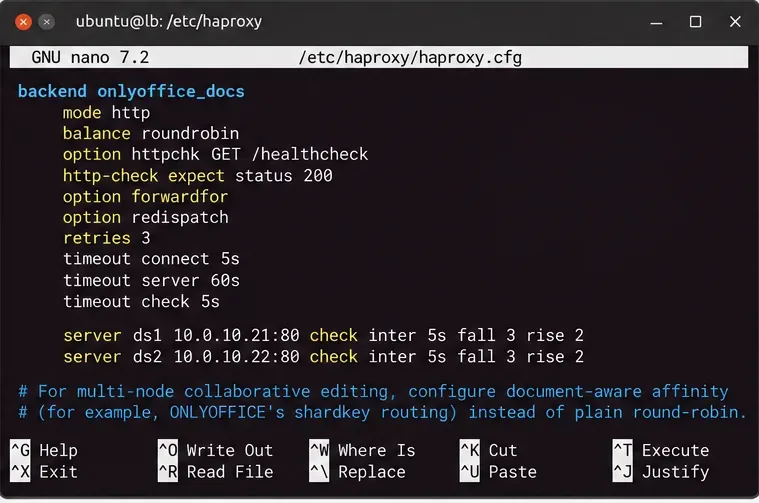
For a real multi-node deployment, do not rely on plain round-robin for collaborative editing. ONLYOFFICE’s current documentation says that all requests belonging to the same document must reach the same server. Browser-to-server editor requests automatically include a shard key, and applications should add ?shardkey=<document-key> to command, conversion, and Document Builder requests where documented.
HAProxy supports hashing on a URL query parameter, so a suitable backend for the standard ONLYOFFICE Docs API is:
backend onlyoffice_docs
    mode http
    option forwardfor
    option httpchk GET /healthcheck
    http-check expect status 200
    timeout tunnel 1h

    balance url_param shardkey

    server ds1 10.0.10.21:80 check
    server ds2 10.0.10.22:80 check
Health checks keep failed nodes out of rotation, while document-aware affinity is required for multi-node collaborative editing. Use shardkey-based routing for the standard Docs API rather than plain round-robin.
HAProxy’s url_param algorithm hashes the selected query-string parameter. If that parameter is absent, HAProxy falls back to ordinary load balancing behavior. That makes it especially important that your integration sends the shard key on requests where ONLYOFFICE recommends it.
WOPI is different. ONLYOFFICE states that WOPI integrations use the WOPISrc query parameter for the same routing purpose. Do not copy the balance url_param shardkey line unchanged into a WOPI design and assume it provides the required affinity.
Validate and reload HAProxy safely
Before reloading the service, validate the configuration:
sudo haproxy -c -f /etc/haproxy/haproxy.cfg
Only reload after syntax validation succeeds:
sudo systemctl reload haproxy
sudo systemctl status haproxy
If your distribution uses a different service manager or configuration path, adapt those commands accordingly. A reload is preferable to an unnecessary hard restart when your HAProxy package supports graceful configuration reloads.
Test through the public URL, not only from inside the backend network
Now test what users and your document-management platform will actually reach:
Finally, open a real document through the integrating application. A health check only proves that the Document Server endpoint is ready; it does not prove callback URLs, JWT configuration, document downloads, save callbacks, or multi-node affinity are all correct.
What to check when the editor loads but disconnects or fails to save
Symptom
Likely layer to inspect
Useful action
Public /healthcheck fails
HAProxy routing, TLS, or backend health
Test each backend directly, then inspect HAProxy status and logs.
Editor frame loads, then disconnects
WebSocket path or idle timeout
Check timeout tunnel and any firewall or proxy between the browser and HAProxy.
Generated URLs use HTTP instead of HTTPS
Forwarded headers
Verify X-Forwarded-Proto: https and X-Forwarded-Host.
Multi-node editing behaves inconsistently
Document affinity
Confirm shardkey is present and that HAProxy hashes it consistently.
Health check works but save fails
Integration callback/network path
Verify Document Server can reach the storage application’s callback and document URLs.
Some nodes repeatedly leave rotation
Backend dependency or health check
Query /healthcheck directly on the affected node and inspect its Document Server logs.
Do you need sticky sessions?
Traditional source-IP stickiness is not the best default answer for ONLYOFFICE. Multiple users editing the same file can have different client IP addresses, and one user can open different documents that do not need to live on the same node. Document-aware affinity based on ONLYOFFICE’s shard key is more precise because the routing key represents the editing document rather than the person’s network address.
The same distinction explains why a simple cookie-based sticky session should not be treated as a substitute for the routing behavior documented by ONLYOFFICE. Use the application’s documented shard key when you are building a multi-node Docs API deployment.
Final configuration checklist
Every Document Server returns true from /healthcheck before it is added to HAProxy.
HAProxy runs in HTTP mode for the ONLYOFFICE frontend and backend.
HTTPS is terminated with a certificate valid for the public Document Server hostname.
X-Forwarded-Proto and X-Forwarded-Host are forwarded correctly.
The WebSocket tunnel timeout is long enough for real editing sessions.
Backend health checks remove failed nodes from service.
Multi-node Docs API traffic uses shardkey-based affinity, not plain round-robin alone.
WOPI deployments use routing appropriate to WOPISrc.
The public health check works, and a real document can open, edit, and save through the integration.
For one Document Server, HAProxy is mainly a clean reverse-proxy and TLS layer. For several Document Server nodes, the decisive difference is document-aware routing. Build the proxy around that requirement first, then add health checks, HTTPS, and timeout tuning around it.