Home
» NETWORK ADMIN
»
5 Best Microsoft Access Alternatives for Desktop and Web Databases
5 Best Microsoft Access Alternatives for Desktop and Web Databases
If Microsoft Access feels too Windows-bound, too file-size-limited, or awkward for team collaboration, you have several strong replacements. The right choice depends on whether you need desktop forms and reports, a simple local database, a shared no-code workspace, or a browser-based business app. The five options below cover those needs without pretending that every Access feature has a one-click substitute.
Why consider a Microsoft Access alternative?
Microsoft Access is still a current product, including Access for Microsoft 365 and Access 2024. Its core file limit also remains: an .accdb or .mdb database can be up to 2 GB, minus space required for system objects. Microsoft recommends moving data to a server database such as SQL Server when an application needs more capacity or scalability. See the official Access specifications and SQL Server migration guidance.
A desktop database tool can combine table editing, relationships, queries, forms, and reports in one workspace.
Five Microsoft Access alternatives worth considering
Alternative
Best for
Main trade-off
LibreOffice Base
Access-like desktop database work
Access forms and VBA do not migrate automatically
DB Browser for SQLite
Simple local SQLite databases
Not a forms-and-reports app builder
Baserow
No-code team databases and internal apps
Browser-first workflow differs from Access
nuBuilder Forte
Self-hosted multi-user business apps
Needs a web/PHP/MySQL environment
NocoDB
Spreadsheet-style work on shared relational data
No direct replacement for Access VBA
1. LibreOffice Base: best overall desktop replacement
LibreOffice Base is the closest fit if you like the classic Access model of tables, queries, forms, and reports in a desktop application. LibreOffice describes Base as a full-featured database front end with wizards for core database objects and connections to external database systems.
It is attractive when you want a free, open-source desktop tool and do not want to build a web application. The main caveat is migration: VBA code, macros, forms, reports, and Access-specific queries usually need to be reviewed or rebuilt. Start with the official LibreOffice Base overview.
2. DB Browser for SQLite: best for a lightweight local database
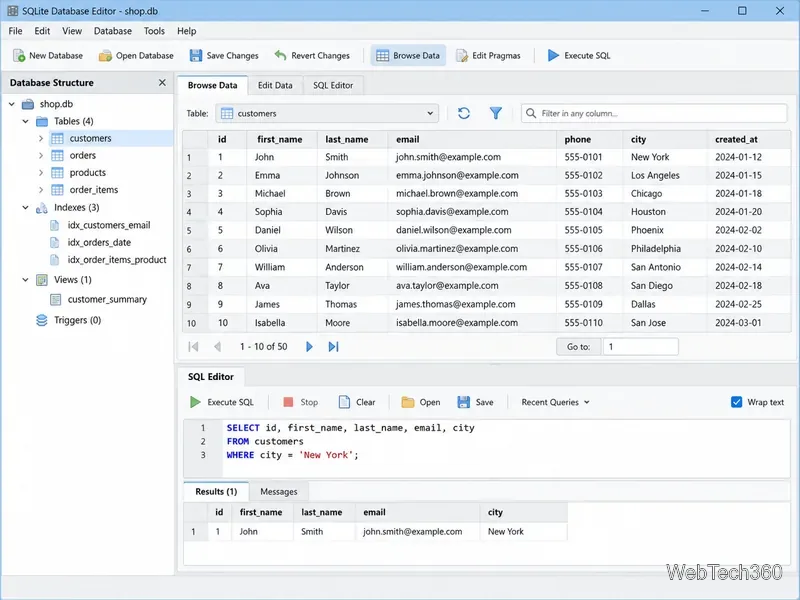
DB Browser for SQLite is a strong choice when you mainly need a compact local database with a graphical interface. It supports creating and editing SQLite databases, defining tables and indexes, browsing records, importing and exporting CSV data, and running SQL queries on Windows, macOS, and Linux.
SQLite-focused tools emphasize direct table editing and SQL queries rather than Access-specific VBA, forms, and reports.
It is not a complete Access clone: there is no equivalent Access application layer for VBA-driven forms and reports. For inventory lists, research data, prototypes, or other single-user databases, that simplicity can be useful. See the DB Browser for SQLite project site.
3. Baserow: best no-code option for collaborative teams
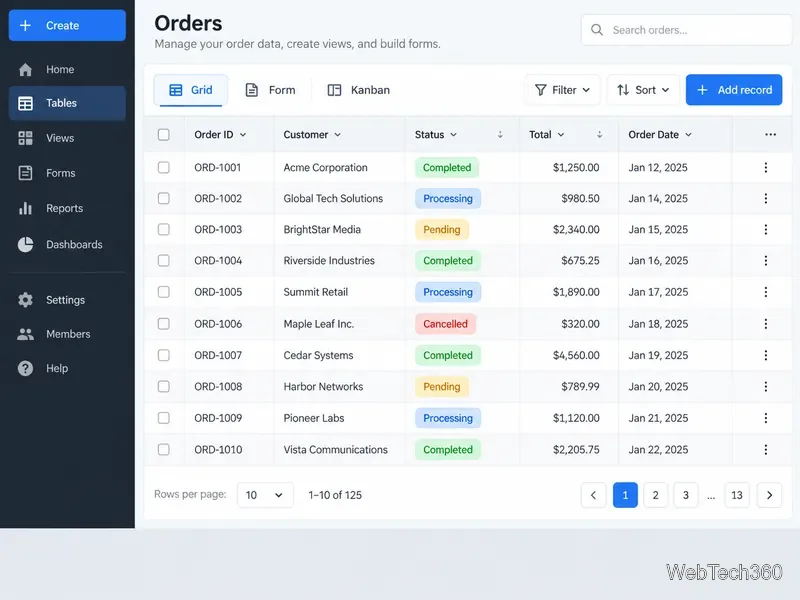
Baserow is an open-source, browser-based no-code database platform. Users can create related tables, import spreadsheet data, build multiple views, collect records through forms, and create applications and dashboards. It offers hosted and self-hosted deployment.
Choose Baserow when several people need to work with the same data and the Access desktop-file model has become a bottleneck. It does not run Access VBA or reproduce an .accdb interface exactly, so workflows must be rebuilt as browser-based views, forms, applications, or automations. See the official Baserow documentation.
Browser-based alternatives make shared tables, views, forms, and team workflows accessible without a Windows desktop database file.
4. nuBuilder Forte: best for self-hosted database applications
nuBuilder Forte is designed to turn database data into a multi-user web application. The open-source project is written in PHP and uses MySQL. Its browser interface supports logins, permissions, forms, searchable lists, related records, calculations, and PDF output, while developers can extend applications with SQL, PHP, and JavaScript.
It suits internal business applications that users reach through a browser, but it requires web-server and database administration. Details are on the official nuBuilder site.
5. NocoDB: best for a spreadsheet-style interface over shared data
NocoDB is a no-code database platform with a spreadsheet-like interface. Its current documentation covers tables, linked records, filters, forms, Kanban and other views, APIs, and custom interfaces. NocoDB can create its own projects and connect to supported PostgreSQL or MySQL databases.
It is a practical option for teams moving away from an Access front end while keeping data in a server database. Access-specific forms, reports, macros, and VBA logic still need to be redesigned. See the official NocoDB documentation.
DB Browser for SQLite: straightforward local SQLite work.
Baserow: collaborative no-code tables, forms, apps, and dashboards.
nuBuilder Forte: self-hosted multi-user business applications.
NocoDB: spreadsheet-like web access to shared relational data.
Before migrating an existing Access database
Inventory more than tables and relationships. List saved queries, forms, reports, macros, VBA modules, import/export routines, and linked data. Most alternatives can accept exported tabular data, but application behavior usually needs separate work.
If Access still suits users but the data file is the problem, a complete replacement may be unnecessary. Microsoft supports keeping Access as the front end while SQL Server or Azure SQL stores the data. If you are leaving Access entirely, migrate a copy first and validate relationships, calculations, permissions, forms, and reports before switching production work.