Home
» NETWORK ADMIN
»
6 Best Free Syslog Servers to Try for Centralized Logging
6 Best Free Syslog Servers to Try for Centralized Logging
If you want to centralize router, firewall, server, and application logs without paying for a commercial platform, there are still several solid free choices. The best fit depends on whether you want a simple receiver, a Windows-friendly GUI, or a full searchable log-management stack. Our current picks are ManageEngine EventLog Analyzer Free, PRTG Freeware, Graylog Open, rsyslog, syslog-ng Open Source Edition, and NXLog Community Edition.
Centralized syslog lets infrastructure devices feed one searchable event stream instead of leaving logs scattered across individual systems.
What a syslog server actually does
Syslog is a standard way to send event notifications from one system to another. The modern message format is defined in RFC 5424. A central collector receives those messages, stores or forwards them, and may add search, filtering, dashboards, or alerts.
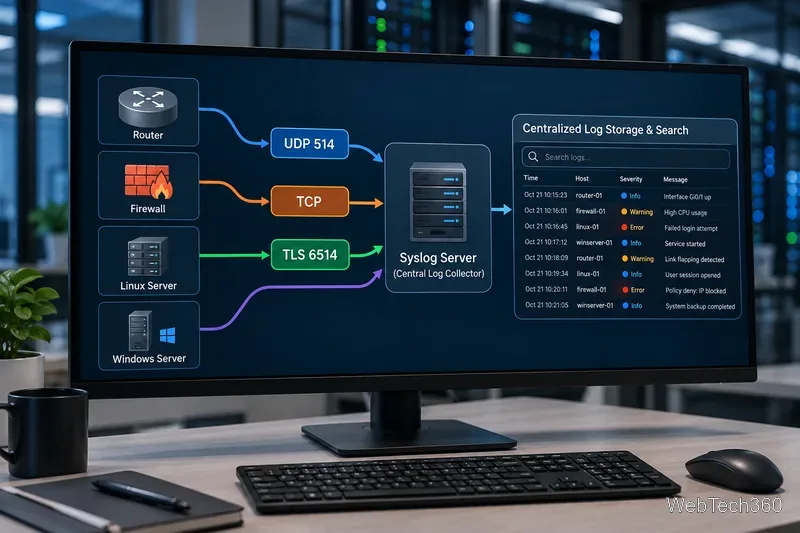
Transport matters too. Traditional deployments often use UDP because it is simple, but UDP does not guarantee delivery. TCP is more reliable, while RFC 5425 defines syslog over TLS and assigns TCP port 6514 as the default for that secure transport. For production use, prefer TCP or TLS when your devices and collector support them.
Windows Event Log is not the same thing as syslog. If you need Windows events in the same pipeline, choose a product that can collect Windows logs directly or use an agent that converts and forwards them.
6 best free syslog servers and collectors
Tool
Free offering
Best for
ManageEngine EventLog Analyzer
Up to 5 log sources
Small GUI-based lab
Paessler PRTG
100 sensors free for life
Syslog plus network monitoring
Graylog Open
Free self-managed edition, no ingest-volume cap
Search, dashboards, and alerting
rsyslog
Open source
Lightweight Linux server or relay
syslog-ng OSE
Open source
Flexible parsing and routing
NXLog Community Edition
Free open-source edition
Cross-platform collection and forwarding
1. ManageEngine EventLog Analyzer Free
EventLog Analyzer is a convenient starting point if you want a browser-based interface rather than editing configuration files. Its Free Edition supports up to five log sources and does not expire. It includes centralized log collection, compliance reports, and log forensics, although advanced real-time correlation and alerting are reserved for paid editions.
2. Paessler PRTG Freeware
PRTG is primarily a network-monitoring platform, but its Syslog Receiver sensor can collect and analyze syslog messages. The Freeware edition includes 100 sensors for life, which makes it useful for a home lab or small environment where you also want ping, SNMP, bandwidth, or server monitoring. One important limitation: the current Syslog Receiver sensor supports UDP only.
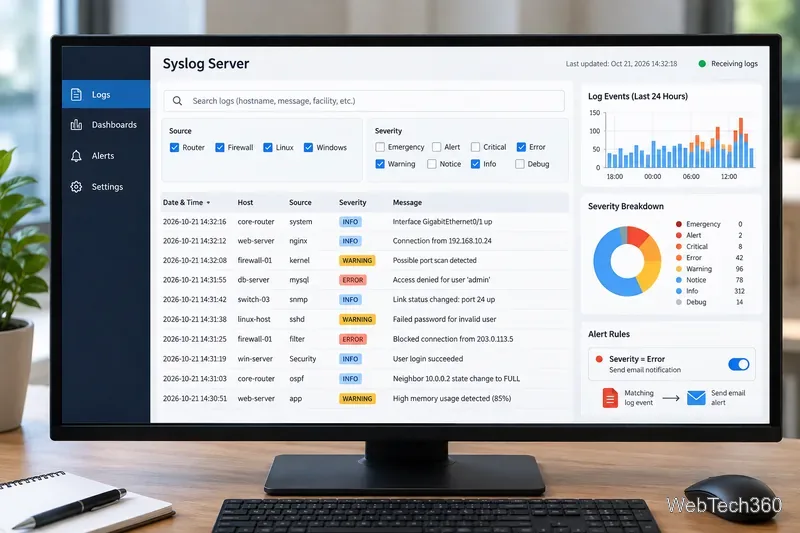
A GUI-based collector can make raw events easier to search, filter by severity, visualize, and route into alerting workflows.
3. Graylog Open
Graylog Open is a much broader log-management platform. Graylog says its Open edition is permanently free, with no daily ingest cap or volume limit, and includes log collection, search, dashboards, and alerting. Its syslog inputs support both TCP and UDP, making it a strong choice when you want to experiment with a more SIEM-like workflow instead of a basic receiver. The tradeoff is that you must operate the supporting self-managed stack.
4. rsyslog
rsyslog is one of the most practical options for Linux. It is a high-performance, modular logging framework that can receive syslog over UDP or TCP, route messages with rules, write to files, and forward data to other systems. TCP inputs can also use TLS through the appropriate network stream driver. There is no polished built-in dashboard, so rsyslog is best when you want a lightweight server, relay, or pipeline component.
5. syslog-ng Open Source Edition
syslog-ng Open Source Edition is another mature open-source choice for centralized logging. It can collect, parse, classify, rewrite, filter, and route logs to many destinations. Its current documentation includes configurations for client, server, and relay roles, so it is especially useful when you want to learn how a flexible log pipeline is assembled rather than just install a GUI application.
Syslog collectors can receive logs over different transports; TLS protects traffic in transit, while UDP remains simple but does not guarantee delivery.
6. NXLog Community Edition
NXLog Community Edition is a free open-source collector for Windows and GNU/Linux. It can receive log data over UDP and TCP, parse syslog, collect Windows Event Log data, and forward events to other platforms. It is particularly useful when you need one lightweight agent or collector technology across mixed operating systems, although it is not a full analytics dashboard by itself.
Which free syslog server should you choose?
For the easiest small GUI lab: ManageEngine EventLog Analyzer.
For syslog alongside network monitoring: PRTG Freeware.
For searchable dashboards and a fuller log-management stack: Graylog Open.
For a lightweight Linux receiver or relay: rsyslog.
For advanced open-source parsing and routing: syslog-ng OSE.
For Windows and Linux collection with one agent family: NXLog Community Edition.
Why Kiwi Syslog Server is no longer on this free list
Older versions of this article recommended SolarWinds Kiwi Syslog Server Free Edition. SolarWinds currently labels that free edition “Coming Soon”, while the available download is a fully functional 14-day trial. Because it is not currently available as a permanent free download, we have not counted it among the six free tools above. You can verify the current status on the official Kiwi Syslog Server page.