Home
» NETWORK ADMIN
»
7 Wake-on-LAN Tools: What’s Still Available From the 2021 List
7 Wake-on-LAN Tools: What’s Still Available From the 2021 List
Best fit depends on your PCs and network. NirSoft WakeMeOnLan is the simplest free Windows pick; Aquila adds scanning, packet listening, and scheduling; WakeOnLANx and EMCO Remote Shutdown suit batch tasks. Since 2021, SolarWinds retired its free standalone utility and EMCO discontinued WakeOnLan. Product status was checked against vendor pages on October 22, 2026.
A Wake-on-LAN (WoL) utility sends the wake signal; it cannot make unsupported hardware wake. Confirm the target PC’s network adapter and firmware support WoL before choosing an app.
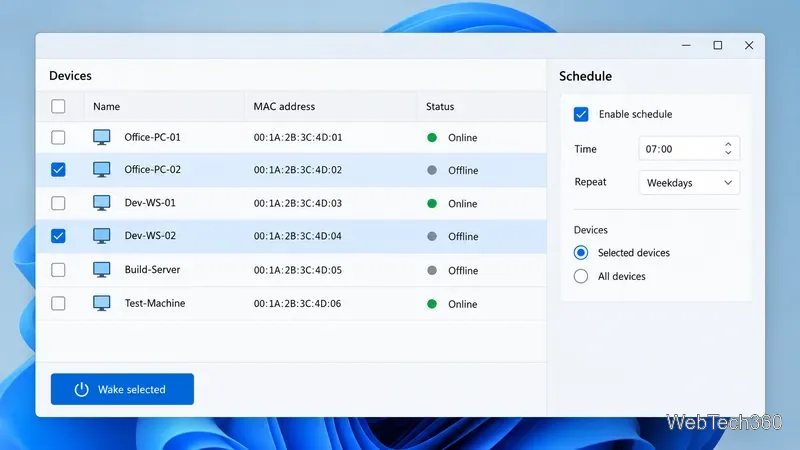
A typical WoL utility keeps saved MAC addresses beside a command for sending the wake packet. The interface is illustrative; product layouts vary.
How Wake-on-LAN works
A WoL tool sends a “magic packet” containing the target network adapter’s MAC address. The adapter listens for that pattern in a supported low-power state and signals the PC to wake. See Microsoft’s Windows driver documentation.
WoL also depends on firmware, drivers, power state, and network configuration. Microsoft documents waking Windows from sleep and explicitly requested hibernation in supported configurations, but not from Hybrid Shutdown; classic shutdown (S5) is not a supported Windows WoL state. Some firmware may support wake from shutdown separately, so check the PC maker’s guidance. See Microsoft’s Wake-on-LAN behavior notes.
7 Wake-on-LAN tools and their current status
1. NirSoft WakeMeOnLan — simple and portable
This free utility scans a local network, saves device names and MAC addresses, and wakes one or more PCs. It also has command-line options. NirSoft lists version 1.96, updated February 25, 2026, but its requirements name Windows 2000 through Windows 10; test it on newer Windows versions first. Details and downloads are on the official WakeMeOnLan page.
2. Aquila WakeOnLAN — GUI with monitoring and scheduling
Aquila combines wake commands with a network scanner, magic-packet listener, shutdown controls, and scheduled tasks. Its site lists version 2.12.4, while the version history shows older dated releases; treat it as legacy software and check compatibility before installing. See the product page and version history.
3. Depicus Wake-on-LAN — GUI, command line, and monitor
Depicus publishes separate Windows GUI, command-line, and monitor/sniffer utilities. The free GUI page refers to Windows 7 and 8, so treat it as an older option and verify it on your PC. Its monitor can help confirm that a packet reaches a subnet. See the GUI and monitor pages.
4. WakeOnLANx — batch actions for Windows
WakeOnLANx loads a host list and can wake, reboot, or shut down selected PCs. The publisher also describes ping status, scheduling, and MAC-address retrieval. It runs as a portable executable and requires .NET Framework 4.0 or later. Review the publisher’s feature and requirement notes, then test it on a few managed machines.
Some batch tools combine saved device lists with scheduled wake-ups; controls differ by product.
5. Wake on LAN (Magic Packet) — Microsoft Store app
HM Software NL’s app is a basic sender for saved devices. The Store listing gives an August 25, 2016 release date and an approximate size of 18.4 MB, so do not assume recent maintenance. Check its publisher and Windows compatibility in the Microsoft Store listing.
6. SolarWinds Wake-on-LAN — no longer a free standalone download
SolarWinds ended the free standalone offering in July 2021. It still documents Wake-on-LAN inside Engineer’s Toolset, a paid suite with a 14-day trial. This option makes most sense for admins already considering the suite. See the deprecation notice and current tool page.
7. EMCO WakeOnLan — discontinued; use its replacement
EMCO says WakeOnLan is discontinued and replaced by Remote Shutdown. The replacement handles wake, shutdown, reboot, and scheduled tasks; its free edition supports up to five PCs per operation and two tasks of each type. See the current product page and discontinuation notice.
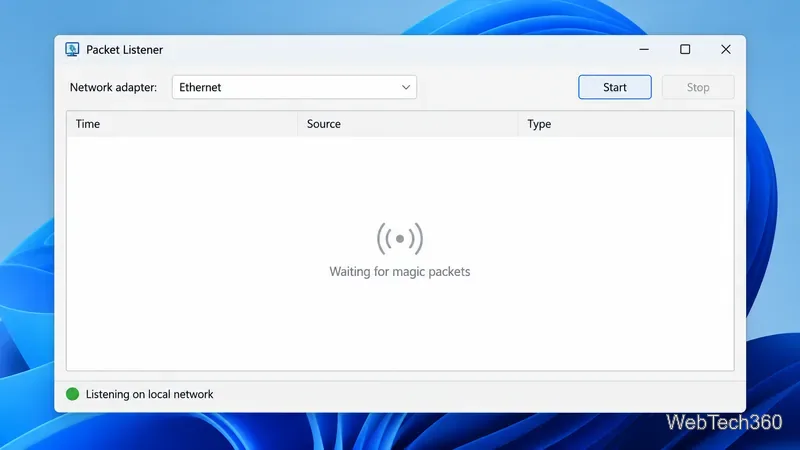
A packet listener can show whether a magic packet reaches the local network; it cannot confirm that the PC finished booting.
Which tool should you choose?
One or two Windows PCs: Start with NirSoft if its listed Windows support fits your system.
Scanning or scheduling: Compare Aquila with EMCO Remote Shutdown, checking each product’s maintenance status and limits.
Several managed PCs: Consider WakeOnLANx, EMCO Remote Shutdown, or SolarWinds Engineer’s Toolset for batch actions.
A basic send command: Depicus or the Store app may be enough if compatible with your Windows release.
Before troubleshooting a failed wake
Test on the same local network, preferably over Ethernet. Enable WoL in BIOS/UEFI and adapter settings, and use the MAC address of the adapter that stays connected in standby. Intel’s setup checklist notes that firewall, driver, BIOS, OS, and router settings can affect results.
A “sent” message does not prove the PC started. Wait, then check reachability with ping or your normal remote-access tool. For another subnet or internet access, use a managed gateway or VPN. Avoid enabling broad IP-directed broadcasts just for WoL: Cisco notes that directed broadcasts can be abused in amplification attacks and are disabled by default on current IOS releases. See its router hardening guidance.