Home
» NETWORK ADMIN
»
9 Best Ping Tools for Testing Latency and Scanning a Network
9 Best Ping Tools for Testing Latency and Scanning a Network
For a quick check, your operating system’s built-in ping is enough. Use a dedicated tool to compare hosts, scan a subnet, test a TCP service, or track latency over time. These nine picks match those different tasks.
What a ping test tells you
Ping sends an ICMP Echo Request and waits for an Echo Reply. Round-trip time (RTT) estimates how long the exchange takes; unanswered probes may indicate packet loss. Ping does not measure bandwidth or confirm that an application is healthy. Firewalls may block or rate-limit ICMP, so a timeout does not prove a host is offline. Replies may include TTL, a remaining packet lifetime that offers only a rough clue about path length.
On Windows, run ping /n 5 192.0.2.10. On macOS or Linux, run ping -c 5 192.0.2.10. Flags differ, so check your system’s documentation before reusing options. See Microsoft’s ping reference and the protocol definition in RFC 792.
A ping test reports replies and round-trip times for the path to a target.
9 ping tools for different jobs
1. Built-in ping: best for a fast, no-install check
All major desktop operating systems include ping, making it the fastest no-install reachability check. Test a gateway or server and review response times and loss. It is convenient for one host; use another tool for trend graphs or many addresses.
2. fping: best for scripting and multiple targets
fping sends probes to many hosts and reads targets from a file, making it useful in shell scripts. For example, fping -c 5 192.0.2.10 sends five probes. It fits Linux and Unix-like systems where batch output matters.
3. gping: best for a live terminal graph
gping graphs response times in the terminal and can compare hosts side by side. Its visual output makes spikes easier to spot than scrolling text. It is open source with install options for Windows, macOS, and Linux; choose it for a lightweight live graph.
4. PsPing: best for Windows TCP checks
Microsoft Sysinternals PsPing supports ICMP, TCP, latency, and bandwidth tests. For example, psping -n 10 server.example:443 checks TCP connection response on port 443 when ICMP is blocked but the service should accept connections. TCP and ICMP results measure different things.
5. Nping: best for advanced packet testing
Nping, distributed with Nmap, sends and analyzes ICMP, TCP, UDP, and ARP traffic to multiple targets. It helps administrators test how devices or firewalls handle different packet types. This command-line tool suits users who know how to interpret the results. Probe only systems you are authorized to test.
6. PingPlotter: best for tracking a connection over time
PingPlotter combines repeated latency measurements, route information, and time graphs for diagnosing intermittent problems. Desktop and cloud editions vary by feature and connection limits, so check current plan details. Use the timeline to see whether loss or latency changes recur along the route.
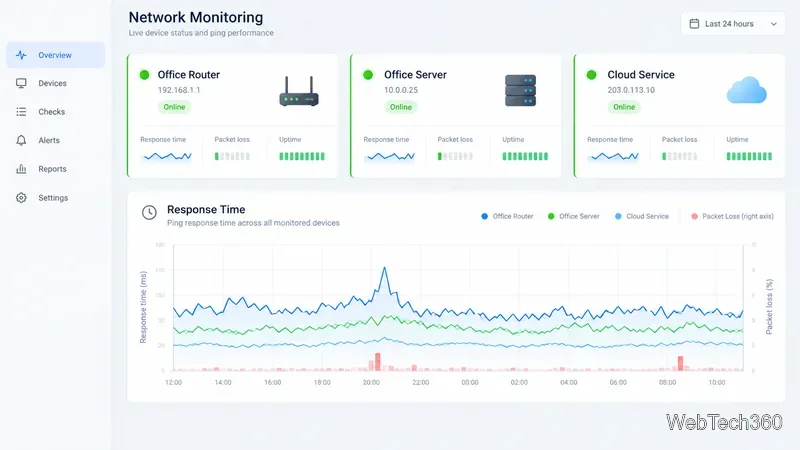
Trend graphs help distinguish a short latency spike from a pattern that keeps returning.
7. SolarWinds Engineer’s Toolset: best for network administrators
The commercial Engineer’s Toolset bundles Simple Ping, Enhanced Ping, Ping Sweep, and other network utilities. Graphs and multi-device monitoring suit admins who need more than a one-off command. It is paid software with a free trial; confirm licensing on the vendor page.
8. Angry IP Scanner: best for cross-platform host discovery
Angry IP Scanner is a free, open-source scanner for Windows, macOS, and Linux. Scan a range or list, check which hosts respond, resolve names, and optionally inspect ports. It exports results but is not a long-term latency monitor. Check official downloads for current packages and requirements.
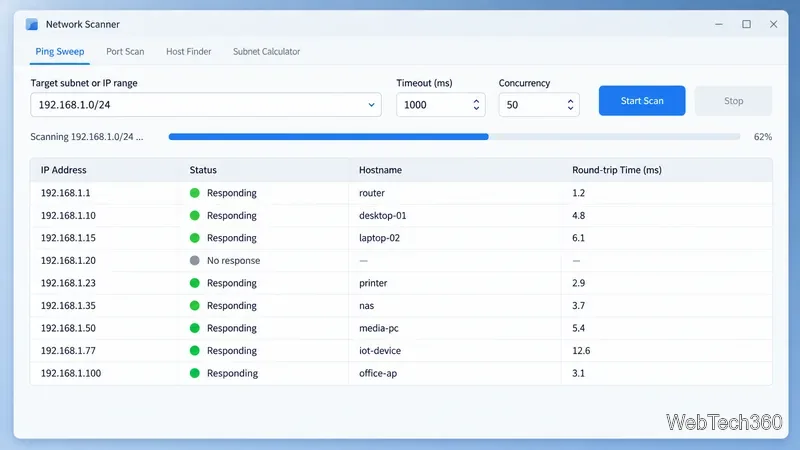
A ping sweep summarizes which addresses reply and their measured round-trip times.
9. Advanced IP Scanner: best for Windows LAN discovery
Advanced IP Scanner is a free Windows utility for scanning a local IP range. It lists devices and can show MAC addresses, shared folders, and remote-control actions when you have access. Those extras make it useful for LAN inventory beyond ping. Scan only networks you are allowed to inspect.
How to choose
One host: built-in ping.
List or subnet: fping or an IP scanner.
TCP service: PsPing with the service port.
Latency trends: gping or PingPlotter.
Managed devices: SolarWinds Engineer’s Toolset.
Custom packet types: Nping.
Send several probes, compare a known gateway with the remote target, and repeat during the problem. Record the protocol: ICMP loss, TCP connection delay, and application response answer different questions.