Home
» NETWORK ADMIN
»
Best TFTP Servers for Windows, Linux, and macOS
Best TFTP Servers for Windows, Linux, and macOS
If you need a TFTP server for firmware images, configuration backups, PXE boot files, or lab work, the best choice depends on your operating system and whether you want a standalone service or extra DHCP/PXE features. On Windows, SolarWinds TFTP Server is the easiest free pick, while Tftpd64 suits labs. On Linux, tftpd-hpa is a dependable default, and atftpd adds advanced TFTP extensions. On macOS, tftp-hpa through MacPorts is the clearest standalone option.
A TFTP server is typically used on a controlled LAN to move firmware, configuration, or boot files to network devices.
Best TFTP servers at a glance
Server
Platform
Best for
SolarWinds TFTP Server
Windows
Simple free GUI and Windows service
Tftpd64 / Tftpd32
Windows
TFTP plus DHCP, DNS, SNTP, or Syslog
haneWIN TFTP Server
Windows
Per-client access controls and TFTP extensions
tftpd-hpa
Linux; macOS via MacPorts
Traditional standalone TFTP daemon
atftpd
Linux
Multicast and advanced option support
dnsmasq
Linux; macOS via Homebrew
PXE-style read-only TFTP with DHCP/DNS
What TFTP does, and why you should isolate it
TFTP is intentionally minimal. RFC 1350 defines it as a simple UDP-based file-transfer protocol with read and write requests but no directory listing or user authentication. The initial request uses UDP port 69; the transfer then uses negotiated transfer identifiers and UDP ports.
That simplicity works well for boot loaders, switches, routers, firewalls, phones, and embedded devices, but not for sensitive transfers over untrusted networks. Microsoft warns that TFTP has no authentication or encryption and no longer provides a Windows TFTP server service. Use it only on a trusted management VLAN, lab network, or restricted segment. For secure general-purpose transfers, use SFTP or SCP.
Best TFTP servers for Windows
SolarWinds TFTP Server: best simple free option
SolarWinds TFTP Server is still offered as a free Windows tool. Its product page highlights concurrent transfers, authorization by IP address or range, and operation as a Windows service. It is a practical choice for firmware and configuration files without a larger network-management suite.
Tftpd64 / Tftpd32: best all-in-one lab tool
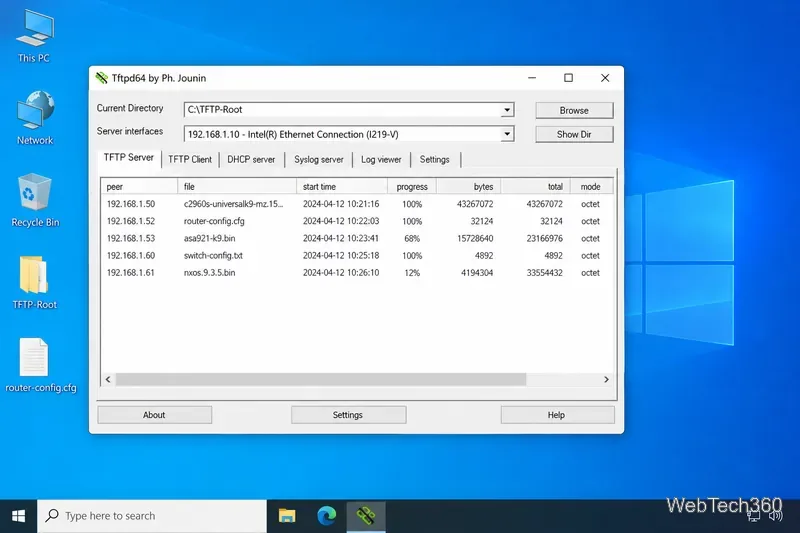
Tftpd64 is an open-source Windows utility from Philippe Jounin that bundles TFTP with DHCP, DNS, SNTP, and Syslog. Current releases include signed Windows binaries, and version 4.74 added support for files larger than 4 GB. It is especially useful for provisioning networks and PXE labs where several lightweight services are convenient in one application.
Tftpd64 combines a TFTP server and client with additional services useful in labs and deployment networks.
haneWIN TFTP Server: best for granular access control
haneWIN TFTP Server is shareware with 32-bit and native 64-bit Windows builds. The vendor lists Windows 11 support, RFC 2347-2349 extensions, multicast, configurable UDP data-port ranges, and access controls based on operation, client IP, and server directory. It fits environments that need tighter upload and download rules.
Best TFTP servers for Linux
tftpd-hpa: best general-purpose Linux daemon
tftpd-hpa remains packaged in Debian stable and is a conventional choice for PXE and device-management workflows. It is small and easy to run with a restricted TFTP root. On Debian-derived systems, use the distribution package and its current service defaults rather than copying old configuration paths from unrelated releases.
atftpd: best for advanced TFTP features
atftpd is also available in current Debian releases. Debian describes it as a multithreaded server supporting the core TFTP RFC plus option negotiation, multicast, and the RFC 7440 windowsize extension. It is a strong fit for specialized boot and deployment environments.
dnsmasq: best for PXE-oriented read-only serving
dnsmasq can provide TFTP alongside DHCP/DNS. Its TFTP server is deliberately limited to read-only boot-file serving and supports options including --enable-tftp, --tftp-root, and a configurable connection limit. It is ideal for PXE, but not when devices must upload configuration backups.
Best TFTP servers for macOS
tftp-hpa via MacPorts: best standalone choice
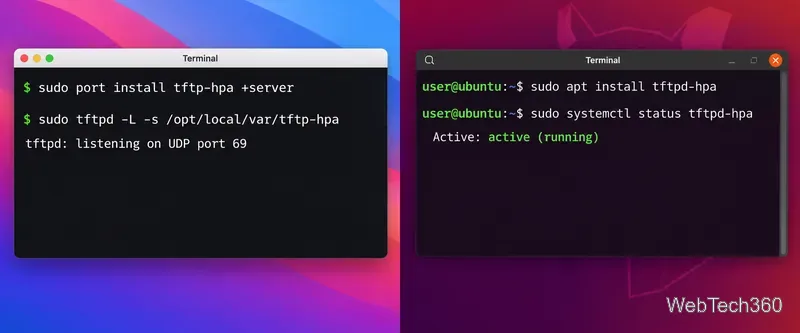
MacPorts packages tftp-hpa for modern macOS and provides a server variant with launchd startup support. MacPorts documents a restricted root directory and an optional upload-enabled variant. This is a more maintainable choice than relying on old macOS TFTP tutorials whose launchd instructions may not match your current release.
dnsmasq via Homebrew: best when you also need DHCP/DNS
Homebrew currently ships dnsmasq for Apple Silicon and supported Intel macOS versions. Pair it with the documented dnsmasq TFTP options for a lightweight PXE or boot-file server. Its built-in TFTP service is read-only.
tftp-hpa is available as a Linux package and through MacPorts on macOS.
Which TFTP server should you choose?
SolarWinds: simplest Windows service with a GUI and IP restrictions.
Tftpd64: Windows labs that also need DHCP, Syslog, or related services.
haneWIN: per-client and per-directory controls.
tftpd-hpa: straightforward Linux or macOS daemon.
atftpd: multicast or advanced TFTP extensions.
dnsmasq: read-only PXE boot files with DHCP/DNS integration.
Whichever server you use, keep TFTP off the public Internet, restrict the server root, limit clients at the firewall or server configuration, and enable write access only when the workflow requires it.