A Matrix Synapse media repository can consume disk space faster than the homeserver database because it holds several different classes of files: media uploaded by local users, thumbnails, cached media fetched from remote homeservers, and resources used for URL previews. The right fix is not to delete random files from the media directory. First identify what is growing, then use Synapse's Admin API or retention controls so the database metadata and on-disk files stay consistent.
As of October 2026, the current Synapse release line is 1.162, and the official media-management documentation includes APIs for querying media, deleting local media, purging cached remote media, and configuring automatic retention. Check the official Synapse releases if your installation is significantly older, because endpoint behavior and configuration options can differ across releases.
Quick Triage Checklist
| Question | What to check | Best next action |
|---|
| Is the filesystem actually close to full? | df -h | Confirm which mounted filesystem contains the media store. |
| Is Synapse media the main consumer? | du -sh <media_store_path> | Compare it with other large directories before deleting anything. |
| Is remote cache the largest category? | du -sh <media_store_path>/* | sort -h | Purge old remote media first; it can normally be fetched again. |
| Is local user media the main category? | Admin API media listings and age/size data | Apply a deliberate local-media retention policy; deletion is permanent. |
| Does growth keep returning? | media_retention, upload limits, monitoring | Add automatic retention and capacity alerts. |
1. Confirm That the Media Repository Is the Disk-Space Problem
Start with the filesystem, not with Synapse. Run:
df -h
du -sh /path/to/media_store
The path is installation-specific. Synapse's media_store_path setting defines the directory used for uploaded images and attachments, and its documented default is media_store relative to Synapse's data directory. Distribution packages and container deployments often set an explicit path, so inspect your actual configuration rather than assuming a location.
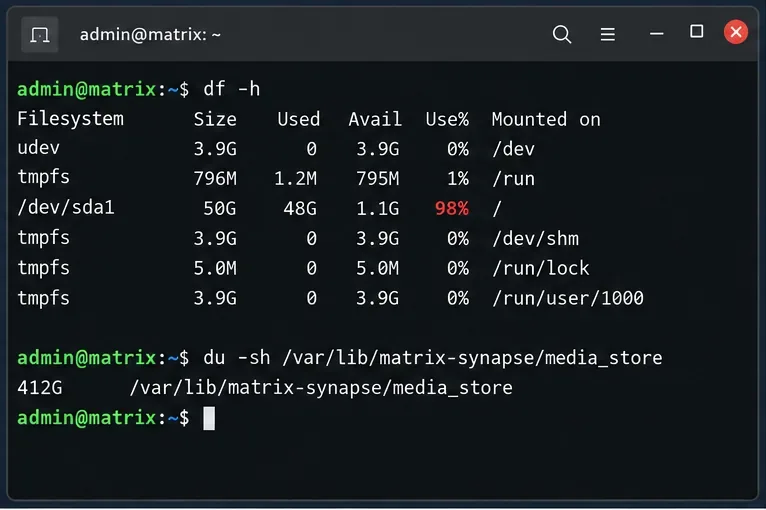
Caption: Compare filesystem usage with the size of the configured Synapse media store before deciding that media cleanup is the correct fix.
If the disk is nearly full, avoid running broad recursive operations that create large temporary files or backups on the same filesystem. If you are at immediate risk of running out of space, first stop unrelated write-heavy jobs or add temporary capacity, then perform cleanup in a controlled way.
2. Verify the Active Media Configuration and Identify What Is Growing
Open the active homeserver.yaml and find media_store_path. Also review max_upload_size, any media_storage_providers, and any existing media_retention block. The official Synapse configuration manual documents these options.
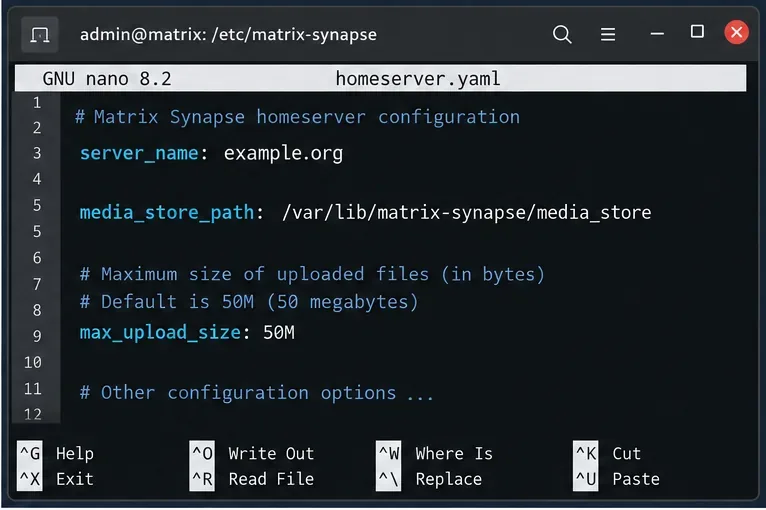
Caption: Confirm the active media_store_path before measuring or changing media storage. The path shown here is an example configuration.
Next, measure the first-level subdirectories:
du -sh /path/to/media_store/* 2>/dev/null | sort -h
Synapse's media repository documentation describes the important on-disk categories. Local uploads are stored below local_content, local thumbnails below local_thumbnails, cached remote files below remote_content, remote thumbnails below remote_thumbnail, and URL-preview data below url_cache and url_cache_thumbnails.
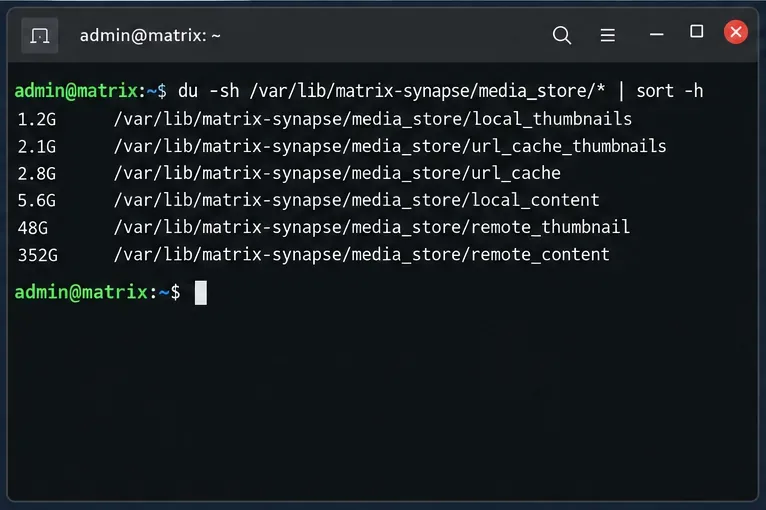
Caption: A directory-level size breakdown helps distinguish recoverable remote cache from local user uploads that may be the only copy stored by your homeserver.
Do not use rm -rf inside these directories as a normal cleanup method. Synapse also tracks media in its database. Bypassing the supported cleanup paths can leave metadata referring to files that no longer exist or remove content that users still expect to retrieve.
3. Reclaim Remote Media Cache First When It Is the Main Consumer
Cached remote media is usually the lowest-risk place to reclaim space. Synapse stores copies of media originally hosted by other homeservers. The official Purge Remote Media API removes cached remote media that was last accessed before a timestamp. If a user requests that media again, Synapse will request it again from the originating homeserver.
The Admin API requires a server-admin access token. Synapse recommends keeping /_synapse/admin/... hidden from public access and normally calling it locally. See the official Admin API guidance.
For example, calculate a cutoff 30 days in the past and purge remote cache older than that:
export SYNAPSE_ADMIN_TOKEN='your-admin-token'
CUTOFF_MS=$(( $(date -d '30 days ago' +%s) * 1000 ))

curl -sS -X POST   -H "Authorization: Bearer $SYNAPSE_ADMIN_TOKEN"   "http://127.0.0.1:8008/_synapse/admin/v1/purge_media_cache?before_ts=$CUTOFF_MS"
The response includes a deleted count. The cutoff is based on last access, not simply file modification time. Choose a period that matches how far back users commonly browse. Purged remote content can only be fetched again if the originating server still makes it available.
4. Treat Local Media as Permanent Data Unless You Have a Retention Policy
Local media is different. It was uploaded to your homeserver, so deleting it can permanently break attachments, images, or other MXC references. Before deleting local media in bulk, inspect representative items or user media through the Admin API.
To query a particular media item:
curl -sS -H "Authorization: Bearer $SYNAPSE_ADMIN_TOKEN" "http://127.0.0.1:8008/_synapse/admin/v1/media/example.org/MEDIA_ID"
The response can include media_length, created_ts, last_access_ts, MIME type, and quarantine status. The official Media Admin API documentation defines these fields and the supported deletion operations.
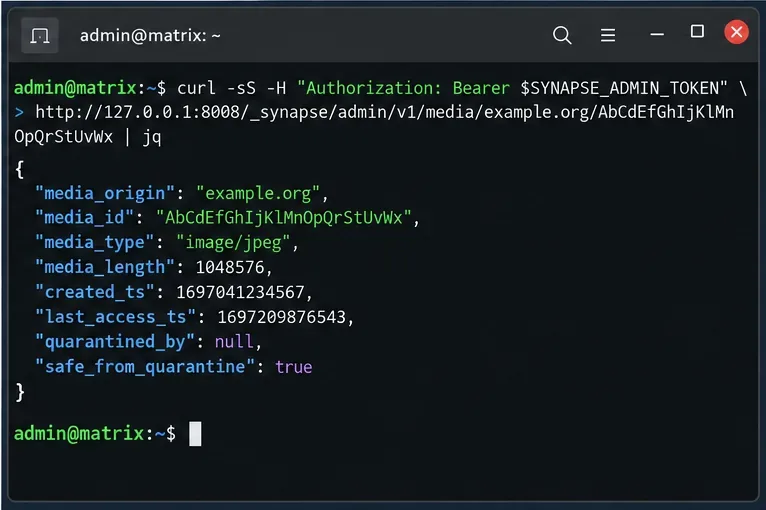
Caption: Query media metadata before applying deletion rules so age and size decisions are based on Synapse's records rather than filesystem timestamps.
Synapse can delete local media by last-access date and optionally by size:
CUTOFF_MS=$(( $(date -d '180 days ago' +%s) * 1000 ))

curl -sS -X POST   -H "Authorization: Bearer $SYNAPSE_ADMIN_TOKEN"   "http://127.0.0.1:8008/_synapse/admin/v1/media/delete?before_ts=$CUTOFF_MS&size_gt=0&keep_profiles=true"
before_ts is a Unix timestamp in milliseconds and refers to last access. size_gt is a byte threshold; its default is zero. keep_profiles=true is the default and preserves media still used as profile or room images. Keep that protection unless you have a specific reason to remove those images.
You can also list or delete media uploaded by a specific local user with /_synapse/admin/v1/users/<user_id>/media. This is useful when one account is responsible for unusual growth. Review the User Admin API documentation before using the delete operation, especially its ordering and limit parameters.
5. Prevent the Media Store from Filling the Disk Again
Enable automatic media retention
For ongoing control, Synapse provides media_retention. An example based on the official configuration format is:
media_retention:
  local_media_lifetime: 180d
  remote_media_lifetime: 30d
Media is eligible for removal when it has not been accessed for the configured lifetime. If it has never been accessed, Synapse uses its creation time. Both the original and thumbnails are removed. If either lifetime is omitted or set to null, that category is not automatically purged.
Choose the local value conservatively: unlike remote cache, deleted local media cannot be reconstructed by simply asking another homeserver for the original. Quarantined media is not deleted by automatic retention, and protected local media is also excluded according to the configuration documentation.
Use upload controls for future growth
max_upload_size limits each individual upload; it does not cap total repository size. Current Synapse also supports media_upload_limits for limiting how much a user can upload during defined time periods. These controls reduce growth but do not replace retention or capacity monitoring.
Consider a storage provider when the local filesystem is the bottleneck
Synapse supports media_storage_providers, including a file-system provider that can place media in another directory. This can help when you have a dedicated storage volume or tier. It is a storage architecture change, not an emergency cleanup command, so test backups, permissions, worker access, and recovery behavior before migrating production media.
Verification After Cleanup
After any purge, verify both capacity and application behavior:
df -h
du -sh /path/to/media_store
du -sh /path/to/media_store/* 2>/dev/null | sort -h
- Open a recent locally uploaded attachment in a Matrix client.
- Open an older remote attachment and confirm that it can be fetched again.
- Check Synapse logs for media-worker or filesystem errors.
- If you use dedicated media workers, confirm the Admin API requests are routed to a media repository worker. Synapse's worker documentation lists the media-specific admin endpoints that must be handled there.
- Record the media-store size after cleanup and compare it again after several days to measure the actual growth rate.
Fast Decision Reference
| What is large? | Preferred response | Main risk |
|---|
remote_content / remote_thumbnail | Purge remote cache by last-access cutoff; then set remote_media_lifetime. | Old media must be re-downloaded and may be unavailable if the origin no longer serves it. |
local_content / local_thumbnails | Define a business retention rule, inspect media metadata, then use local-media Admin APIs. | Deletion is permanent for content hosted by your server. |
| URL preview cache | Confirm URL-preview behavior and current Synapse cleanup before intervening manually. | Manual filesystem deletion can desynchronize stored metadata. |
| All categories keep growing | Add media_retention, upload controls, monitoring, or dedicated media storage. | Cleanup alone only delays the next capacity incident. |
Bottom Line
When a Matrix Synapse media repository fills a disk, first establish which media class is responsible. Remote cache is usually the safest first target because Synapse has a dedicated purge API and can normally fetch that content again. Local media needs a much stricter policy because it may be the only server-side copy of an attachment. Once immediate space is recovered, configure media_retention and monitor the media-store growth rate so cleanup becomes predictable maintenance instead of an emergency.









