Home
» NETWORK ADMIN
»
Ingress vs. Egress: What’s the Difference in Networking?
Ingress vs. Egress: What’s the Difference in Networking?
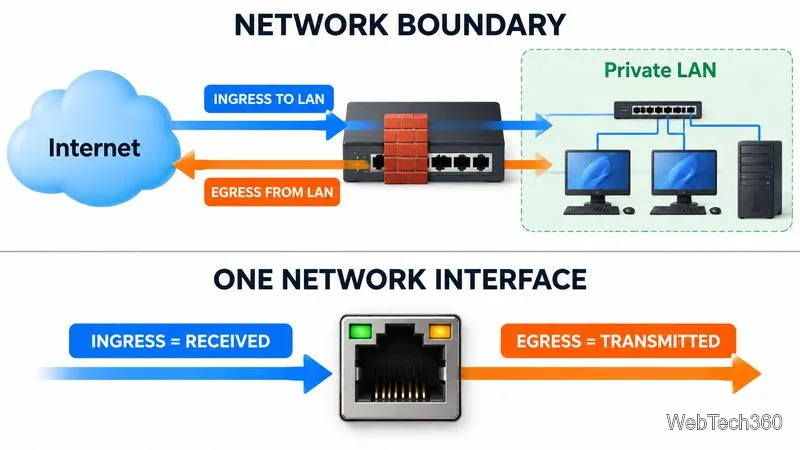
Ingress is network traffic entering a defined network, device, or interface; egress is traffic leaving it. The terms are relative to the point being measured, not permanent labels attached to a packet. A request from a laptop to a cloud service is egress from the laptop or office network and ingress to the cloud service. For firewall rules, cloud platforms commonly define ingress as packets entering a target and egress as packets leaving it. See the Google Cloud definition of ingress and egress traffic.
At the LAN boundary, traffic entering the private network is ingress; traffic leaving it is egress.
Ingress vs. egress at a glance
Term
Meaning relative to the chosen boundary
Example
Ingress
Inbound; received by the target
A connection arriving at a web server or cloud virtual machine
Egress
Outbound; sent from the target
A laptop uploading a file to cloud storage
Why the viewpoint matters
Imagine an employee opening a website. The request leaves the employee’s laptop and office LAN, so it is egress from those systems. When it reaches the company gateway, the packet enters the gateway through its LAN-facing interface and leaves through its internet-facing interface. At the website’s server, the same request is ingress. The reply follows the reverse path.
That is why network tools may show in/out, received/sent, or Rx/Tx rather than simply ingress and egress. A dashboard’s “in” value usually describes traffic received by the specific interface being measured—not necessarily traffic entering your entire organization. Always check whether the context is a host, interface, subnet, firewall, cloud resource, or whole network.
Ingress and egress depend on the boundary: a network-level view differs from a single-interface view.
How to monitor ingress and egress
Network monitoring software collects interface counters, throughput, errors and discards, latency, and device availability. The Simple Network Management Protocol (SNMP) commonly polls supported switches, routers, firewalls, and servers. The IETF’s Interfaces Group MIB specification (RFC 2863) defines ifInOctets and ifOutOctets counters for bytes received and transmitted. Use 64-bit high-capacity counters on fast links when available.
SNMP shows traffic volume but not always which applications or endpoints created it. NetFlow, IPFIX, sFlow, or jFlow can add source/destination IPs, ports, protocols, and flow volumes. Packet capture provides deeper detail but can require more storage and expose sensitive information. Prefer SNMPv3 where supported and restrict monitoring access.
ManageEngine OpManager provides device and interface monitoring, traffic visibility, discovery, and reporting; additional flow-analysis capabilities depend on the selected components.
Paessler PRTG combines SNMP interface monitoring with flow protocols and configurable bandwidth alerts.
Compare device support, protocols, retention, alerting, deployment, and the number of interfaces or metrics you need. SNMP shows overall bandwidth; flow data helps identify what is consuming it. Monitoring alone does not block traffic.
Egress in data security
Outbound traffic is normal; the risk is unauthorized data egress, such as sensitive files sent to personal email, an unapproved cloud service, or a suspicious external server. A large upload alone does not prove a breach. Look for a new destination, unusual volume, an unfamiliar app or account, off-hours activity, or a transfer that differs from the organization’s baseline.
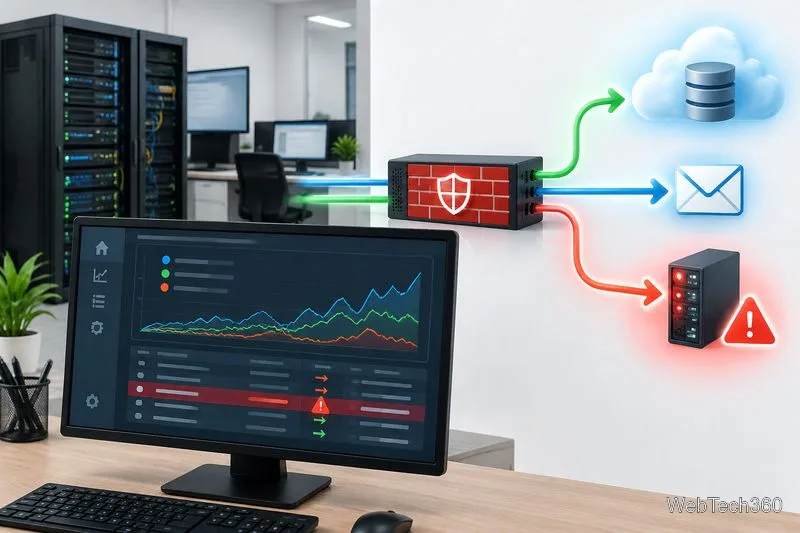
Outbound traffic monitoring is most useful when unusual destinations and transfer patterns trigger an investigation.
Use layered controls rather than relying on a single dashboard:
Set policy: list approved services, classify sensitive data, and explain sharing rules.
Restrict outbound access: use firewall rules, secure web gateways, or DNS filtering to limit unnecessary destinations and services.
Collect logs: correlate firewall, endpoint, identity, cloud, and file-access events; alert on meaningful deviations from normal traffic.
Protect sensitive data: consider data loss prevention (DLP) and endpoint controls for uploads, copying, and removable media. Test policies to avoid disrupting legitimate work.
Where SIEM tools fit
A security information and event management (SIEM) platform centralizes logs and correlates events so analysts can investigate possible data theft or compromised accounts. It complements, but does not replace, firewall rules, DLP, or endpoint protection. Options include SolarWinds Security Event Manager, Splunk Enterprise Security, and ManageEngine Log360. Compare current features, licensing, data volume, and retention.
A quick checklist
Write down the exact boundary: host, interface, subnet, firewall, or cloud resource.
Confirm what the tool means by inbound/outbound, received/sent, and Rx/Tx.
Baseline traffic by direction, destination, protocol, time, and business process.
Set useful alerts and define who investigates them.
Test egress restrictions against both approved workflows and unauthorized destinations.
Bottom line: ingress means “in” and egress means “out,” but only after you identify what the traffic is entering or leaving. Use interface counters and flow data to understand performance, then correlate outbound activity with identity, endpoint, and application logs to investigate security risks.