A Kopano database migration error immediately after a MySQL or MariaDB version upgrade usually means the application and database no longer agree about something that used to be implicit: schema state, server defaults, SQL behavior, authentication, or the upgrade path itself. The useful goal is not simply to make kopano-server start once. The goal is to reach a state where the schema is consistent, Kopano starts without database-upgrade errors, users can open stores, and mail flow survives a restart.
This guide focuses on evidence. Each stage includes a success signal and a point at which you should stop trying the same remedy and change direction. Kopano's public administrator documentation is older than current MySQL and MariaDB releases, so do not assume that every modern database version is supported by every historical Kopano build. Use the exact Kopano package version, database vendor, and server error as the deciding evidence.
Start with the outcome you need
Before changing configuration, define what “fixed” will mean. A healthy recovery normally has all of these signs:
kopano-server starts and stays running after a service restart.- The Kopano log no longer reports a database schema upgrade or SQL execution failure.
- The database is readable and writable by the configured Kopano account.
- Existing stores and users are visible, rather than a newly created empty schema.
- Mail submission and delivery resume normally.
- A second restart produces the same healthy result.
If you only achieve the first item, keep testing. A temporary start after changing sql_mode, for example, does not prove that the underlying schema is correct.
1. Stop Kopano writers and take a restorable database backup
Kopano's upgrade documentation recommends backing up the database and configuration files and stopping the services that use the database before upgrade work. The documentation specifically calls out stopping kopano-spooler and kopano-server, plus optional components that are running. See the Kopano Core upgrade documentation.
sudo systemctl stop kopano-spooler
sudo systemctl stop kopano-server

mysqldump -u root -p --single-transaction kopano > /root/kopano-before-fix.sql
ls -lh /root/kopano-before-fix.sql
For a large installation, also preserve /etc/kopano/, note the attachment storage location, and follow your existing database backup policy. If attachments are stored outside MySQL, a SQL dump alone is not a complete Kopano backup.
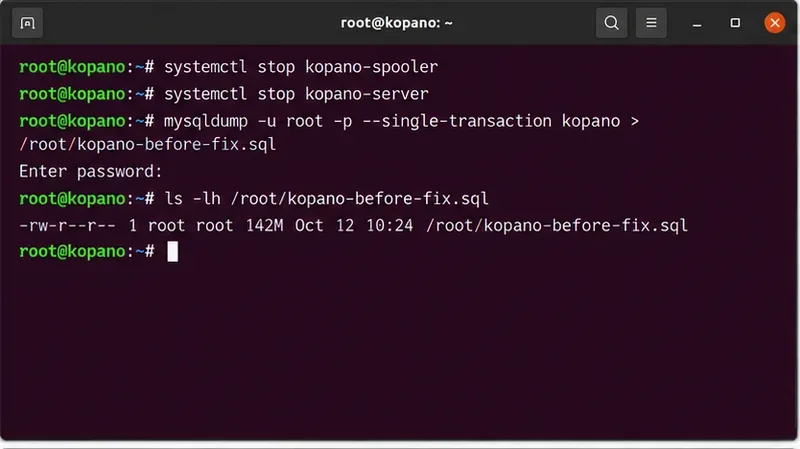
Stop Kopano services that write to the database and verify that a fresh dump exists before changing schema or server settings.
Success signal: you have a backup that can be restored to a separate database instance and you know where external attachments are stored. Change approach if: the dump itself fails. Fix database corruption, permissions, disk space, or connectivity before attempting a Kopano schema migration.
2. Record the exact database version and changed defaults
A major MySQL upgrade can change server defaults without modifying existing tables. MySQL 8.0, for example, changed the default server character set to utf8mb4 and the default collation to utf8mb4_0900_ai_ci. It also changed other defaults and removed or deprecated older behavior. Oracle documents these differences in Changes in MySQL 8.0.
Capture the actual server state rather than assuming what the package upgrade did:
mysql -u root -p

SELECT VERSION();
SHOW VARIABLES LIKE 'sql_mode';
SHOW VARIABLES LIKE 'character_set_server';
SHOW VARIABLES LIKE 'collation_server';
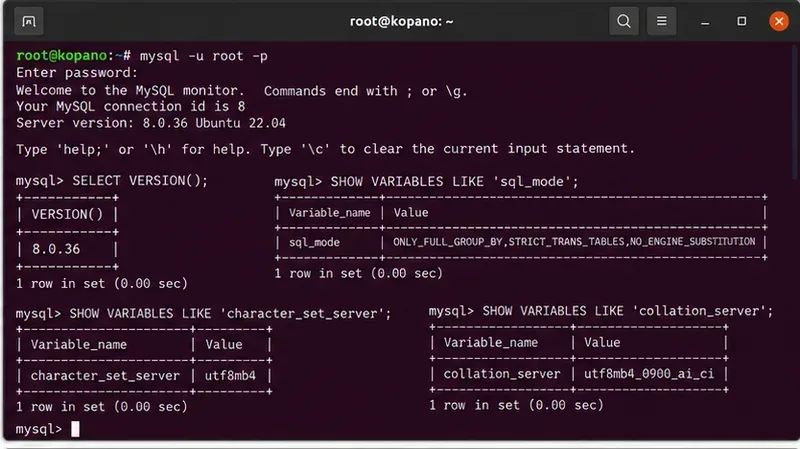
Record the database version and defaults that Kopano now sees; these values help explain failures that appeared only after the database upgrade.
Do not immediately disable strict SQL modes. A strict-mode error can reveal invalid legacy data or SQL that must be corrected. Turning strict mode off may hide the symptom while leaving data that fails later. First capture the exact failing statement or database error from Kopano's log.
3. Read the first SQL error, not only the final service failure
Systemd often shows only that kopano-server exited. The useful line is usually earlier in the journal or Kopano log. Start with:
journalctl -u kopano-server -n 100 --no-pager
Then classify the failure. The following table is a practical triage map rather than a claim that one cause applies to every installation.
| Log symptom | What to inspect next | Do not do first |
|---|
| Access denied / authentication plugin error | Kopano MySQL credentials, host grants, authentication method | Alter the schema |
| Unknown column / duplicate column / table already exists | Partial schema migration, interrupted previous upgrade | Drop the affected table |
| Incorrect string value / collation error | Database, table, and column charset/collation | Blindly convert every table |
| Invalid default / data truncated / strict mode error | Specific failing column and stored data | Globally disable strict mode |
| Index too long / row size error | Table definition, charset expansion, InnoDB format | Delete indexes without a backup |
| Server starts but reports a required Kopano database maintenance task | The exact kopano-dbadm subcommand named by your Kopano release | Invent a generic upgrade command |
Kopano's changelog confirms that some releases introduced schema changes that required specific kopano-dbadm operations. It also records historical database upgrade defects, including failures involving old MySQL table definitions and utf8mb4 upgrades. Use the Kopano Core changelog to match the maintenance action to your exact Kopano release.
4. Compare the existing Kopano schema with the new server defaults
Check the schema as it exists; server defaults alone do not tell you how old Kopano tables are defined.
SHOW CREATE DATABASE kopano;
SHOW TABLE STATUS FROM kopano;
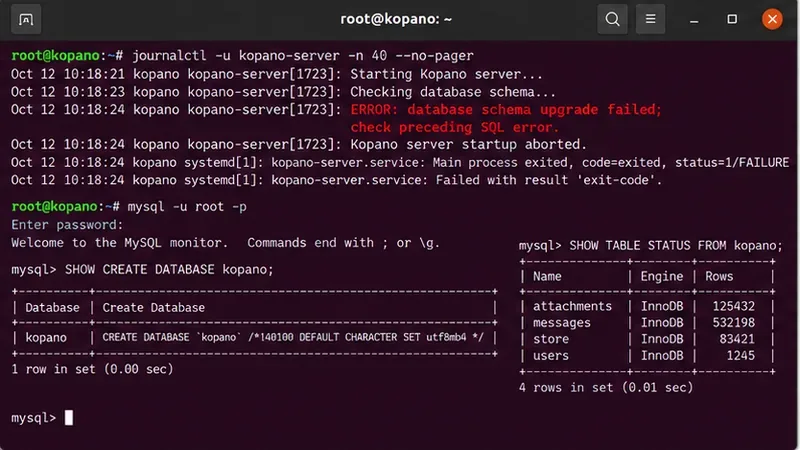
Inspect the existing Kopano database definition and storage engines while keeping the original migration error visible for comparison.
If the database was originally created on an older MySQL release, its tables may keep older character sets even though newly created objects now default to utf8mb4. MySQL explicitly states that upgrading from 5.7 to 8.0 does not automatically convert existing database objects to the new default character set. That distinction matters: a migration can fail when a new column or index is created with different defaults from neighboring objects.
Kopano itself added utf8mb4 support in later Core releases and documented a specific database maintenance step, kopano-dbadm usmp, for upgrading existing databases for 4-byte Unicode support. Do not run that command merely because MySQL now defaults to utf8mb4; run it only when your installed Kopano release documentation or server output calls for it.
5. If MariaDB was upgraded, complete the MariaDB-side upgrade first
If your backend is MariaDB rather than Oracle MySQL, finish the database server's own upgrade procedure before blaming Kopano. MariaDB documents mariadb-upgrade as the tool that updates system tables and checks tables after major-version changes. Its documentation recommends backing up all databases first. See the official mariadb-upgrade reference.
This is a branch, not a universal command. Do not run mariadb-upgrade against Oracle MySQL. Conversely, do not apply MySQL 8.0 assumptions to a MariaDB server just because both accept the mysql client protocol.
6. Verify the Kopano database account still has the required privileges
Kopano's administrator manual states that the server needs permissions including ALTER, CREATE, CREATE ROUTINE, DELETE, DROP, INDEX, INSERT, LOCK TABLES, SELECT, and UPDATE on the Kopano database. The database connection parameters are configured through the MySQL-related settings in /etc/kopano/server.cfg. See Configure KC Components.
After a MySQL version migration, an administrator may recreate users, change authentication plugins, move the database host, or restore grants incompletely. Test the same hostname and account that Kopano uses. If authentication fails before any migration SQL executes, fix the account or grant problem first.
7. Repair only the condition proven by the error
At this point you should have one concrete failure class. Apply the smallest change that explains it:
- Partial Kopano schema update: follow the release-specific Kopano upgrade or
kopano-dbadm instruction identified by the installed version. Never delete a version marker or manually add columns just to make the next statement run.
- Character set or collation mismatch: identify the affected table and column first. Plan conversions against a restored copy before touching production because charset changes can alter index sizes and comparison behavior.
- MariaDB system-table mismatch: complete the documented MariaDB upgrade procedure, then retry Kopano.
- Permissions or authentication: correct the Kopano DB account and verify a login from the Kopano host.
- Unsupported version combination: stop configuration experiments. Restore the pre-upgrade database environment or move to a Kopano/database combination that your vendor or package source supports.
The last case is important. The publicly accessible Kopano Core administrator manual is from an older product generation, while current MySQL and MariaDB releases have continued to change. If you cannot find a support statement for your exact pairing, lack of documentation should not be interpreted as compatibility.
8. Start Kopano and validate more than the process state
sudo systemctl start kopano-server
sudo systemctl start kopano-spooler

systemctl --no-pager --full status kopano-server
journalctl -u kopano-server -n 50 --no-pager
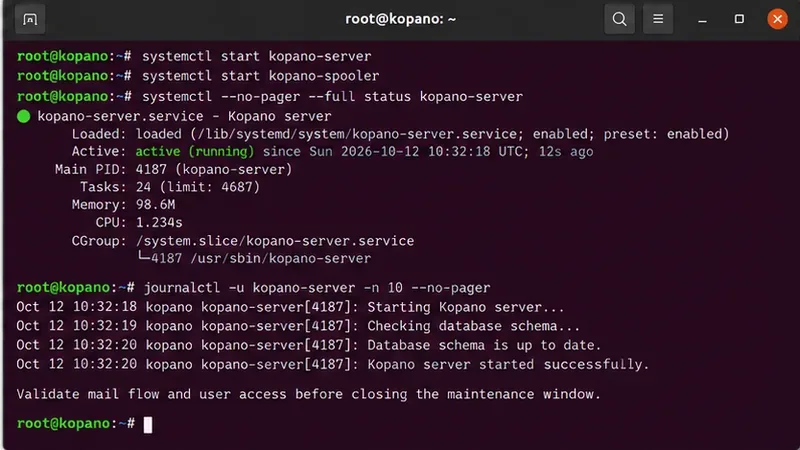
A healthy service state is necessary but not sufficient; review the startup log and then validate user stores and mail flow.
After the service stays up, test with real application behavior. Open at least one existing mailbox, verify that old folders and messages are present, send a message between two local accounts, send one outbound message, and confirm that inbound delivery works. If you use IMAP, ActiveSync, archiving, multi-server components, or external attachment storage, exercise those paths too.
When should you change approach?
Stop repeating schema changes when any of these conditions appears:
- The SQL error changes after every manual modification, suggesting a partially migrated schema.
- The restored pre-upgrade database works on the old database version but fails consistently on the new one.
- You cannot establish that your Kopano build supports the installed MySQL or MariaDB major version.
- Table checks report corruption rather than a normal schema incompatibility.
- A charset conversion would require changing many large tables without a tested rollback.
In those cases, the safer path is often to recreate the previous database environment, restore the known-good backup, and plan a staged upgrade in a clone. Oracle notes that downgrading MySQL 8.0 to 5.7 is not supported in place; the supported alternative is restoring a backup taken before the upgrade. See the MySQL 8.0 release notes.
Final verification checklist
- The database backup and Kopano configuration backup are preserved.
- The exact MySQL or MariaDB version is recorded.
- The first real SQL error has been identified and explained.
- No broad SQL-mode or charset workaround was applied without evidence.
- Required Kopano schema maintenance matches the installed Kopano release.
kopano-server survives a second restart.- Existing mailboxes, folders, and messages are intact.
- Inbound, outbound, and local delivery tests succeed.
- Optional components used by your environment have been tested.
A database migration problem is resolved when the schema, database server, and Kopano version agree again—not when the error message has merely disappeared. Preserve the evidence that led to the repair, because it is also the information you will need for the next database or Kopano upgrade.









