A common Matrix Synapse failure looks deceptively simple: local clients can log in, your reverse proxy is online, and Synapse itself may appear healthy, yet remote homeservers cannot federate with you. Logs on one side may contain phrases such as certificate verify failed, hostname mismatch, unable to get local issuer certificate, or a generic federation request failure caused by TLS verification.
The fastest way to fix this is to test the exact hostname and port that Matrix federation discovery resolves to, then repair the certificate, chain, or discovery path that is wrong. Do not start by disabling certificate checks. Matrix server-to-server traffic is HTTPS, and the Matrix specification requires the destination to present a certificate signed by a trusted certificate authority. Synapse also keeps outbound federation certificate verification enabled by default. See the Matrix Server-Server API specification and the current Synapse configuration documentation.
1. Identify the hostname federation is actually validating
Before changing Nginx, Caddy, Synapse, or DNS, determine the certificate name Matrix expects. The answer depends on your server_name and on server discovery.
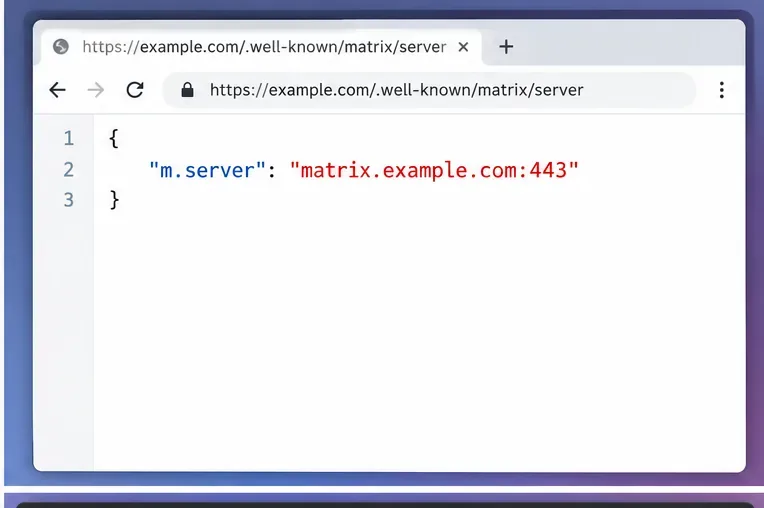
If your Matrix server name is example.com and you do not delegate federation, other homeservers normally try the federation service associated with that name, commonly on TCP 8448. If you serve https://example.com/.well-known/matrix/server, the m.server value can delegate federation to another hostname such as matrix.example.com:443. In that case, the delegated hostname is part of the TLS validation path. Matrix also supports SRV-based discovery, but the Synapse documentation recommends .well-known delegation for typical deployments because it is easier to reason about and configure correctly. The authoritative behavior is documented in server discovery in the Matrix specification and Synapse federation delegation.
If the file is absent or invalid, do not assume that is itself the TLS bug. Matrix has fallback discovery rules. The important point is to know which hostname and port a remote server will finally contact.
A valid server discovery response can deliberately send federation to another hostname and port; that delegated hostname must present its own valid certificate.
2. Reproduce the certificate verification failure with OpenSSL
Once you know the expected federation endpoint, test it directly with SNI and hostname verification. This separates a TLS identity problem from a Synapse application problem.
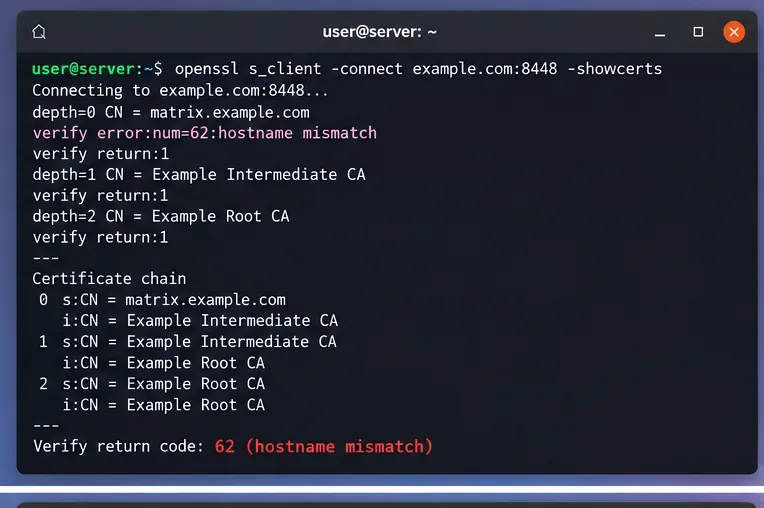
Focus on the final verification result and the certificate subject alternative names. A connection can succeed at the TCP and TLS protocol level while still failing identity verification. That is why “the port is open” is not enough.
An OpenSSL check exposes the key symptom: the server answers, but the certificate identity does not match the hostname federation expects.
What the most common OpenSSL errors usually mean
Hostname mismatch: the reverse proxy served a certificate for a different hostname, or your discovery record directs federation to a hostname not covered by the certificate.
Unable to get local issuer certificate / unable to verify the first certificate: the server is often missing an intermediate CA certificate in the chain, or the client trust store does not trust the issuing CA.
Certificate has expired / not yet valid: renew the certificate and also verify the system clock on both the server and any tightly controlled private federation client.
Self-signed certificate: public federation will normally reject it. For a private federation, use a private CA and configure trust explicitly rather than globally turning verification off.
3. Fix a hostname mismatch at the reverse proxy
A hostname mismatch is especially common when the client-facing site and the federation endpoint use different virtual hosts. For example, example.com may host a website while matrix.example.com proxies Synapse. If your .well-known file delegates to matrix.example.com:443, the TLS endpoint on that host must serve a certificate valid for matrix.example.com.
For Nginx, inspect the active virtual host rather than only the configuration file you intended to use:
sudo nginx -T | less
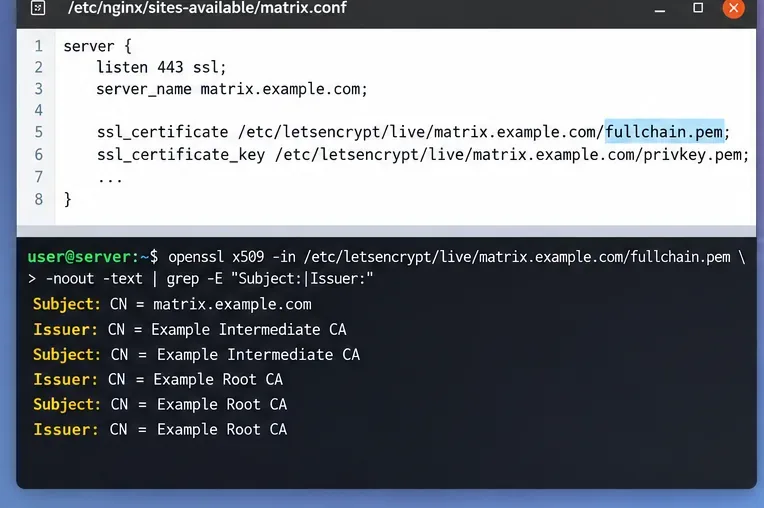
Check the server_name, listening port, and certificate paths. A typical TLS section uses the full certificate chain:
Validate and reload only after the configuration test succeeds:
sudo nginx -t && sudo systemctl reload nginx
Synapse recommends a reverse proxy for common deployments and distinguishes the usual client port 443 from the default federation port 8448. Consult the official Synapse reverse proxy documentation for the current proxy requirements.
4. Serve the complete certificate chain
A leaf certificate can look correct in a browser you already use and still fail for another homeserver if your server does not send the required intermediate certificate. Synapse documentation explicitly says that when Synapse itself is configured with a certificate, the PEM file should contain the full chain; with Certbot, that means using fullchain.pem rather than only cert.pem.
The same principle applies when TLS terminates at Nginx, Caddy, HAProxy, or another proxy: configure that proxy to present the correct full chain. Inspect what is actually being served, not only what exists on disk:
You should see the leaf certificate followed by the needed intermediate certificate or certificates. The root CA generally does not need to be sent by the server because clients normally already trust roots through their trust store.
The reverse proxy should serve the certificate for the federation hostname and include the intermediate chain, not only the leaf certificate.
5. Check DNS and Matrix discovery for stale or split routing
If the certificate is correct on one machine but remote federation still reports a different certificate, DNS may be directing some clients elsewhere. Check both IPv4 and IPv6 records and remember that a working A record does not compensate for a stale AAAA record if remote homeservers prefer IPv6.
dig +short A example.com
dig +short AAAA example.com
dig +short A matrix.example.com
dig +short AAAA matrix.example.com
Also inspect any federation SRV records you intentionally use:
dig +short SRV _matrix-fed._tcp.example.com
If you recently changed .well-known, allow for caching. The Matrix specification permits clients to cache discovery responses and even failed discovery attempts for a period of time. This means a configuration can be correct now while a remote server temporarily continues using previously discovered routing.
When both A and AAAA exist, run the TLS check against each route if necessary. If a load balancer fronts multiple proxy nodes, verify that every node has the same current certificate and chain.
6. Fix private-CA trust without weakening public federation
Private federation is the main legitimate case where a public CA may not be appropriate. Synapse provides federation_custom_ca_list for custom authorities. Current documentation notes an important behavior: this list replaces the CA certificates supplied by the operating environment. Therefore, if you set it, include the complete trust set your deployment actually requires.
After changing trust configuration, restart Synapse using the service mechanism for your installation and inspect logs for certificate errors. Container deployments also deserve special attention: the host may trust a private CA while the Synapse container does not. Confirm the trust material is mounted into the container and that the configured path is readable from inside it.
Synapse also exposes federation_certificate_verification_whitelist and the global federation_verify_certificates switch, but the official documentation restricts these to exceptional scenarios. Turning off verification globally can make the error disappear while leaving the underlying identity problem unresolved. For ordinary public federation, repair the certificate or routing instead.
7. Verify the repair at the TLS layer first
After making changes, repeat the exact OpenSSL command that failed earlier. The goal is a successful hostname and chain verification for the endpoint Matrix discovery resolves to.
Then make an HTTPS request to a federation endpoint. For a direct endpoint on 8448:
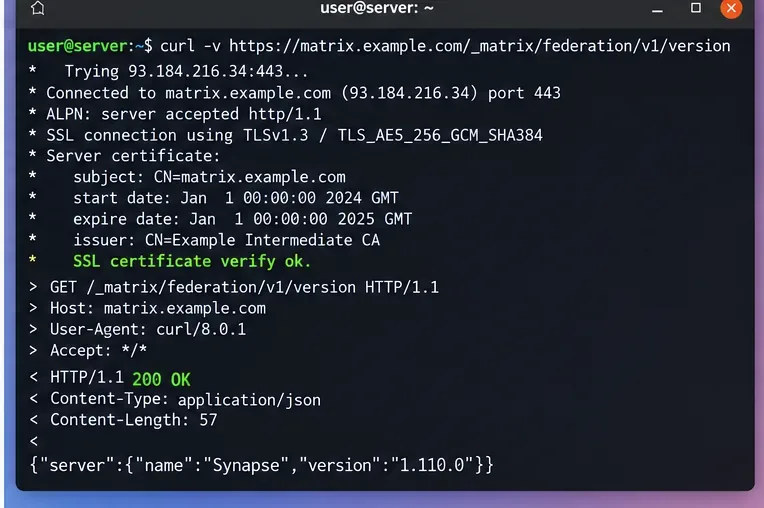
A healthy TLS result should show that the certificate verifies successfully. The Matrix endpoint should then return an HTTP response from the homeserver or proxy path rather than failing during certificate validation. The version endpoint itself is useful for reachability testing; it does not prove that every room or remote server will federate correctly.
After the repair, repeat a TLS-verified request and confirm that certificate validation succeeds before checking higher-level federation behavior.
8. Check Synapse logs and distinguish TLS from higher-level federation errors
If TLS verification now succeeds but federation still fails, stop treating it as a certificate problem. Move up the stack and inspect Synapse logs for DNS failures, connection timeouts, HTTP status errors, signing-key problems, authorization failures, or remote-server backoff.
On systemd-based installations, a common starting point is:
journalctl -u matrix-synapse -n 200 --no-pager
For Docker, use the container logs for your Synapse service. Search around the timestamp of a fresh federation attempt rather than relying on old certificate messages that may no longer be relevant.
Quick decision table
Test result
Most likely cause
Next action
Hostname mismatch
Wrong certificate or wrong discovery target
Align .well-known/DNS with the proxy certificate name
Missing issuer/intermediate
Incomplete served chain
Configure the proxy or Synapse with the full chain
Expired/not yet valid
Certificate lifecycle or clock issue
Renew certificate and verify time synchronization
Works on host, fails in container
Different CA trust store
Install/mount the required CA inside the Synapse container
TLS verifies, federation still fails
Not a certificate problem anymore
Inspect Synapse federation logs, routing, and HTTP responses
How to know the problem is really fixed
Do not use “the service restarted without errors” as the success criterion. A reliable repair has three observable signs: the exact federation hostname passes hostname verification, the served chain validates to a trusted CA, and a fresh federation HTTPS request reaches Synapse without a TLS verification exception.
If only one remote homeserver still fails after these checks, consider caching, that remote server's trust store, or an endpoint-specific network path. If many unrelated public homeservers fail in the same way, re-check your own certificate, IPv6 route, load balancer nodes, and discovery configuration first.
For production systems, keep certificate verification enabled and make certificate renewal observable. The durable fix is not to suppress verification; it is to ensure that Matrix discovery, DNS, SNI, the reverse proxy, and the certificate chain all describe the same federation endpoint.