A Matrix Synapse homeserver can look healthy for days and then suddenly leave PostgreSQL consuming most of the machine's available RAM. The usual symptoms are familiar: swap starts growing, client syncs slow down, federation jobs queue up, and an otherwise modest server becomes difficult to administer. The important first step is not to assume that PostgreSQL has a leak. High memory use can come from several independent sources, including the shared buffer cache, per-query work memory, many database backends, maintenance workers, and inefficient queries caused by stale statistics or table churn.
Synapse's own documentation recommends PostgreSQL for production and exposes database connection-pool controls such as cp_min and cp_max. PostgreSQL, meanwhile, warns that settings such as work_mem can be used by multiple operations inside one query and by many sessions at the same time. That combination is why a setting that looks harmless in isolation can become expensive during a busy period. The safest fix is to measure first, reduce unnecessary concurrency second, then tune memory and maintenance behavior only where the evidence points.
Step 1: Confirm that PostgreSQL is really the memory pressure source
Start at the operating-system level. On Linux, compare total memory, available memory, swap, and the largest processes:
free -h
ps aux --sort=-%mem | head -n 15
Do not judge the server from a single process line. PostgreSQL uses shared memory as well as private memory in backend processes, so the useful question is whether the host is actually under pressure: low available memory, growing swap, OOM kills, or sustained latency. Record the numbers during a quiet period and again during a busy period. That baseline makes later changes measurable instead of guesswork.
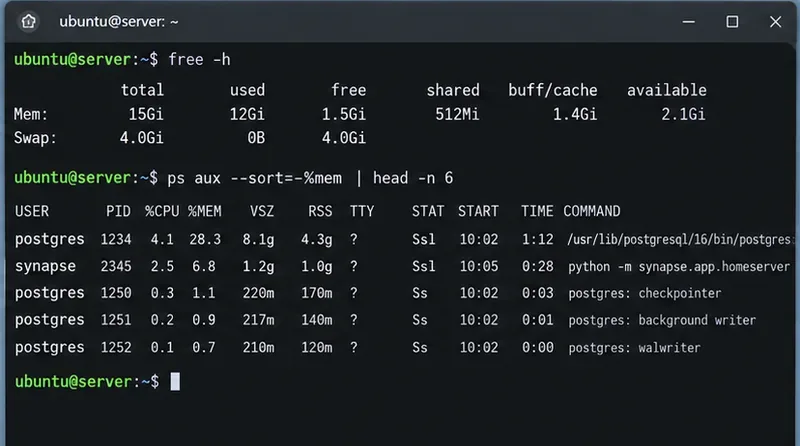
Caption: A first-pass memory check compares host-level available RAM with the PostgreSQL and Synapse processes before any configuration is changed.
Next, inspect the PostgreSQL settings most likely to affect memory:
SHOW shared_buffers;
SHOW work_mem;
SHOW maintenance_work_mem;
SHOW autovacuum_work_mem;
SHOW max_connections;
The PostgreSQL resource-consumption documentation describes the key distinction. shared_buffers is a server-wide shared cache. By contrast, work_mem is a limit for individual sort or hash operations before they spill to temporary files; a complex query can have several such operations, and many sessions can run them concurrently. PostgreSQL currently documents 4 MB as the default work_mem value and notes that total use may be many times that value.
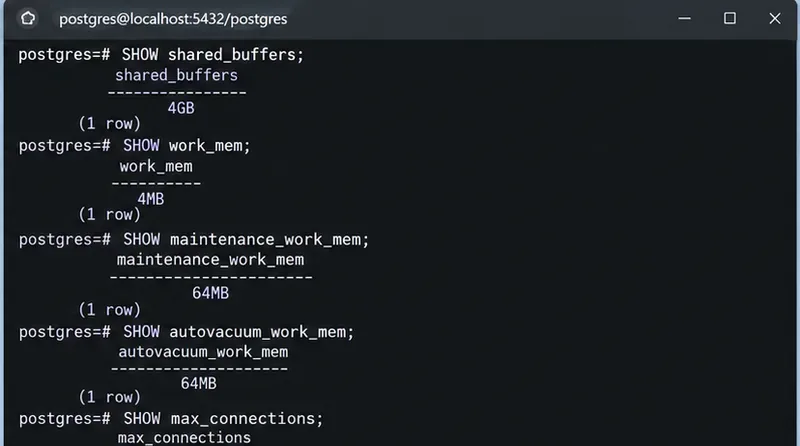
Caption: Read the active PostgreSQL memory-related settings before changing them; the dangerous value is often the combination of settings and concurrency rather than one number alone.
Step 2: Count Synapse database connections and find active work
A large connection pool does not automatically consume work_mem for every connection, but every PostgreSQL backend has its own process and private memory, and more concurrent queries create more opportunities for per-operation memory allocations. Check how many connections are actually open and what state they are in:
SELECT state,
       usename,
       application_name,
       count(*) AS connections
FROM pg_stat_activity
GROUP BY state, usename, application_name
ORDER BY connections DESC;
Then inspect long-running active queries:
SELECT pid,
       usename,
       state,
       now() - query_start AS running_for,
       wait_event_type,
       wait_event,
       left(query, 180) AS query
FROM pg_stat_activity
WHERE state <> 'idle'
ORDER BY query_start;
The official pg_stat_activity documentation explains the session and activity fields. A high number of idle sessions is different from a small number of expensive active queries, so the remedy should be different too. If the problem is connection count, address pool size. If the problem is a few memory-hungry queries, lowering the pool alone may only hide the symptom.
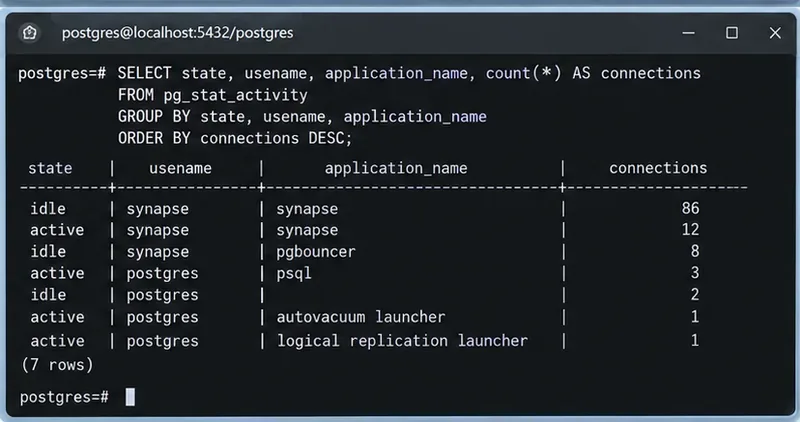
Caption: Grouping pg_stat_activity makes it easier to distinguish many idle backends from a smaller set of active database sessions.
Step 3: Right-size the Synapse PostgreSQL connection pool
Synapse passes most database arguments to PostgreSQL while consuming options beginning with cp_ for its Twisted connection pool. The current Synapse PostgreSQL guide shows an example with cp_min: 5 and cp_max: 10. Treat those as example values, not a universal target.
Check the database block in homeserver.yaml:
database:
  name: psycopg2
  args:
    user: synapse_user
    password: "your-secret"
    dbname: synapse
    host: 127.0.0.1
    cp_min: 5
    cp_max: 10
If you previously raised cp_max aggressively and pg_stat_activity shows a large number of mostly idle Synapse connections, lower it gradually and watch request latency. On a worker-based Synapse deployment, remember that database demand comes from multiple Synapse processes, so evaluate the combined number of connections rather than one worker in isolation. The Synapse configuration manual confirms that cp_ options configure the connection pool.
After editing the configuration, restart the affected Synapse process or processes according to your deployment method, then run the connection-count query again. Do not reduce the pool until requests start queueing just to save a few megabytes. A pool that is too small can turn database concurrency into application latency.
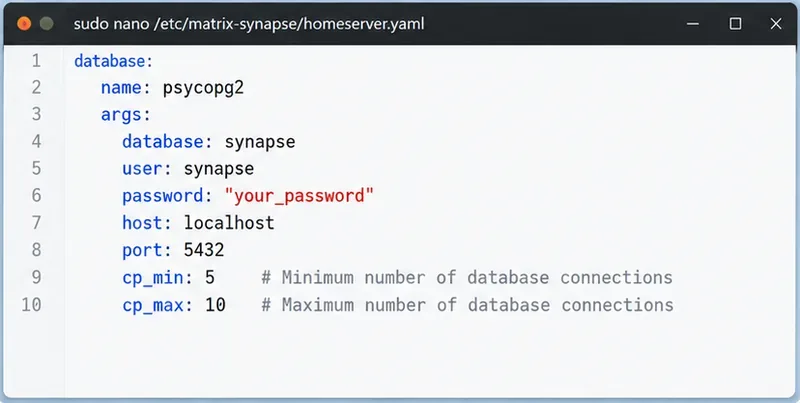
Caption: Synapse exposes cp_min and cp_max in the PostgreSQL database configuration, allowing administrators to cap unnecessary backend concurrency.
Step 4: Tune PostgreSQL memory conservatively
Once connection count is reasonable, review PostgreSQL memory settings in the context of the RAM that is actually available to the database. PostgreSQL says that on a dedicated database server with at least 1 GB of RAM, about 25% of system memory is a reasonable starting point for shared_buffers. That guidance is explicitly for a dedicated database server. If Synapse, reverse proxy, Redis, monitoring, and PostgreSQL share one small VM, PostgreSQL does not own the whole machine, so budget accordingly.
The setting most likely to surprise administrators is work_mem. Avoid multiplying work_mem by max_connections and treating that as a hard reservation; PostgreSQL does not preallocate it that way. Instead, think in terms of concurrent query operations. A single query can use several sort or hash nodes, and hash operations may use a multiple of work_mem. If you set work_mem to a very large number globally because one report was slow, a federation burst or sync-heavy period can produce a much larger memory peak than expected.
A sensible pattern is to keep the global value conservative and raise it only for a specific administrative session when a known query benefits from more memory. Before changing values, preserve your existing configuration and note which parameters require a PostgreSQL restart. shared_buffers, for example, is a server-start setting. Changes should be scheduled so you can compare memory, latency, and temporary-file behavior before and after.
Also check maintenance_work_mem and autovacuum_work_mem. PostgreSQL notes that autovacuum workers can allocate maintenance memory concurrently. If autovacuum_work_mem is left at its inherited behavior, an unusually large maintenance_work_mem can make several simultaneous autovacuum workers expensive. Do not disable autovacuum to save RAM; that usually trades a short-term memory symptom for table bloat, stale statistics, and worse performance.
Step 5: Check vacuum health, then verify the fix under real load
Synapse writes and updates large amounts of event and state data. PostgreSQL needs routine vacuuming to reclaim dead tuples for reuse and to keep planner statistics current. The PostgreSQL routine-vacuuming guide recommends autovacuum for most installations.
Look for tables with many estimated dead tuples or stale maintenance timestamps:
SELECT relname,
       n_live_tup,
       n_dead_tup,
       last_autovacuum,
       last_autoanalyze
FROM pg_stat_user_tables
ORDER BY n_dead_tup DESC
LIMIT 20;
If a specific table clearly needs attention, a normal VACUUM (ANALYZE) is usually the first manual tool to consider:
VACUUM (ANALYZE) your_table_name;
Avoid jumping straight to VACUUM FULL. The official VACUUM reference explains that regular VACUUM can run alongside normal reads and writes, while VACUUM FULL rewrites the table and takes an ACCESS EXCLUSIVE lock. Use the latter only when reclaiming disk space is worth the planned disruption.
How to tell whether the change actually worked
Verify the result over the same kind of workload that caused the problem. A successful fix is not simply "Postgres uses less RAM immediately." Database caches are supposed to use memory. Instead, look for stable available memory, little or no unexpected swap growth, no OOM events, a connection count that matches expected concurrency, and acceptable Synapse response times.
- Run
free -h and the process list at the same traffic level used for your baseline.
- Repeat the
pg_stat_activity connection query and confirm that idle backend count fell if you changed the Synapse pool.
- Watch query and sync latency after lowering
cp_max; reverse the change if database waits noticeably increase.
- Check
pg_stat_user_tables over time to confirm autovacuum is actually visiting busy tables.
- If you lowered
work_mem, monitor whether large sorts now spill excessively to temporary files before lowering it further.
If PostgreSQL still grows until the host swaps heavily after these checks, capture the active query list during the spike and investigate the workload rather than repeatedly shrinking global memory limits. On supported PostgreSQL versions, pg_backend_memory_contexts can inspect memory contexts for the current backend; the PostgreSQL system-view documentation describes the view and its permissions. That is more useful for a focused database investigation than assuming every high-memory Synapse deployment has the same cause.
Bottom line
For Matrix Synapse on PostgreSQL, high database memory usage is most safely fixed in layers: prove that the host is under real memory pressure, count database sessions, right-size Synapse's pool, keep PostgreSQL's per-operation memory conservative, and make sure autovacuum is healthy. The goal is not the smallest possible PostgreSQL footprint. The goal is predictable memory use without turning normal database caching and concurrency into avoidable swap, OOM events, or slow Matrix clients.









