What a good fix should look like
When an amavisd process sits at or near 100% CPU, the goal is not simply to make that process disappear. A useful fix should restore normal mail flow, reduce processing latency, keep anti-spam and anti-virus protection working, and prevent the Postfix queue from continuing to grow.
In Zimbra, Amavisd-New sits between the MTA and the content scanners. Zimbra's current Daffodil administration guide describes Amavisd-New as the interface between the Zimbra MTA, ClamAV, and SpamAssassin. That means a CPU spike can come from Amavis itself, from SpamAssassin rules or message content, from anti-virus scanning, or from a backlog that keeps every available worker busy. See the Zimbra Daffodil Administrator Guide.
A successful outcome has four signs: Amavis CPU drops to a sustainable level, deferred and active queues stop climbing, new messages pass through without unusual delay, and anti-spam/anti-virus services remain healthy. If CPU falls only because filtering was disabled, the underlying problem has not been fixed.
Step 1: Confirm that Amavis is really the CPU consumer
Start at the operating-system level. Do not assume Amavis is responsible merely because mail delivery is slow. Check the busiest processes and confirm whether one or more amavisd workers are consistently consuming a full CPU core.
top -c

ps -eo pid,user,pcpu,pmem,etime,cmd --sort=-pcpu | head -20
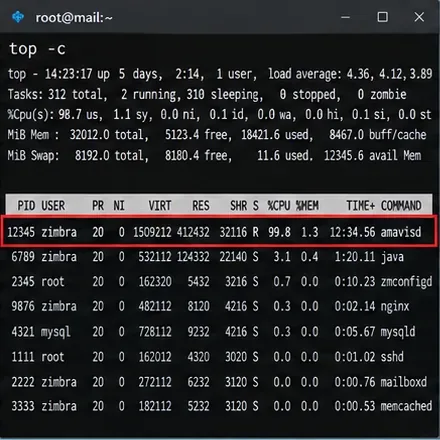
Caption: A terminal view where amavisd is the dominant CPU consumer, which is the first condition to verify before changing Zimbra settings.
A short spike can be normal while a large message or compressed attachment is scanned. Treat the problem as persistent when the same symptom continues while mail delays or queue depth increase. Also check load average, free memory, swap activity, and I/O wait. High CPU with heavy swap or storage contention may require a broader host-level investigation rather than an Amavis-only change.
Step 2: Check Zimbra service health before restarting anything
Switch to the Zimbra account and review service status. Zimbra's documentation uses zmcontrol status as the standard check for enabled services.
su - zimbra
zmcontrol status
zmamavisdctl status
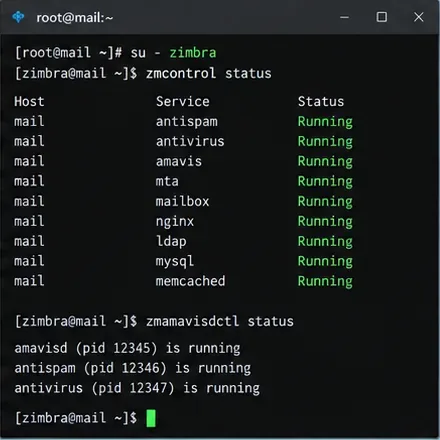
Caption: Zimbra service status showing Amavis, anti-spam, anti-virus, and MTA components running before troubleshooting begins.
This step matters because “100% CPU” and “service down” are different failure modes. If Amavis is not running, investigate startup errors instead. If Amavis is running but saturated, continue with queue and log analysis.
Step 3: Measure the mail queue, not just CPU usage
Queue depth tells you whether the high CPU is affecting delivery. Zimbra's queue troubleshooting material documents zmqstat for queue counts and Postfix queue commands for message details. Run the checks repeatedly a few minutes apart.
sudo /opt/zimbra/libexec/zmqstat
postqueue -p
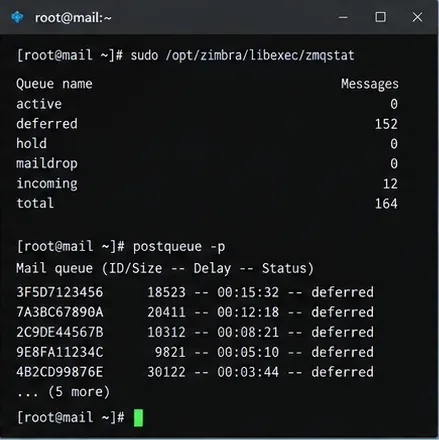
Caption: Queue statistics and deferred messages provide a better measure of mail-flow impact than CPU percentage alone.
Look for direction, not one isolated number. A queue that rises on every sample means throughput is below arrival rate. A queue that steadily falls after a change is one of the strongest signs that the change actually helped.
If you run a multi-MTA deployment, check the affected MTA node specifically. Do not assume the queue on another node reflects the same bottleneck.
Step 4: Use the Zimbra log to identify the slow stage
Amavis and SpamAssassin troubleshooting messages are written to /var/log/zimbra.log. Search around the time of the CPU spike and correlate message IDs, process IDs, and scan durations.
grep -iE 'amavis|spamassassin|clam' /var/log/zimbra.log | tail -n 200
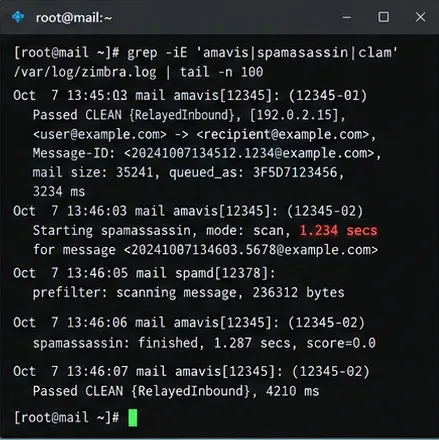
Caption: Amavis and SpamAssassin log lines can reveal whether individual messages or scanning stages are taking unusually long.
Useful patterns include repeated long SpamAssassin scans, repeated retries for the same queue IDs, ClamAV communication errors, decompression-related failures, or a small set of messages that repeatedly consume workers. Zimbra's troubleshooting documentation specifically recommends Amavis and SpamAssassin debug logging when scanning delays disrupt mail flow. See Zimbra's logging troubleshooting reference.
Step 5: Increase Amavis logging temporarily if the normal log is inconclusive
Zimbra exposes separate logging controls for Amavis and SpamAssassin. The documented Amavis range is 0 through 5, while zimbraAmavisSALogLevel uses 0 or 1. Start with Amavis level 2 rather than maximum verbosity unless you need deeper debugging.
su - zimbra
zmprov mcf zimbraAmavisLogLevel 2
zmprov mcf zimbraAmavisSALogLevel 1
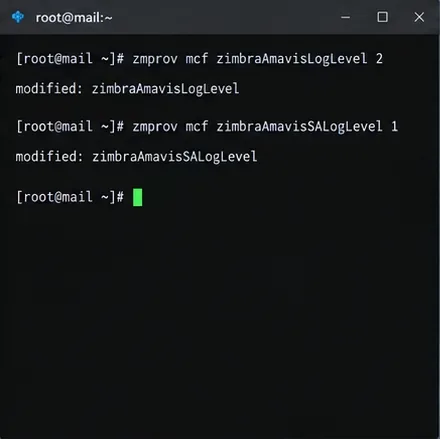
Caption: Temporary logging changes make scan timing and SpamAssassin behavior easier to correlate with the CPU spike.
Reproduce or observe the issue only long enough to capture useful data. Higher logging adds disk writes and can make a busy server noisier. After the investigation, return to your previous values; Zimbra documents the default SpamAssassin logging level as 0 and Amavis logging as normally low-volume.
zmprov mcf zimbraAmavisSALogLevel 0
zmprov mcf zimbraAmavisLogLevel 1
Step 6: If SpamAssassin is the slow stage, validate and update its rules
If the logs consistently point to SpamAssassin, check whether the issue began after a rules change, custom rule deployment, or failed rule update. Poorly designed regular expressions and problematic rules can become expensive on certain message bodies.
Zimbra's official Amavis troubleshooting material documents the bundled SpamAssassin update command for ZCS 8.8 and later as:
su - zimbra
/opt/zimbra/common/bin/sa-update -D
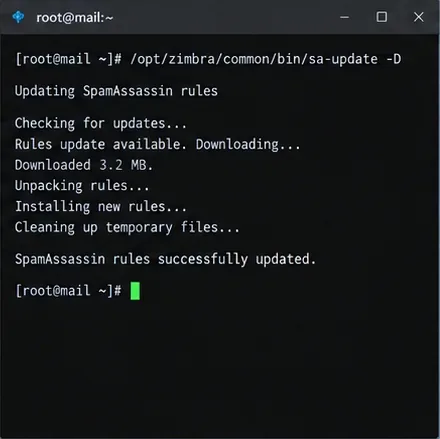
Caption: Updating the bundled SpamAssassin rules is appropriate when logs or startup errors point to stale or damaged rule data.
Do not treat sa-update as a universal CPU fix. If the spike began immediately after adding a custom rule, test that rule first. Zimbra stores modern custom SpamAssassin rules under /opt/zimbra/data/spamassassin/localrules/. Remove or disable only the suspected customization in a controlled maintenance window, then compare scan time and queue behavior.
The official Zimbra wiki also notes automatic rule update and compilation settings for newer ZCS releases. Review Zimbra Anti-spam Strategies before enabling automated behavior on an established server.
Step 7: Restart Amavis only after you know what you changed
A restart can clear stuck workers and load updated rules, but it should follow diagnosis rather than replace it. Restart only Amavis first unless evidence points to the wider MTA stack.
su - zimbra
zmamavisdctl restart
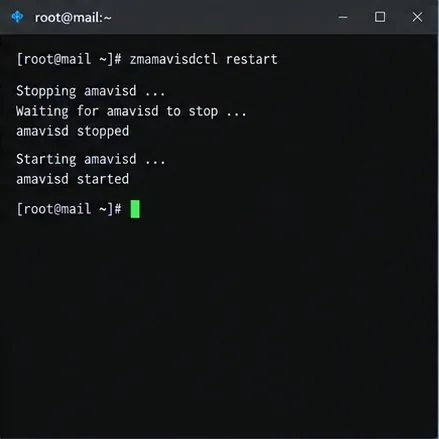
Caption: Restarting Amavis reloads the service after a targeted rules or configuration change without unnecessarily restarting all Zimbra services.
If the CPU immediately returns to 100%, that is useful evidence: the cause is still present. Go back to the logs and identify whether the same message, scanner, or rule appears again. Repeatedly restarting the service can temporarily reduce symptoms while allowing the queue to grow.
Step 8: Verify recovery with three independent checks
Do not call the incident resolved after seeing a lower CPU number once. Verify process load, queue direction, and service health together.
top -c
sudo /opt/zimbra/libexec/zmqstat
zmcontrol status
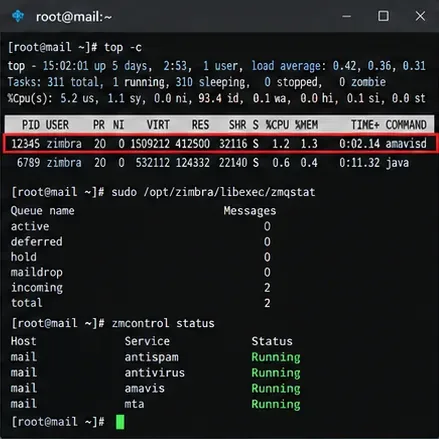
Caption: Recovery is stronger when CPU usage, queue depth, and Zimbra service status all improve at the same time.
Then send a test message through the affected MTA and confirm that it is delivered within your normal latency range. For a message that should pass filtering, inspect its headers for the expected Zimbra/Amavis spam and virus scan fields. Zimbra documents headers such as X-Virus-Scanned and X-Spam-Status when those checks are active.
How to decide what to do next
| What you observe | Best next action | Why |
|---|
| One message repeatedly causes long scans | Quarantine or inspect that message safely and correlate its queue ID with logs | The bottleneck may be content-specific rather than capacity-related |
| SpamAssassin timing dominates | Review custom rules, rule updates, and debug output | Regex-heavy or damaged rule sets can make scoring expensive |
| ClamAV errors or timeouts dominate | Investigate anti-virus health and update state | Amavis may simply be waiting on the scanner it calls |
| CPU is high but queues stay near zero | Observe longer before making disruptive changes | High utilization can be acceptable if throughput and latency remain healthy |
| Queues grow even after targeted fixes | Escalate to capacity, message-pattern, or support-level analysis | The server may be undersized, under attack, or hitting a software-specific defect |
Changes to avoid as a first response
Do not permanently disable anti-spam or anti-virus scanning merely to lower CPU. Zimbra does support bypass policies for specific trusted/originating traffic, but that changes the security model and should be a deliberate mail-policy decision, not a generic performance tweak. Zimbra's documentation for originating SpamAssassin bypass makes clear that the bypass is tied to trusted internal networks.
Also avoid raising the Amavis worker count blindly. More workers can increase concurrency, but they also increase memory pressure and may make CPU contention worse. The correct value depends on message mix, attachment size, scanner behavior, available cores, memory, and I/O. Test changes against queue throughput and latency rather than assuming a larger worker pool is faster.
Limits of this troubleshooting path
This procedure is designed for the common case in which Amavis is running but persistently CPU-bound. It does not replace version-specific Zimbra support guidance for a confirmed product defect, a compromised server, a malformed-message denial-of-service campaign, or a multi-node architecture with external scanners.
Zimbra's community technical material has documented historical cases where specially crafted messages or SpamAssassin behavior could leave Amavis workers CPU-bound for extended periods. Because the exact exposure depends on the Zimbra and SpamAssassin versions installed, do not apply an old package upgrade recipe blindly. First record your Zimbra version with zmcontrol -v, compare it with your supported release and patch level, and use current vendor guidance for upgrades.
Final verification checklist
- Amavis CPU is no longer pinned continuously under ordinary traffic.
- Deferred and active queues are stable or shrinking across repeated samples.
- New test messages pass through the MTA within an acceptable time.
- Amavis, anti-spam, anti-virus, and MTA services remain running.
- Expected spam and virus scanning headers are still present where applicable.
- Temporary debug logging has been returned to normal.
- Any custom rule or configuration change is documented so it can be reviewed after upgrades.
Official references









