Home
» NETWORK ADMIN
»
Fix Zimbra “LDAP Server Not Responding” Boot Failure: A Practical Recovery Guide
Fix Zimbra “LDAP Server Not Responding” Boot Failure: A Practical Recovery Guide
When Zimbra fails during startup with an error such as LDAP server not responding, the important question is not simply how to make the message disappear. The real goal is to restore a healthy LDAP dependency, confirm that Zimbra can read its configuration again, and avoid changing unrelated services while the root cause is still unknown.
This guide focuses on that outcome. It uses commands documented by Zimbra for service status, LDAP checks, local configuration, certificate verification, and multi-server LDAP URLs. The examples use placeholder hostnames such as ldap1.example.com; replace them with values from your own deployment.
What a successful recovery should look like
Before changing anything, define the finish line. A repair is convincing when all of the following are true:
ldap status reports a running slapd process on an LDAP node.
zmcontrol status reports LDAP and the dependent Zimbra services as running on the affected host.
The LDAP hostname resolves to the expected address from the affected Zimbra node.
The configured LDAP port is reachable.
If TLS is involved, the certificate chain validates and the previous TLS error is gone.
In a multi-server deployment, ldap_url and ldap_master_url contain valid, active LDAP hosts in the intended order.
After restart, /var/log/zimbra.log no longer shows recurring LDAP connection failures.
If one of these checks still fails, keep troubleshooting that layer rather than repeatedly restarting the whole Zimbra stack.
Quick reference: symptoms and the next check
Symptom
Most useful next check
ldap shows Stopped
Run ldap status and inspect /var/log/zimbra.log.
Hostname does not resolve
Check DNS, /etc/hosts, and the value in ldap_url.
Host resolves but port fails
Check routing, firewall rules, listening sockets, and the configured port.
TLS or PKIX errors appear
Verify the Zimbra certificate chain and CA files.
An old LDAP server remains in configuration
Correct ldap_url and ldap_master_url.
LDAP starts but other services still fail
Restart Zimbra and re-check service-specific logs instead of assuming LDAP is still the cause.
1. Establish whether LDAP itself is down
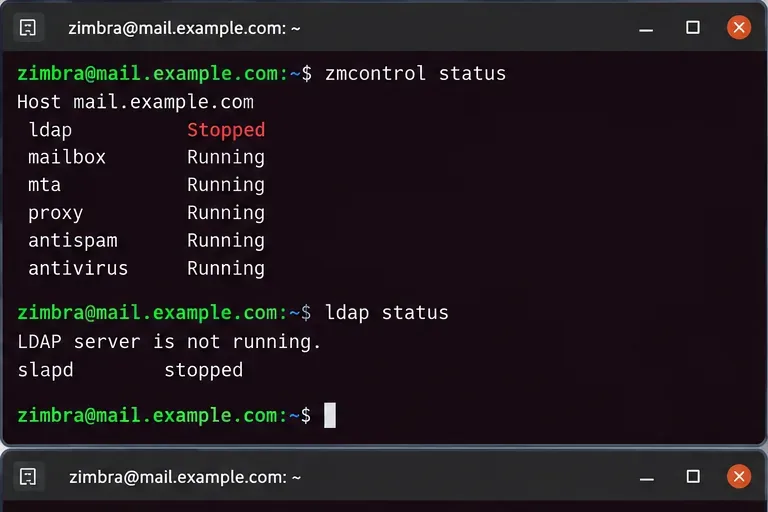
Run status checks as the zimbra user:
su - zimbra
zmcontrol status
ldap status
Zimbra’s LDAP troubleshooting documentation recommends checking whether the slapd process is actually running and then confirming that Zimbra recognizes it with ldap status. If LDAP is not running locally, investigate the LDAP process before troubleshooting mailbox, MTA, proxy, or web services. LDAP is a core configuration dependency, so downstream services can fail simply because they cannot read configuration data.
Start by confirming whether LDAP itself is stopped rather than treating every downstream startup failure as a separate problem.
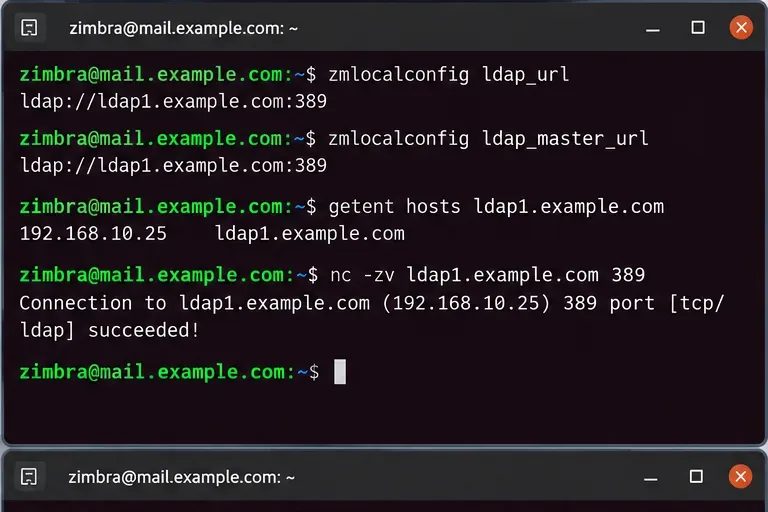
In Zimbra 10 multi-server documentation, ldap_url identifies the LDAP servers a node should query, while ldap_master_url identifies the master endpoint or master set used for writes. Zimbra also documents that replica URLs should normally appear before the master in ldap_url, with the master retained in the list.
This check is especially important after a server migration, LDAP replacement, IP renumbering, disaster recovery, or rolling upgrade. A perfectly healthy LDAP server cannot help a Zimbra node that is still trying to contact a retired hostname.
If DNS returns the wrong address, fix name resolution first. If DNS is correct but the port cannot be reached, investigate network routing, host firewalls, security groups, or the LDAP daemon’s listener. Do not change LDAP passwords merely because the TCP connection times out; a timeout happens before bind credentials can be evaluated.
Compare the configured LDAP endpoint with actual DNS resolution and port reachability before editing authentication settings.
Zimbra’s current v10 multi-server guide explicitly requires non-LDAP nodes to contact the LDAP master during configuration and states that installation cannot proceed if the server is unreachable. See the Zimbra Daffodil v10 Multi-Server Installation Guide.
3. Read the log before deciding what to repair
Use the central Zimbra log to identify the failure category:
tail -n 100 /var/log/zimbra.log
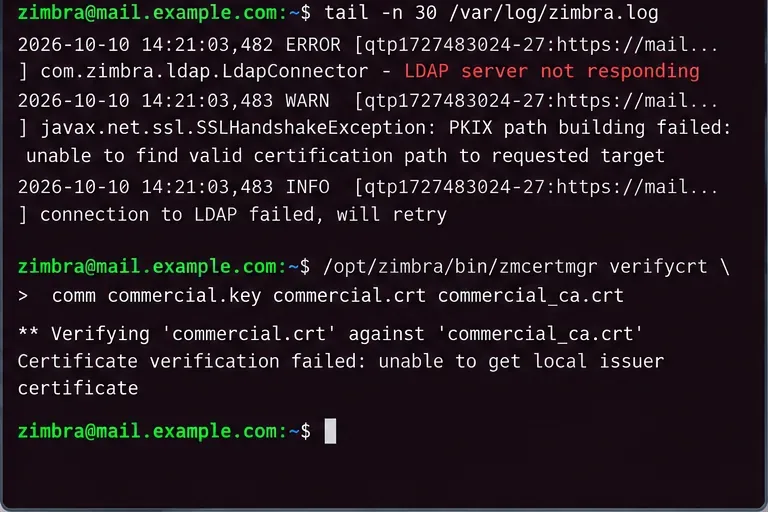
Look for a pattern rather than a single line. Common categories include connection timeout, connection refused, hostname errors, bind failures, or TLS validation errors. The category matters because each requires a different repair.
Timeout or no route: focus on DNS, routing, firewall, or a dead host.
Connection refused: the host is reachable but nothing is accepting connections on the configured port, or a local firewall is actively rejecting it.
TLS/SSL validation error: verify certificates and trust chains.
Authentication or bind error: only then investigate LDAP passwords or replication credentials.
When certificates are the problem
Zimbra has documented cases where LDAP communication fails because a root or intermediate CA has expired. A useful verification command for a commercial certificate is:
/opt/zimbra/bin/zmcertmgr verifycrt comm commercial.key commercial.crt commercial_ca.crt
Run it from the directory containing the relevant commercial certificate files, commonly under /opt/zimbra/ssl/zimbra/commercial/. If validation fails, correct the certificate chain rather than disabling TLS verification as a shortcut.
Use the log message to choose the repair path; a TLS-chain failure should not be treated as a DNS or password problem.
4. Correct stale LDAP endpoints only after verifying the replacement
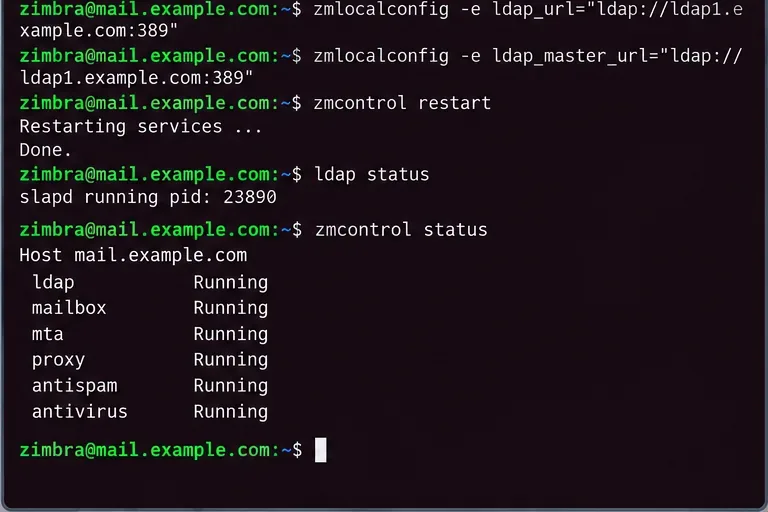
If the configured hostname is obsolete and you have already verified the correct active LDAP server, update the local configuration as the zimbra user. For example:
For a deployment with replicas, use the topology documented for your environment rather than reducing the list to one server. Zimbra’s v10 documentation gives examples in which replicas are listed first for reads and the master remains included. Multi-master environments have their own ordering requirements.
Do not copy these example URLs literally. Confirm the protocol, hostname, port, and intended master/replica role first. If your deployment uses LDAPS or StartTLS, preserve the security design rather than silently switching to plain LDAP to make startup succeed.
5. Restart once, then validate the entire dependency chain
After correcting the actual root cause, restart Zimbra:
zmcontrol restart
Then verify:
ldap status
zmcontrol status
A good recovery ends with LDAP running and the dependent Zimbra services returning to a healthy state after a controlled restart.
A restart that merely changes the error message is not enough. Re-check /var/log/zimbra.log for repeated connection failures and test normal administrative or user operations appropriate to the server role.
6. Multi-server environments need an additional replication check
If you run LDAP replicas or multiple masters, a server can be reachable while replication is unhealthy. Zimbra documents the zmreplchk utility for replication validation:
/opt/zimbra/libexec/zmreplchk
For multi-master systems, Zimbra documentation describes a healthy result as an in-sync status with error code 0. The exact recovery procedure depends on whether you have single-master replication, multi-master replication, or a migration in progress.
Stop treating this as a simple connectivity issue when any of the following is true:
slapd will not start even though the hostname and port configuration are correct.
The log reports database backend or LDAP data-store errors rather than network errors.
Replication remains out of sync after connectivity has been restored.
Passwords differ between LDAP masters or replicas after a migration.
The LDAP listener cannot bind because the configured hostname no longer belongs to the server.
At that point, the problem may involve LDAP database recovery, replication credentials, migration state, or server identity rather than a basic “server not responding” condition. Zimbra’s migration documentation specifically notes that DNS, hostname mismatches, incorrect local-config passwords, and stale references to old LDAP servers can all prevent LDAP startup.
What not to do
Do not delete LDAP database files as an early troubleshooting step.
Do not reset LDAP passwords before proving that authentication is the failing layer.
Do not remove a master from every LDAP URL just because one replica is responding.
Do not disable TLS verification simply to make the connection succeed.
Do not repeatedly run zmcontrol restart without reading the resulting logs.
Final recovery checklist
LDAP hostname resolves to the intended host.
LDAP port is reachable from the affected Zimbra node.
ldap_url and ldap_master_url match the current topology.
TLS certificate chain is valid if encrypted LDAP is used.
ldap status reports slapd running.
zmcontrol status shows the required services running.
Replication is in sync where applicable.
/var/log/zimbra.log no longer shows recurring LDAP failures.
The main limitation of this procedure is that “LDAP server not responding” is a dependency symptom, not a single root cause. It can result from a dead LDAP process, stale URLs, broken DNS, blocked ports, certificate failures, replication problems, or incorrect credentials. The safest approach is therefore to prove each layer in order and change only the layer that fails.