Home
» NETWORK ADMIN
»
How to Configure DKIM, SPF, and DMARC Records for a Zimbra Server
How to Configure DKIM, SPF, and DMARC Records for a Zimbra Server
DKIM, SPF, and DMARC solve three different parts of outbound email authentication, and a reliable Zimbra deployment needs them to work together. SPF tells receivers which systems are allowed to send with your envelope domain. DKIM adds a cryptographic signature tied to a domain. DMARC checks whether a passing SPF or DKIM identity aligns with the domain visible in the message's From header, then publishes a handling and reporting policy.
One current standards detail matters here: as of October 2026, the active DMARC protocol specification is RFC 9989, published in May 2026. It obsoletes the older RFC 7489 and changes some deployment details, including making the old pct tag historic and introducing the t testing tag. That is important if you are copying an older DMARC example from a previous Zimbra guide or DNS tutorial.
What you need before changing DNS
You need administrative shell access to a Zimbra MTA, access to the authoritative public DNS zone for your sending domain, and a complete list of every system that legitimately sends mail using that domain. That list may include your Zimbra server, a relay or smart host, marketing platforms, ticketing systems, cloud applications, and any disaster-recovery mail service.
A common misunderstanding is that publishing records for the Zimbra host alone is always enough. It is only enough when Zimbra is truly the only authorized sender. SPF is evaluated against the SMTP identity, and DMARC can expose forgotten third-party senders once enforcement is enabled. Action: inventory all outbound sources before you publish a restrictive SPF or DMARC policy.
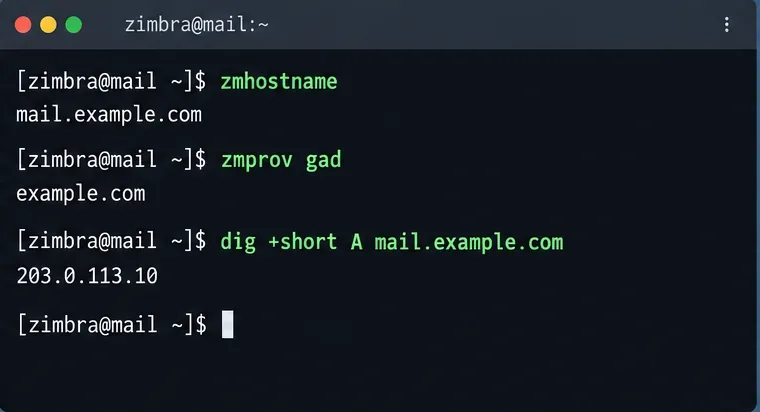
Confirm the Zimbra hostname, hosted mail domain, and public DNS mapping before building SPF, DKIM, or DMARC records.
Step 1: Generate the DKIM key in Zimbra
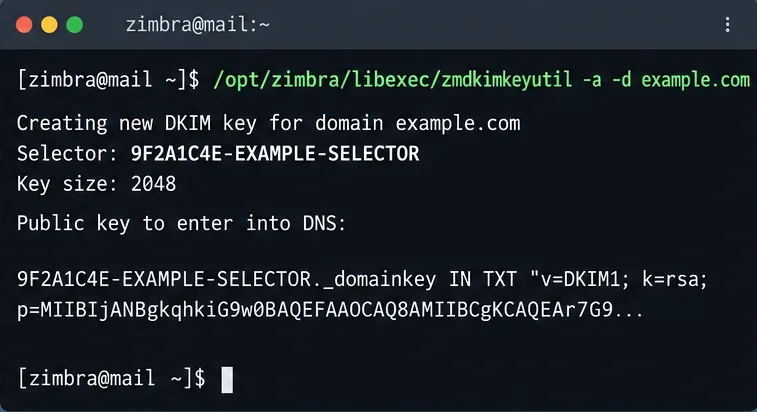
Zimbra includes the zmdkimkeyutil utility for domain-level DKIM signing. Zimbra's official documentation says to run it on an MTA server. To add DKIM data for a domain that does not already have it, switch to the Zimbra account and run:
su - zimbra
/opt/zimbra/libexec/zmdkimkeyutil -a -d example.com
The command stores the DKIM data in Zimbra's LDAP domain entry and prints the selector and public TXT record you need to publish. Zimbra's DKIM signing documentation also documents -q to query existing DKIM data, -u to update it, and -r to remove it.
For modern Zimbra installations, the output may differ in exact selector value from examples you see online. The selector is not supposed to be a fixed word such as default or zimbra; use exactly the selector that your own server prints. Action: copy the entire public-key record from your command output rather than reconstructing it manually.
Run Zimbra's DKIM utility on an MTA and use the selector and public key it actually returns for your domain.
Step 2: Publish the DKIM TXT record
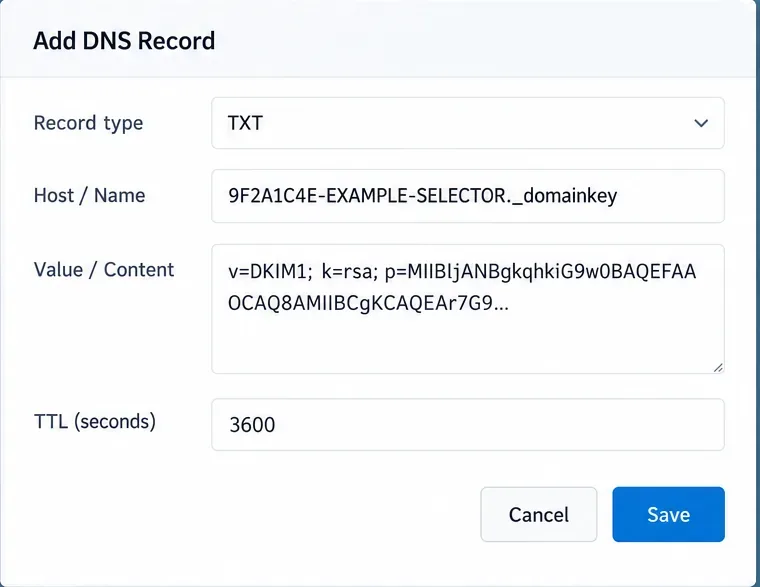
DKIM verifiers look up the public key in DNS under a name built from the selector and ._domainkey. The mechanism is defined in RFC 6376. In practical DNS-provider terms, the record usually looks like this:
Field
Example
Type
TXT
Name
YOUR_SELECTOR._domainkey
Value
v=DKIM1; k=rsa; p=YOUR_PUBLIC_KEY
Whether you enter only YOUR_SELECTOR._domainkey or the full YOUR_SELECTOR._domainkey.example.com depends on your DNS control panel. Some providers automatically append the zone name. Action: preview the final fully qualified record name in your provider before saving so you do not accidentally create ...example.com.example.com.
Publish the DKIM selector under _domainkey and paste the complete public key produced by Zimbra.
Step 3: Create one SPF TXT record for the sending domain
SPF is published as a DNS TXT record at the domain whose sending authorization you want to describe. RFC 7208 requires TXT records for SPF and says that multiple SPF records at the same owner name produce a permanent error. In other words, do not create a second v=spf1 TXT record just because you add another mail service.
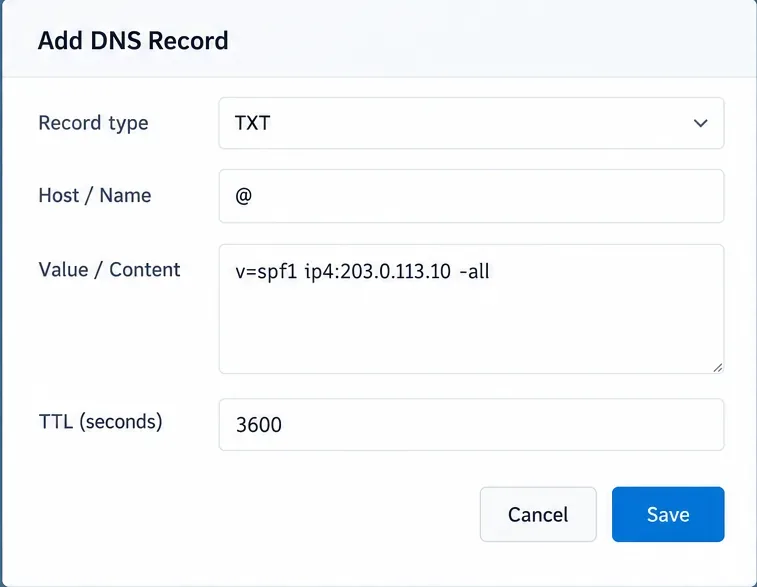
If your Zimbra server sends directly from one stable public IPv4 address, a minimal example is:
v=spf1 ip4:203.0.113.10 -all
If all hosts referenced by your domain's MX records are legitimate outbound senders, you might use mx; if a third-party service publishes an SPF include domain, you may need an include: mechanism. The exact record is deployment-specific, so there is no single universally correct Zimbra SPF string.
Another common mistake is assuming ~all is always safer than -all. The real question is whether your authorized-sender inventory is complete. A strict -all is reasonable when it is. Action: authorize every legitimate sender in one SPF record, verify it in production, then choose the final all qualifier based on that evidence.
Keep SPF reasonably simple. RFC 7208 limits mechanisms and modifiers that trigger DNS lookups to 10 during evaluation; exceeding the limit can result in permerror. Action: count includes and other DNS-expanding mechanisms before adding another vendor.
A simple direct-sending setup can authorize the Zimbra public IP in a single SPF TXT record; add other legitimate senders only when your environment requires them.
Step 4: Publish DMARC in monitoring mode first
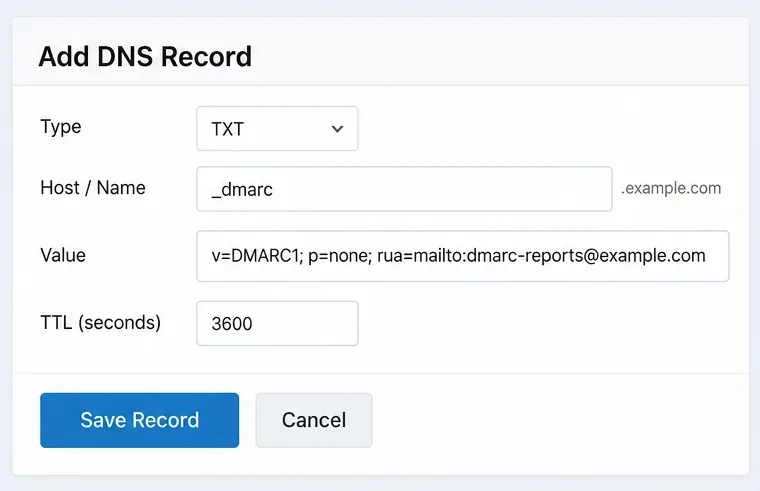
DMARC policy is published at _dmarc.example.com. A cautious first record is:
p=none asks receivers not to change handling based on the DMARC policy while you collect data. The rua address requests aggregate reports; the current aggregate-report format is specified by RFC 9990. Use a mailbox or reporting service capable of processing DMARC reports rather than an unattended personal inbox.
Do not blindly copy pct=10, pct=25, or similar rollout examples from older articles. RFC 9989 marks pct historic because operational experience showed inconsistent application. The current standard uses t=y for testing behavior when needed. Action: start with p=none and analyze reports; do not rely on percentage sampling as your safety mechanism.
Begin with a DMARC monitoring record at _dmarc so you can see real sending sources before requesting quarantine or rejection.
Step 5: Verify all three records in public DNS
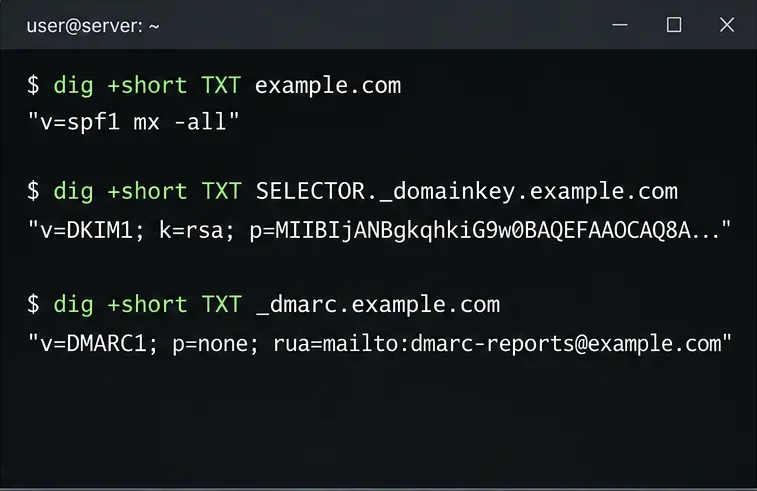
After the DNS provider has published the records, query them from outside the authoritative server or from a resolver that sees public DNS. For example:
For SPF, confirm that only one TXT response beginning with v=spf1 exists at that owner name. For DKIM, confirm the selector exactly matches the value currently stored by Zimbra. For DMARC, confirm there is a single usable DMARC policy record at the expected name.
DNS propagation is conditional on your provider, TTL, and resolver cache. A change that appears immediately on an authoritative nameserver may still be cached elsewhere. Action: test against at least one independent public resolver before blaming Zimbra for an old answer.
Use independent DNS lookups to verify that the public records match the policy you intended to publish.
Step 6: Send a real message and check authentication alignment
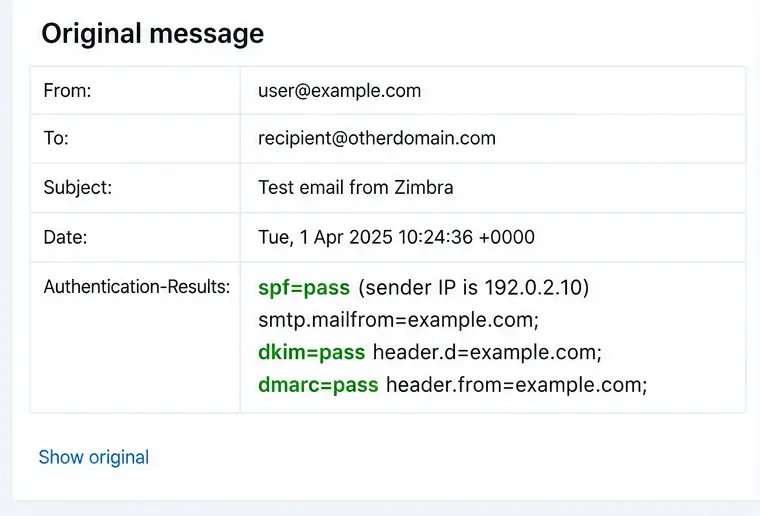
Send a message from the Zimbra domain to a mailbox on a different provider and inspect the full message headers. A successful result should normally show a passing DKIM signature and/or SPF result, plus DMARC passing because at least one authenticated identity aligns with the visible From domain.
This is where another misconception becomes visible: DMARC does not require both SPF and DKIM to pass. It requires a passing aligned SPF identity or a passing aligned DKIM identity. RFC 9989 defines relaxed alignment as the default for both aspf and adkim, although you can request strict alignment with s. Action: inspect Authentication-Results and identify exactly which mechanism is providing the aligned DMARC pass.
A real external delivery test should show not only SPF or DKIM passing, but also DMARC passing for the visible From domain.
Step 7: Move from monitoring to enforcement only after the reports are clean
Once your DMARC data shows that legitimate senders authenticate and align correctly, you can change the policy to p=quarantine or eventually p=reject. In the current standard, none, quarantine, and reject express the domain owner's assessment of unauthenticated use, but receivers still retain local handling discretion.
Do not treat p=reject as a deliverability optimization. DMARC is primarily an authentication and domain-abuse control; it does not make wanted mail automatically trustworthy or guarantee inbox placement. Action: make enforcement a security decision based on aligned authentication coverage, not a promise of higher inbox rates.
Step 8: Rotate DKIM keys without immediately deleting the old DNS record
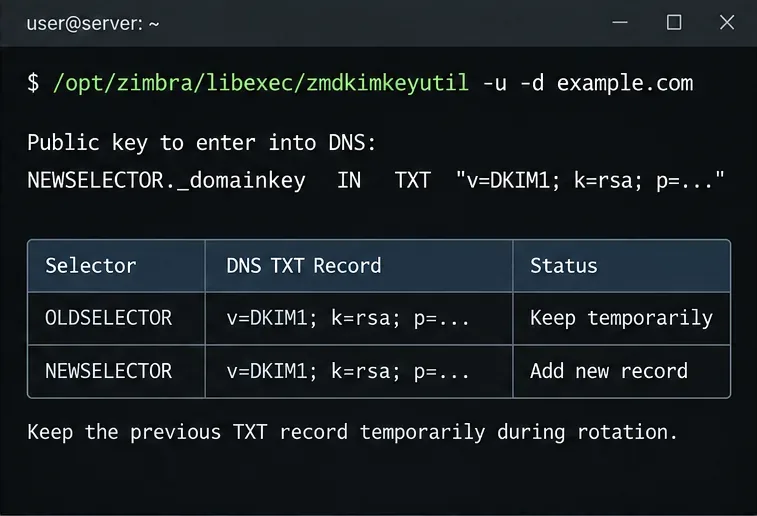
To update DKIM data for a domain, Zimbra documents:
The command creates updated DKIM data and produces a new DNS entry. Zimbra specifically advises leaving the previous TXT record in DNS for a period of time so messages signed with the previous key can still be verified while they are in transit or queued. Action: publish the new selector first, verify it, and keep the previous selector temporarily before removing it.
During DKIM rotation, publish the new key and retain the previous selector temporarily so older signed mail can still validate.
Quick reference: what each record proves
Control
What it checks
Where you configure it
Primary failure to avoid
SPF
Whether the sending host is authorized for the SMTP identity
Public DNS TXT record
Multiple SPF records or missing third-party senders
DKIM
Whether a message carries a valid signature for a signing domain
Zimbra key generation plus public DNS TXT key
Wrong selector or truncated public key
DMARC
Whether SPF or DKIM passes and aligns with the From domain
Public DNS TXT record at _dmarc
Enforcing before legitimate senders align
Zimbra-specific checks worth making
Zimbra's email protection guidance notes that DKIM must be generated per domain and published in each domain's public DNS. It also documents alignment issues that can appear with certain personas or auto-responder behavior on older configurations. Those details are situational rather than universal: if your deployment uses aliases, personas, relays, or unusual envelope-from rewriting, test those message paths separately.
For a multi-domain Zimbra installation, repeat DKIM setup and DNS publication for each sending domain. SPF and DMARC are likewise domain policies; do not assume a record on one hosted domain automatically covers another unrelated domain. Action: build a small test matrix for every domain and every outbound route before enabling strict DMARC enforcement.
Final validation checklist
There is exactly one SPF record beginning with v=spf1 at each sending domain.
The SPF record includes every authorized outbound route and stays within SPF DNS-processing limits.
Zimbra is signing outbound mail with the selector stored for that domain.
The matching DKIM public key is visible in public DNS under selector._domainkey.
The DMARC TXT record is published at _dmarc.domain and uses current syntax.
External test messages show an aligned SPF or DKIM pass and therefore a DMARC pass.
Aggregate reports are reviewed before moving from monitoring to quarantine or reject.
Old DKIM selectors are retained temporarily during rotation and removed only after the transition window.
If these checks pass, your Zimbra server is not merely publishing three DNS records; it is presenting a coherent authentication chain that remote receivers can validate. That distinction matters more than copying any one example string from a guide, because the correct SPF sources, DKIM selector, and DMARC enforcement timing depend on how your own mail actually leaves the organization.