Home
» NETWORK ADMIN
»
How to Configure Nextcloud Mail App with OAuth2 Authentication
How to Configure Nextcloud Mail App with OAuth2 Authentication
OAuth2 is the preferred way to connect many hosted mail accounts to Nextcloud Mail because the mail provider issues tokens instead of requiring Nextcloud to keep using the user’s normal mailbox password. In practice, however, a good setup is not measured by whether an OAuth consent window closes successfully. The useful outcome is that Nextcloud Mail can load folders over IMAP, send mail over SMTP, refresh authentication without repeated user prompts, and continue doing so after the first access token expires.
This guide covers the two OAuth integrations that Nextcloud Mail documents directly: Google accounts and hosted Microsoft Outlook/Microsoft 365 accounts. As of October 6, 2026, the Nextcloud App Store lists Mail 5.12.3 as the stable release for Nextcloud 32 through 35, while the current administration manual documents Google OAuth and Microsoft XOAUTH2 configuration. If you are running an older Mail release, update within the compatibility range supported by your Nextcloud server before troubleshooting behavior that may already have changed.
What a successful Nextcloud Mail OAuth2 setup should achieve
Before changing provider settings, define the result you expect. A working configuration should pass all of these checks:
The provider redirects the user back to the exact Nextcloud redirect URI configured for the OAuth client.
Nextcloud Mail opens the mailbox and lists folders without asking for the normal mailbox password again.
New messages arrive through IMAP and a manually refreshed inbox updates without an authentication error.
A test message sent from Nextcloud Mail is accepted through SMTP and appears in the Sent folder.
After enough time for the short-lived access token to expire, the account continues working through a refresh token rather than forcing a fresh login every time.
If the setup only passes the consent-screen step but not the IMAP and SMTP tests, treat it as incomplete. OAuth authorization and mail-protocol access are related but separate stages.
Step 1: Confirm that your provider matches a supported OAuth path
Nextcloud Mail currently exposes built-in OAuth handling for Google and Microsoft accounts. Google’s mail servers support OAuth 2.0 with SASL XOAUTH2 for IMAP and SMTP. Microsoft documents OAuth2 support for IMAP, POP, and SMTP in Microsoft 365 and Outlook.com. Nextcloud then uses the provider-issued token when authenticating to the mail protocols.
Do not assume that any OpenID Connect or OAuth2-capable mail server can be dropped into the same interface. A 2026 Nextcloud Mail enhancement request for generic third-party OAuth/OpenID providers remained an enhancement rather than a documented general configuration path. If your provider is neither Google nor Microsoft, verify support for that exact provider before building a production rollout around OAuth2. The project discussion is available in the Nextcloud Mail generic OAuth2 enhancement issue.
Configure Gmail with OAuth2
Step 2: Copy the Gmail redirect URI from Nextcloud
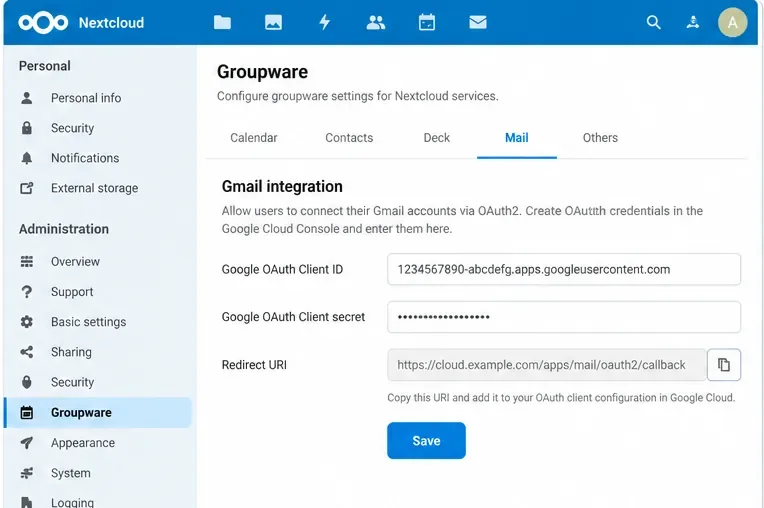
Sign in as a Nextcloud administrator, open the administration settings, go to Groupware, and find Gmail integration. The Nextcloud administration manual says to enter a Google client ID and client secret in this section. Use the redirect URI displayed by your own instance when configuring Google; do not reconstruct the path from an example because reverse proxies, web-root changes, and deployment layout can affect the externally visible URL.
In Nextcloud administration, Gmail OAuth is configured under Groupware. Copy the redirect URI shown by your own Nextcloud instance rather than inventing one.
Quality check: the redirect URI should use your production HTTPS hostname and should be reachable from the user’s browser. If Nextcloud shows an internal host name while users access a public host name, correct the Nextcloud/proxy URL configuration first. OAuth will not compensate for a mismatched public URL.
Step 3: Create the Google OAuth client
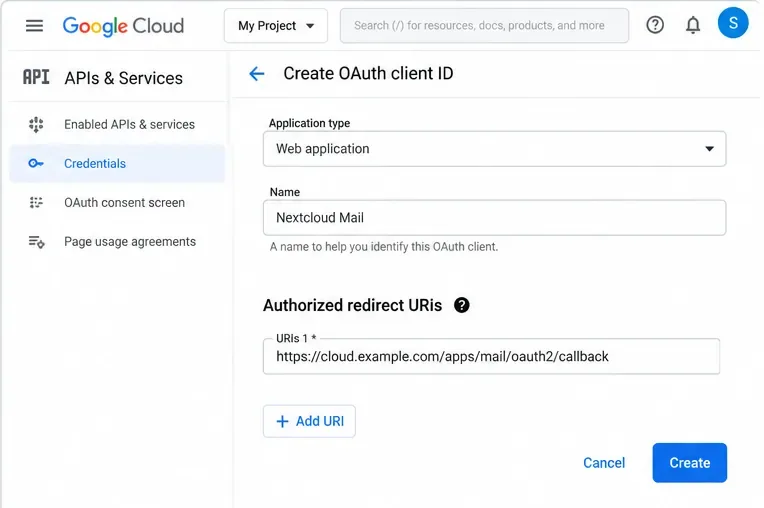
In Google Cloud, configure the Google Auth Platform/consent settings for the project and create an OAuth client for a Web application. Add the redirect URI copied from Nextcloud as an authorized redirect URI. Google requires the redirect URI in the authorization request to match an authorized value exactly; scheme, case, path, and trailing slash matter. Google documents this behavior in Using OAuth 2.0 for Web Server Applications.
Create a Google OAuth client for a web application and make the authorized redirect URI match the value displayed by Nextcloud exactly.
Gmail mail access is important from a compliance perspective. Google classifies the broad https://mail.google.com/ scope, including IMAP, SMTP, and POP3 usage, as a restricted scope. Depending on whether the app is internal, in testing, or intended for broader production use, Google verification requirements can apply. Review Google’s restricted scopes documentation and OAuth app verification guidance before onboarding a large user population.
Step 4: Save the Google client ID and secret in Nextcloud
Return to Administration settings > Groupware > Gmail integration, paste the Google client ID and client secret, and save. Avoid exposing the secret in screenshots, tickets, shell history, or shared notes. If you rotate the OAuth client secret later, update Nextcloud promptly and schedule a controlled verification of existing accounts.
Step 5: Add the Gmail account and complete consent
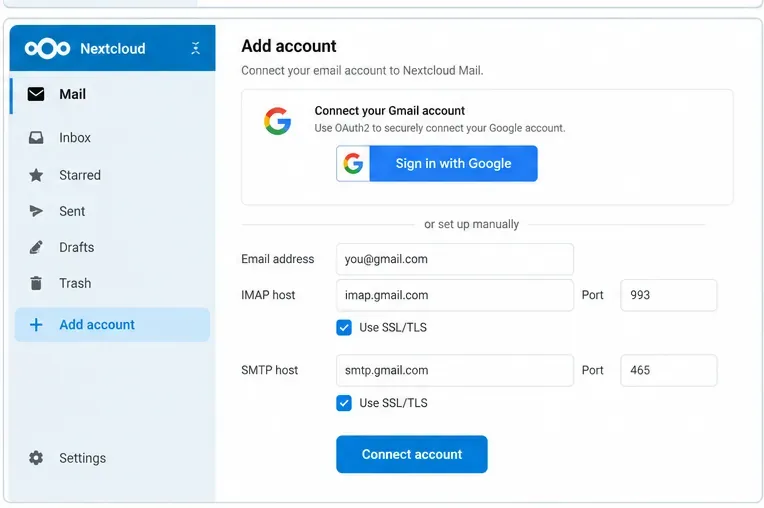
Open Nextcloud Mail as the user and add the Gmail account. Current Mail code recognizes Gmail by the standard Gmail IMAP/SMTP hosts and switches the authentication method to XOAUTH2 when the administrator has configured Google OAuth. Google documents imap.gmail.com:993 for IMAP over SSL and smtp.gmail.com with TLS on supported SMTP ports.
After the administrator saves Google OAuth credentials, a Gmail account should use the Google authorization flow instead of storing the normal account password.
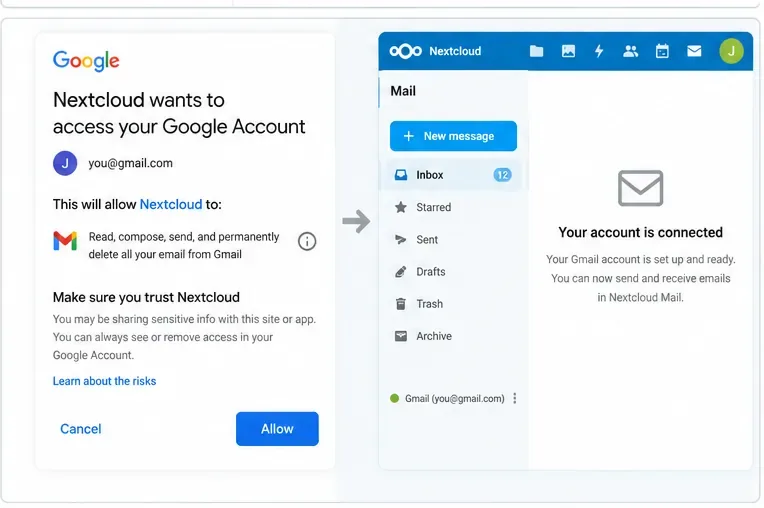
Continue to Google sign-in and review the consent screen. The provider may show warnings or restrict access if the OAuth app has not been configured or verified for the scopes and audience being used.
Grant only the permissions presented by the provider, then return to Nextcloud and verify that the mailbox actually loads; the redirect page alone is not a sufficient success test.
Do not stop at “account connected.” Load the Inbox, open at least one message, send a message to a second mailbox you control, reply to it, and confirm the round trip. That test proves considerably more than the OAuth redirect alone.
Configure Microsoft 365 or Outlook with OAuth2
Step 6: Register the application in Microsoft Entra
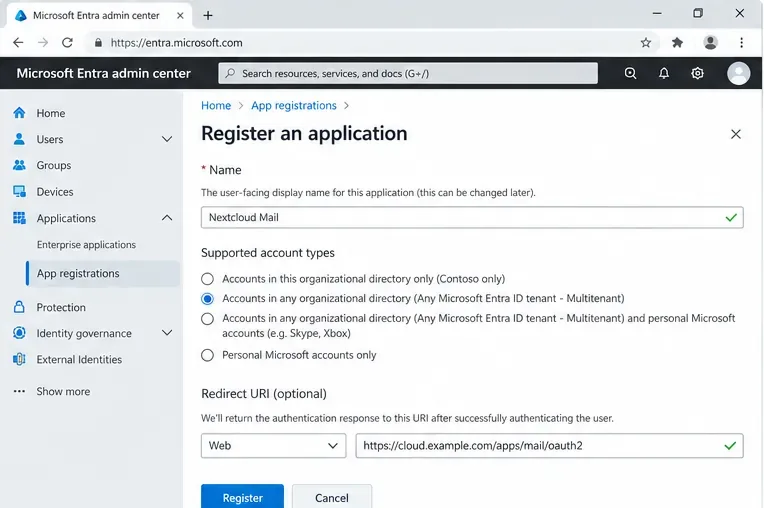
Open the Microsoft Entra admin center and create an app registration. The Nextcloud guide tells administrators to choose account types that allow organizational and personal Microsoft accounts for its general example and to configure a Web redirect URI copied from Nextcloud. If your organization deliberately uses a single tenant, do not blindly copy the multitenant example: align the supported account types and tenant setting with your identity policy.
For Microsoft 365 or Outlook.com, register a web application in Microsoft Entra and choose supported account types that match the tenant strategy you intend to use.
Microsoft requires redirect URIs to be registered on the application. A mismatch can result in errors such as AADSTS50011. Microsoft’s current guidance is in Redirect URI best practices and limitations.
Step 7: Record the client ID and create a client secret
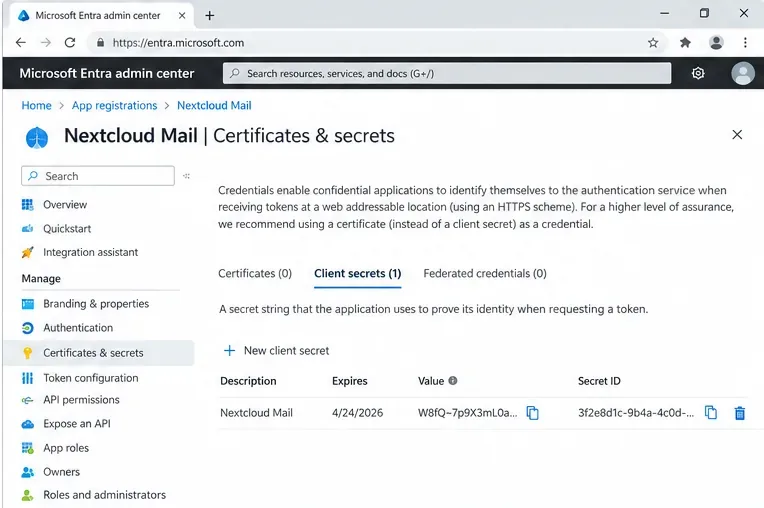
Copy the Application (client) ID. Then open Certificates & secrets, create a new client secret, and copy the secret value immediately. Microsoft states that the value is not displayed again after you leave the page. It also limits client-secret lifetime to 24 months or less and recommends a shorter expiration period in its current app-registration documentation.
Create and securely record the client secret value. Microsoft notes that secret values are shown only once and have a limited lifetime.
That expiration date is an operational dependency, not a one-time installation detail. Put the secret-expiration date into your organization’s credential-rotation process. Otherwise an apparently stable Nextcloud Mail deployment can later fail because token refresh can no longer be completed.
Step 8: Enter Microsoft credentials in Nextcloud
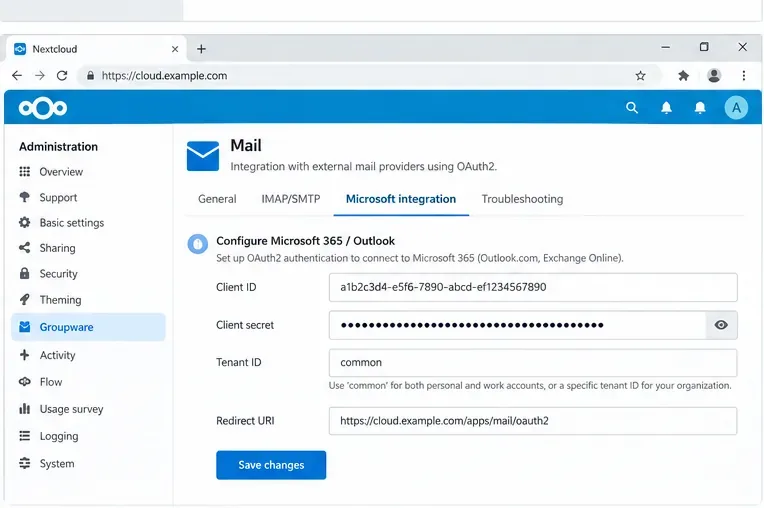
In Nextcloud administration settings, open Groupware and the Microsoft integration area. Enter the client ID and client secret. The official Nextcloud guide uses the tenant value common for the broad hosted-Outlook configuration and explicitly warns that a custom tenant ID is outside that basic guide unless you also changed the supported account types.
Enter the Microsoft application credentials in Nextcloud Groupware. The official Nextcloud guide uses the default tenant value “common” for its general hosted-Outlook example.
For the underlying protocol permissions, Microsoft documents delegated scopes including https://outlook.office.com/IMAP.AccessAsUser.All for IMAP and https://outlook.office.com/SMTP.Send for SMTP, plus offline_access when a refresh token is needed. Nextcloud constructs the provider flow; you should still confirm that tenant policies and Conditional Access rules permit the requested delegated access.
Step 9: Connect the Microsoft account and verify the mailbox
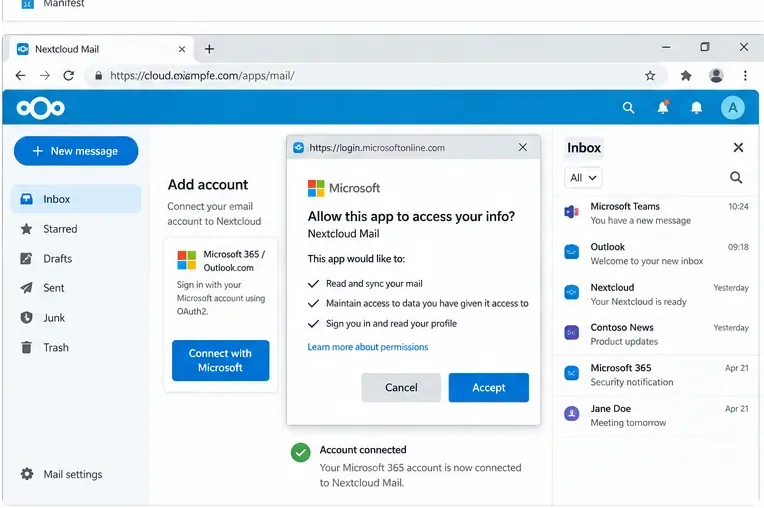
Add the Outlook or Microsoft 365 address in Nextcloud Mail and continue through the Microsoft sign-in/consent flow. The Nextcloud administration manual explains that, once OAuth is configured, the password entered during account setup is discarded and the user is prompted for Microsoft consent.
Complete Microsoft consent, then confirm that folders load and that both receiving and sending work before treating the OAuth setup as complete.
Again, the visible consent result is only an intermediate signal. Confirm that the folder list loads, a test message can be read, a message can be sent, and the Sent folder contains the expected copy.
How to tell whether OAuth2 is actually healthy
Signal
What it means
What to do next
Consent succeeds and Inbox loads
Authorization and IMAP are probably working
Test SMTP sending and refresh behavior
Consent succeeds but folders do not load
The redirect may have completed while the mail connection failed
Check provider policy, IMAP access, Nextcloud logs, and account settings
Receiving works but sending fails
IMAP works; SMTP authorization or server policy may not
Verify SMTP service, delegated permission, and tenant/provider restrictions
It works initially but later asks for sign-in repeatedly
Refresh-token use, secret validity, app status, or provider policy may be failing
The registered callback URL does not exactly match the request
Copy the URI from Nextcloud again and compare it character for character
When to change your approach
Change the OAuth application configuration when the redirect URI, supported account audience, tenant setting, or consent configuration does not match your deployment. Repeated retries will not fix a structural mismatch.
Change the deployment URL/proxy configuration when Nextcloud generates an internal, HTTP, or otherwise incorrect public callback address. Fix the canonical external URL first, then recreate or update the provider redirect URI.
Use provider-specific administration rather than generic OAuth assumptions when Conditional Access, admin-consent policy, Google app verification, or restricted scopes prevent users from completing authorization. Those controls are intentionally enforced by the identity provider.
Consider a different authentication method only when the provider and your security policy explicitly allow it. For example, the Nextcloud Mail interface notes that a Google App Password can be an alternative when Google OAuth is not configured and the Google account uses two-factor authentication. That is not equivalent to OAuth2 and should not be treated as the preferred organization-wide replacement merely because it is simpler to set up.
Known limitations and 2026 troubleshooting caution
There is an important diagnostic caveat in the Nextcloud Mail project history. In July 2026, maintainers confirmed a bug report where provider-side OAuth errors could still render the same “Account connected” redirect page as a successful authorization. The report covered Microsoft directly and identified the same controller pattern for Google. A separate 2026 report described difficulty reconnecting an account after its refresh token became unusable. These reports were filed against Mail 5.10.7-era code; do not assume that every version is affected forever, but also do not use the redirect page as your only evidence of success.
You can review the project’s OAuth redirect error-handling issue and OAuth reconnect issue. If you are troubleshooting a current release, first check the installed Mail version and the latest release notes before applying workarounds written for an older branch.
Final validation checklist
Confirm the installed Mail app version is supported by your Nextcloud server version.
Use the redirect URI displayed by the actual Nextcloud instance and register it exactly with the provider.
For Google, verify the OAuth audience, consent configuration, restricted-scope requirements, and production/testing status.
For Microsoft, verify supported account types, tenant choice, client ID, client-secret validity, and any Conditional Access or admin-consent policy.
Connect one pilot account before rolling the configuration out broadly.
Test Inbox loading, message reading, sending, Sent-folder storage, and later token refresh.
Record client-secret expiration and ownership so credential rotation does not become an unplanned outage.
OAuth2 improves the authentication model for Nextcloud Mail, but it does not eliminate the need to manage provider policy, redirect URIs, application credentials, and mail-protocol access. A configuration is ready for production when the entire path—provider authorization, token refresh, IMAP retrieval, and SMTP sending—works predictably under the policies that apply to your users.