Home
» NETWORK ADMIN
»
How to Delete Inactive User Accounts in Matrix Synapse via Admin API
How to Delete Inactive User Accounts in Matrix Synapse via Admin API
In Matrix Synapse, there is an important distinction between deleting an inactive account and deactivating it. Synapse’s documented Admin API does not provide a general-purpose hard-delete endpoint that removes every database record associated with a user. The supported administrative workflow is to identify an account, review it, then call the deactivation endpoint. You can optionally set "erase": true to remove profile information and mark the user as erased.
A good result is therefore not “the user ID disappears from every Synapse table.” A good result is that the user can no longer authenticate, active tokens and devices are removed, the account is taken out of rooms, third-party identifiers are removed, and—if your policy requires it—the profile is erased. Uploaded media and historical messages are separate concerns and are not automatically deleted by account deactivation.
This guide uses the current Synapse Admin API documentation available in October 2026. Always compare the examples with the documentation for the Synapse version running on your homeserver, especially if you operate a long-lived deployment or use Matrix Authentication Service. The authoritative references are the Synapse User Admin API documentation, the Synapse Admin API overview, and the Synapse Media Admin API documentation.
What outcome should you aim for?
Before changing anything, define the cleanup policy. “Inactive” is not a Synapse account state; it is a rule you create from fields such as last_seen_ts, account type, administrative status, and business context.
Goal
Recommended action
How to verify it
Disable stale accounts but preserve identity/profile
Deactivate with "erase": false
User record reports deactivated: true
Deactivate and remove profile fields
Deactivate with "erase": true
User reports both deactivated: true and erased: true
Remove user-uploaded local media
Use the separate user media deletion API
Media deletion response reports the deleted IDs/count
Temporarily block activity while retaining an easier recovery path
Consider suspension instead of deactivation
User is suspended but not deactivated
If you are unsure whether an account is abandoned, do not make last_seen_ts your only criterion. Service accounts, application-service users, emergency administrators, bots, support accounts, and SSO-linked users can have unusual login patterns. A reliable cleanup process includes an explicit exclusion list and a review step.
Step 1: List local users and collect activity data
Admin API requests require an access token belonging to a server administrator, which is different from being a room administrator. Send the token in the HTTP Authorization: Bearer header rather than placing it in a URL or shell history where possible.
The user-list API supports pagination. When the response contains next_token, request the next page using that value as from. Do not assume the first page represents the full server.
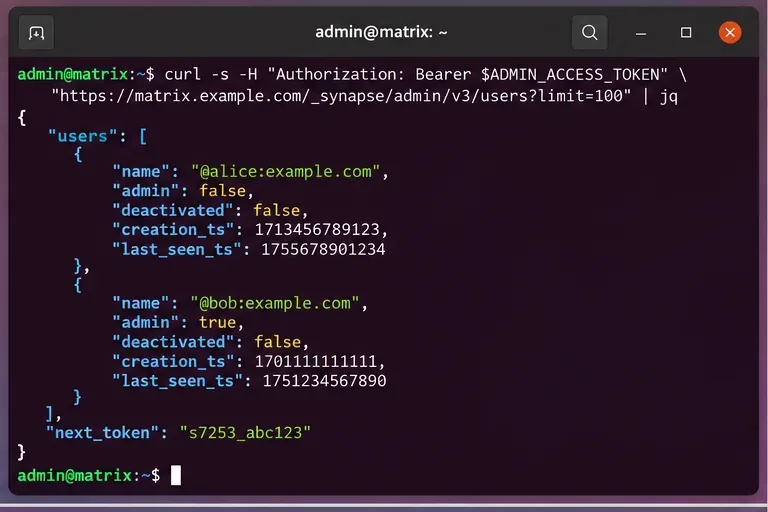
The API exposes useful fields for cleanup decisions, including whether an account is an admin, its user type, whether it is already deactivated, when it was created, and when it was last seen. The documentation defines last_seen_ts as the user’s last activity timestamp in milliseconds since the Unix epoch.
Start by listing local users through the V3 Admin API and follow next_token until every page has been reviewed.
What counts as “inactive”?
A common policy is “no activity for 180 days,” but the right threshold depends on the environment. A small private server may reasonably use 90 days. A university, seasonal organization, or alumni service may need 365 days or more.
Use an absolute cutoff timestamp rather than comparing formatted dates. For example, a Python job can compute the threshold in milliseconds:
Then consider a user inactive only when the account is active, non-administrative, not protected by policy, and its last_seen_ts is older than the threshold.
Treat a missing or null last-seen value conservatively. It may mean the account has never produced the activity data you expect, not necessarily that it is safe to remove. Cross-check creation time, account type, SSO mapping, and business ownership before including it.
Step 2: Build an inactivity candidate list, not an automatic deletion list
The quality of this step matters more than the speed of the API calls. Your objective should be a reviewed candidate list containing only accounts that are safe to deactivate.
At minimum, exclude:
homeserver administrators;
known application-service and integration accounts;
bots and support accounts that are intentionally dormant;
break-glass or emergency accounts;
accounts on a legal-hold or retention exception list;
users who recently changed identity provider or account mapping;
already deactivated users, unless you are auditing previous cleanup work.
A simple candidate record should contain the Matrix user ID, last_seen_ts, creation timestamp, admin flag, account type, and the reason it passed the inactivity rule. Keeping this evidence makes later review and rollback decisions much easier.
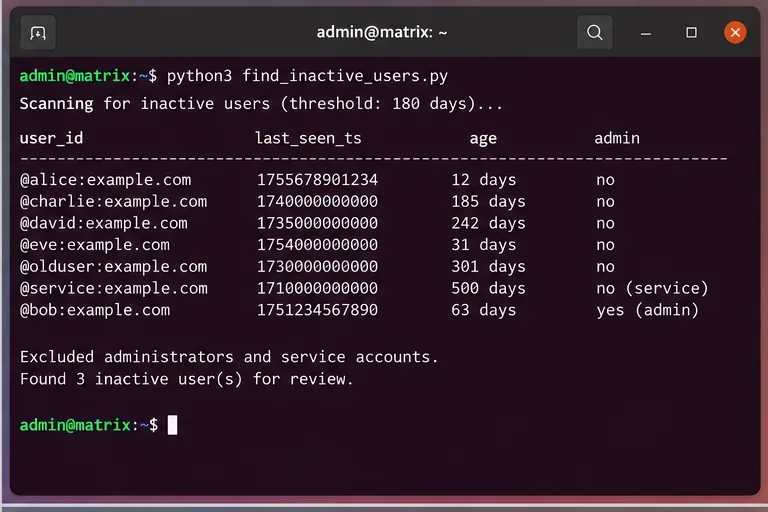
A useful inactivity scan separates stale users from protected administrators and service accounts instead of deactivating every old timestamp automatically.
How do you know the candidate selection is good enough?
Look for three signs:
Completeness: your script paginated through the entire local-user list.
Explainability: each candidate has a visible reason, such as “last seen 242 days ago, non-admin, non-service account.”
Low false-positive risk: special accounts and business exceptions were filtered before any destructive call.
If you cannot satisfy those checks, change the process before moving on. For example, add a human approval stage, send an inactivity warning, or start with suspension rather than deactivation.
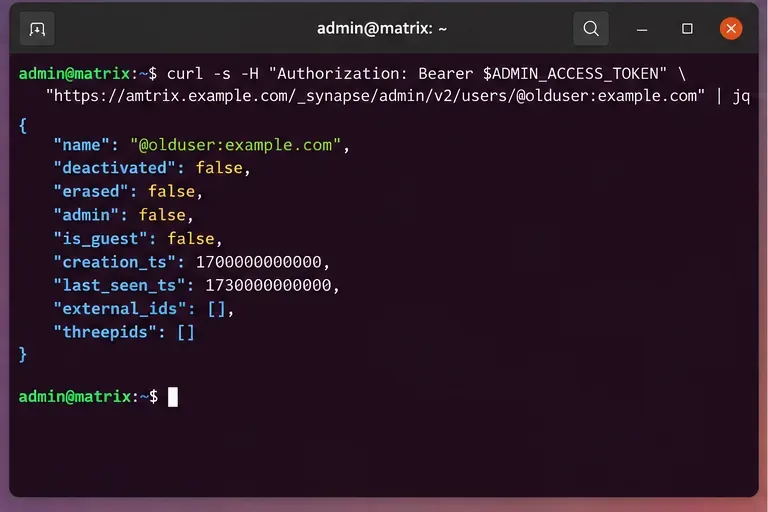
The response can include the account’s administrative state, deactivation and erasure flags, creation and last-seen timestamps, external identities, and third-party identifiers. This is the point to verify that the account is the one you intend to affect.
Inspect the individual account before deactivation so an old timestamp cannot override important context such as administrator status or external identity mapping.
Should you use erase true or erase false?
Use "erase": false when the operational goal is to disable access while retaining profile information. According to the current Synapse documentation, normal deactivation removes active access tokens, the password hash, devices and end-to-end encryption keys, pushers, third-party IDs, room memberships, account data, pending invites, and related account-validity information.
Use "erase": true when your policy also calls for removing the display name, avatar URL, custom profile fields, and marking the user as erased. Erasure does not mean every historical artifact is destroyed. Synapse explicitly documents that previously sent messages are not deleted by this API, and uploaded media is not automatically deleted either.
That distinction is critical. If your policy requires content deletion beyond profile erasure, account deactivation alone is not sufficient.
Step 4: Dry-run, deactivate, and verify
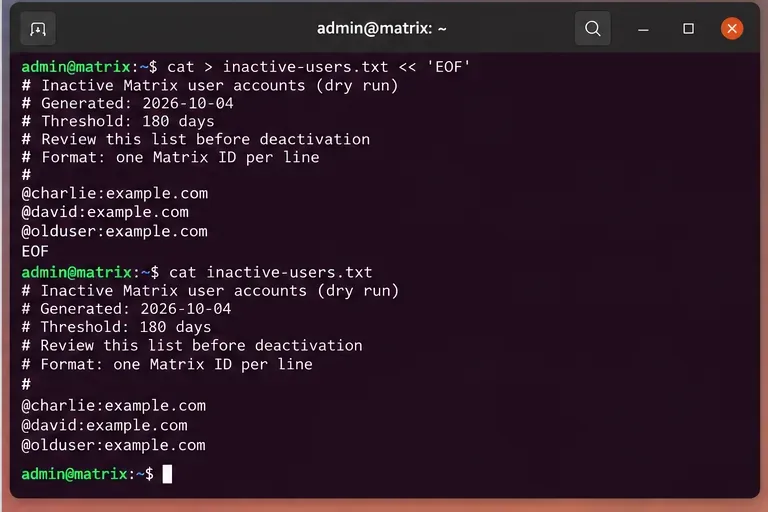
Before executing changes, write the final user IDs to a plain-text or JSON file and review it. A dry run should be immutable for the duration of the change window: if the candidate-generation script changes while you are deactivating users, stop and regenerate the approved list.
Use a reviewed dry-run list as the input to the change window so the accounts being deactivated are explicit and auditable.
For each approved local user, call the documented deactivation endpoint:
A successful operational result should show "deactivated": true. If you requested erasure, also verify "erased": true. Do not use “the API returned HTTP 2xx” as your only success criterion; read the user record after the change.
What does deactivation actually remove?
The current Synapse documentation lists several effects of deactivation. Among them are removal of active access tokens, third-party identifiers, devices, end-to-end encryption keys, pushers, password hashes, room memberships, pending invites, and account data. It also removes the user from the user directory.
With erase: true, Synapse additionally removes the display name, avatar URL, custom profile fields, and marks the account erased.
Synapse also documents important items that are not removed by this operation. These include sent and received messages, uploaded media, SSO mappings, creation timestamps, rate-limit overrides, monthly active user records, and some consent information. The documented list is not necessarily exhaustive, so treat deactivation as account shutdown—not a universal data purge.
Do you also need to delete the user’s uploaded media?
If your retention policy requires deleting locally stored media uploaded by the user, Synapse provides a separate endpoint:
The user media API deletes local media and thumbnails stored by the Synapse media repository. The documentation notes two limits that matter operationally. First, media stored in an external media repository is not affected by this API. Second, if you do not set a limit, the endpoint deletes 100 files per request, so users with large media histories can require repeated calls.
Do not add media deletion automatically unless your retention policy calls for it. It is materially more destructive than account deactivation and may affect media still referenced in historical rooms.
When should you use suspension instead?
Synapse also documents an account suspension API. Suspension blocks activities such as sending messages, joining rooms, sending invites, changing profile information, and most redactions while preserving a different recovery path than deactivation.
Suspension is a better fit when you need a reversible administrative hold, when inactivity is uncertain, or when an offboarding review is still underway. Deactivation is the stronger choice when access should be terminated and tokens, devices, room memberships, and account data should be removed.
For automated cleanup, a staged policy is often safer:
flag an account after the inactivity threshold;
notify or review it;
suspend it if ownership is uncertain;
deactivate only after the retention or approval window has passed.
How should you automate cleanup safely?
Keep discovery and deactivation as separate jobs. The discovery job should be read-only and produce a candidate file. The execution job should consume only an approved file and log every request and response status.
A production-quality workflow should also:
follow all pagination tokens;
rate-limit bulk requests rather than firing thousands simultaneously;
exclude server administrators and named service accounts by default;
store timestamps in UTC;
record the cleanup policy version that selected each account;
stop on authentication, authorization, or repeated server errors;
re-query each user after deactivation;
keep administrative access tokens out of source code and logs.
If the post-change verification does not match the requested state, do not continue blindly with the remaining batch. Investigate the first failures and determine whether the problem is permissions, API version compatibility, a proxy configuration issue, Matrix Authentication Service integration, or an account-specific condition.
Final checklist
Use a server-admin bearer token.
Enumerate every local-user page, not just the first 100 users.
Define inactivity with a documented threshold and exclusions.
Inspect high-risk accounts individually before action.
Generate and approve a dry-run list.
Use the deactivation endpoint rather than assuming Synapse supports full account hard deletion.
Choose erase: true only when profile erasure is part of the policy.
Handle uploaded media separately when required.
Verify deactivated and, when applicable, erased after each change.
The most dependable cleanup is one you can explain afterward: which inactivity rule selected an account, which exceptions were checked, which API action was performed, and which post-change field proved the desired state. That standard is more useful than simply maximizing the number of accounts processed in one run.