Home
» NETWORK ADMIN
»
How to Fix Matrix Synapse Running Out of Memory During Sync
How to Fix Matrix Synapse Running Out of Memory During Sync
As of October 6, 2026, the latest stable Matrix Synapse release is 1.162.0, published on September 29, 2026. If your homeserver is running out of memory during client synchronization, upgrading to a current supported release is a sensible first check, but the durable fix is usually operational rather than a single magic setting. Synapse intentionally keeps recent room data and metadata in memory to make common requests faster, and the official administrator documentation warns that reducing caches too aggressively can actually make memory pressure worse by creating a backlog of slow requests.
This guide follows the path a new administrator can use safely: understand what “sync” means, confirm that the process is really hitting a memory limit, reduce avoidable cache pressure, separate unusually heavy initial-sync traffic when needed, and monitor the result. The goal is not simply to make the resident set size smaller. The goal is to stop out-of-memory crashes while keeping the homeserver responsive.
What “sync” means in Matrix Synapse
A Matrix client repeatedly calls the Client-Server API /_matrix/client/v3/sync to receive new events such as messages, room state, account data, presence information, and device updates. A normal ongoing sync usually includes a since token so Synapse only needs to return changes after the previous synchronization point.
An initial sync is different. It is the first synchronization for a device or session and does not have a previous since token. The official Synapse worker documentation describes these requests as potentially very resource intensive. On larger homeservers, Synapse supports routing initial sync separately from ongoing sync so a few expensive first-time synchronizations do not disrupt everybody else.
Record your Synapse version and installation method.
Back up homeserver.yaml, worker configuration files, reverse-proxy configuration, and the PostgreSQL database according to your normal backup procedure.
Note whether Synapse runs as one process, in containers, or as a main process plus workers.
Find the actual memory limit. A container, systemd unit, Kubernetes pod, or VM may have a lower limit than the physical server.
Confirm that PostgreSQL is in use for production. Current Synapse installation documentation says SQLite is for testing and performs poorly for production workloads, especially around large rooms.
Step 1: Confirm that memory exhaustion is the real failure
Do not start by changing cache values. First identify which Synapse process is consuming memory and whether it is killed by the operating system or by a container limit.
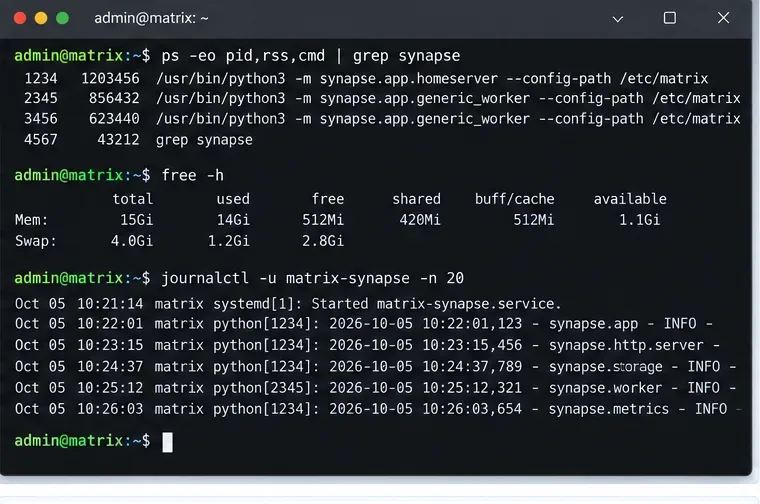
Start with process RSS, available memory, swap pressure, and recent Synapse service logs so you know whether the problem is true memory exhaustion or a different sync failure.
On a Linux host, commands such as the following provide a quick first view:
If you use Docker, Podman, Kubernetes, or another scheduler, inspect the container or pod memory limit as well. A host with several gigabytes free can still kill Synapse if the process is restricted to a much smaller cgroup limit.
Look for a repeatable pattern. Does memory climb only when a specific user signs in on a new device? Does it increase gradually all day? Does one generic worker grow while the main process stays stable? Those observations distinguish an initial-sync spike from general cache growth or request backlog.
Step 2: Check the cache settings before lowering them
A cache is data Synapse keeps in RAM so it does not need to recompute or reload the same information repeatedly. Synapse has many caches, plus an event cache. The configuration reference currently documents a default caches.global_factor of 0.5, an event_cache_size default of 10K before the global factor is applied, time-based cache expiry, and a sync_response_cache_duration default of 2 minutes.
The tempting fix is to set the global factor as low as possible. Do not do that blindly. The Synapse administrator FAQ explicitly warns that too small a cache can make a slow system even slower, allowing requests to pile up and causing memory use to explode from backlog instead of cache entries.
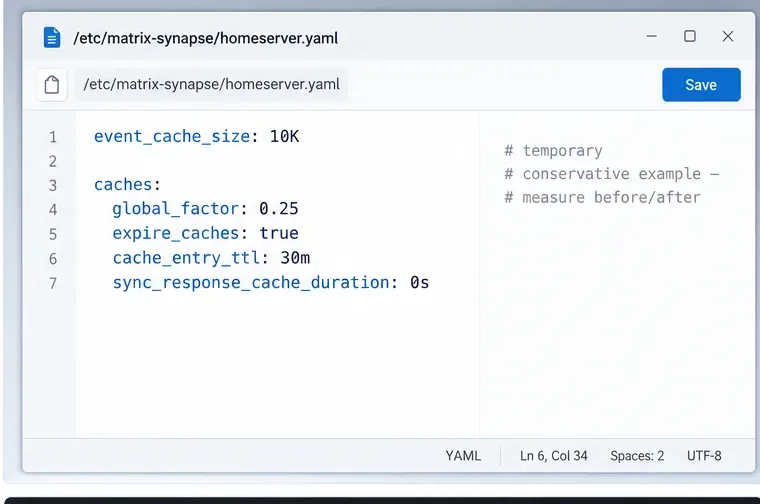
Make cache changes conservatively and measure the result; the example illustrates where the relevant settings live rather than a universal production value.
If profiling shows that cache memory is genuinely the dominant consumer and request throughput remains healthy, try a modest reduction rather than a drastic one. For example:
This is a troubleshooting example, not a recommended value for every server. Setting sync_response_cache_duration to zero disables caching of completed /sync responses. That can save memory when many sync responses are being retained, but it may make reconnecting clients do more work. Test it under your actual workload.
Synapse also provides cache autotuning with max_cache_memory_usage, target_cache_memory_usage, and min_cache_ttl. The official documentation says this feature requires jemalloc, an alternative memory allocator, and all three settings must be supplied. Do not enable only one or two values; the documentation warns that incomplete configuration can cause unstable behavior.
Step 3: Make sure the database is not creating a request backlog
Memory problems during sync are not always caused by the amount of cached data. A slow database can keep many requests alive at once, and each in-flight request consumes memory. This is why reducing cache size can backfire on storage that is already slow.
For production, follow the official Synapse PostgreSQL guide. Check database CPU, storage latency, connection saturation, long-running queries, and whether the PostgreSQL server itself is swapping. If sync latency rises at the same time as resident memory, investigate backlog before reducing caches again.
If you recently moved to large public rooms, federated into much larger communities, or added many active users, the workload may simply have outgrown a configuration that previously worked. In that case, database tuning and worker isolation often matter more than shaving a small amount off one cache.
Step 4: Isolate initial sync on larger homeservers
Synapse can run as a single monolith, meaning one main homeserver process, or it can split work into workers, which are additional Synapse processes sharing the same PostgreSQL database. The worker model is intended for larger installations that need to scale individual workloads independently.
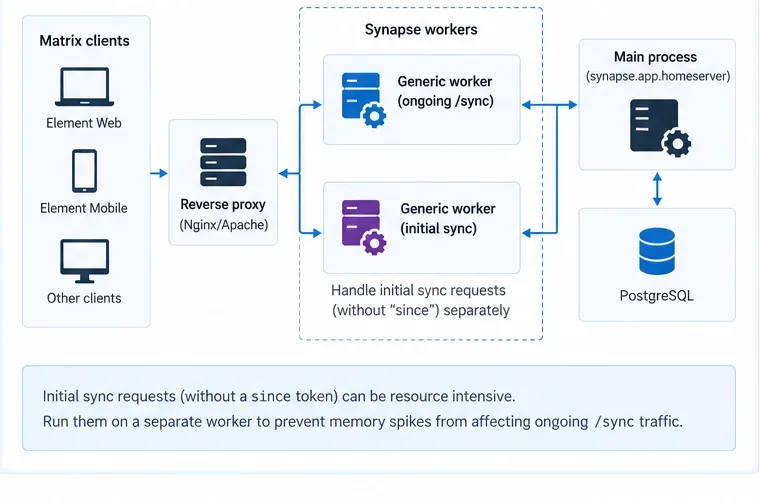
On larger PostgreSQL-backed deployments, route expensive initial sync separately from ongoing sync so a first login does not consume the same worker pool as normal client updates.
The worker documentation states that a generic worker can handle /sync and /initialSync. It also recommends considering separate handling for sync requests without a since parameter because these initial-sync requests can be very resource intensive.
A practical architecture is:
Reverse proxy receives Matrix client traffic.
Ongoing /sync requests go to one or more generic workers.
Initial sync requests go to a separate generic-worker group.
The main process continues handling responsibilities that are not delegated.
All Synapse processes share PostgreSQL.
Do not expose the Synapse replication listener to the public Internet. The current worker documentation warns that replication traffic is unencrypted and unauthenticated unless a replication secret is configured.
Workers are not the right first move for a small homeserver. Synapse's own guidance recommends monolith mode for smaller instances. Add workers when you have evidence that a particular workload needs isolation or horizontal scaling.
Step 5: Reload cache factors safely and observe the result
Synapse allows cache factors to be reloaded with SIGHUP. The configuration reference gives this example:
kill -HUP PID_OF_SYNAPSE_PROCESS
If the packaged systemd service supports it, systemctl reload matrix-synapse can perform the same operation. In a worker deployment, the official documentation says the relevant worker configuration must be updated and each worker must receive the reload signal individually.
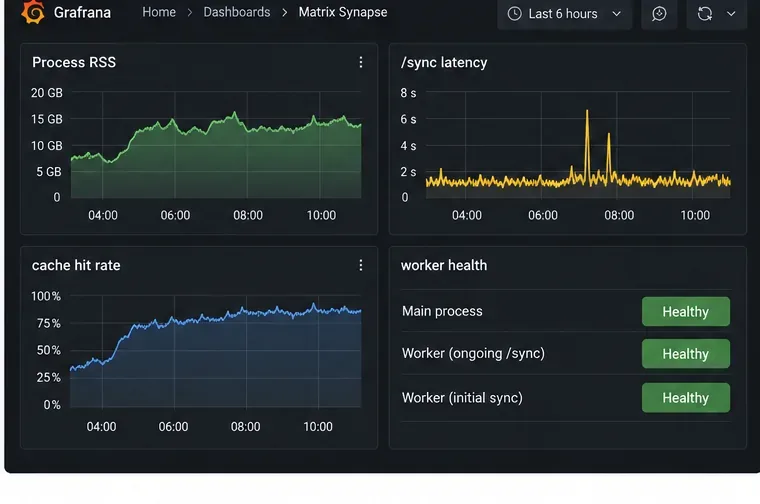
After every change, give the server enough time to reach a normal traffic pattern. Watch resident memory, request latency, database load, and active worker health together. A memory graph that falls while sync latency doubles is not a successful fix.
Step 6: Enable Prometheus metrics for repeatable diagnosis
For anything beyond a one-off incident, turn on Synapse metrics and collect them with Prometheus. The official monitoring guide documents enable_metrics: true and a dedicated internal metrics listener. Keep the metrics endpoint on an internal interface or protect it at the reverse proxy; it should not be exposed unnecessarily.
Track memory and sync latency together. The useful outcome is stable memory with acceptable response time, not the smallest possible RSS value.
Use the official Synapse Prometheus monitoring guide for the current listener syntax. In worker deployments, monitor every worker separately because worker metrics are not automatically aggregated into the main process.
Common mistakes to avoid
Lowering SYNAPSE_CACHE_FACTOR until the server becomes slower
A smaller cache uses less memory per entry but increases database and computation work. If that extra work creates a queue of unfinished requests, total memory can rise rather than fall. Reduce the factor in small steps and always watch latency.
Assuming every /sync request costs the same
An ongoing sync with a since token and an initial sync without one have very different resource profiles. Separate them in your diagnosis before scaling the whole server.
Using workers while still on SQLite
Synapse workers share a PostgreSQL database. The worker documentation says SQLite is for demo or testing use and is not the foundation for a worker-based production deployment.
Using swap as the primary fix
A small amount of swap may prevent an abrupt process kill, but heavy swapping makes sync dramatically slower and can create the same backlog feedback loop. Treat swap as protection against a short spike, not as capacity planning.
Changing several memory settings at once
If you simultaneously reduce caches, change worker routing, alter PostgreSQL settings, and increase a container limit, you will not know which change solved the problem. Make one controlled change at a time and compare the same metrics.
A practical decision path
What you observe
Likely next action
Memory spikes when users sign in on new devices
Identify initial sync and consider isolating it on a worker for larger deployments.
Memory climbs steadily while cache hit rate is high and latency is normal
Reduce cache capacity conservatively and retest.
Memory and sync latency rise together
Investigate database or storage backlog before shrinking caches further.
Only one worker reaches its limit
Adjust that worker's memory budget or scale that worker group rather than the entire homeserver.
The host has free RAM but Synapse is killed
Inspect container, cgroup, systemd, or Kubernetes memory limits.
Final checklist
Run a current supported Synapse release; version 1.162.0 is the latest stable release as of October 6, 2026.
Use PostgreSQL for production.
Confirm which process is actually consuming RSS and what memory limit applies to it.
Distinguish normal incremental sync from initial sync.
Keep cache expiry enabled and tune cache factors gradually.
Do not enable cache autotuning unless jemalloc is in use and all required values are configured.
For larger deployments, isolate initial sync or add generic sync workers when the measurements justify it.
Monitor memory and latency together after each change.
Synapse is deliberately memory-hungry because caching is part of its performance strategy. The correct fix for sync-related OOM failures is therefore a balance: remove unnecessary cache retention, eliminate database or request backlog, and isolate exceptional workloads without starving the caches that keep normal sync fast. That approach is more reliable than treating the highest RSS number as the problem by itself.