Home
» NETWORK ADMIN
»
How to Fix the ownCloud File Locking “Lock Mechanism Timeout” Error
How to Fix the ownCloud File Locking “Lock Mechanism Timeout” Error
If ownCloud reports a file locking timeout during sync, upload, move, rename, or chunk assembly, the first thing to know is that the error usually involves transactional file locking, not the user-facing Manual File Locking feature. Transactional locking is an internal safety mechanism that prevents two requests from saving or mutating the same file at the same time. It is enabled by default in ownCloud and can use the database or Redis as its locking backend.
Current ownCloud 11 documentation still recommends Redis for transactional file locking because database-backed locks create significant database load. On clustered installations, every application node must use the same shared Redis instance for locking. That is the durable fix to understand before changing timeout values or deleting lock records.
This guide walks through the problem from a beginner administrator's perspective: what the lock means, what to back up, how to confirm the failing component, how to configure Redis, how clusters change the picture, and which shortcuts can make the situation worse.
What the error means
When ownCloud changes a file, it acquires a lock so another request cannot perform an incompatible change at the same time. The lock can also cover a parent directory so it cannot be renamed while work is happening inside it. If the lock cannot be acquired in time, the operation can fail with a locked-resource or timeout-style error rather than risking a corrupted file.
This is different from Manual File Locking, the optional WebDAV-based check-in/check-out feature that lets a user deliberately lock a file in the web interface. Manual locks have configurable user-facing expiration values. Changing those values does not fix a transactional lock backend that is overloaded or incorrectly configured.
Before you start
Back up the ownCloud database and config/config.php.
Record your ownCloud version and deployment type: traditional package, Docker Compose, or multi-node cluster.
Identify your database engine and whether Redis is already installed.
Record the exact operation that fails, such as a desktop sync, WebDAV upload, folder rename, or chunked upload.
Note whether the problem affects one file, one user, or many users at the same time.
A broad outage affecting many users usually points to a shared component such as the lock backend, database, Redis, or storage. A repeatable error on one file may instead involve a genuinely active operation or a stale lock that has not yet expired.
Step 1: Confirm which locking mechanism is failing
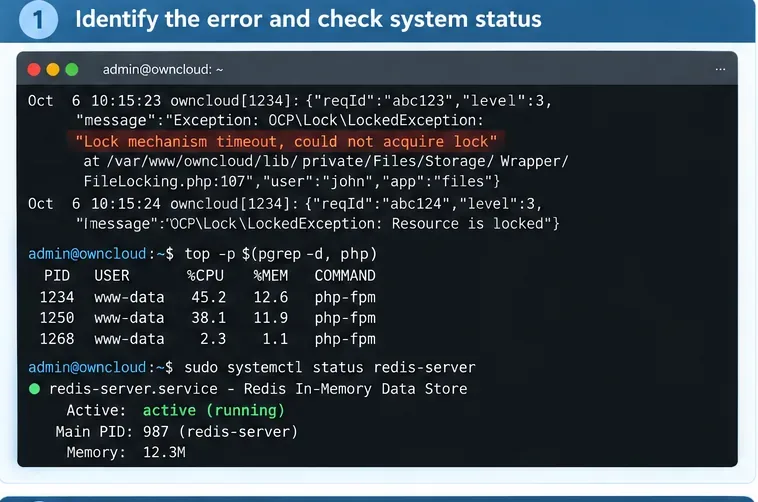
Start with the ownCloud log, web server log, PHP-FPM log, and Redis service status. You are looking for repeated locked-resource exceptions, database lock-wait errors, Redis connection failures, or a pattern where the same path remains blocked long after the original operation ended.
Check the ownCloud error log and the health of PHP and Redis before changing lock settings. The goal is to determine whether the timeout comes from lock contention, an unavailable backend, or a slow database.
A healthy Redis command should return PONG. If ownCloud is configured to reach Redis through a socket, container hostname, password, or remote host, test the same connection path ownCloud actually uses rather than assuming that a local redis-cli test proves application connectivity.
If the log contains a database message similar to “lock wait timeout exceeded,” investigate database contention as well. The old database locking backend is functional, but ownCloud's documentation explicitly warns that it places significant load on the database.
Step 2: Move transactional file locking to Redis
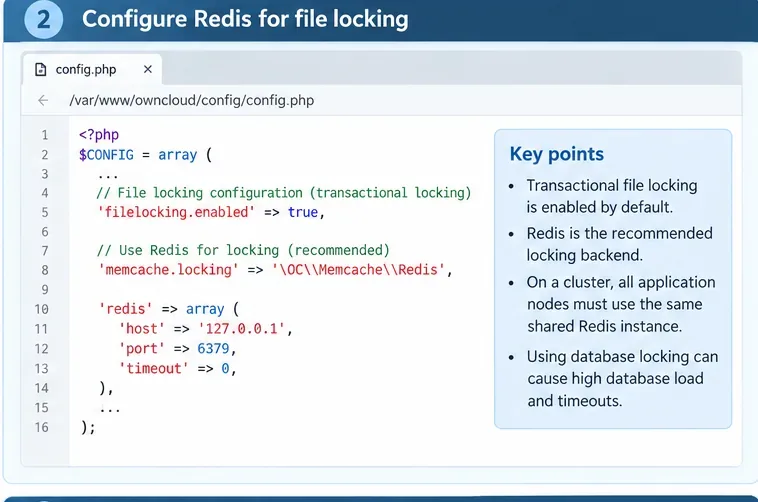
For a traditional ownCloud installation, configure Redis as the memcache.locking backend in config/config.php. The current ownCloud memory caching documentation provides a Redis TCP example similar to this:
Use Redis as the transactional locking backend instead of leaving high-volume locking work in the database. Adapt the host, port, socket, and authentication values to your environment.
Do not copy the empty password literally into an Internet-exposed Redis setup. The ownCloud memory caching documentation recommends protecting Redis appropriately. Ideally, Redis should be reachable only from trusted ownCloud hosts or the internal container network.
In the official ownCloud Docker configuration, Redis is enabled with environment variables. Current ownCloud 11 documentation shows:
When Redis is enabled in that deployment model, ownCloud sets both the distributed cache and locking cache to Redis automatically. Use the deployment-specific configuration documented for your installation instead of mixing Docker environment variables with a manually maintained config.php unless you understand which layer wins.
Step 3: In a cluster, make every node use the same Redis
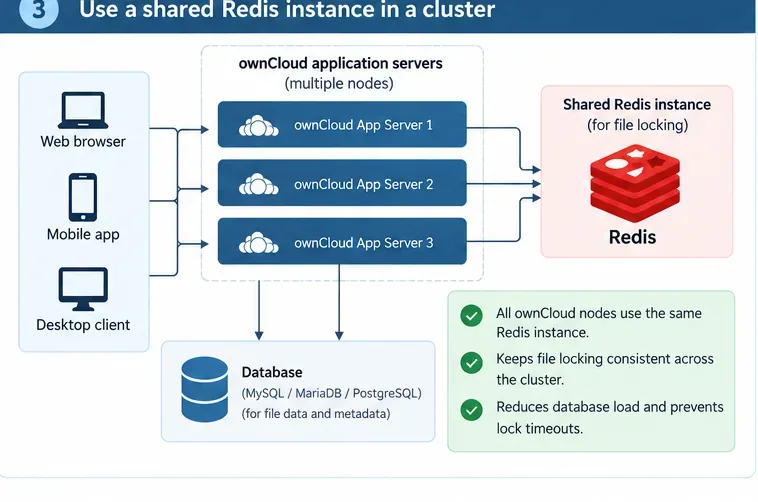
A cluster is a deployment with multiple ownCloud application servers behind a load balancer. In this design, a lock created on one application node must be visible to every other node. Per-node APCu caches or separate per-node Redis instances cannot provide that shared lock state.
In a multi-node ownCloud deployment, all application servers must use the same Redis locking service so every node sees the same file lock state.
The ownCloud clustered shared storage guide is explicit: use one shared Redis instance reachable by all application nodes. It warns against relying on filesystem or NFS locks for ownCloud's application-level locking.
Check every node for the same Redis endpoint and credentials. A common failure pattern is that one node is still using the database or a local Redis while the others use the shared service. That creates inconsistent lock behavior that can look intermittent because the result depends on which application node handles each request.
Step 4: Verify the configuration and retry the original operation
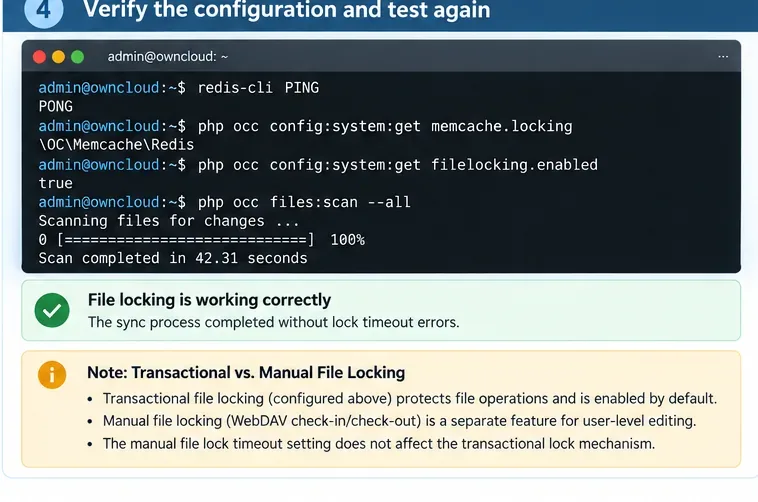
After configuring Redis, verify the active ownCloud settings with occ. Depending on your installation, the command may be invoked as the web-server user or through Docker Compose.
The first command should report \OC\Memcache\Redis, and transactional file locking should remain enabled. Do not “solve” the problem by disabling file locking. That removes a data-integrity safeguard instead of fixing the backend.
Confirm Redis connectivity and the active ownCloud locking backend, then repeat the same sync or upload that originally failed. A full files scan is not required just to prove the locking fix.
Now retry the exact failing operation. If a desktop client upload timed out, repeat that upload. If a folder move failed, repeat the move. Watch the ownCloud and Redis logs during the test. A successful retry with no recurring lock timeout is much stronger evidence than running an unrelated maintenance command.
What if the file still appears locked?
First determine whether another operation is genuinely still using the file. Large uploads, external storage calls, file moves, encryption, or slow storage can legitimately hold locks longer than expected. Killing the lock while the operation is still active can create the race condition the lock was designed to prevent.
Transactional locks are designed to be released after interrupted transactions. Older ownCloud configuration references also document a lock time-to-live mechanism so old locks can be cleaned up automatically. Because exact configuration details can vary by ownCloud release, verify the option in the documentation matching your installed version before changing it. Do not make the TTL extremely short just to hide a slow storage or database problem.
If metadata itself is inconsistent, ownCloud provides repair-oriented file scanning commands. The official occ command documentation recommends backing up the database before a repair scan. A repair scan is for damaged or inconsistent file metadata; it is not the first-line fix for normal lock contention.
Do not confuse transactional locking with Manual File Locking
Feature
Purpose
Typical control
Transactional file locking
Protects concurrent file operations and saves
memcache.locking, normally Redis
Manual File Locking
User deliberately checks out/locks a shared file
WebDAV lock timeout and lock-breaker settings
Current ownCloud 11 documentation says Manual File Locking is disabled in the web interface by default. When enabled, web-interface locks default to 30 minutes and the maximum default is 24 hours. Those values are documented in the Manual File Locking guide.
If your problem is specifically a user-created manual lock, then commands such as these are relevant:
If your problem is an internal timeout while syncing or saving a file, changing these manual-lock values is usually the wrong fix.
Common mistakes that make lock timeouts worse
Deleting lock rows from the database while ownCloud is active
This can race with live requests and can remove valid locks. It also treats the symptom without fixing the database or Redis configuration that caused the timeout.
Disabling transactional file locking
Transactional locking exists to protect file operations from concurrent modification. Keep it enabled and repair the backend.
Using APCu for shared locking in a cluster
APCu is a local, per-node cache. It is suitable for local caching, but it does not provide one shared lock state across multiple application servers. Use shared Redis for distributed and locking caches in clustered deployments.
Running one Redis instance per application node
That leaves each server with a different view of file locks. All nodes need the same shared Redis service for lock coordination.
Increasing database lock-wait time without fixing contention
A longer database timeout may only make users wait longer. Moving transactional lock traffic to Redis reduces the database's locking workload and addresses the architectural bottleneck.
Making lock expiration unrealistically short
A slow external storage operation or large upload may legitimately need time. Expiring its lock prematurely can allow another request to modify the same resource concurrently.
Quick troubleshooting checklist
Confirm that the error involves transactional locking rather than a user-created manual lock.
Check ownCloud, PHP, database, and Redis logs around the same timestamp.
Verify that Redis is reachable from the ownCloud runtime, not only from your shell.
Set memcache.locking to \OC\Memcache\Redis.
Keep filelocking.enabled enabled.
On a cluster, point every node to the same Redis instance.
Retry the original sync, upload, or move while monitoring logs.
Only use repair scans or lock-expiration changes when the evidence points to metadata damage or stale locks.
Bottom line
The most reliable fix for ownCloud file locking timeout errors is not to remove locks or raise arbitrary timeout values. Start by identifying whether the error comes from transactional locking, then move that lock workload to Redis and make sure every ownCloud node sees the same Redis instance. Retest the exact operation that failed and investigate database or storage latency if locks still remain active too long.
This approach follows the current ownCloud documentation: transactional file locking stays enabled, Redis handles the shared lock state, and Manual File Locking timeout settings are treated as a separate feature rather than a universal lock-timeout fix.