Home
» NETWORK ADMIN
»
How to Install a Commercial SSL Certificate on a Zimbra Server
How to Install a Commercial SSL Certificate on a Zimbra Server
A commercial SSL certificate on Zimbra can fail in several frustrating ways even when the certificate authority says the certificate was issued correctly. The most common problems are not usually the certificate itself: the private key does not match the returned certificate, an intermediate CA is missing, the hostname is absent from the certificate's Subject Alternative Name (SAN), or the administrator deploys the files before validating the chain.
The safest way to handle the job is to treat it as a sequence of checks rather than a single “install certificate” command. Zimbra's documented certificate tool, zmcertmgr, can create a certificate signing request (CSR), verify the private key and CA chain, deploy the certificate to Zimbra services, and show the certificate that is currently active. The official Zimbra Tech Center documents these commands in its Administration Console and CLI Certificate Tools guide.
What a successful Zimbra SSL installation should look like
Before changing anything, define the result you want. A correct deployment should meet all of these conditions:
The certificate's SAN list includes every public hostname clients actually use, such as mail.example.com.
The issued certificate matches the private key stored for the commercial certificate.
Zimbra can validate the full chain from the server certificate through the intermediate CA certificates to the root CA.
zmcertmgr deploycrt comm completes without a key-mismatch or chain-validation error.
Zimbra services restart cleanly.
zmcertmgr viewdeployedcrt shows the expected certificate.
A browser or TLS client connecting to the public hostname sees the new certificate and no trust warning.
If one of these checks fails, fix that specific layer before continuing. Repeatedly redeploying the same files rarely solves a key, SAN, or chain problem.
Before you start: choose the right certificate workflow
Situation
Recommended approach
Main tradeoff
New certificate using a Zimbra-generated CSR
Generate the CSR with zmcertmgr and keep the generated commercial.key
Simplest key matching, but the private key remains tied to this Zimbra installation
Certificate issued from an existing private key
Confirm that key is the one Zimbra will use before deployment
Useful for migrations, but key mismatch is easier to create
Single-node Zimbra
Verify and deploy locally, then restart
Straightforward, with one maintenance window
Multi-node Zimbra
Plan certificate placement and deployment per node or use Zimbra's supported multi-server options
More coordination is required; do not assume a single-node procedure covers every role
Zimbra's current Tech Center page notes that on Zimbra 8.7 and later, zmcertmgr is run as the zimbra user. It also documents that the commercial private key must be named commercial.key in /opt/zimbra/ssl/zimbra/commercial, and that the server certificate plus CA-chain file should be staged in a temporary directory before deployment.
Step 1: back up the current certificate material
Do not begin by deleting the existing SSL directory. First create a backup that you can restore if the new deployment fails. As root, a conservative example is:
cp -a /opt/zimbra/ssl/zimbra /opt/zimbra/ssl/zimbra.backup-$(date +%Y%m%d-%H%M%S)
Also record the current deployed certificate before changing it:
su - zimbra
/opt/zimbra/bin/zmcertmgr viewdeployedcrt
This gives you a baseline for comparison after the change. If your environment has multiple Zimbra nodes, capture the current certificate state on each relevant server rather than assuming they are identical.
Step 2: generate a CSR with the hostnames you actually need
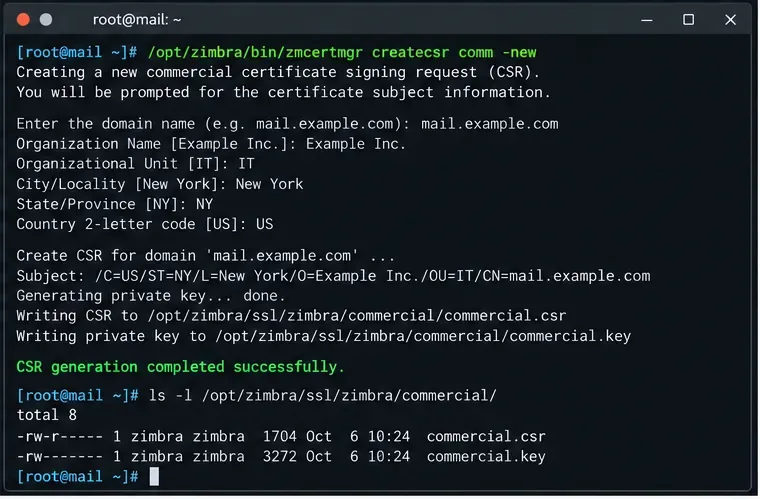
For a new commercial certificate, create the CSR with the production hostname and any additional SANs. Zimbra documents the following syntax:
/opt/zimbra/bin/zmcertmgr createcsr comm -new \
-subject "/C=US/ST=CA/L=Sunnyvale/O=Example/OU=IT/CN=mail.example.com" \
-subjectAltNames "mail.example.com"
If users also connect through another name, such as webmail.example.com, include it in the SAN list when requesting the certificate. Modern TLS clients validate hostnames against SANs, so a certificate that looks correct by common name alone may still produce a browser warning if the hostname is missing.
Review the CSR before sending it to your certificate authority:
/opt/zimbra/bin/zmcertmgr viewcsr comm /opt/zimbra/ssl/zimbra/commercial/commercial.csr
A terminal workflow for the CSR stage, where the commercial request and private key are created before the request is sent to the certificate authority.
Checkpoint: stop here if the requested DNS names are wrong. Issuing the certificate first and discovering a missing SAN later means you normally need the CA to reissue it.
Step 3: collect the server certificate and the complete CA chain
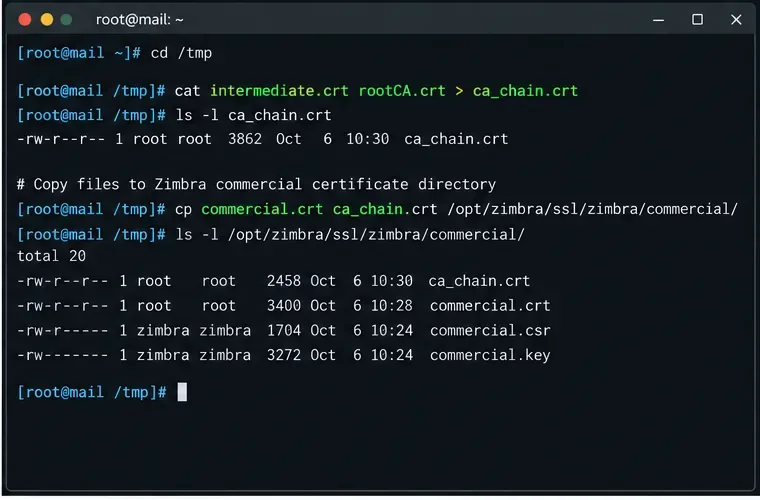
After validation, your commercial CA normally returns the server certificate plus one or more intermediate certificates. Zimbra's official single-node commercial-certificate procedure expects the server certificate in PEM form and instructs administrators to combine intermediate and root CA certificates into a chain file.
Use the files supplied by your certificate authority for your exact certificate product. Do not copy an intermediate certificate from an unrelated tutorial simply because the CA brand name looks similar. CA hierarchies change over time, and the wrong intermediate is a common cause of unable to get local issuer certificate.
The CA-chain stage combines the issuing intermediate certificate and root certificate into the chain file that Zimbra verifies alongside the server certificate.
Step 4: verify the private key, server certificate, and chain before deployment
This is the most important safety gate. Run the documented verification command as the Zimbra user on current Zimbra releases:
su - zimbra
/opt/zimbra/bin/zmcertmgr verifycrt comm \
/opt/zimbra/ssl/zimbra/commercial/commercial.key \
/tmp/commercial.crt \
/tmp/ca_chain.crt
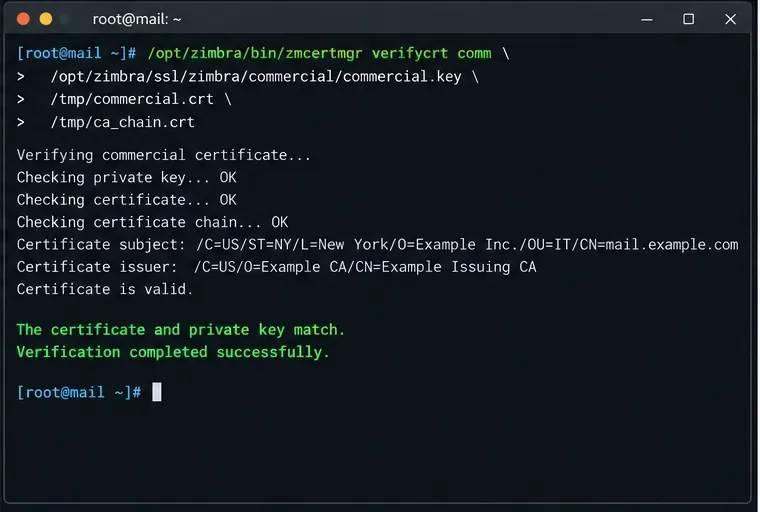
A successful verification reports that the certificate and private key match and that the certificate is valid. Zimbra's certificate tooling documentation explains that verifycrt combines a key check and a certificate-chain check.
The verification stage should confirm both the key-to-certificate match and the CA chain before any certificate is deployed.
If verification fails, choose the fix based on the error
Unmatching certificate and private key: the CA certificate was not issued from the CSR associated with the current commercial.key. Restore the correct key or reissue the certificate from a new CSR.
Unable to validate certificate chain: the intermediate/root bundle is incomplete, in the wrong order, expired, or not the chain for this server certificate. Obtain the correct chain from the issuing CA.
Certificate expired: do not deploy it. Request a current certificate and also check whether an intermediate or root in the chain has expired. Zimbra documents this failure mode in its expired root CA troubleshooting guidance.
Hostname missing: verification may not represent the same hostname check a browser performs. Inspect the issued SANs and reissue if the public name is not present.
Step 5: deploy the commercial certificate
Only after verification succeeds should you deploy it:
/opt/zimbra/bin/zmcertmgr deploycrt comm /tmp/commercial.crt /tmp/ca_chain.crt
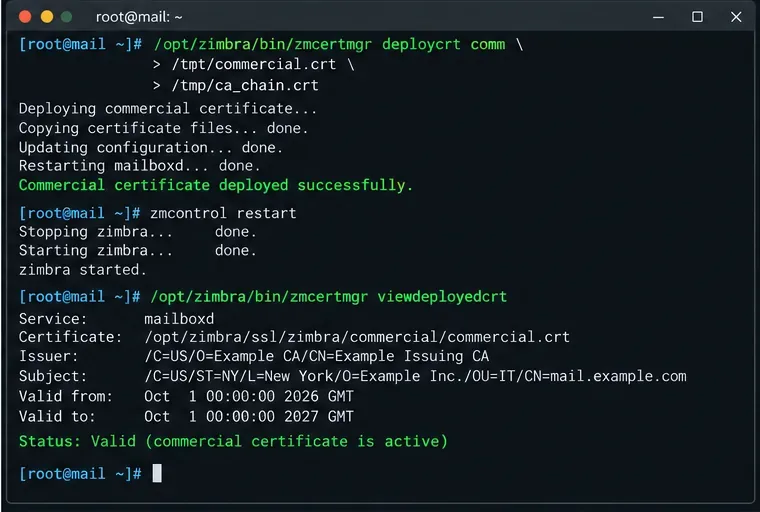
Zimbra's documented deployment process copies the commercial certificate into its SSL area, appends the CA chain, updates certificate configuration, and installs certificate material for services such as the MTA, LDAP, proxy, and mailbox components as applicable to the server.
Do not manually overwrite random Java keystores or service certificate files unless the documentation for your exact Zimbra release specifically requires it. The purpose of zmcertmgr is to keep the service-specific certificate material consistent.
Step 6: restart Zimbra services
After deployment, restart Zimbra:
su - zimbra
zmcontrol restart
Then check service state:
zmcontrol status
If a service does not return to Running, investigate before declaring the certificate change complete. Certificate problems can affect LDAP, proxy, mailbox, or other TLS-dependent communication, especially in multi-node installations.
The final server-side stage deploys the verified certificate, restarts Zimbra, and checks the certificate reported by viewdeployedcrt.
Step 7: verify the result from both Zimbra and the client side
Use Zimbra's own certificate view first:
/opt/zimbra/bin/zmcertmgr viewdeployedcrt
You can also check whether any deployed service certificate is nearing expiration:
/opt/zimbra/bin/zmcertmgr checkcrtexpiration all -days 30
Finally, test the exact public hostname that users open. A useful OpenSSL check from another machine is:
Look for the expected leaf certificate, the correct hostname, a complete chain, and a successful verification result. Then open the same HTTPS URL in a current browser. A browser test matters because it exercises the hostname users actually reach, not just the certificate files on disk.
When the standard procedure is not enough
Change your approach rather than forcing the single-node steps if any of these conditions apply:
Multi-node Zimbra: certificate deployment may need to cover proxy, mailbox, LDAP, and MTA roles on different hosts. Zimbra's certificate tool supports multi-server options, but verify the procedure for your topology before using them.
Reverse proxy or external load balancer terminates TLS: the public certificate may also need to be installed on that device. A correct Zimbra certificate alone will not change what clients see if TLS terminates upstream.
You are importing an existing key: ensure it is placed where Zimbra expects the commercial private key and that permissions match the version's requirements before verification.
Your CA supplies only an intermediate bundle: follow the CA's current chain instructions rather than inventing a root certificate. Zimbra needs a chain it can validate; the exact files depend on the issuer.
The certificate was renewed with the same hostname but a different key: update the matching private key before verification. A previous commercial.key cannot validate a certificate issued for a new key pair.
Final self-check
The installation is complete only when all of the following are true: verifycrt passes, deploycrt succeeds, Zimbra services return to Running, viewdeployedcrt shows the new certificate, and an external TLS connection to the real hostname receives the same valid certificate without a trust or hostname warning.
For command syntax and version-specific behavior, use Zimbra's official certificate-tools documentation as the primary reference. The examples here use mail.example.com as a placeholder; replace names, certificate files, and organizational details with the values issued for your environment.