Home
» NETWORK ADMIN
»
How to Set Up Automated Recording Cleanup in BigBlueButton
How to Set Up Automated Recording Cleanup in BigBlueButton
Recording storage can grow quickly on a busy BigBlueButton server, but “cleanup” can mean two very different things: removing raw source data after a recording has been published, or deleting the published recording itself after a retention period. Choosing the wrong one can either waste disk space or remove content earlier than your users expect.
This guide focuses on BigBlueButton 3.0, which the official documentation lists as the current production branch as of October 2026. BigBlueButton 4.0 documentation is available but is still marked as in development. For production systems, confirm your installed version with bbb-conf --check before copying retention settings from documentation for another branch. See the official BigBlueButton installation documentation.
Choose the cleanup policy before changing anything
There is no single retention value that fits every deployment. A university may need semester-long playback access, while an internal training server may only need recordings for 30 days. The useful distinction is between raw recording data and published playback files.
Cleanup choice
What it saves
Main tradeoff
Best fit
Delete raw data after publication
Raw media and processing material
You lose the ability to rebuild a recording from the original raw data after it is removed
Servers that want to keep published playback but control disk growth
Delete complete recordings after N days
Published and associated recording data
The recording is no longer available to users
Clear retention policies such as 30, 60, or 90 days
Application-controlled deletion
Depends on the integration
More policy flexibility, but more application logic and operational complexity
Multi-tenant systems or LMS workflows with per-course retention rules
BigBlueButton’s official customization guide says raw data is retained so administrators can rebuild a recording if processing fails, add another recording format, or recover from an accidental deletion. That benefit has a storage cost. The same documentation states that BigBlueButton removes raw data for published recordings after 14 days by default. See Server Customization in the official BigBlueButton documentation.
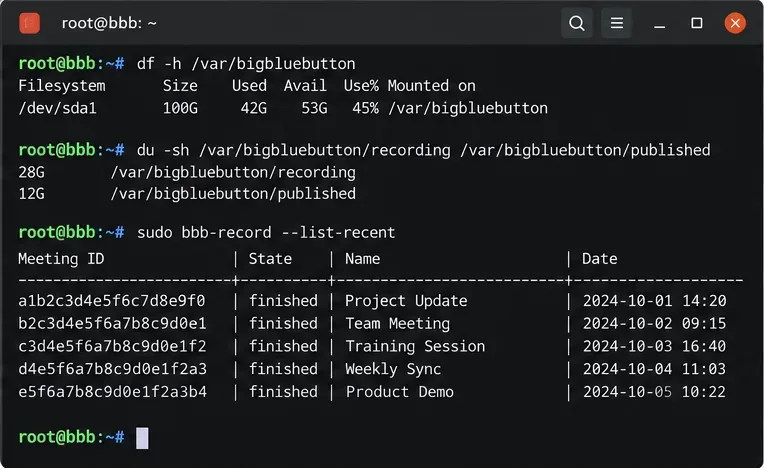
Check current disk usage and recent recordings before choosing a retention period. The important baseline is how quickly /var/bigbluebutton is growing and which recordings users still need.
Option 1: keep published recordings but remove raw data
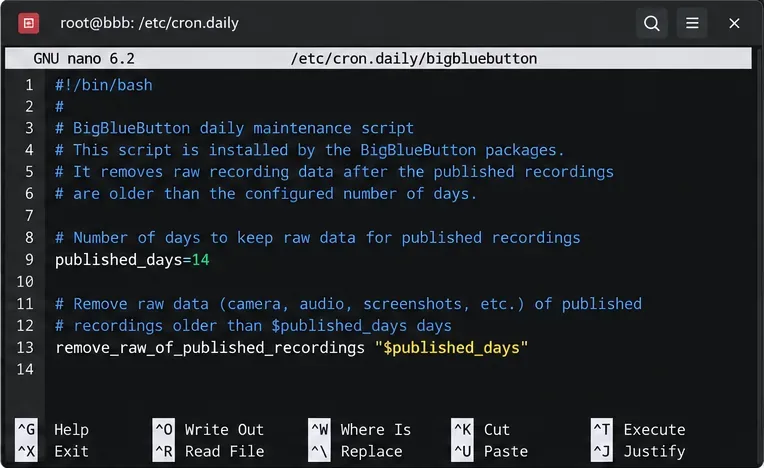
If your main problem is disk consumption but users still need playback links, start with the built-in raw-data retention setting. BigBlueButton’s daily maintenance script is located at /etc/cron.daily/bigbluebutton. The documented default is:
published_days=14
The script also calls the raw-recording cleanup function for published recordings. Increasing published_days gives you a longer recovery window for rebuilds; decreasing it reduces storage use sooner. A value such as 30 days may be reasonable when administrators routinely need time to discover recording defects, while a shorter period is more appropriate when storage is constrained and published output is routinely checked soon after meetings.
Do not confuse this with a full retention policy. Changing published_days does not mean the published recording itself will disappear after that many days. It controls how long the raw data remains available after publication.
The built-in daily maintenance file contains the published_days setting used for raw data from published recordings.
Option 2: delete complete recordings older than a fixed age
If your requirement is “recordings must disappear after 30 days,” BigBlueButton documents a separate daily cleanup script. The official example creates /etc/cron.daily/bbb-recording-cleanup, checks the age of published status files and raw recording data, and calls bbb-record --delete for recordings older than the configured maximum age.
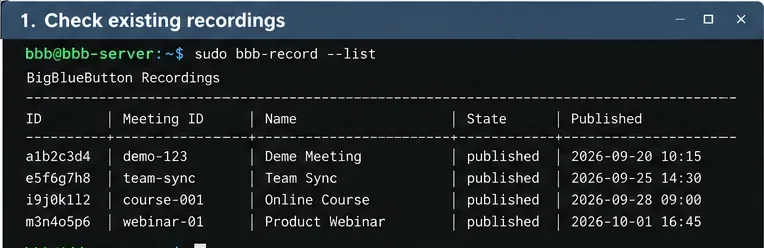
Before enabling deletion, inspect the candidate set. For a 30-day policy, this read-only command helps you see which published presentation status files are older than the threshold:
This is not a BigBlueButton dry-run command; it is simply a safe filesystem check. Use it to catch policy mistakes before an automated job starts deleting data.
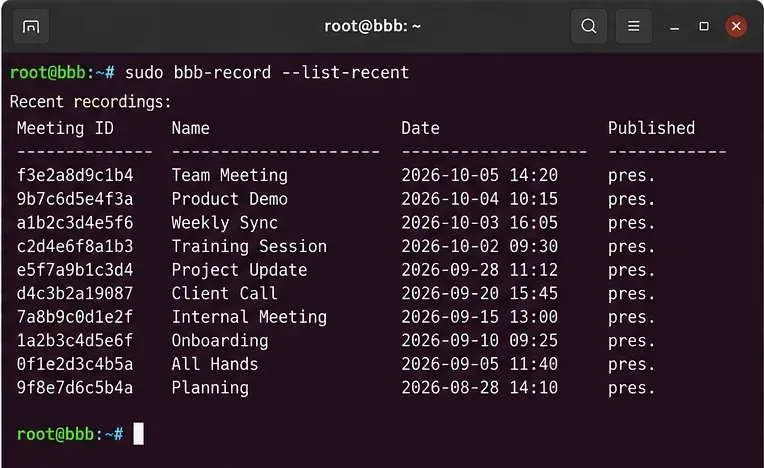
Review recent recordings and their dates before enforcing a full-retention policy.
Create the cleanup script
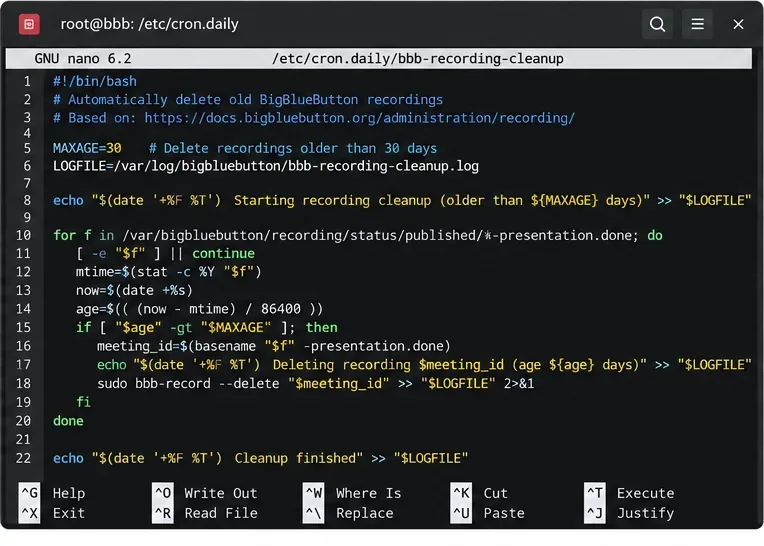
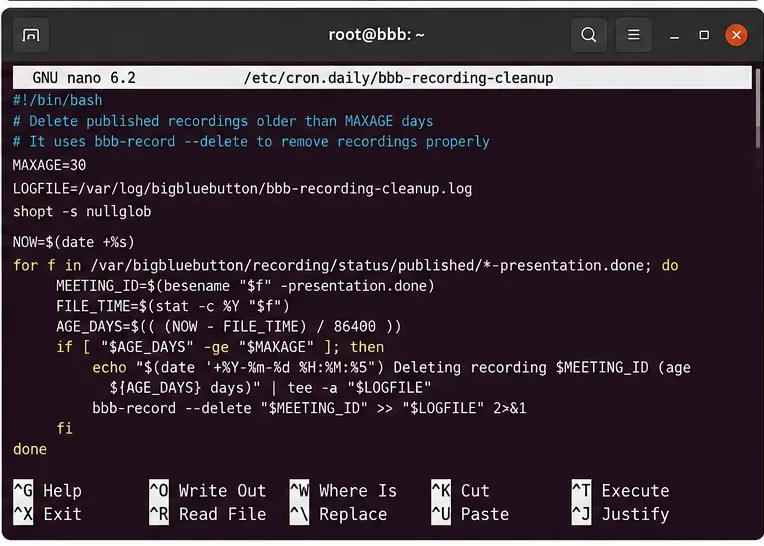
Create /etc/cron.daily/bbb-recording-cleanup. The following implementation follows the paths and deletion approach described in BigBlueButton’s official customization guide, while keeping the retention value and log file easy to find:
#!/bin/bash
set -u

MAXAGE=30
LOGFILE=/var/log/bigbluebutton/bbb-recording-cleanup.log
NOW=$(date +%s)

shopt -s nullglob

for donefile in /var/bigbluebutton/recording/status/published/*-presentation.done; do
    MTIME=$(stat -c %Y "$donefile")
    AGE=$(( (NOW - MTIME) / 86400 ))

    if [ "$AGE" -gt "$MAXAGE" ]; then
        MEETING_ID=$(basename "$donefile")
        MEETING_ID=${MEETING_ID%-presentation.done}
        echo "$(date --rfc-3339=seconds) deleting $MEETING_ID age=${AGE}d" >> "$LOGFILE"
        bbb-record --delete "$MEETING_ID" >> "$LOGFILE" 2>&1
    fi
done

for eventsfile in /var/bigbluebutton/recording/raw/*/events.xml; do
    MTIME=$(stat -c %Y "$eventsfile")
    AGE=$(( (NOW - MTIME) / 86400 ))

    if [ "$AGE" -gt "$MAXAGE" ]; then
        MEETING_ID=${eventsfile%/events.xml}
        MEETING_ID=${MEETING_ID##*/}
        echo "$(date --rfc-3339=seconds) deleting raw $MEETING_ID age=${AGE}d" >> "$LOGFILE"
        bbb-record --delete "$MEETING_ID" >> "$LOGFILE" 2>&1
    fi
done
Set MAXAGE to your policy, not to an arbitrary low number. For example, 30 days gives a smaller storage footprint but a shorter recovery and access window than 90 days. If recordings are part of a formal retention requirement, confirm the policy with the data owner before enabling deletion.
A cleanup script can identify old published recordings by age and pass their internal meeting IDs to bbb-record --delete.The cleanup logic should operate on BigBlueButton recording status and raw-data paths rather than deleting arbitrary directories by name.
Make the daily script executable
sudo chmod +x /etc/cron.daily/bbb-recording-cleanup
sudo ls -l /etc/cron.daily/bbb-recording-cleanup
The filename intentionally has no extension. Ubuntu’s daily-job mechanism commonly uses run-parts, whose filename rules can cause some dotted names to be skipped. Keeping the documented name bbb-recording-cleanup avoids that unnecessary source of confusion.
The tradeoff of /etc/cron.daily is simplicity rather than exact timing. If you need cleanup at a precise low-traffic hour, a root cron entry or systemd timer can provide tighter scheduling, but that becomes your own operating-system customization rather than the BigBlueButton-documented default. Track and test it separately.
Run the cleanup manually once before trusting automation
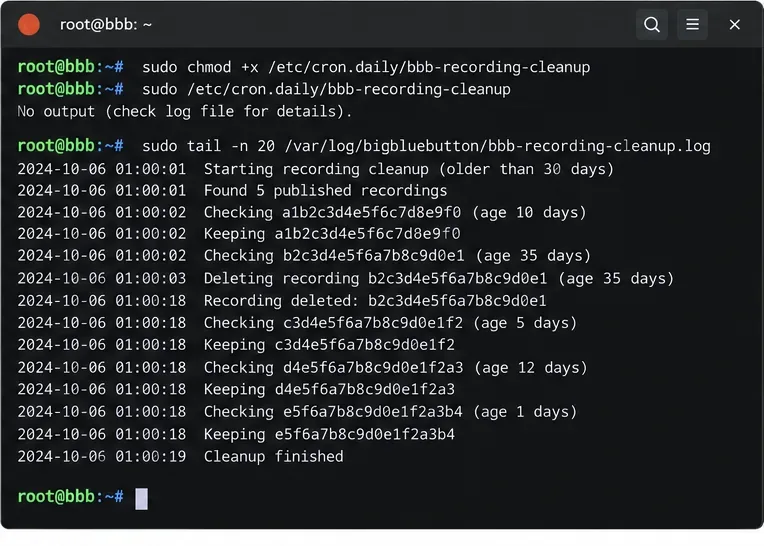
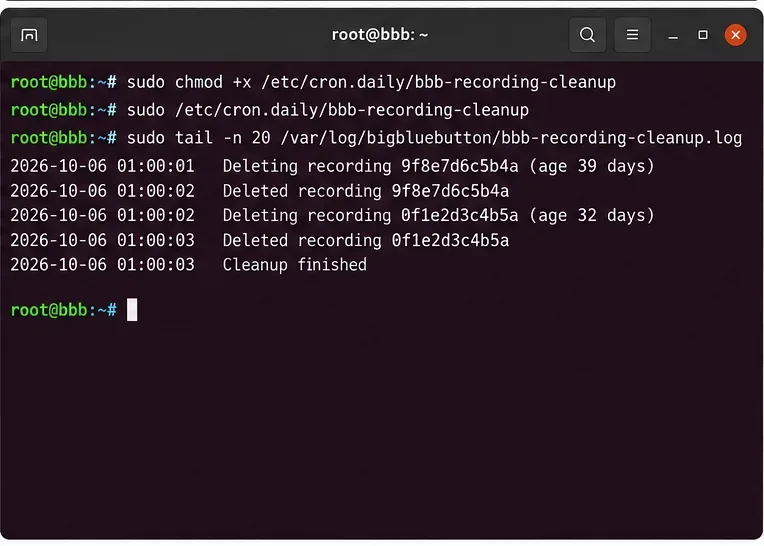
After reviewing the candidate files, run the script once from the shell:
BigBlueButton documents bbb-record --delete <internal-meeting-id> as the command that removes a meeting’s data and its recording. The recording documentation also warns that this command can wipe a running meeting. A sensible retention policy therefore uses a large enough age threshold that an active meeting can never qualify, and it deletes only IDs discovered from old recording artifacts. See the official Record and Playback documentation.
Run the cleanup job manually once and inspect its log before relying on unattended daily execution.A useful cleanup log records which internal meeting IDs were deleted and when the job completed.
Verify that cleanup is doing what you intended
Verification should cover both user-visible recordings and disk use. Start with BigBlueButton’s own recording commands:
bbb-record --list-recent shows the ten most recent recordings. bbb-record --check checks recording configuration and permissions in BigBlueButton 2.5 and later. Neither command replaces storage monitoring, so also measure the recording tree:
df -h /var/bigbluebutton
sudo du -sh /var/bigbluebutton/recording /var/bigbluebutton/published
Do not expect disk usage to drop by exactly the playback size shown to users. Raw media, processing files, published presentation files, logs, and temporary data are stored separately, and cleanup timing may differ between categories.
Use bbb-record listing commands after cleanup to confirm that the expected recordings remain available.
How to choose a retention period
A useful retention value comes from three constraints: user expectations, recovery needs, and available storage. Short retention lowers storage pressure but gives administrators less time to discover processing defects or rebuild recordings. Long retention increases recovery flexibility but requires more disk and may conflict with data-minimization requirements.
Keep playback, minimize raw storage: tune published_days and leave published recordings intact.
Enforce a hard playback expiration: use the separate daily cleanup script with a clearly documented MAXAGE.
Need per-course or per-customer rules: put retention decisions in the LMS or application layer and use BigBlueButton’s API deliberately, rather than forcing one server-wide age onto every recording.
Need rebuild flexibility: keep raw data longer than the minimum and make sure backup capacity matches that choice.
Common mistakes to avoid
The first common mistake is assuming that published_days deletes published recordings. It only governs raw data associated with published recordings. The second is using rm -rf against BigBlueButton recording directories as the primary retention mechanism. That bypasses the recording tool’s knowledge of meeting IDs and can leave inconsistent state.
Another mistake is setting retention aggressively before measuring actual growth. Capture at least several days of du and df data, then select a period that leaves enough headroom for unusually busy weeks. BigBlueButton’s production requirements themselves call for substantial recording storage, which is a reminder that cleanup should be designed as capacity management, not as an emergency reaction after a filesystem is nearly full.
Final checklist
Confirm the installed BigBlueButton version with bbb-conf --check.
Decide whether you only need raw-data cleanup or complete recording expiration.
Measure current storage use before selecting a retention period.
Review old recording candidates before enabling deletion.
Create the daily cleanup script and make it executable.
Run it manually once and inspect the log.
Recheck bbb-record --list-recent, bbb-record --check, and disk usage.
Document the retention policy so users know how long playback remains available.
For most single-server BigBlueButton 3.0 installations, the lowest-maintenance design is to let the built-in daily job remove published recordings’ raw data after a recovery window, then add the documented bbb-recording-cleanup daily script only when you also need published recordings to expire. That separates two different storage decisions and makes the tradeoff explicit instead of treating every old recording file the same way.