Home
» NETWORK ADMIN
»
ownCloud Infinite Scale vs Nextcloud 28: Performance and RAM Usage Explained
ownCloud Infinite Scale vs Nextcloud 28: Performance and RAM Usage Explained
ownCloud Infinite Scale and Nextcloud 28 can both provide self-hosted file sync and sharing, but they reach that goal through very different server architectures. That difference matters when you are trying to predict memory pressure, request latency, scaling behavior, and how much tuning work a deployment will need.
The most important caveat comes first: there is no trustworthy universal number such as “Infinite Scale uses X MB while Nextcloud 28 uses Y MB.” RAM consumption changes with enabled services, user concurrency, background jobs, storage backends, PHP worker counts, caching, previews, office integration, and applications. The official documentation also publishes different kinds of memory guidance for the two products, so treating those figures as a direct benchmark would be misleading.
There is also a lifecycle issue. Nextcloud 28, also known as Hub 7, was released in December 2023 and reached end of life in December 2024; the final 28.x release was 28.0.14. As of October 2026 it no longer receives normal bug fixes or security updates. This comparison is therefore most useful for understanding an existing Nextcloud 28 installation or planning a migration, not for recommending a new Nextcloud 28 deployment. See Nextcloud's official maintenance and release schedule.
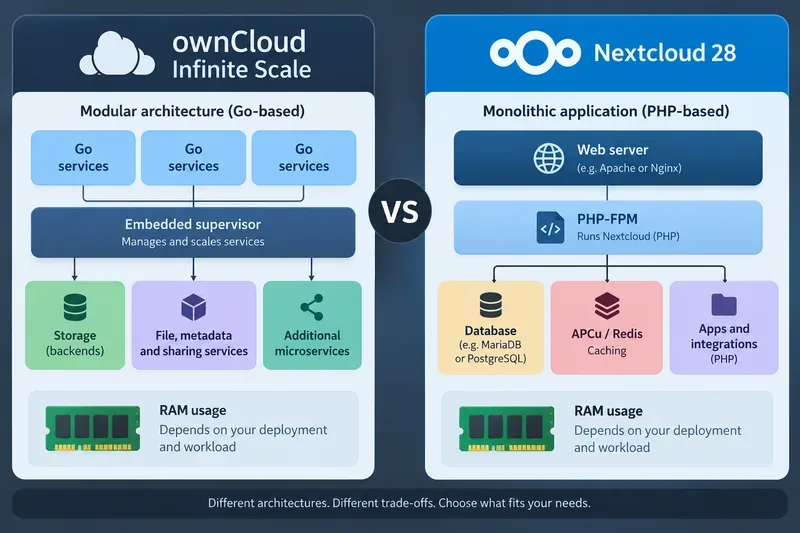
A simplified architecture comparison. It illustrates why RAM behavior differs between the two platforms; it is not a measured benchmark or proof of throughput.
The architectural difference drives most performance trade-offs
ownCloud Infinite Scale, often shortened to oCIS in configuration and documentation, is built as a set of Go services. Its default runtime can start built-in services inside a single process and supervise them with an embedded supervisor. ownCloud says this design helps reduce memory footprint, while individual services can also be moved to other nodes when a deployment needs to scale out. The platform does not require PHP or a traditional application database for its core operation. See the official Infinite Scale architecture documentation and Infinite Scale administration overview.
Nextcloud 28 follows the familiar PHP web-application model. A typical production stack includes a web server such as Apache or Nginx, PHP or PHP-FPM workers, a supported relational database, and usually memory caching. Nextcloud's own documentation recommends APCu for local caching and Redis for distributed caching and transactional file locking in organizational deployments. That makes Nextcloud highly flexible, but it also means the total memory budget is spread across several independent processes and services rather than represented by one server process.
RAM usage: what the official numbers actually mean
Area
ownCloud Infinite Scale
Nextcloud 28
Published memory guidance
ownCloud's production Compose example recommends at least 4-6 GB for the complete example deployment.
Nextcloud 28 documents a minimum of 128 MB RAM per process and recommends at least 512 MB per process.
Can those figures be compared directly?
No. The Infinite Scale figure covers a deployment example that includes additional software such as online office components, while the Nextcloud figure is per process rather than total server RAM.
Main variables
Enabled services, office integration, antivirus, storage type, service topology, concurrency.
ownCloud's current production deployment example explicitly recommends 4-6 GB of memory minimum and notes additional memory needs when antivirus scanning is enabled. That figure should not be interpreted as “oCIS itself always consumes 4-6 GB.” The documented setup also brings in office packages and other required components. See the official Infinite Scale production deployment example.
Nextcloud 28 takes a different approach in its requirements documentation: it says RAM needs vary greatly with users, apps, files, and activity, then gives 128 MB minimum and 512 MB recommended per process. That is especially important with PHP-FPM, where several worker processes may be active at once. A server configured for high concurrency can therefore reserve considerably more memory than the per-process value suggests. See the Nextcloud 28 system requirements.
Which is likely to feel lighter under file-centric workloads?
If the workload is primarily authentication, browsing, sync, upload, download, and sharing, Infinite Scale's Go runtime and service design can reduce some of the overhead associated with a PHP request stack. ownCloud also uses binary protocols such as gRPC internally for parts of its service communication. Architecturally, that gives Infinite Scale a credible path to high concurrency without multiplying PHP worker processes.
That does not establish a universal throughput advantage. Storage latency can dominate file operations, TLS and reverse proxies add overhead, metadata behavior depends on the chosen storage driver, and optional services change the profile. ownCloud's own storage documentation explicitly discusses optimizing memory and performance differently for local storage, NFS, and S3-backed deployments. See Infinite Scale storage considerations.
Nextcloud 28 can also perform well when tuned correctly. Its documentation says memory caching can significantly improve server performance. APCu avoids repeatedly rebuilding frequently used PHP objects locally, while Redis can handle distributed cache data and transactional file locking. For a single organizational server, Nextcloud 28 recommends APCu for local cache and Redis for distributed caching and locking. See the Nextcloud 28 memory caching documentation.
Where Nextcloud's RAM goes
For Nextcloud 28, “Nextcloud RAM usage” is really the sum of several budgets. PHP-FPM workers consume memory according to enabled PHP modules and application code. The database needs its own buffers and connection memory. Redis consumes memory for cached objects and locks. APCu keeps a local cache in each PHP environment. Preview generation, antivirus integrations, Talk, full-text search, and third-party apps can add their own processes or background activity.
This model gives administrators many tuning levers. Reducing PHP-FPM worker limits can keep a small server alive under constrained RAM, but requests may queue under load. Increasing workers improves concurrency until CPU, RAM, database connections, or I/O become the bottleneck. Using Redis for local cache can save some memory in low-memory environments, but Nextcloud's own documentation says APCu is faster for local caching when sufficient RAM is available. That is a real performance-versus-memory trade-off rather than a single recommended setting for every host.
Where Infinite Scale's RAM goes
Infinite Scale also consists of many logical services, but its embedded runtime can manage built-in services within one process and run each service in a Go routine. ownCloud describes this as an admin-friendly way to package the platform while still allowing individual services to be separated for distributed deployments. The embedded supervisor also restarts failed services and is specifically documented as reducing memory footprint compared with running every service under an external supervisor.
That consolidation can make resource behavior easier to reason about on a single host, but it does not make RAM usage fixed. Adding Collabora or OnlyOffice, antivirus scanning, external identity services, Redis or NATS-based components, thumbnail processing, or larger caches changes the footprint. Moving services into separate containers or Kubernetes pods can also increase baseline overhead while improving isolation and horizontal scalability.
Performance comparison by workload
Workload
Likely advantage
Why
Small file-sync appliance with few integrations
Infinite Scale
Fewer traditional web-stack components and no required PHP/database tier for the core platform can simplify the runtime.
Large app ecosystem and groupware-heavy deployment
Nextcloud
The broader PHP app ecosystem may matter more than raw server efficiency, although RAM planning becomes more important.
High concurrency with predictable file operations
Infinite Scale is architecturally attractive
Go services and a scale-out service model avoid tying concurrency directly to a large PHP worker pool.
Existing optimized LAMP/LEMP infrastructure
Nextcloud can be operationally easier
Teams already skilled in PHP-FPM, MariaDB/PostgreSQL, Redis, and web-server tuning may prefer the familiar stack.
Very small RAM budget
Depends on feature scope
Neither vendor's official numbers support a clean total-RAM winner; strip optional services and measure your exact workload.
How to benchmark them fairly
If performance is the deciding factor, benchmark both products on the same hardware instead of relying on community screenshots or isolated memory numbers. Use the same storage device or backend, network path, TLS termination method, test file set, user count, and client behavior. Warm caches before recording steady-state results, but also measure cold-start behavior separately.
Useful metrics include median and 95th-percentile latency for directory listing, metadata operations, small-file upload, large-file upload, download, and share creation; requests completed per second; total resident memory across every related process; CPU utilization; storage IOPS; database latency for Nextcloud; and background-job impact. Measure idle RAM separately from loaded RAM, because a system that looks smaller at idle may allocate much more memory under concurrent use.
For Nextcloud, count the web server, PHP-FPM, database, Redis, and any extra app services. For Infinite Scale, count the oCIS services plus reverse proxy, identity components, office integration, caches, and storage-related services. Otherwise the result becomes an architecture comparison disguised as a benchmark.
Which should you choose?
Choose ownCloud Infinite Scale when your priority is a modern file-centric platform, you value a Go-based service architecture, and you want to avoid the operational model of PHP workers plus a required relational database for the core server. It is especially interesting for organizations planning horizontal service scaling or large file-sharing environments.
Choose a supported Nextcloud release when the Nextcloud app ecosystem, groupware integrations, existing administrative knowledge, or application compatibility is more important than minimizing runtime layers. If you currently run Nextcloud 28, performance tuning may still help in the short term, but the security lifecycle is the stronger reason to plan an upgrade because version 28 has been unsupported since December 2024.
If the decision is specifically about RAM, neither vendor's published requirements justify declaring a universal winner. Infinite Scale's architecture removes PHP and a traditional application database from the core stack and is deliberately designed for efficient service execution, while Nextcloud offers mature caching controls and highly configurable PHP concurrency. The defensible choice is to compare the complete production stacks you actually intend to operate, using the same workload and measuring total-system RAM rather than one process in isolation.